



Huion Drawing Graphics Tablet 10"x6.25" USB Digital Creative Pen Tablet Writing Design Tablet Board with Hot Express Keys for Windows & Mac - H610 PRO Black
Product ID: 47963351
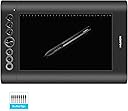
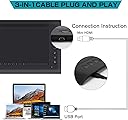
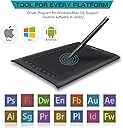
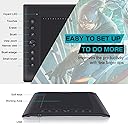
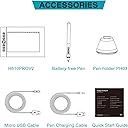
Huion Draw Creative Pen Tablet Huion 8 express key graphic pen tablet H610 Pro express your inner creativity like a professional artist would have! Easiy connect to your PC/Mac, it's a great digital drawing pad that helps you accomplish the most sophisticated computer-aided designing, drawing and writing accurately and smoothly. You can also use it as an ergonomic alternative to your mouse for navigation. Rechargeable Stylus The H610 Pro comes with a Huion P80 rechargeable pen, lighter than the Huion P68 pen. The best part of a rechargeable pen is you don't need to charge it constantly because it lasts 800 hours after every 2-hour's charging. Accurate Recognition of Your Artwork 5080 lines per inch resolution and 233 resolutions per second reporting rate let you create your artwork accurately and smoothly. The improved responsiveness of the tablet results in faster recognition of the pen input and more fluent drawing experience. Specification: Active Area: 10" x 6.25" Reading Height: 0.6" Hand Input Resolution: 5080 LPI (Lines per Inch) Report Rate: 233 RPS (Revolutions per Second) PressureSensitivity: 2048 Levels Supply Voltage: DC 5 V Input Current: <60 mA Power: 0.35 W Interface Support: USB USB Cable Length: 150CM Pen Type: Rechargeable Li-ion Pen Color: Black Net Weight: 480 g Compliance: CE/FCC/CCC OS Support: Windows 8/7/Vista/Xp; Mac OS 10.4.0 or later Packing Lists: 1x Huion H610 Pro Graphic Tablet 1x Digital Pen 8x Spare Digital Pen Tips 1x Plastic Pen Holder 1x Installation CD 1x USB Cable 1x Pen Charging Cable 1x User Mannual Review: Outstanding budget tablet - I did a bit of digital art as a teenager and decided recently I'd get back into it. I dug out my old tablet, a Wacom Volito2, which was Wacom's budget model ten years ago - it's got a very small drawing area, poor sensitivity and it wasn't that great even when new. I thought I'd just buy the current Wacom equivalent, the Intuos Draw, but I heard good things about Huion online and I'm glad I gave them a go. I ultimately chose this H610 over their similarly-priced H640P because the H610 is bigger and a little cheaper. Although the H640P is more sensitive (8192 pressure levels vs 2048 on the H610) I've read that the difference isn't really that noticeable. Well - it's miles better than the Volito2, with perfect sensitivity allowing a great deal of control when drawing in Photoshop. The increased wide A5-ish size (more than double the Volito2 or the Intuos Draw) does make a big difference in bigger, more controlled line work. The pen is comfortable to hold and I really love the hard buttons on the side to zoom in/out or switch between brush and eraser (all this is customisable but set up to work with Photoshop out of the box). Unlike the Intuos Draw the hard buttons are arranged on one side so they're much easier to access with your other hand when drawing. Downsides - it's a little ugly compared to the sleek H640P. I've not used any other Wacom tablets so I couldn't say if they're worth paying extra for, but there's nothing missing with the H640P when it comes to the basics of a tablet. The Wacom Intuos Pro has tilt and wireless functionality, which is nice, but it's also four times the price! Ultimately for the same price as the Intuos Draw you're getting more buttons and double the surface area, which makes it fantastic for a budget tablet. Review: Good item - Great item I was happy with this purchase. The graphic drawing board works well for the objective I set out to do. The battery inside the pen didnt last long, but that was the only problem. I used this for graphic design work and have had no problems. Easy to set up and install.
| ASIN | B018FY9YI6 |
| Active Surface Area | 10 inches x 6.25 inches |
| Box Contents | 1x Huion H610 Pro Graphic Tablet, 1x Digital Pen, 8x Spare Digital Pen Tips, 1x Plastic Pen Holder, 1x Installation CD, 1x USB Cable, 1x Pen Charging Cable, 1x User Mannual |
| Brand | HUION |
| Brand Name | HUION |
| Colour | Black |
| Compatible Devices | Personal Computer |
| Connectivity technology | USB |
| Customer Reviews | 4.0 out of 5 stars 130 Reviews |
| Item Weight | 480 Grams |
| Manufacturer | Huion |
| Network Connectivity Technology | USB |
| Operating System | Windows |
| Operating system | Windows |
| Pressure Sensitivity | 2048 Levels |
| Pressure sensitivity | 2048 Levels |
| Product Features | 10 x 6.25" Active Area, 2048 Levels Pen Pressure, 230 RPS Report Rate, 4 Spare Digital Pen Tips, Hot Express keys, Rechargeable Stylish Pen, Resolution 4000 LPI, USB Interface |
| Special feature | 10 x 6.25" Active Area, 2048 Levels Pen Pressure, 230 RPS Report Rate, 4 Spare Digital Pen Tips, Hot Express keys, Rechargeable Stylish Pen, Resolution 4000 LPI, USB Interface Special feature 10 x 6.25" Active Area, 2048 Levels Pen Pressure, 230 RPS Report Rate, 4 Spare Digital Pen Tips, Hot Express keys, Rechargeable Stylish Pen, Resolution 4000 LPI, USB Interface See more |
| Target Audience | Teacher |
| UPC | 889328067519 |
M**T
Outstanding budget tablet
I did a bit of digital art as a teenager and decided recently I'd get back into it. I dug out my old tablet, a Wacom Volito2, which was Wacom's budget model ten years ago - it's got a very small drawing area, poor sensitivity and it wasn't that great even when new. I thought I'd just buy the current Wacom equivalent, the Intuos Draw, but I heard good things about Huion online and I'm glad I gave them a go. I ultimately chose this H610 over their similarly-priced H640P because the H610 is bigger and a little cheaper. Although the H640P is more sensitive (8192 pressure levels vs 2048 on the H610) I've read that the difference isn't really that noticeable. Well - it's miles better than the Volito2, with perfect sensitivity allowing a great deal of control when drawing in Photoshop. The increased wide A5-ish size (more than double the Volito2 or the Intuos Draw) does make a big difference in bigger, more controlled line work. The pen is comfortable to hold and I really love the hard buttons on the side to zoom in/out or switch between brush and eraser (all this is customisable but set up to work with Photoshop out of the box). Unlike the Intuos Draw the hard buttons are arranged on one side so they're much easier to access with your other hand when drawing. Downsides - it's a little ugly compared to the sleek H640P. I've not used any other Wacom tablets so I couldn't say if they're worth paying extra for, but there's nothing missing with the H640P when it comes to the basics of a tablet. The Wacom Intuos Pro has tilt and wireless functionality, which is nice, but it's also four times the price! Ultimately for the same price as the Intuos Draw you're getting more buttons and double the surface area, which makes it fantastic for a budget tablet.
F**H
Good item
Great item I was happy with this purchase. The graphic drawing board works well for the objective I set out to do. The battery inside the pen didnt last long, but that was the only problem. I used this for graphic design work and have had no problems. Easy to set up and install.
C**E
The next time i got it out the box the screen had peeled apart from the board so sadly i am returning the tablet and will nowsav
When i got this out of the box and plugged it in i was initially impressed. Do beware that the pen doesn't come with a battery! It took me 10 minutes to figure out why it wouldnt connect. I played around with it for a few minutes then put it back in the box. The next time i got it out the box the screen had peeled apart from the board so sadly i am returning the tablet and will nowsave up for a more expensive and hopefully better made version.
D**H
If you're new and in the market for a tablet, PLEASE get this over the Intuos!
I have used an Intuos 4 for years until recently the pen broke. Given how expensive Intuos 4 Pens actually are I decided to have a look around at some alternatives. I was skeptical about this tablet at first. The specifications far outshined my Intuos 4 which I had paid £150 for about 3 years ago, I was expecting there to be some sort of fatal flaw. There isn't. The software is a little bit less shiny than Wacom's but the drivers actually WORK. As any Wacom user will tell you losing pen sensitivity and a having to restart/reinstall drivers is an almost daily occurrence but I have not experienced any such problem with this. Even if I did, there is a simple button that gets added to your task bar that will restart the drivers and open the control panel. They basically took every frustration about owning a Wacom product and fixed the problems then improved vastly and made the price suspiiciously low. The fact that this has more drawing space than my Intuos 4 still amazes me. The one and ONLY issue is that the pen requires a AAA battery to run, but that is it's one downfall. The current cheapest "Intuos" tablet from Wacom is more expensive than this. Here is a quick comparison between the this product and the lowest end Intuos which is in the exact same price range. Intuos Huion Active Area: 6 by 3.7 in 10" x 6.25" Pressure Levels: 1024 2048 Hard Input Res: 2540 LPI 4000 LPI Express Keys: 4 8 The Huion is objectively better, there are no doubts about it. It's even better than my Intuos 4. If you're new and in the market for a tablet, PLEASE get this over the Intuos!
M**X
Great Tablet! Troubleshooting Tips Below
The product itself is amazing and easily give Wacom and other branded tablets a run for their money. At a low price tag, this is as good if not better than most £100-£300 Wacom tablets. Having use both I would rebuy this over a Wacom band just for the lower price and value for money. Tips and troubleshooting for people who buy this tablet (H610): Things the manual doesn't make very clear or may be a little strange or quirky. *TabletDriver Tray Icon - It can be double clicked to open the Tablet menu! *16 Softpress Keys (The ones at the top) are DISABLED by default. Enable them under Advanced Setting in the menu I just explained how to open. (Press "Enable Soft Key") *Cursor not even moving with Paint Tool SAI? - Exit the TabletDriver and Run it as Administrator, SAI requires Administrator access as of Windows 8.1. Pros: A lot of advanced features, custom bindings and highly configurable. 2048 Levels of pressure works really well and require little setup. Cons: Drivers and only drivers: Drivers seem to be Huion's minor letdown, thankfully this is now fixed. The CD drivers are not current and don't work very well with Paint Tool SAI and GIMP. This is easily fixed by downloading the latest drivers from the Huion website. Some users may also have issues installing drivers due to Windows 8.1 and 10 adding an extra layer of security.
W**Y
For price this unit is awesome. The pen is a big large and does ...
For price this unit is awesome. The pen is a big large and does cramp my hand a bit. The software had a couple glitches but after re installation I have had no issues. Good stuff.
H**R
it was good for a few weeks.
Frist review (w/ beer goggles): my only problem with this was the delivery. but that had nothing to do with the product itself. it arrived at 7:00pm ish. almost missing the day it was meant to be delivered on. The product itself was bigger than i expected, ithe device is clearly over the 10"x6". the inner drawing piece is that big. the manual isn't a good one, i'd call it a write off in that area. the pen it comes with requires AAA battery. Though i didn't see any information of that kind even in the manual/s. I use this with paint and manga studio. soon i'll use it with gimp and flash as well. it's pretty sensitive for the pen, easy to use. the buttons on the side of it aren't as strong as i had hoped. i'm a bit heavy handed anyway but it was indented into the device, but i managed to fix it back up normal again. if your looking for a decent device with some good specs i'd give it a go. Real time review: what a waste of money! thing only worked a couple times on manga studio, never really calibrated for flash and there was no real programme i could use to open and fix it. Save yourself some time and get a better product.
J**S
Good Graphics Tablet
The Huion H610 is a good tablet with a good size active drawing area of 10" x 6.25". There are 8 physical buttons and 16 soft touch buttons all can be customised to suit your needs. The tablet is light weight and does not flex making it suitable to use on a table or on your lap. Compatible with various software which supports pen pressure, i've so far used it with: gimp, sketchpad and microsoft paint, without any problems. Suitable for all skill levels, I would recommend this tablet.
V**Z
Regalo
Fue un regalo a una niña apasionada del dibujo, todo un éxito. Le encantó.
C**S
Quasi perfetto
allora io cercavo un prodotto per iniziare nel mondo del disegno digitale senza perdere troppo tempo e senza dover spendere troppi soldi, dopo settimana seguendo questi tipi di prodotti ho scelto questo, devo dire dopo svariate ore di prova, non sono per niente delusso, anzi consiglio questo prodotto, allora perche 4 stelle?, perchè il prodotto è arrivato con delle dittate nel piano di disegno, e anche nel retro del prodotto, poi il cartone d'imballaggio della tavoletta era aperto, la fascetta che lega il cavo USB era aperto, ma nonostante quello dopo una verifica esaustiva e dettagliata posso confermare che tutto era nuovo e niente sembrava usato, senza righe ne nulla ma soltanto queste benedette dittate che con un panno in microfibra e il detersivo per schermi LCD, e rimasto come nuovo. Consegna amazon stupenda come al solito e il corriere (SDA) credo si abbia coperto della pioggia con il pacco che quando consegnato era tutto bagnato quasi sfondato por el acqua ma la scattola del prodotto in sè non è stato compromesso....
Trustpilot
3 weeks ago
1 month ago