Buy anything from 5,000+ international stores. One checkout price. No surprise fees. Join 2M+ shoppers on Desertcart.
Desertcart purchases this item on your behalf and handles shipping, customs, and support to South Korea.
🚀 Elevate your workflow—work smarter, anywhere, anytime.
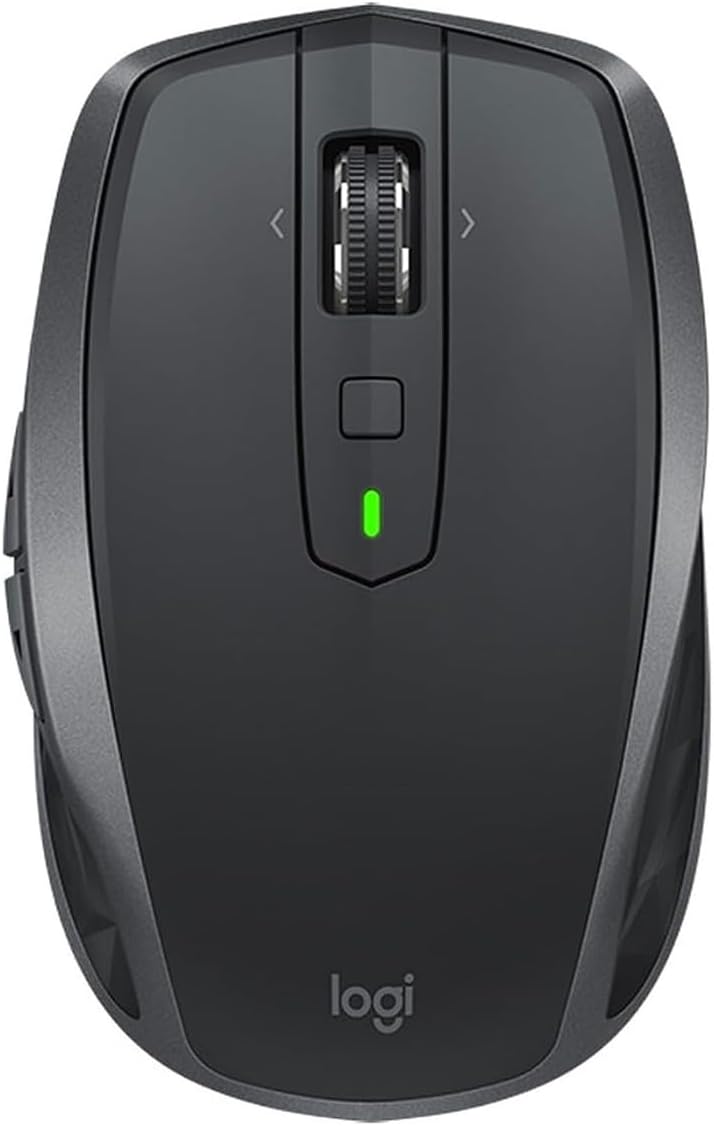
The Logitech MX Anywhere 2S is a compact, wireless mouse designed for professionals who demand flexibility and precision. Featuring an impressive 70+ day battery life, Darkfield tracking technology for use on any surface including glass, and seamless multi-device control via Logitech Flow, it empowers users to switch effortlessly between devices. With customizable buttons and a versatile scroll wheel, it’s engineered to enhance productivity whether at the office, home, or on the go.


| ASIN | B072BG9Z8W |
| Antenna Location | Gaming, Office |
| Are Batteries Included? | Yes |
| Are Batteries Required | Yes |
| Battery Average Life | 24 Hours |
| Best Sellers Rank | 18,832 in Computers & Accessories ( See Top 100 in Computers & Accessories ) 330 in PlayStation Legacy Systems 448 in Mice |
| Box Contents | Batteries |
| Brand | Logitech |
| Brand Name | Logitech |
| Button Quantity | 7 |
| Colour | Black |
| Compatible Devices | Laptop, Mac, Personal Computer, iPad |
| Connectivity technology | Bluetooth, USB |
| Country of Origin | China |
| Customer Reviews | 4.5 out of 5 stars 811 Reviews |
| Enclosure Material | Plastic |
| Global Trade Identification Number | 05099206073050 |
| Hand Orientation | Ambidextrous |
| Hardware Platform | [OMIT] |
| Item Dimensions L x W | 10.1L x 6.2W centimetres |
| Item Type Name | Logitech MX Anywhere 2S Wireless Bluetooth Mouse for Mac and Windows - Graphite |
| Item Weight | 3.74 Ounces |
| Manufacturer | Logitech |
| Manufacturer Part Number | 910-005153 |
| Model Name | MX Anywhere 2S |
| Model Number | 910-005153 |
| Mouse Maximum Sensitivity | 4000 Dots per Inch |
| Movement Detection | Laser |
| Movement detection technology | Laser |
| Network Connectivity Technology | Bluetooth, USB |
| Number of Batteries | 1 Lithium Polymer batteries required. (included) |
| Number of buttons | 7 |
| Operating System | Microsoft Windows, Apple Mac OS X |
| Pattern | Mouse |
| Power Source | Battery Powered |
| Product Features | Wireless |
| Product Finish Type | Matte |
| Product Warranty | 2-year Limited hardware warranty |
| Range | 10 meters |
| Special feature | Wireless |
| Style Name | MX Anywhere 2S |
| Theme | Computer Accessories |
| Unit Count | 1.0 count |
M**M
The best mouse I have ever owned
Whilst I didn't get the product off Amazon in the end, I thought i'd do a quick review for this mouse. I owned the old MX anywhere 1 mouse and it was stellar. It was comfortable and compact and lived off AA batteries. When I knew Logitech made a second generation, i knew I had to bite. Darkfield technology was what made the first generation so good - you could track the mouse on clear glass and it would still work (not like the oldschool mice of the past generation). These things, stand out. The MX Anywhere recharges using its own in built battery, and as such if you ran out of juice, you'd have to plug it in. fortunately you can find a cable and you can charge it whilst in use so there is no issue with break in usage. I have found the battery life to be above average for a mouse of its size. It connects well using the unifying receiver and you have to make sure you connect the two before use. The scroll wheel can be switched from smooth to notched, a great feature of the mouse to help with speedy or accurate scrolling. I use this with both my mac (connected via bluetooth) and my work laptop (connected via unifying receiver). Both work just as well. It has a button on the bottom that allows you to switch between the two laptops, which is super handy. I have also been able to customise what all the side and top buttons do. This is very handy when you want to change it to and from mac commands like launchpad and also being able to scroll back on a website to a prior page. A super mouse that will last for years, i'd give it more stars if i could. Fantastic product.
M**D
Best mouse so far
Really smooth & precise, really does work on almost any surface, comfortable, not too bulky, lots of configurable buttons. A really nice upgrade from the similarly priced apple magic mouse. On a mac you can configure all 7 buttons and the wheel to do a huge variety of things - although the default forward/back, side scrolling and mission control all work pretty well. The wheel can be made to be smooth or clicky by pressing it in. It's just a physical setting with no other effect that I can see. I set it smooth and will leave it like that forever. By default the square button on the top is configured as a gesture button, hold it down and move the mouse up/down/left or right to trigger different actions. Out of the box it's set to switch spaces left or right or open mission control etc - the same as the 3 finger gestures on the trackpad or 2 fingers on the magic-mouse. In practice this button is a little hard to reach and the gesture movements have to be really big so it's not perfect. (But then the gestures on the magic mouse were never that good either imo). I might forgo the side scrolling on the wheel and use that to to switch spaces instead. Logitech could make it perfect by making the gesture movements much smaller, and making the wheel into a press-able button (for gestures) instead of switching between clicky and smooth scrolling modes.
R**R
so far so good
I have been using this for a couple of weeks now for both my work laptop via bluetooth and my home PC via the provided USB adapter. Both connects quickly and without issues, no dropouts so far. A simple click on a tiny button on the base of the mouse switches between 3 registered computers. Incidentally it works on Android too. The mouse is rechargeable, and one charge lasts for a very long time. It's been over a week since the last charge and it's still showing as "good" on the Logitech windows app. That's after using it for 9+ hours a day every day. Ironically the one feature that attracted me to the mouse isn't really working so well. That is the ability to free-spin on the scroll wheel. One press of the wheel, it releases the notch mechanism, and you can scroll through a long document in a single action. That part works very well. Unfortunately, it's when you stop the wheel when it doesn't work so well. With the notch off, the tiniest movement will cause the wheel to start scrolling, so whenever you stop the wheel after a free spin, you are bound to nudge it a bit and it scrolls the screen a few lines up or down. I found this random scrolling so annoying, I stopped using the free spinning feature altogether. Another unexpected effect of the scrollwheel feature is that the wheel no longer acts as the middle button. You have to use the little button behind it for the middle button, which isn't as well positioned and it's a fiddle to click it. The little button can be set up to understand mouse gestures too, but it's bit of a gimmick than any real use. The size of the mouse fairly small, and it feels ok for my small hands, but I'd imagine would be quite uncomfortable for people with large hands to use for long hours. All in all, it's a very good mouse, but I wish it was a bit bigger, and that the free spinning scroll wheel didn't have the annoying quirk. Well, I liked it enough to be using it as my main mouse for two different computers.
M**L
Amazing multitasking and great battery life! A must have!
I searched the internet for desktop mouse reviews and found most cool devices were for gaming and the reviews were mostly aimed at that. Even looking at the Logitech MX Anywhere 2S the reviews had a hint at gaming and not so much for multitasking. I took the plunge and purchased this mouse as I needed a portable mouse for multitasking at home and on the go. It turned out that this was my best mouse purchase in more than a decade. The multitasking feature "Flow" allows you to work with two or three computers by just dragging the mouse towards the edge of the screen only to end up on my laptop situated next to my desktop. Its amazing and I do not even need to flip the switch under the mouse to change my workstation. I would however need to flip that switch once I work with one computer only which is fine. Not only is this a great multitasking mouse it also has amazing battery life, even though I only tried it for a short period of time. The surface I use the mouse on is an old wooden table with a rugged surface and there is no issue with the connection and movement on the screen, flawless! The shape and buttons sit perfectly and I had no problem reaching everything. I do have large hands. If you are looking for a multitasking mouse on the go, get this one!
I**N
Still the best Bluetoth mouse money can buy
I've been buying this mouse in its many iterations for years. I started off with a Razer Orochi, as the original MX Anywhere took batteries and would not work wired, but since the release of the MX Anywhere 2, and then the 2S, the mouse works wired when the battery is charging, and the shape and button placement have not changed. To my mind this is hands down the best Bluetooth mouse on the market. You can pair it with up to three different devices, you can pair as many of them as you want to, to the one device. There is no need to carry or fit a wifi dongle into the side of your laptop (although they do supply one if you insist on not using Bluetooth - but then if you're going to have a dongle sticking out the side/back of your laptop, then you might as well look at the whole gamut of non-Bluetooth mice on the market too. As someone who travels a lot with his laptop (or at least he did until March 2020, lol) and uses the mouse maybe 12-14 hours a day, this mouse lasts. The one I just bought replaces the exact same model that has been in daily use since the summer of 2017, and the microswitch in the offside button gave out. For £50 I'd rather just buy a new mouse than mess around trying the replace the microswitch. Logitech's software is useful, but not essential. I use it because it allows me to programme the button clicks as and throws up warnings when the battery is low, but the default button functions work without Logitech's software installed. My only wish would be for the other colour options to be available at a reasonable price.
D**M
Very good
A great product. I really do not understand folks that mark this down because it is apparently too small or light ... it's a TRAVEL MOUSE and advertised as such. Great ergonomics, build quality and software/functionality. I use both the Master 2S and this for business 4k Video editing. The Master is substantially larger and better if you spend the whole day on a station. Click action is slightly firmer and the scroll wheel/raster action a tad more precise but only in direct comparison plus it is too large for travel. This portable version is good for a few hours a time, no problems and I have large hands. The Master also has the middle click so many seem to miss on the Anywhere but it took me all of a minute to get used to the button above it, it really is no hardship. The Anywhere has most of the functionality of the Master but lacks the programmable thumb rest/button and physical side scroller. However, it also has the side scroll function through the main scroll wheel and thus is superb for editing time lines and similar productivity tasks. Some have commented on the scroll wheel feeling loose on the Anywhere ... it isn't. What you have to remember is the scroll wheel works in four directions. On the Master it works in two. It feels smooth and precise in use on both mice. I use Windows 10 Pro on a Dell XPS 2019 and I had no issues with bluetooth connectivity or latency. - I can't vouch for Mac. Both were nearly £100 when launched. Whilst I would not call a £60 mouse cheap , if you use the functions available for design and editing work, these versatile, programmable mice are creators dreams and I have not seen anything better. Highly Recommended
C**S
The most comfortable travel mouse I've used
I'll be straight with this review - I purchased it because I already have one for work and wanted to have one the same for my own laptop as I'd been so happy with it. This review is therefore based on over a years worth of use of one of these. Most travel mice are either small, really light or very flat. This one has enough weight to it to give a nice quality feel when you're holding or moving it. It pairs quickly and easily with up to three separate devices using a selector button on the bottom so it can be shared with other users. Charging is pretty quick - a 2-3 min charge will last all day and a full charge will last around 90 days (both documented and from my experience). Whilst the price may seem a little high, I think these are worth it. My wife however has her eye on this now after borrowing this one to test it herself so I think another one may be needed soon...
B**Y
Great Mouse!
Firstly ill talk about the thing I always consider first with wireless and that is battery life. I actually think the battery life in this is understated. It goes months without needing to charge and I really don't charge it for long. The computer is in use all day every day and I only set the mouse to sleep when I go to sleep but even when I don't the battery life seems to last a long time. It needs you to install the logitech wireless app to program the buttons but even if you dont want to do that you should download it because it fixes some issues with drivers and although was a little strange at first has worked perfectly since. My computer also stands a good 6 feet from where I use it so the range on the bluetooth is impressive. It has plenty of programmable buttons but is not overboard, it is light but not weightless and feels good in my hands personally. The only issue is a little wear and tear on the grip rubber but it is not a big deal at all.
Trustpilot
4 days ago
1 month ago