Buy anything from 5,000+ international stores. One checkout price. No surprise fees. Join 2M+ shoppers on Desertcart.
Desertcart purchases this item on your behalf and handles shipping, customs, and support to South Korea.
🚀 Upgrade your laptop speed without breaking the bank!
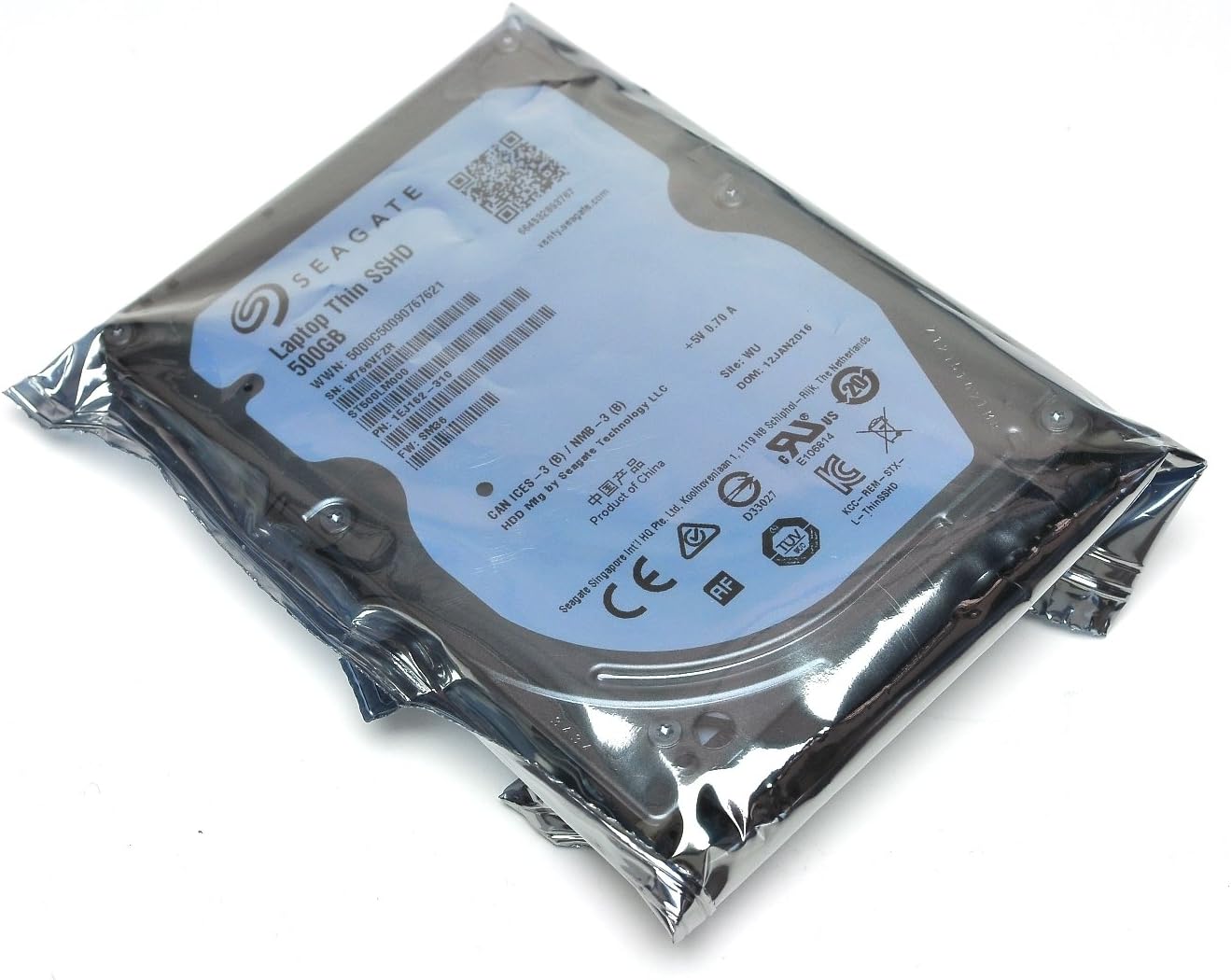
The Seagate 500GB 2.5-inch Laptop Solid State Hybrid Drive (SSHD) delivers SSD-like speed with HDD-level capacity by integrating NAND flash memory and a 5400 RPM hard drive. Featuring SATA 6 Gb/s connectivity and Adaptive Memory technology, it accelerates boot times by up to 60%, enhances system responsiveness, and fits any standard laptop seamlessly. Ideal for professionals seeking a cost-effective performance boost without sacrificing storage space.


| ASIN | B00B99JU5M |
| Best Sellers Rank | 15,899 in Computers & Accessories ( See Top 100 in Computers & Accessories ) 1 in Internal Hybrid Drives |
| Box Contents | Festplatte |
| Brand | Seagate |
| Brand Name | Seagate |
| Cache Memory Installed Size | 64 |
| Compatible Devices | Server/Arbeitsstation |
| Compatible Video Game Console Models | Sony PlayStation 4 |
| Connectivity technology | SATA |
| Customer Package Type | Standard Packaging |
| Customer Reviews | 4.5 out of 5 stars 2,549 Reviews |
| Data Transfer Rate | 6 Gigabits Per Second |
| Digital Storage Capacity | 500 GB |
| Digital storage capacity | 500 GB |
| Enclosure Material | Nand Flash |
| Form Factor | 2.5-inch |
| Global Trade Identification Number | 00763649042694, 07636490041242 |
| Hard Disk Average Latency | 5.56 Milliseconds |
| Hard Disk Description | Hybrid Drive |
| Hard Disk Form Factor | 2.5 Inches |
| Hard Disk Interface | Serial ATA-600 |
| Hard Disk Rotational Speed | 5400 RPM |
| Hard disk form factor | 2.5 Inches |
| Hard disk interface | Serial ATA-600 |
| Hard-Drive Size | 500 GB |
| Hardware Connectivity | SATA 6.0 Gb/s |
| Hardware Platform | PC |
| Installation Type | Internal Hard Drive |
| Item Dimensions L x W x Thickness | 10.2L x 7.1W x 0.7Th centimetres |
| Item Part Number | ST500LM000 |
| Item Weight | 91 g |
| Manufacturer | KOMQI |
| Manufacturer Part Number | ST500LM000 |
| Media Speed | 1 |
| Model Name | ST500LM000 |
| Model Number | ST500LM000 |
| Network Connectivity Technology | SATA |
| Number of Items | 1 |
| Product Features | Fast Speed, Compact |
| Read Speed | 6 Gigabytes Per Second |
| Special feature | Fast Speed, Compact |
| Specific Uses For Product | Gaming |
| UPC | 707223032268 608729690061 013329045768 763649042694 674329073702 112840350686 013201088203 102930720611 021112254297 |
| Unit Count | 1.0 count |
A**R
Great quality for good price + no problems with the ...
Great quality for good price + no problems with the ssd price per gb. Worked perfectly on first boot - as expected. I fitted it on an old Acer 5750g laptop, and sshd is much faster than the old hdd. Quicker system start, waking it up from the sleep mode is nearly instant, helped Serato DJ a bit as well (especially when downloading tracks in the background and playing music at the same time). I do not think I couldget much more from buying an SSD drive for such an old laptop, and for much better price SSHD made all the difference I needed. The only issue I've had, was when I wanted all of my mp3 files from a certain library (+/- 300 songs) to have their context data indexed (need to be able to search for data contained in IDtags) - took a while to process, surprisingly long I'd say. Still - likely be an issue with the OS rather than hardware itself, and I only do it every now and then - definitely a 5 star product.
P**V
in a word Awesome
My hard drive packed in on my (typically, just out of warranty) Acer aspire laptop so instead of buying a new laptop i thought no...that's what they want you to do try repairing the old one, so after a chat with an IT colleague, he pointed me in this direction so I bought it......... Then after watching various you tube vids I fitted it myself (not hard at all) downloaded windows 7 etc for free (dont pay for back up disc off the manufacturer there's no need as Microsoft directs you to servers that will let you download it with instructions etc you just need to have your licence key for after the install that should be on your computer somewhere, then get your specific drivers etc from the manufacturers website again for free for the specific hardware you have) and OMG I was back in business. I run the computer for music production ie Fruity Studio and Serato and also for Photography so Photoshop etc. Granted... I do NOT use this for the internet (learned my lesson years ago) i have loads of other devices that do that (phone and tablet etc) so in doing so I have no antivirus on it (no need as long as you know you can trust the stuff your putting on it, which should be the case anyway) and it is set up for performance not visual, but that's what my last one was like.... but this hard drive is lightning fast compared to the stock one. I mean it takes about 5 seconds to boot, so that's from switching on until its usable and the processors are free. and less to power down. I've only seen that on a mac-book before now.All for 50 odd pound and a bit of research......... Well worth it in my world.
A**S
Easy to swap over & clone Windows 7
Bought this to replace a 3 year old WD in my Acer laptop. Basically the laptop packed up so I thought it was the HD only to be told it was the MB. Even with a 3 year warranty Acer tried wiggling out of their responsibilities. Tip - Never buy an Acer! Anyway I couldn't afford a new laptop at the time so found one on Ebay for £129.99 refurbished with dual Core 3 Gb Ram, Windows 7, SD card reader, 6 month warranty that should hopefully tide me over. It's actually pretty decent for the price & the seller has been great - that's all they sell, based in Portsmouth. Problem is it only came with an 80GB HDD & I had this one so used Macrium Reflect to clone that onto this 500GB Seagate. Having never done anything like this before was a bit nervous but it was very easy. Took about 15 minutes to clone the 80 GB with Windows 7 onto this and another 15 to fit as had to remove it again once tested to put the remaining screws in the caddy. I didn't have to rename this drive to C. The only thing I did have to do was increase the partition in disk manager. There is now 442GB Free of 465GB total. It is too early to tell if boot up times are increased - only got the laptop & fitted the drive yesterday but the freeware programmes I am using, Infranview & Open Office & Adobe Reader open up instantly in 1 second or less. That appears to be a definite improvement. I will install Photoshop Elements & Nero & see how quick they are. I paid £60 for the 500GB version last month and realise I could have got a normal HDD with twice the size for cheaper but like the theory behind this technology. 4 Stars & recommended but could possibly be improved once I have done some more tests. *** Update 1/ 10 / 13 - It takes 14.64 seconds to shutdown & 57.72 seconds from switch on to Google homepage. Has quite a fair bit of software on it now but not loads of files - 436GB now. Software opens instantly on double click. No doubt SSDs will be the only drives within 5 years but at the moment these are a great compromise. A great and relatively cheap upgrade. Will keep an eye on it and update progress & longevity when I have had it longer!
B**N
Good upgrade
Great price for upgrading my laptop did the job
D**N
Great Performance, Great Price
This is the 3rd generation of hybrid drive from Seagate - after having had the 1st generation, Momentus XT, in my MacBook for the past couple of years I was running out of space and had read some good reviews of this version, which said it was even quicker on startup and just generally. After having installed it a few days ago, I would say the reviews are spot on. The boot time is very good - around 8-10 seconds, and the programs open quickly ... generally my computer feels very quick. I noticed the difference, even though I was already using a hybrid drive, and if you've been using a traditional hard drive then this will DEFINITELY give you a real improvement in performance. For anyone thinking about buying a new computer because there current one feels slow, I'd recommend buying one of these drives and asking a techie friend to install it and transfer your data across - why spend £500-800 on a new computer, when you can spend £60 and breathe life back into your old one!
M**7
Slimmer than Normal 2.5 Inch SATA Drive
Took longer than expected to arrive! Easy to install, Took ablout 10 minutes. This Hybrid Drive is slimmer than the Toshiba Drive which was installed. I had to partition it before installing Windows 10 Professional, This was installed from a USB stick. Took me about 3 minutes how to perform the Partition, But quite straightforward. Had Windows 10 installed in about 30 minutes. You don't hear this drive in operation, Also it's faster to access the data due to it being partly SSD. Good quality Drive! Hopefully it will give many years of use. 5 Stars!
R**B
Great replacement
Bought for an old dell laptop as hard drive was failing. Works as expected, quiet, fast and laptop is now back to good working order. Bit fiddly to get in the caddy but a bit of patience and now in perfectly. Good value for money if you need a decent replacement.
D**4
Excellent value for money
I needed to replace my old HDD as it was getting very slow. Unfortunately I could not clone the old one as it had a 512b sector size and this has a 4096b so just a warning about that (I have not found any software that could rectify that problem successfully). None the less, I just backed the OS from the old one and installed it onto this new disk and it's like my laptop is brand new again. Obviously it is not as good as a full SSD but for the price it is excellent value for money and much better than a HDD. Highly recommended
A**A
nice product nice service by amazon.
its worth it as the , the performance is really good, there is difference in the booting of the system and its hardly takes 5-10 seconds to boot win7 ultimate , overall performance is good, those who are looking for 7200 rpm hdd must go for it because of the 64mb buffer it never lets you down in data transfer. and finally amazon rocks in its delivery... nice product nice service by amazon.
R**T
Been working ok
No issues working ok
J**K
Goed bevonden
Doet wat het moet doen
群**S
古いwindows 7が快適になりました
我が家の古いwindows 7のパソコンのハードディスクが起動が遅く、ストレスの原因となっておりました。 SSDに換装すれば、かなり起動も早くなるんでしょうが、OSのアップデートも期待出来ない古いパソコンに高価なSSDを使用するのももったいなく、探していた所、SSHDの中古ハードディスクの500GBが1999円とお手頃価格で発見!! 使用頻度はそれなりに高い中古品でしたが、 そもそもが古いパソコンなので、起動が早くなれば良い訳で、安さに釣られてポチりました。 結果、元のハードディスクから丸々データをSSHDに移行して起動した所、立ち上げ速度とソフトウェアの起動と、体感速度が明らかに早くなり、ストレスもかなり軽減されました^ ^ 買って良かったです。買って正解でした。 耐久性は未知ですが、、下手に怪しいSSDを使用するよりは、長持ちするんじゃないかなと、思っております。 またこのSSHDの1TBのやつとかが、中古で出てくれば、またリピしたいなと思っております。
S**N
Einsatz in PS3 - definitiv empfehlenswert!
Durch die Abonnierung von PlayStation Plus reichte der Festplattenspeicher meiner PS3 fat 80GB (Modell CECHK04) natürlich vorne und hinten nicht mehr; bereits bei den Retail-Games musste ich immer wieder Platz für die Installationen freiräumen. Deshalb musste für die monatlichen kostenlosen Spiele-Downloads eine neue Festplatte her. Zunächst war der Kauf einer gewöhnlichen HDD geplant; nach kurzer Recherche wurde ich jedoch auf SSHDs (Hybridfestplatten, deren gewöhnlicher mechanischer Speicher um schnellen Flash-Speicher erweitert wird) aufmerksam und stellte fest, dass man für 500GB Speicher zu einem nur geringen Aufpreis von ca. 15 € (zu einem vergleichbaren HDD-Modell mit 500GB) einige der Vorteile einer reinen SSD bekommt und dies auch mit einer PS3 funktioniert. Die Meinungen bezüglich des Nutzens einer SSD in der PS3 gehen auseinander; viele sehen den hohen Preis der SSDs für den erhaltenen Geschwindigkeitszuwachs als nicht gerechtfertigt an - angesichts der Verfügbarkeit von Hybridfestplatten (SSHDs) neige ich dazu, dem zuzustimmen. Die Leistungsunterschiede zwischen normaler HDD und den Flash-Platten sind definitiv spürbar (dazu später mehr); der zwischen SSD und SSHD jedoch zumindest auf der PS3 kaum erwähnenswert, wobei die SSDs bis jetzt deutlich teurer sind. Somit lohnt sich meiner Meinung nach der Einbau einer SSHD in eine PS3 definitiv und ist absolut zu empfehlen. Im Detail: - Produkt: Die Seagate ST500LM000 ist eine 2,5"-SSHD (Hybridfestplatte) mit 500GB Speicher bei 5.400 Umdrehungen pro Minute und 8GB Flash-Speicher. SSHDs sind mit einem "lernenden" Chip ausgestattet, was bedeutet, das oft verwendete Dateien (wie beispielsweise beim Boot-Vorgang) im Flash-Speicher abgelegt werden und darauf schneller zugegriffen werden kann. Die Platte passt problemlos in die Halterungsschiene der PS3. - Einbau (mit Datentransfer) in PS3 fat 80GB: Da ich nicht alles neu konfigurieren, installieren und herunterladen wollte, mussten die Daten vorab gesichert werden. Hierfür benötigt man eine externe USB-Festplatte (natürlich mit ausreichend Platz für die Sicherungsdatei) im FAT32-Format (hierfür gibt es kostenlose Formatter, einfach googlen) sowie einen USB-Datenträger mit der neuesten Firmware (benötigt man in jedem Fall, auch ohne Datentransfer). Nach der Datensicherung via [Einstellungen] > [System-Einstellungen] > [Datensicherungsprogramm] konnte der Einbau vollzogen werden: 1. PS3 vom Strom trennen, 2. Deckel an der linken Seite der Konsole abnehmen, 3. Sicherungsschraube per Kreuzschraubenzieher abschrauben, 4. Halterungsschiene mit alter HDD rausziehen, 5. durch Entfernen der vier Schrauben HDD von der Halterung trennen, 6. neue Platte befestigen und zurück in die PS3 schieben, 7. Sicherungsschraube wieder anschrauben und Deckel drauf -> fertig. Dieser Vorgang dauerte keine fünf Minuten und klappt problemlos. Danach alles wieder anschließen, USB-Datenträger mit der Firmware einstecken und PS3 starten. Dann den Anweisungen folgen und nach einem weiteren Restart ist die PS3 mit neuer SSHD einsatzbereit. Nun schließt man die externe Festplatte mit der Sicherungsdatei an und wählt erneut das [Datensicherungsprogramm] aus, um die Dateien wiederherzustellen (dauert in etwa so lange wie die Sicherung zuvor). Anschließend ist alles in genau dem Zustand wie vor dem Festplattentausch. Wichtige Anmerkung: Trophäen werden NICHT übertragen, diese daher unbedingt vor dem Tausch mit dem PSN-Server synchronisieren! Nach Umbau den Vorgang wiederholen, damit die Trophäen wieder da sind. Für den gesamten in diesem Punkt beschriebenen Vorgang gibt es auf YouTube hervorragende Video-Guides, in denen alles Schritt für Schritt erklärt wird. - Leistung: Der wichtigste Punkt - ist die SSHD den Aufpreis gegenüber einer gewöhnlichen HDD wert? Meiner Meinung nach DEFINITIV. Bereits beim Booten zeigt sich eine deutliche Verbesserung. Die XrossMediaBar-Benutzeroberfläche ist gleich nach Beendigung des Bootvorgangs flüssig und schnell nutzbar, auch die Symbole der einzelnen Punkte müssen nicht erst mit Verzögerung nachgeladen werden. Gleiches gilt in der Trophäenliste, die ich als besonders langsam erachtet habe; mit der SSHD funktioniert alles blitzschnell. Vor allem beim Öffnen des XMB während eines laufenden Spiels merkt man den Unterschied. In Spielen macht sich die neue Festplatte ebenfalls deutlich bemerkbar: GTA V lädt gefühlt nur noch halb so lange wie zuvor und hat in-game deutlich weniger Probleme mit dem Nachladen von Texturen. Assassin's Creed 3 startet ebenfalls merklich schneller und die Ladezeiten beim Gebietswechsel sind auch verkürzt. Dasselbe bei Red Dead Redemption bezüglich des Startens. Bei auf der Festplatte befindlichen PSone-Classics konnte ich keinen Unterschied feststellen, hatte hier aber auch keinen erwartet. Alles in allem beschleunigt sich die PS3 subjektiv deutlich und macht die Benutzung angenehmer. Anmerkung: Die Spieleinstallation von BluRays ist selbstverständlich unverändert langsam - dies liegt an der niedrigen Lesegeschwindigkeit des BD-Laufwerks der PS3 und lässt dich nicht durch den Festplattenwechsel beschleunigen. - Laustärke und Wärmeentwicklung: Die Festplatte ist in der PS3 nach meinem Empfinden absolut unhörbar. Temperaturmessungen habe ich nicht vorgenommen, gemäß im Internet verfügbaren Berichten bleibt sie jedoch durchgehend kühl. Fazit: Die Anschaffung der SSHD für meine PS3 lohnt sich meines Erachtens eindeutig. Der Bootvorgang und das Laden der Spiele wird beschleunigt und die Benutzeroberfläche läuft merkbar flüssiger. Der Aufpreis zu einer normalen HDD ist angesichts des deutlichen Leistungszuwachses sehr gering und der Preis ist weit unter dem einer reinen SSD bei annäherend gleicher Leistung einer solchen. Somit eine klare Empfehlung hierfür. Bei einer PS4 allerdings könnte der Unterschied zwischen einer SSHD und einer SSD aufgrund der Dateigrößen eventuell deutlicher sein. Hier gibt es ebenfalls Berichte mit genauen Messdaten im Internet zu finden.
Trustpilot
1 week ago
3 weeks ago