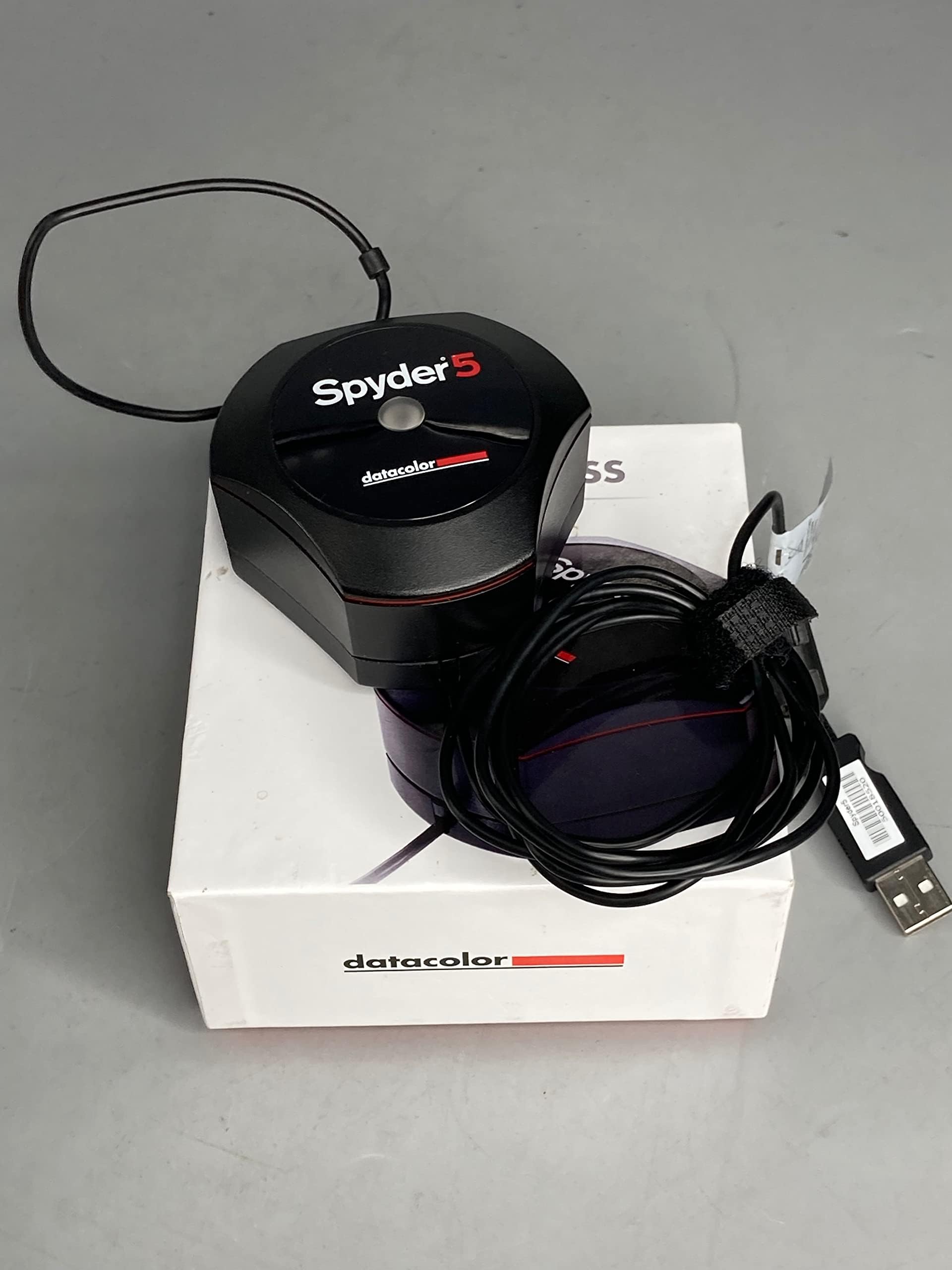
Spyder5EXPRESS - S5X100
Product ID: 48696858
🎨7-detector optical engine for precise color capture
💻Compatible with Windows 7/8/10 32/64-bit
⏱️5-minute initial calibration time
Desertcart purchases this item on your behalf and handles shipping, customs, and support to South Korea.
🎯 Nail True Colors Every Time — Because Your Vision Deserves Precision
The Datacolor Spyder5EXPRESS S5X100 is an entry-level, fast, and easy-to-use monitor color calibrator featuring a patented 7-detector optical engine. It supports Windows 7, 8, and 10 (32/64-bit) and guides users through a simple 4-step process to achieve exceptional color accuracy in just 5 minutes. Ideal for photographers and creatives, it includes a 90-day Adobe Creative Cloud trial and offers before-and-after comparisons to ensure your screen colors match your prints and creative intent.


| ASIN | B00UBSL2TO |
| Brand | datacolor |
| Colour | Black |
| Customer Reviews | 4.3 4.3 out of 5 stars (893) |
| Date First Available | 7 April 2015 |
| Guaranteed software updates until | unknown |
| Included components | Spyder5Express |
| Item Weight | 0.13 Kilograms |
| Item model number | S5X100 |
| Model year | 2015 |
| Package Dimensions L x W x H | 11.7 x 11.7 x 6.1 centimetres |
| Package Weight | 0.34 Kilograms |
| Part number | S5X100 |
| Plug profile | Desktop |
| Product Dimensions L x W x H | 6.9 x 7.4 x 4.3 centimetres |
| Size | Spyder 5 |
| Style | Express |
| Water Resistance Level | Waterproof |
L**R
Very capable, if inexpensive screen calibration system
Some years ago, another screen calibration system was used but then became incompatible with a later version of Windows; it was not then upgraded or replaced as needs had changed. Recently, it was finally decided to purchase a modern alternative and several were ruled out on the basis of unnecessary expense. The earlier v4 Spyder system was initially excluded due to a number of adverse comments about its software which was sometimes described as 'flaky' or 'behaving erratically' and some minor hardware issues. It was then that a review was found where the alternative DisplayCAL software package was mentioned and strongly recommended. Other similar recommendations and suggestions were since found and the least expensive "Datacolor Spyder5EXPRESS - S5X100" was chosen in consequence as the Version 5 hardware is now identical across the entire range and any operational differences are in the included software. No instructions or software are included, but all are downloadable, the link is provided on the product packaging. Although other versions of DataColor's software could be downloaded, the license restricts that which can be used. The colorimeter needs be in close contact with the screen and draped over the centre of the screen once the cap is removed; once detached, the cap is used as a counterweight, the length of cable between it and the device being adjustable to suit. There is a screw thread of a size that allows fitment to a tripod when evaluating a digital projector. The software can be used on a desktop or laptop, tablet etc provided that the software can be installed and there is a free USB port to which it can be connected. Both systems demand that any personal screen settings be abandoned and all be reset to default. The screen's colour temperature must be set to 6500K in both instances. Opting for DisplayCAL, downloading and installing the various components was quick and simple, far quicker than the analysis which took around one-and-a-quarter hours! However, once the initial calibration is performed, subsequent ones are supposedly simplified and faster. The device showed that my screen's green channel output was weakest by far but at the end of the procedure and with the calculated profile installed, there was a clear improvement with greys more neutral having lost a slight brownish tint which was perfectly acceptable if viewed in isolation. There may also be a slight adjustment to brightness and contrast as the screen images are 'snappier' than previously. Although Datacolor's XPRESS software was downloaded, its installation was deliberately delayed. Later installation was simple and fast but, operationally, there was far more user input required of it than with DisplayCAL although this was a single package against the other's three. Part of the process was registration of the device. The two systems function somewhat similarly although DataColor's is full screen while the other is a relatively small central window. DataColor's is also a single analysis run whereas DisplayCal requires several stages, each more intensive and time consuming. DataColor was complete in about three minutes! The final results were remarkably similar although DataColor claimed that it needed a white balance adjustment of 0, 0.3, 0.3 relative to DisplayCal's previous profile and settings which is an extremely close result. There was some minor colour difference between the before and after, the before using DisplayCal's prior calculated profile, while DataColor's offers slightly more brightness and contrast. For colour printing and other such requirements, either is perfectly acceptable although with its more extensive analysis DisplayCal's profile is probably the more accurate. Some of the criticisms that may have previously applied to DataColor's software appear to no longer apply and it has thus far been used on a single monitor. There is no reason to expect a varying experience should it be used to calibrate several, although they may need to be temporarily connected to one PC and the generated profile copied to the true target PC once the monitor is reconnected. For the outlay and with a poorly adjusted (or manufactured) screen, clear improvements are certainly possible. Not all will need it but serious users and photographers will find it, or something similar, a necessity. UPDATE @ 09-2019 - There was a later upgrade to the much improved XPro hardware and software bundle.
M**!
Simple and Effective.
I bought the Spyder 5 Express. There isn't any difference in the sensor and if you decide later you want more options you can upgrade to the other software, although in all the years I have used Spyders I have never once used the other settings so decided to save money buying the express. Setup consists of tapping in a web address on your browser and following the instructions. It's really well done actually and there are even guide videos although you won't need them. The web page tells you what to expect then downloads the software which then resides on your PC. You are given a code that effectively ties the software to your specific calibration unit. That allows you to install the software on other PC's and calibrate all your screens. Should you get a new unit though you have to repeat the process to get a new key. The software will not work with ANY unit, only the one you bought. Sooner or later it will ask you to place the sensor on the screen. I needed to lean the screen back to get it to stay put, which is unfortunate. I guess you could use a ruler or something to lean against the sensor to hold it in place. The counter-balance weight isn't really a weight any more. It used to be heavy. Now it's really light. I ran off to get the weight for my old Spyder 2 which is an actual weight. It doesn't really matter though since you have to lean the monitor back anyway. Which brings me to a fatal flaw! If you have the monitor attached to the wall you may not be able to lean it back in which case it's a problem. I resorted to a piece of bamboo to press it against one monitor. There is a standard photo thread on one side of the Spyder. I guess that means you could screw in a mono-pod type arrangement to lean it against the monitor. The Express is very simplistic in that it asks hardly nothing and just wanders off and does everything automatically. You don't have to touch the monitor controls which means that all of the calibration is through a monitor profile on your operating system. In fact you don't need the Spyder application once the profile is established. One kind of bug I found in the operation is if you have multiple monitors and one or more are Display Port. You ideally want to minimise ambient light so you turn off any monitors except the one you are calibrating. Except, if its Display Port, Windows realises you turned it off and re-configures your desktop, which causes Spyder to have a fit. I just had a small soft towel handy to throw over the Display Port monitor rather than switching it off. The downside to the simple calibration is that it doesn't adjust the monitor controls so if you take the monitor on to another PC it is totally un-calibrated. My old Spyder 2 actually told you to adjust the monitor controls to get the best picture before it created a profile so if you took the monitor to another PC it was at least partially calibrated. The good news is of course there is nothing to stop you calibrating the monitor on the other PC. Something that I had never noticed before, was just how long it can take a LED monitor to warm up. It really can take up to 30 minutes, and I was initially very confused the day after I calibrated the monitors that they didn't match at all when I first powered them on. Sure enough about 30 minutes later they were a perfect match again. When Datacolor tells you to leave them on for 30 mins before calibration, really, do just that, you may be amazed how much of a difference there is. Oh, one complaint, the cable is about five feet long. Too short Datacolor! It wouldn't reach my PC!! So yes, get a USB extension cable ready, just in case. Datacolor should work on, though, is presentation. Overall you come away feeling you spent a lot of money on not a lot of goodies. I really think they should pad the software out with optional information. Something to just make you feel you got value for money. Another point is that there is no information about how it setup windows to use the profiles. For some video cards I found it literally did nothing because it didn't configure Windows correctly for that video card. I had to manually set the profile before it worked. More info please Datacolor! Anyway, all in all, even in it's cheapest configuration it seems expensive, but it is worth the money. Especially if you have several monitors, this really is essential to get them matching each other.
S**E
Simple to use but people buying it do need to ...
Simple to use but people buying it do need to READ the documentation which says the software must be uploaded from the Datacolor website before it can be used, bit of a faff really, but instructions how to do it are very clear. I run two different makes of screens (Dell and AOC) and the calibration results are very comparable.
R**N
Works but not consistently.
This is plug and play simple really. I bought it to calibrate 3 different types of monitors. With a few clicks it goes off and does its thing. It has a slightly redder hue to the screen thatn I expected and this is noticeable when you start up your PC. Once the software kicks in, you can see the switch from standard to calibrated. I am often left thinking its darker and redder than I want. However, I can use my screen for long periods without eyestrain so that's really good. However, the calibration is not the same on the 3 different screens (Benq XL2411T, Dell 2405WFP and Asus PG279Q).
D**.
Ho acquistato lo Spyder 5 Express per calibrare il mio monitor 4k Samsung LU28E590DS. Il prodotto arriva in una confezione assolutamente adatta ed ergonomica, un cubo, al cui interno si trova lo Spyder con il suo cavo usb, una serie di manuali e fogli di garanzia. L'installazione è assolutamente tranquilla, consiglio di scaricare dal sito Datacolor direttamente i driver aggiornati, che comprendono anche il programma di calibrazione. La procedura di calibrazione è molto semplice, guidata passo passo, e la differenza si vede al termine sin da subito, anche grazie ad un sistema che mostra il prima e il dopo la calibrazione. Per completezza però consiglio l'uso di DisplayCal, programma freeware e open che gestisce la calibrazione molto meglio. Ha bisogno di un attimo di studio delle procedure, e la calibrazione stessa dura molto di più, comprendendo diversi passaggi, che vanno dal ritocco di parametri del monitor quali luminosità, temperatura, contrasto etc, all'analisi dei colori e quindi la vera e propria calibrazione. Io ci ho messo un'ora e mezza (mentre il programma Datacolor poco meno di cinque minuti), però lo consiglio per avere un'affidabilità maggiore del profilo di calibrazione creato. L'uso di questo programma permette di effettuare una calibrazione più accurata pur avendo un colorimetro entry-level, quindi lo consiglio a chi, come me, è appassionato amatore di fotografia.
A**R
L'ensemble "colorimètre + logiciel" vendu sous le nom de Spyder5 Express se compose d'un colorimètre (que je ne jugerai pas par manque de moyens de laboratoire mais qui fait son travail) et d'un logiciel très basique (qui fait le minimum). En sortie de boîte, après avoir chargé le logiciel auquel on a droit sur le site Datacolor et lancé l'opération de calibrage, le logiciel envoie une dizaine d'écrans aux couleurs bien définies, le Spyder lit la réponse de l'écran et en 5mn génère un profil ICC qui devient le profil par défaut de l'écran. Quelques images permettent de voir l'avant/après et je dois dire que sur un nouvel écran EIZO EV2455 la différence est notable et agréable. Donc, sans se casser la tête, on en a déjà pour son argent. Mais on ne se lance pas dans ces opérations de calibrage, avec un certain investissement quand même, sans vouloir en savoir plus. Le nouveau moteur (logiciel) qui va donc remplacer celui d'origine s'appelle DisplayCal et il est gratuit (licence GUI, d'où mes 5 étoiles). Alors là, on entre dans un nouveau monde! Il reconnait le Spyder5 et ses paramètres puis analyse des centaines d'écrans (des "patchs"); une opération de caractérisation d'écran peut prendre plus de 2 heures. En sortie, on obtient un profil ICC (stocké dans C:\Windows\System32\spool\drivers\color) qui pèse environ 100x plus qu'un profil standard (1400 Ko pour l'Eizo comparé à 11 Ko pour le basique). A l’œil la différence entre le profil Spyder5 Express et celui généré par DisplayCal n'est pas aussi flagrante que ne l'était l'écart entre pas de calibrage et Spyder5 Express (normal puisqu'on part de moins loin) mais il existe et en plus on reçoit un rapport de mesure très détaillé. Je n'ai pas essayé les logiciels des versions Pro et Elite, mais la combinaison "colorimètre Spyder5 + DisplayCal" a répondu et dépassé mes attentes dans ce domaine que je connaissais pas. Pour répondre à une question posée ici, il me semble que DisplayCal ne gère pas le contrôle de la luminosité de la pièce (chez moi c'est l'EIZO qui fait ça) et n'a pas d'option de réétalonnage rapide. A vérifier sur les forums ou le site DispalyCal car il s'agit de propriétés liées au logiciel. Par contre DisplayCal offre de nombreuses possibilités d'analyse de l'affichage (comparaison entre le profil généré et différentes mires);il y a même les différentes versions de Colorchecker.
W**L
The Spyder5Express worked as expected. The software to run the device was easy to find and install. Once the software was installed the device calibrated the screen in a few minutes and create a profile file for the screen. I have 3 monitors and was able to calibrate all 3. After calibrating the screens moving the same image to all three monitors it looked very similar. Prior to calibration the image looked completely different on each monitor. I now know when I do photo editing on an image I am seeing what it will actually look like when printed using a proper printing profile. For the price it is a great tool!
E**G
Como ya se ha comentado antes, este es el calibrador que se debe comprar ya que la etiqueta de "Express" hace referencia exclusivamente al SOFTWARE incluido, el dispositivo de hardware es un Spyder5 en toda regla, sin ninguna limitación. El software de Datacolor que viene de serie es prácticamente INSERVIBLE; es muy rápido y sencillo (calibra en 5 minutos con un asistente de muy pocos clicks) pero el resultado es mediocre. Para un resultado profesional/de calidad hay que usar el discpcalGUI. Este programa ha mejorado mucho en facilidad de uso (además se puede poner en castellano para quien lo necesite) y con él se consigue una calibración excelente. Para conseguir resultados óptimos hay que escoger la opción de calibración más "a fondo" que tarda 2h 50 mins (puedes dejarlo calibrando e irte a dormir; el propio programa no permite que la pantalla entre en modo de ahorro de energía así que no hay problema). En resumen, un gran dispositivo que permite una calibración de muy alta calidad y con la ventaja de que el software de calibración más profesional, eficaz y completo del mercado es totalmente gratuito.
L**G
The problem I had previously was that the two laptop screens have strong color cast. When I connect my laptop with my monitor, it color doesn't match at all. I'm no professional graphic designer, but I take pictures regularly, and has always had the doubt that however the color look on my screen, it will look different on another viewer. After calibrated with spyder 5 express, which only takes 5 mins on me, and maybe 15 mins in total, the color cast is all gone. There is still a very slight color difference (hue, saturation) between 3 screens, but I attribute that to the display quality itself. Now the white color looks the same. It might still looks different on someone else' screen, but if theirs get calibrated as well (which I believe all professionals, and most prosumers do), the difference should be minimum. One thing to notice is how the software interact with windows 10. Initially I switched to my laptop monitor view only, calibrated it, then switched to monitor display only, calibrated it, then I switched to the extended mode. Windows 10 only use the color profile for the monitor display, and therefore, the color on the laptop display was still off. So I calibrated the monitor display again, but in the extended mode. Now they are the same. I suspected that there is some configuration in windows that would allow you apply color profile to each display directly, but I didn't spend the time figuring it out. The calibration process was fast enough that I just did it again. Overall, I'm very happy with the product, and will recommend this to other people.
Trustpilot
1 month ago
2 months ago