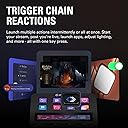
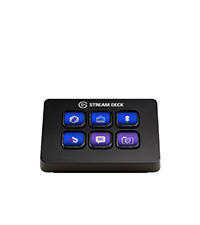
🎥 Elevate your stream, mix, and create — all in one sleek command center!
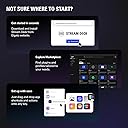
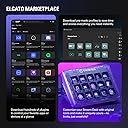
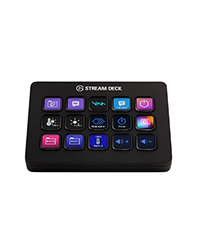
The Elgato Stream Deck Plus is a professional-grade production console featuring 8 customizable LCD keys, 4 multifunctional rotary dials, and a touch strip. Designed for content creators, streamers, and gamers, it offers seamless integration with Mac and PC via USB-C, supports multi-action macros and smart profile switching, and unlocks a vast ecosystem of plugins and royalty-free media through the Stream Deck Store. Its tactile controls and visual feedback empower users to streamline complex workflows, making it an indispensable tool for elevating live production and creative content.


| ASIN | B0BJL8SJ59 |
| Audio Input | USB |
| Best Sellers Rank | #129 in Musical Instruments ( See Top 100 in Musical Instruments ) #1 in Digital Audio Workstation Controllers |
| Brand | Elgato |
| Brand Name | Elgato |
| Connectivity Technology | USB-C |
| Customer Reviews | 4.6 out of 5 stars 4,268 Reviews |
| Frequency | 20 KHz |
| Included Components | USB Cable |
| Item Dimensions D x W x H | 5.51"D x 5.43"W x 4.33"H |
| Item Weight | 470 Grams |
| Manufacturer | Corsair |
| Output Connector Type | USB Type C |
| Power Source | Corded Electric |
| Product Dimensions | 5.51"D x 5.43"W x 4.33"H |
| UPC | 840006645146 |
| Voltage | 1 Volts |
| Warranty Description | 2 year manufacturer. |
M**E
A Game-Changer for New Streamers
First Impressions: Right out of the box, the Stream Deck Plus felt solid and well-made. Setting it up was a breeze, and I customized it to fit my needs in no time. What I Liked: • Ease of Use: The 15 programmable LCD buttons let me set up hotkeys for quick access to essential functions, making managing my stream and other apps much simpler. • Extra Controls: The rotary knobs and touch screen add flexibility for adjusting audio and other settings. Now, I can easily tweak my mic volume or switch scenes in OBS without hassle. • Customization: Being able to personalize each button with icons and even GIFs is awesome! My Stream Deck now looks just the way I want it. What Could Be Better: • Software: Occasionally, the Elgato software can be glitchy. Some plugins have crashed or didn’t work correctly, and the plugin installation site can be slow. But overall, it’s manageable. • Price: For a newbie streamer, the cost might seem steep. However, considering its functionality and build quality, I think it’s a worthwhile investment. Conclusion: The Elgato Stream Deck Plus has become an indispensable tool in my streaming setup. Despite a few minor issues, I’m thrilled with the purchase. If you’re starting out in streaming and want to enhance your broadcasts, I highly recommend checking out this device. Hope my review helps! Good luck with your streams!
M**E
From Button Mashing to Command Center — The Elgato Stream Deck Is Pure Gaming & Streaming Magic
The Elgato Stream Deck has completely transformed my daughter’s gaming and streaming setup — and I don’t say that lightly. What immediately stands out is how intuitive and satisfying this device is to use. The customizable LCD keys, smooth dials, and touch strip turn complex actions into effortless, one-tap commands. Scene changes, audio adjustments, app launches, macros — everything that used to interrupt her flow now happens seamlessly and instantly. The visual clarity of the keys is excellent, the responsiveness is spot-on, and the overall build quality feels premium and purpose-built. This isn’t a gimmicky accessory — it’s a serious productivity and performance tool disguised as a sleek piece of hardware. What I love most is how quickly it becomes indispensable. Once it’s set up, you wonder how you ever streamed or gamed without it. My daughter raves about it daily, not because it’s flashy, but because it actually makes everything easier, faster, and more enjoyable. If you’re a gamer, streamer, content creator, or even a power user looking to streamline your workflow, the Elgato Stream Deck is absolutely worth it. It’s one of those rare products that lives up to the hype — and then exceeds it. Highly recommended.
J**N
Great combo tool
This thing absolutely BANGS. This is one of my favorite desk accessories in recent years. I think I may have been the target crowd for this, as I had a normal Stream Deck Gen 1 and a Wave XLR, in order to declutter I bought this and I have to say this is such a good product. The knobs offer so much utility that I didn't realize I wanted! Also unlike the Gen1 Stream Deck, this thing feels premium, there's a solid weight to it and I actually like that it has less buttons than the normal Stream Deck, I didn't need all that. I'm not a streamer, but this is still such a handy tool. As for the mic portion, it seems like my playgroup can hear me just fine so I believe the sound quality is quite good. 10/10 would recommend.
S**N
It's a stream deck. But with volume controls.
Function. Not bad. I have 2 of them. one with XLR mic and one with USB hub. All said and done. Love having them around. work great. Cons. Not exactly super friendly for a novice. Sure you can program in the buttons pretty easy. but it takes some tinkering to really get some of the features to really work.
H**N
Good alternative to the TC Helicon: GoXLR.
After using the GoXLR for a few years, I wanted to tone down on the desk space and just go with an audio mixer. The Stream Deck XLR is sleek, works just as well as a regular stream deck, and is compatible with the plugins and apps that Elgato already offers, with long term support. I will say the only two gripes I have with it is that the sound is a little too loud between the outputs, and the touchscreen isn’t as sensitive to swipe across and move to a new page.
R**R
A must have for anything you might do. Not just for Content Creation!
First off, the hardware is top-notch. The buttons are easy to press and have a nice illuminated design. The tactile dials are a brilliant addition, and their ability to both turn and be pressed for functions like muting or switching inputs is fantastic. The interactive touch screen above the dials works seamlessly and adds a clean and modern touch to the device. The solid stand with a rubber grip ensures it stays firmly in place on your desk. The angle of the stand is just right, giving you a clear view of the Stream Deck+ without requiring an additional stand. Plus, the USB cord is conveniently designed for easy plug-in. Now, let's talk software. While there might be a learning curve, the effort is absolutely worth it. The Stream Deck software and the accompanying Wave Link software provide immense customization options. You can make this device work exactly the way you want it to. Whether you're using it as a controller for specific applications or for various tasks, the customization options are limitless. You can change the look of your Stream Deck+ and fine-tune how individual buttons function, such as launching apps, adjusting volumes, starting streams, and more. I must emphasize that the Elgato Stream Deck+ is not just for streamers. I personally use it for various tasks, including volume control, productivity, and even gaming. It's a versatile powerhouse that caters to a wide range of needs. In summary, if you're contemplating getting the Elgato Stream Deck+, do it without hesitation. It's a premium device that delivers on all fronts. Whether you're a content creator, gamer, or simply someone who values efficient control over your digital tasks, this device has it all and more. It's a true game changer, and I wholeheartedly recommend it to anyone seeking a versatile and powerful control solution.
V**L
A Must-Have Tool for Streamers, Content Creators, and Power Users!
The Elgato Stream Deck + is a game-changer for anyone serious about streaming, content creation, or just looking to enhance their computer setup with more buttons and dials. This device is incredibly versatile and easy to set up, making it an essential part of my daily workflow. The customizable buttons and knobs allow for endless possibilities, from launching apps and controlling audio to automating complex tasks with just a tap. The build quality is top-notch, with responsive buttons and a sleek design that looks great on any desk. The added touchscreen and rotary knobs are a fantastic addition, giving you more control and customization options than ever before. It’s especially useful if you’ve ever wished you had more physical controls at your fingertips, whether for streaming, video editing, or just managing multiple tasks on your computer. It integrates seamlessly with popular streaming software like OBS and Twitch, and also works great with tools like Photoshop, Premiere Pro, and even basic desktop functions. The Stream Deck + has saved me so much time during streams and editing sessions, and it’s a joy to use for day-to-day tasks as well. Whether you’re a seasoned pro, a content creator, or simply someone who wants more buttons and dials to streamline your computer use, this is a tool that will elevate your setup and make your work so much easier. Highly recommended!
M**S
Just buy it !
Let me preface by saying I fell for the hype behind this item, BUT IT WAS WELL WORTH IT, I truly only bought this because of the knobs and was really just going to use it as a mixer😭 but when I say I use this every single day, I mean that I use it for all kinds of apps, I launch almost all my important apps, games, websites using it, change all volumes with the knobs, press the screen all the time, this has so many functions as it’s worth the money at first I didn’t think it was but with everything I can do with it I can confidently say it’s worth the money, if your on the edge of get it or not just do it, as someone who isn’t a streamer or content creator this thing is still of tremendous help even on a day to day, love using this thing, greatest edition to my setup without a doubt and I even use the XLR dock attachment that you buy separately and it’s even better love it to death!
Trustpilot
1 month ago
1 month ago