Buy anything from 5,000+ international stores. One checkout price. No surprise fees. Join 2M+ shoppers on Desertcart.
Desertcart purchases this item on your behalf and handles shipping, customs, and support to South Korea.
🛡️ Elevate your MacBook Air’s defense with invisible, glare-free clarity!
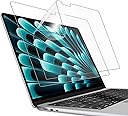
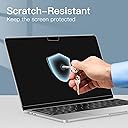
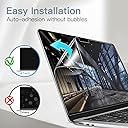
The JETech Screen Protector for MacBook Air 13 Inch (2022-2026) offers a 2-pack of precision-cut, anti-glare matte PET films with oleophobic coating to reduce fingerprints and scratches. Designed for easy bubble-free installation, it enhances screen visibility and durability, making it an essential upgrade for professionals seeking a clean, glare-free workspace.


| ASIN | B0BG5GFJ95 |
| Best Sellers Rank | 749 in Computers & Accessories ( See Top 100 in Computers & Accessories ) 1 in Laptop Screen Protectors |
| Brand | JETech |
| Brand Name | JETech |
| Clarity | 9 |
| Colour | bright |
| Compatible Devices | MacBook Air 13 Inch (M2-M5, 2022-2026) |
| Compatible Phone Models | MacBook Air 13 Inch (M2-M5, 2022-2026) |
| Compatible devices | MacBook Air 13 Inch (M2-M5, 2022-2026) |
| Compatible phone models | MacBook Air 13 Inch (M2-M5, 2022-2026) |
| Country of Origin | China |
| Customer Package Type | FFP |
| Customer Reviews | 3.8 out of 5 stars 6,144 Reviews |
| Finish Type | Oil |
| Included Components | screen protector |
| Item Dimensions L x W | 29.9L x 19.7W centimetres |
| Item Hardness | 3H |
| Item Weight | 24 Grams |
| Item hardness | 3H |
| Manufacturer | JETech |
| Material | Polyethylene Terephthalate |
| Model Name | Pellicola Protettiva |
| Model Number | 1196- |
| Number of Items | 2 |
| Part Number | 1196- |
| Product Warranty | 1 year manufacturer |
| Product dimensions | 29.9L x 19.7W centimetres |
| Screen Size | 13.6 Inches |
| Screen Surface Description | Matte |
| Special Features | Anti-Glare, Fingerprint-Proof |
| Water Resistance Level | Not Water Resistant |
K**R
Recommended
Excellent fit and good quality
M**O
Good quality, dims the screen glare, very easy to bubble
Luckily you get 2 in a pack- because as the other reviews suggested- it is SUPER easy to bubble these- but that is probably more user error than product error- solid screen protectors dont bubble as easily but can interfere with closing the laptop- so I found these a happy middle ground. There arent reflective so it dims some of the glare which is great.
A**A
A NIGHTMARE TO INSTALL
I Threw away both covers because they were absolutely IMPOSSIBLE to install. The instructions were SO confusing, too many pieces to install just a simple screen protector, at the point in which I didn’t know what to use to erase bubbles. First screen: bubbles everywhere. I had to throw it away, because once it is all attached the glue weakens and it creates even MORE bubbles so it is impossible to retry. Second screen I almost managed to remove them, but then when It was time to finally pull the outer cover off it came out entirely. My faith was then sealed because I was at the starting point again. I throw angrily everything in the bin alongside my money to buy it. If you don’t do it as a job everyday like me, please do not engage in this activity and preserve your money and sanity.
A**R
Great finish & elevates the look of the MacBook, but only if you can install it perfectly!
PROS: Great matte/anti-glare finish, diffuses the light very finely and although it still causes some of the rainbow 'graininess' you usually get with matte finishes, it's generally to a minimum and very tolerable. especially compared to the larger grain ones for iPad which uses the grittiness for Apple Pencil traction. (NB. Often online you can tell if the texture is fine enough to not interfere with the screen underneath by looking at images of windows/lights reflecting off the screen protector, the more blurred it is/ the harder it is to make out the outlines, the better it will look.) I love not being distracted by light reflections/ my own reflection on the screen when I'm working, and I find the matte finish gives a cleaner look and is more immersive than a shiny finish which is often marred by fingerprints. It's very thin and I've not noticed any problems closing the screen or any signs of damages (I use a keyboard cover as well.) CONS: The installation process: - The biggest con is that the result is ENTIRELY dependent on your ability to apply it without any air bubbles / dust underneath. You do get 2 screen protectors and 2 install kits (alcohol wipe, cloth and sticker) and a squeegee, so you have 2 attempts to get it right. Instructions are vague one-liners on a printout, but try and follow them. Don't do what I did on my first attempt, which is to peel off the whole back and try to place it in one go onto the screen. Unless your home is literally dust & lint free like TSMC's microchip manufactory plant, you WILL get dust specs sticking to your screen protector the moment you peel the backing off due to the static electricity that's generated in the process. Plus, even if you don't get any dust sticking, when you go on to lining it up with your Macbook's screen, the static will cause the edges you aren't holding to keep magnetising to the screen at random places once you hold it close enough, making it really difficult to align. How I achieved a dust free installation: - Wash your hands/make sure they aren't sweaty or oily. - Lay your Macbook with the screen flat on the table and the keyboard/body pointing up. - Clean the screen (alcohol wipe --> cloth --> sticker to pick up dust), then with the backing still on align it to your screen. - Use 2 pieces of cellotape and tape the screen protector's edge, do this on the edge with the pull tab for the backing (so now can fold on a hinge like a book (this was the left side for mine), this way it is aligned and you don't have to worry about alignment when you take the backing off. - Peel the backing off until it's roughly ⅓ of the way off, folding the loose backing onto itself, then lower the exposed sticky side onto the screen making sure it's taut against the cellotape. - When there is a speck of dust between the screen protector and the screen, no matter how hard you squeegee there will always be a bubble formed around the dust particle there. If you see any specs of dust, lift the screen protector up and grab it with the sticker (usually the dust is on the screen protector surface and not the laptop screen, so slide the sticker with the sticky side up and press the screen protector down where roughly the piece of dust was to grab it) - if you see an airbubble (without a dust particle trapped underneath), you can lift the screen protector up slightly to let the air bubble out then lower it slowly again (to save you the trouble of using a lot of force to press it out later and risk damaging your screen) - keep doing this and slowly work your way down, as you go you can retract more of the backing, this way you don't have a lot of the sticky side exposed at once and decreases the likely hood of getting dust. - for the corners, as long as it hasn't completely suctions onto the screen you can usually lift it up with a piece of tape to grab any dust particles near the edges. (don't use your fingernails since you'll crinkle the screen protector or transfer dust from your nail onto the bottom of the screen protector) Other cons: - The size of the cutout is slightly smaller than the macbook screen, with about a 1mm clearance on all 4 sides, I feel like the screen protector should have been more precisely cut. - This is the first screen protector of all the ones I've installed where the actual protector has this weird pull tab cut out from the actual protector, (it's located on the bottom left - see the red outline I drew on the last picture), which is completely useless and even damages the protector when you go to rip it off, as it leaves 2 divots where it was connected and causes the underneath to not stick properly. - I swear the alcohol wipe they give you took off like a line of the anti-reflective coating on my MBA, so if you have something gentler like non-alcohol lens cleaning solution then I would suggest using that instead.
T**A
The best purchase for your Mac!
Absolutely amazing! Initially, the application process was a bit tricky, as it requires using two small tapes to properly align the protector on the screen before removing the back cover and applying it. However, once aligned, the process becomes straightforward. To remove any trapped dust or bubbles, simply lift the protector slightly with a piece of tape and use another to remove the debris underneath. This method also helps eliminate air bubbles effectively. Overall, a great screen protector with a smooth application process once you get the hang of it! The matte finish is absolutely gorgeous, and makes it free from scratches, fingerprints and most important the keyboard imprints on the screen.
D**R
Great Screen Quality Upgrade – But Be Ready for a Tricky Install
I’ve been using this matte screen protector on my MacBook Pro 14”, and overall—it’s a solid product with one big downside. 💻 Screen Experience – Big Improvement Once applied properly, the difference is noticeable: * Glare is reduced a lot (especially under lights or near windows) * Screen feels softer on the eyes * Fingerprints and smudges are way less visible That’s exactly what matte PET films are designed for—reducing reflections and improving comfort during long usage If you spend hours on your Mac, this actually makes a difference. 🧵 Quality – Surprisingly Good The film itself feels: * Durable and well-cut * Properly sized for the 14” MacBook * Doesn’t feel cheap or flimsy You get 2 in the pack, which honestly is needed (and you’ll understand why below 😅). 😬 Installation – This is the Problem This is where it gets frustrating. * Very hard to apply perfectly * Air bubbles show up easily * Needs patience, clean environment, and multiple attempts Even though it claims “easy installation,” in real use it’s not that simple. If you’re someone who wants a perfect, bubble-free finish first try, this might annoy you. 🚶♂️ Real Use After finally getting it on properly, it’s been great: * No more constant cleaning * Better visibility in bright environments * Feels more comfortable for long sessions So the struggle is kind of worth it—but yeah, it tests your patience. 🔥 What I Liked * ✔ Strong anti-glare effect * ✔ Reduces fingerprints noticeably * ✔ Good material quality * ✔ 2-pack helps in case of mistakes ⚠️ What Could Be Better * ❌ Installation is not beginner-friendly * ❌ Bubbles can be frustrating to remove ✅ Final Verdict This is one of those products where the end result is great—but the process isn’t. 👉 If you can handle a bit of effort during installation, you’ll really enjoy the result.
D**N
Excellent anti glare solution. Very happy.
I purchased this in the hope it would allow me to work outside when the weather permits. Usually this is difficult due to reflections and glare on the MacBook screen. The JETech significantly reduces reflections and works better than I expected, given its cost. Significantly cheaper than buying a new MacBook with Nano texture screen and much better than an alternative magnetic product I tried (costing four times this). The screen comes supplied with various cleaning cloths which I DID NOT USE. It is recommended to clean a MacBook screen with a slightly damp microfibre cloth. It wasn't too difficult to apply the protector. I still have a spare should this one degrade. Overall, one happy customer.
M**E
Stops keyboard cover marks on screen.
Perfect for the reason I wanted a protector- to stop the keyboard cover making marks on the screen. Easy to fit, cut well to size. Only got bubbles where bits remained on the screen despite cleaning first. These are still MUCH less annoying than the marks with no protector. Good value for two protectors; so I could take off the first “attempt”, clean again even more thoroughly, and apply a fresh one more carefully and still be happy with the value.
M**D
جودة ممتازة
جدا ممتازة
F**R
Goede fit
Super
M**1
Mat ekran koruyucu
Kutudan 2 adet çıkıyor. Uygulaması zor fakat 2 adet geldiği için ben birini feda ettim. Tozlu bir ortamda uygulamayın. Mümkünse steril bir ortamda yavaşça uygulayın. Ekranı mat hale getirdi ve bilmeyenler için Macbook Air 15 ekranı parlak. Mat olması sayesinde yansımayı önlüyor. Tavsiye edilir.
J**A
efectivo desde el primer momento
El producto es muy bueno, con poca paciencia queda muy bien!!!
W**N
Super facil de instalar y calidad excelente
Duradero y practico, protege de manchas y ralladuras la pantalla de mi macbook pro.
Trustpilot
2 weeks ago
2 weeks ago