Description
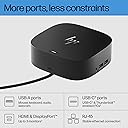
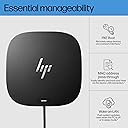
Get to work with the versatile, elegant, and space-saving HP USB-C Dock G5. Compatible with HP laptops, MacBook® computers, and other notebooks (2), this USB dock is great for organizing your desk with its small footprint and single-cable set-up. Whether it’s displays or other electronic accessories, your universal dock will assist with charging, data transfers, and networking between devices. (1) For USB-C® functionality, host PCs must support the DisplayPort™ Alt mode protocol through its USB-C® port. Thunderbolt™-enabled notebooks will function at USB-C® speeds. Charging and port replication is supported on notebooks that have implemented USB-C® industry specifications. Power button to turn on or wake the system, Wake-on LAN from warm and cold dock, Wake-on LAN from S4/S5, and MAC Address Pass-Through in S0, S3, S4, S5 warm and cold dock features only function on HP or HP-supported notebooks. HP does not provide Ethernet and audio drivers on Mac PCs. (2) Based on HP internal testing on select non-HP notebook models compatible with USB-C® industry standards. Certain Alt mode features are not supported, such as power button, MAC Address Pass-Through, Wake-on LAN, and OOB Wake on LAN. Visit the HP Support page to determine your HP notebook's wattage and port specifications. Visit the support page of your non-HP notebook to determine its wattage and port specifications. (3) Supports three displays including the notebook screen. (4) Internet connection required and sold separately. Managed PCs must be running Windows 10.
Review: Great for daily multi-computer use, occasional display flicker - I use this dock every day for both work and personal setups, switching between computers regularly, and it’s been a solid part of my setup. It handles multiple connections well and makes it easy to move between devices without constantly reconnecting everything. For productivity, it does exactly what it’s supposed to do. One important tip: make sure you use HP Support Assistant (or HP’s driver tools) to keep the dock firmware and drivers updated. That seems to help overall stability. The only issue I’ve noticed is occasional screen flickering. It happens briefly for a few seconds and only once every few days, so it hasn’t been a major problem, but it’s worth mentioning. Pros Great for switching between multiple computers Reliable for daily use Simplifies multi-device setups Works well once drivers are updated Cons Occasional screen flicker (infrequent but noticeable) Bottom Line If you need a dock for a multi-device setup, this works well and is reliable for everyday use. Just keep the firmware updated and be aware of minor display flicker.
Review: Not a UK product. Has US plug!!! - Whilst I do not wish to give a bad review I am somewhat angry that I bought this on desertcart UK and the product arrives with a a US plug. Not sure whether to return or see if I can get a uk adapter. It was not apparent on the website that this is a US product. I dont really wish to have to make a return but likewise down what the pain of having to use an adapter.