Buy anything from 5,000+ international stores. One checkout price. No surprise fees. Join 2M+ shoppers on Desertcart.
Desertcart purchases this item on your behalf and handles shipping, customs, and support to South Korea.
🚶♂️ Light up your life instantly—because waiting is so last decade!
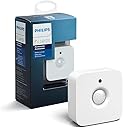
The Philips Hue Indoor Motion Sensor is a wireless, battery-powered smart sensor designed exclusively for Philips Hue smart bulbs. It offers near-instant motion detection to automate lighting, includes a daylight sensor to optimize energy use, and features a warm night light mode for subtle illumination. Easy to install anywhere without wiring, it requires the Philips Hue Bridge to integrate seamlessly with your smart home ecosystem, supporting up to 50 lights and compatibility with HomeKit and Alexa.


| ASIN | B076MGK22M |
| Antenna Location | Walkway |
| Battery Description | AAA |
| Best Sellers Rank | #208,396 in Industrial & Scientific ( See Top 100 in Industrial & Scientific ) #7,779 in LED Bulbs |
| Brand | Philips Hue |
| Color | White |
| Compatible Devices | Philips Hue smart lights |
| Customer Reviews | 4.6 out of 5 stars 3,419 Reviews |
| Global Trade Identification Number | 00046677473389 |
| Item Dimensions D x W x H | 1.1"D x 2.44"W x 2.44"H |
| Item Type Name | Philips Motion Sensor for Smart Lights (Installation-Free, Smart Home, Exclusively for Philips Hue Smart Bulbs) |
| Item Weight | 8 Grams |
| Manufacturer | Signify North America Corporation |
| Mfr Part Number | 473389 |
| Model Number | 929003067507 |
| Mounting Type | Wall Mount |
| Number of Batteries | 2 AAA batteries required. (included) |
| Operating Temperature | 15 Degrees Celsius |
| Power Source | Battery Powered |
| Smart Home Compatibility | Smart Home Compatible |
| UPC | 046677473389 |
| Unit Count | 1.0 Count |
M**T
Upgraded from SmartThings
I previously used a SmartThings motion sensor but, for whatever reason, that sensor had 2 problems that this sensor (when used in conjunction with a hue bridge) does not. First - that one took a moment to respond. It wasn’t a long time per se but it was long enough that I might as well just go flip the light switch myself. Secondly the SmartThings motion sensor would sometimes lose connection. It wasn’t often but it happened a few times and in fact the final time I was bever able to get it connected again. So I bought the hue motion sensor. BIG IMPROVEMENT. It registers the motion and triggers the associated routines nearly instantly and it has never once lost connection. It costs more than the SmartThings one but I have a lot of smart home devices and the best advice i can give is : reliability is king. Its not worth saving money on a device that won’t work every time you need it to work. TLDR: Pros: — works nearly instantly — reliable and stable (stays connected) — compatibility with a huge variety of other smarthome ecosystems (I use it in alexa routines which allow it to control almost anything that works with alexa — great value (worth the price) Cons: — does cost more than budget options
M**E
Typically expensive Hue accessory, but worth it for offline operation
Typically expensive Hue accessory, but worth it for offline operation. Requires the Hue hub, which is where you want to set up the motion lights (as opposed to in an Alexa routine). The motion lights continue to work, even if you unplug your router, the Internet is having trouble, etc. What a revelation, that these are able to match the utility of "dumb" motion lights, ancient X10 systems, etc. :) Very easy to set up with the Hue hub and app and Alexa sees them almost immediately as well. Give it a name, tell it which room (or zone) it is in and it is off and running. That being said, $50 is still pretty outrageous for such a thing. This is my second one and the first has worked trouble-free for years. Come to think of it, the battery should be getting pretty low by now, but the app has not yet warned about it. They certainly outlast the sticky switches, despite near constant use in my application. Update for Alexa routine users: as expected, the extra complication of communicating between Philips and Amazon (through the Cloud?!) can break, rendering related routines useless. Light still comes on, of course, but no routine-based extras while they work out whatever happened. This feature had been reliable up until now. :( Update: They fixed the routines quickly. No issues since.
S**E
Works great, but not with every Hue light...
I got this to trigger the lights in my closet as I've usually got a handful of something as I'm walking in there. It works nicely now that I have the right lights paired with it. I've been a Hue fan since the beginning so some of my lights are the older "less of a spectrum" or just "white lights". They're all updated with the latest software but I found that they weren't always turning on even though the sensor was triggered. When you first set things up, it works. But after a certain period of time ( maybe 10 minutes ) the sensor would trigger but the lights stopped turning on. I deleted the lights entirely, deleted the sensor ( from the app ) and recreated everything and it worked again. But again, after a short time, even though the sensor would trigger, the lights stopped illuminating. I got some newer lights - the full spectrum colored - and updated those as well. Same problem occurred which left me stumped because those are the latest lights Philips offers. I let the problem sit for a few weeks and went back to it the other day... this time using yet another new set of colored full-spectrum bulbs. These came already updated. The software didn't indicate they needed an update at all and lo and behold, those bulbs do NOT have the problem. So... I don't think it was ever a sensor issue, but there may have been a software update that fixed the issue with the associated bulbs. Not sure. I'm just happy they're working now and the feature is awesome.
H**N
Plays well with Apple
I bought several Hue products to act as a system for automating my household lights in certain rooms for daily use, & also to give the illusion that someone is at home when no one is. The products included the one for which I am posting this review, and I will be posting the identical review for the other products I bought. The products involved are the White Ambiance Decorative Candle 40 W dimmable, the White Ambiance 60W Dimmable, the Dimmer Switch with Remote, the Motion Sensor, and the Hue Hub. I use these products over an eero based WiFi system, with the Apple HomeKit app operating on my Apple TV4. I control them remotely from my iPhone and my iPad, using the Home app from Apple and the Hue app. (You really need to use both to set the system up, because it maximizes your options to do so.) Setting up the system was quite easy, and all of the accessories work as one would expect. Nevertheless, there is room for improvement, which is why I’ve rated all of them, together, as 4 rather than 5 stars. The biggest problem I have with the system concerns our chandeliers. Both of the ones we have are dimmable, and one of them is controlled by switches at two different doorways. Both of them take 3 light bulbs, and neither of them will function reliably if all three of the bulbs are Hue bulbs. The problem is that when all three of the bulbs are Hue bulbs, they flicker on & off, rendering it impossible to use the chandelier at all. This is a known issue with certain light fixtures which are dimmable, and Phillips is upfront with the likelihood that this could occur. Unfortunately, you won’t know if you have the problem till you try it out. The best solution is to rewire the chandeliers so that they are not dimmable. But pending having that done, I discovered that the living room chandelier works just fine if one light socket is left empty. Not true for the dining room chandelier, but for that one, I discovered that if two of the bulbs are Hue, and the third is a refrigerator light bulb, the flickering does not occur. The problem is that in order to use the scheduling & remote features for the Hue bulbs, the socket the bulbs are in have to be switched on all the time, which means that in the dinning room, the refridgerator light winds up being on all the time. A minor problem I have with Hue lights is that they are all 60 watts (or less). This is not bright enough to read by. For instance, I had three 100 watt bulbs in both our chandeliers, and even when I get three Hues to operate correctly in them, it’s not quite bright enough. I’m hoping that Phillips is working on higher watt versions of the Hue bulbs. The remote device and the motion detector work just fine. Oddly, the motion detector also gives the temperature at the place where it is positioned. For what it’s worth, the ordinary Hue bulbs will work outside even when the temperature drops as much as 20 degrees below zero. At least, that’s been my experience after about a month of use involving a lot of subzero temperatures.
M**E
Excellent Product!
I use Apples HomeKit in our house and garage and needed something in the garage to turn the lights on automatically when someone opens the door and walks in. The first Homekit enabled motion sensor I purchased from another manufacturer constantly dropped off the network giving me "Unreachable" errors in the Home app. Because I have several Philips Hue lights in our home and have had great luck with them I decided to give their motion sensor a try. I'm very glad I did as it solved my lighting issue in the garage perfectly. Setup was pretty straight forward, although I do find the Philip's Hue app a bit cumbersome to get around in. Once the app found the device and installed it in the Home app I was able to create a new automation. Now when motion is detected it turns on three of my Smart Plugs connected to shop lights. I wasn't sure if the Hue motion sensor would be able to turn on non Philips Hue products but it works great. From the time it senses motion to activation of all three lights is under a second so it's very responsive. In the Home app automation I created for the sensor and lights I've set the lights to turn off after 20 minutes of no motion detected. As long as i'm moving around in the garage the lights will remain on. Perfect for what I need. The motion sensor comes with a magnet which when attached to the device allows you to place the sensor on metal surface. I placed mine on the side of my gun safe which is facing my garage door. I do find it odd that Philips included the magnet but the screw they include to attach the magnet to the sensor is a wood screw. The sensor housing has fine threads. It still works as there is virtually no weight too sensor so you only need to turn the screw a quarter turn to get it to bite. But it's still not correct and a dumb oversight on Philips part. Another nice feature of the motion sensor is the inclusion of a temperature sensor. Now I can see the temp of my garage from my Home app anytime I want. However, the Home app doesn't let you use the temperature sensor for any automation. I'm not sure if this is a Apple issue or Philips but it might be nice to say turn on a fan in the garage if a certain temperature is reached. All in all though I would highly recommend this product to anyone wanting to add a motion sensor to their Homekit setup.
M**K
Reliable, hassle free
These things work fantastic in a home assistant setup with a conbee stick. Never had an issue with any of them. I only had a few for places I wanted to track temp, and filled out my house with cheaper motion only sensors, but the later were unreliable after a year or so. These hue ones never broke down, never glitched, and only needed a battery change after about a year+. Slowly phasing out my cheaper motion sensors for these simply due to how reliable and hassle free they've been. The only downside is they're hard (impossible?) To corner mount with the included hardware. Mounting anywhere else is a piece of cake. However, thingverse has some great corner mount solutions if you know someone with a 3d printer, have one yourself, or can find something like a makerspace or library with one. Pricey, yes, but if you're economical about where you really need these, they're worth the money. I've had several for well over a year, and they'll go even longer I'm sure. I never used the hue app, so ymmv in terms of software support.
C**S
Works perfectly
We’re a mostly Hue household, but I also have a Samsung SmartThings hub to help with controlling a couple of other devices. I wanted to be able to put a motion sensor aimed at our stairs so that if someone comes down the stairs at night the downstairs lights will turn on to a middle-of-the-night-appropriate level and then turn off again a few minutes later. For a while, I used a Samsung SmartThings motion sensor and set up a routine in ST to turn the lights on based on time of day, motion, etc. This worked pretty well, but the battery didn’t last very long with the Samsung motion sensor. This isn’t the case with the Hue motion sensor. It has been going strong since day one with no battery issues. And I’d say it is more reliable than the Samsung version. I wish there were more customization/programming criteria in the Hue app for this device, but I can’t really fault them for that because the device works well and they need to design their system for the masses and not someone like me who will spend hours trying to perfect a routine. I guess I need a new hobby! I’m glad Hue is making devices like this and can’t wait to see what else they come out with.
K**6
Will be buying more!
This was super easy to set up and connect! There was no screw to attach the one little part to the wall so I had to use my own. It has worked every time since we got it and I plan to buy more (one for a closet and on for our hallway!). The quality is great as are most Hue products. I just wish they were a little cheaper so I could buy even more :).
K**R
Works well
This works with Alexa, and is sufficiently small to be unnoticeable to unwelcome intruders.
S**N
works great and attaches almost anywhere!
easy to attach and start using right away. can attach it directly to fridge using the magnetic attachment in box. can also attach it to light fixtures and vents magnetically without screwing anything in. setup is fairly simple with hue app. best used in hallways. automatically can switch off light after 5 mins of no motion detection. can change that in settings. choose light sensitivity using hue app so it will adjust light brightness based on how much light the sensor detects. works great with iphone and home app in general on ios.
J**D
On time
Good choice for home improvement
I**Z
Buenísimo y funcional
Compre dos sensores, los posicione en las escaleras, uno en planta baja y otro en planta alta, así que cuando es de noche y pasas, en mi caso enciende la luz de la escalera y pasillo de planta alta, simplemente amo. Super fácil de sincronizar y tiene opciones buenas para que los configures a tu gusto. La batería por cierto les dura literal años y te avisa cuando ya es tiempo de cambiarla.
C**W
Works perfectly
Nothing more to add, it just works.
Trustpilot
3 weeks ago
1 week ago