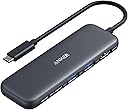
🚀 Elevate your workspace with power, speed, and clarity — all in one sleek hub!
The Anker 5-in-1 USB-C Hub combines a 4K HDMI port, one 5Gbps USB-C data port, two 5Gbps USB-A ports, and an 85W power delivery pass-through charging port into a compact, travel-friendly design. Compatible with MacBook Pro, MacBook Air, Dell, and other USB-C/Thunderbolt-enabled laptops, it enables seamless multitasking with ultra-fast data transfer and crisp 4K display output, backed by an 18-month warranty.


| ASIN | B0BQLLB61B |
| Additional Features | HDMI™️ |
| Best Sellers Rank | #2 in Computers & Accessories ( See Top 100 in Computers & Accessories ) #1 in Laptop Docking Stations |
| Brand | Anker |
| Color | Black |
| Compatible Devices | Windows and MacBook computers that support USB-C with DP Alt Mode and Power Delivery, as well as USB4 and Thunderbolt 3/4/5 ports. Compatible Devices Windows and MacBook computers that support USB-C with DP Alt Mode and Power Delivery, as well as USB4 and Thunderbolt 3/4/5 ports. See more |
| Customer Reviews | 4.4 out of 5 stars 16,721 Reviews |
| Data Transfer Rate | 5 Gigabits Per Second |
| Enclosure Material | Aluminum |
| Hardware Interface | USB Type C |
| Item Dimensions L x W x H | 4.78"L x 1.59"W x 0.45"H |
| Item Weight | 0.09 Pounds |
| Manufacturer | Anker |
| Number of Ports | 5 |
| Operating System | Chrome OS, Windows 10, Windows 7 |
| Special Feature | HDMI™️ |
| Total USB Ports | 3 |
| Total Usb Ports | 3 |
| UPC | 194644101237 194644121358 |
| Warranty Description | 18-month |
B**S
Simple and Effective
This is the perfect addition to my office setup. As someone who regularly needs to connect an extra screen to my laptop, this hub ticks all the boxes. The HDMI port supports 4K display, which gives me crisp and clear visuals, making multitasking much more efficient. One of the standout features is the combination of data and power ports, I can easily connect my keyboard, mouse, and any other peripherals I need. Plus, the powered USB-C port lets me keep my device charged throughout my workday without sacrificing performance. Another benefit I appreciate is how easy it is to detach the hub from my laptop. When it’s time to leave the office, I can simply disconnect one cable, and everything comes with me. No need to unplug multiple cords or worry about keeping track of adapters. The hub’s compact size is an added bonus. It’s small enough that it doesn’t clutter up my workspace, which is important for keeping my desk organized and professional-looking. This is great for streamlining my daily workflow. If you’re looking for a simple, effective way to connect multiple devices and keep your setup tidy, I highly recommend this hub. Although I should have gotten a different color than dark gray.
W**E
Compact, Travel friendly, Works well with ROG ALLY
This is a compact and well built adapter, and it is travel friendly. I use it for my ROG ALLY when I don’t want it docked and still need charging and other device inputs. It has just about enough ports for what I need, usb-c power delivery port for charging (ROG ALLY can still run at maximum performance using this with a 100W charging brick and a cable that allows 100W power pass through). I use the remaining USB-C port and two USB-A ports for external hard drives or gaming controller 2.4Ghz receiver. Transferring files between ROG ALLY and an external SSD with this adapter is fast, could reach above 380 mb/s. All the device inputs were as advertised, “plug and play”. The hdmi port also gives me an option to connect my ROG ALLY to TV when I don’t have the dock which takes up more space for traveling. One thing to note, you will have to use the USB-C port on your PC which provides more power (usually at the back and not on the front of the pc), if not plugged in to a power source. When I received my first order, I plugged it into the front USB-C port of my mini PC, just for my wired keyboard and mouse, the computer didn’t recognize it and couldn’t get any input from my keyboard and mouse. I returned the first one and thought it wouldn’t work as I expected. A few days later when I was using another Anker 7 in 1 USB-C adapter, I ran into the same issue but I know that adapter had been working well, then I realized I had to plug it into the port on the back of the PC. So I got this again and tried, it just worked like a charm. Hope they actually mentioned it on their product page so I wouldn’t have to return the first one. The cable length on this adapter is just right, not too long or too short when using with ROG ALLY (not hanging, since the cable is pretty sturdy, when I picked up the ROG ALLY, the adapter just comes along).
A**A
Second time ordering- No issues, good quality
I like the color, good quality and it works great. I ordered one of these before in the dark gray and it was great but I lost it. I had it for a little less than a year and never had any connection issues. It always did what it was supposed to do. I wish it came with a case, I sometimes worry about the chord be long and exposed but it hasn't shorted out or been an issue yet. Definitely works way better than the other adapter I ordered from a different company without the chord. That one had a usb-c connection that was attached the base of the adapter and plugged directly into my MacBook Pro. The connection started giving out after a few months which is an issue I haven't had with this one so that's good.
A**O
Decent USB-C Hub
I have always been a fan of Anker products ever since their company was erected. They make great chargers and cables. The Anker 332 USB-C hub appears to be no different. So far, it works well with my M1 MacBook Air. I chose this hub because of its sleek design and lack of SD card and Ethernet ports. The 332 is a 5-in-1 USB-C hub featuring an HDMI port, 2 USB 3.0 ports, 1 USB-C data port, and one USB-C port for power delivery. This is the port that you connect your power adapter for pass-through charging. The hub supports power adapters of up to 100W. However, the 332 requires 15W of power for itself, so be sure that you attach a 45W or greater power adapter if you are using an M1 or an M2 MacBook Air. I discovered this when trying to use the included 30W power adapter that comes with the M1 MacBook Air. When attached through the hub and using the 30W power adapter, only 15W of power was available to the MacBook Air, and thus the battery remained in a "Not Charging" state, and processor-intensive tasks would cause the MacBook Air to consume battery power. Thankfully, I already had an Anker Power Port Atom III 60W power adapter that I was using to charge my previous Non-Retina MacBook Air using a MagSafe2 to USB-C cable. After swapping out the 30W charger for the 60W, 45W of power was now made available to the MacBook Air. As you would expect, charging began instantaneously, and battery power was no longer consumed while connected to the hub. The USB-C and USB-A data ports support transfer speeds of up to 5 Gbps. The HDMI port supports up to 1080p @ 120Hz, 1440p @ 60Hz, and 4K @ 30Hz. Some would prefer to have support for 4K @ 60Hz, but I already knew this going in, and it is a non-issue as I do not currently own a 4K display. I did run into an issue with audio playback over HDMI, whereby audio playback is choppy when the resolution is set to 1080p @ 60Hz. The only remedy is to lower the refresh rate to 50Hz, at which point audio playback is stable. In contrast, audio playback over HDMI is flawless at 1080p @ 60Hz on Apple's official USB-C Multiport AV Adapter. At 5Gbps, the USB ports are decent on this Anker 332 hub; however, when connecting an external USB 3.0 SSD, this hub showed the following write/read speeds: write ~80MB/s, read 140MB/s as opposed to write ~160MB/s, read 290MB/s when connected directly to the M1 MacBook Air or via Apple's official USB-C Multiport AV Adapter. The enclosure is entirely made of plastic. I would have preferred an enclosure made of aluminum for better heat dissipation and a more premium aesthetic, but aside from that, it does its job quite well. The hub gets warm but never hot, and thus I'd expect it to last long. It also comes with Anker's 18-month warranty.
A**R
Gets the job done
This is exactly what I needed without a high price tag. It’s working great, use it everyday and it’s easy. Plugged directly into laptop, have a hard drive and 2 monitors plugged it. Laptop charges while in use. Compact and doesn’t slow anything down.
S**N
Rock-Solid Performance and Premium Build — A USB-C Hub That Just Works
⭐️⭐️⭐️⭐️⭐️ Excellent USB-C Hub – Reliable, Well-Built, and Does Exactly What It Promises I’ve been using this Anker USB-C Hub daily and it has been rock solid. Setup was completely plug-and-play with no drivers or configuration needed. The HDMI output works flawlessly, delivering a clear, stable signal to my external display with no flicker, lag, or dropouts. USB ports recognize devices instantly, whether it’s flash drives, peripherals, or accessories. Build quality is exactly what you’d expect from Anker—solid, compact, and well-finished. The cable length is just right: flexible enough to position comfortably without putting stress on the USB-C port, yet short enough to stay tidy on a desk or in a travel bag. Power delivery passthrough works reliably, allowing me to charge my device while using multiple ports at the same time with no overheating or performance issues. I also appreciate how portable this hub is. It’s lightweight, easy to carry, and feels durable enough for frequent travel. It’s been consistently reliable across different setups and hasn’t caused a single disconnect or compatibility issue. Everything functions exactly as advertised. Overall, this is a high-quality, dependable USB-C hub that just works. If you need a compact, well-designed hub for HDMI output, data transfer, and everyday productivity, this is an excellent choice. Definitely worth the money and an easy recommendation.
B**L
Compact and works as advertised, though not perfect.
Compact, and works as advertised. I love the green color. The light color makes it easy to find in a bag, and the small size makes it ideal for travel. However, be aware that there is some lag in the video when driving my 4K monitor. This makes it difficult to use the mouse quickly. This is not going to work for me at my home office. However, I may use it for traveling in case I need to present on a large monitor, because my laptop does not have an HDMI port.
B**N
Buyer beware, stopped working very quickly
I bought the Anker 332 USB C Hub for my Chromecast, so that I could use a wireless keyboard and USB C Flash drive to expand the memory. I received the item quickly, but didn't get it set up for 2 weeks. Once I got it set up, everything worked perfectly and I was satisfied. Last week however, I powered on my Chromecast and noticed several apps missing. I used my remote to navigate to the app store as well as my downloader app in order to get the apps again, but when I went to type in the name of the app I noticed my keyboard not working. I then went to the settings on my Chromecast and the first thing I noticed was my USB C Flash drive didn't show up either. I hadn't considered the USB C Hub going bad on first consideration because it was still receiving power and transmitting it to the Chromecast, however it just isn't receiving input from either the keyboard which is in one of the USB A slots, or the USB C drive which is in the USB C slot. Everything is still in the slot that I set it up in and that it originally worked in. I also tried the keyboard receiver in the other USB A slot and it's not recognizing input from that slot either. And wouldn't you know, it went bad just outside the 30 day window for returns. From my orders page, I clicked "Product support" for the item, then "Amazon's customer service page," then the Anker USB C Hub. A page comes up that says "How can we help you with this item?" I clicked "return or replacement" > "other" > "start return or replacement." The next page, the item was already selected, so I selected "item defected or doesn't work," and typed in that the product stopped working after 2 weeks of use, and clicked continue. The next page was a useless help video for troubleshooting use of the product on PC, and the only other option was "continue shopping" which when I click it, it takes me to the Amazon home page. I'm very upset with this product, with the manufacturer Anker, and with Amazon as well. I paid $17.99 for the product (it was on sale at the time). It's bad enough that the product doesn't work and there are no options for getting a replacement. I guess I could buy another one and the damage wouldn't be too bad, although the price has already increased to $24.99 and who is to say the next one won't stop working as well? The far worse part of this is the $35.99 USB C flash drive, $25 keyboard, and the $37.99 Anker power source (purchased to support the power demands from the additional devices), are all rendered useless if the dongle that I need to use them with the Chromecast doesn't work. Oh and on top of that I spent $46.99 on a Chromecast that now doesn't have enough storage for all the apps I use, and that I can't use a keyboard in order to type things in. So that's $124.97 spent on items that are now useless to me without the dongle, and an additional $17.99 on a dongle that straight up doesn't work. UPDATE: I've been in contact with Anker support and they provided me with a replacement dongle but it has the same issue, but they have been very courteous and helpful. I then turned to Google support. Turns out the issue might be with Chromecast's new firmware. Countless Youtube videos and Google community posts recommend USB C hubs for use with Chromecast so that users can expand storage and use a wireless keyboard. After talking with 2 different Google support people for a total of an hour apparently new firmware they use doesn't support this any more. I don't have any other devices that have USB C input so I can't test if either dongle works with other devices or not.
Trustpilot
1 month ago
2 weeks ago