Buy anything from 5,000+ international stores. One checkout price. No surprise fees. Join 2M+ shoppers on Desertcart.
Desertcart purchases this item on your behalf and handles shipping, customs, and support to South Korea.
🔌 Power, Ports & Performance — All in One Hub!
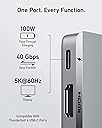
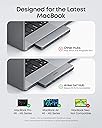
The Anker 7-in-2 USB-C Hub is a premium, ultra-compact accessory engineered for MacBook Air and Pro users, expanding limited USB-C ports into a versatile array including 4K HDMI, SD/microSD slots, and multiple USB-A/C ports. It supports up to 100W charging, 40Gbps data transfer, and dual high-res displays, making it the ultimate productivity booster for professionals who demand seamless connectivity and sleek design.


| ASIN | B0BNZ5V1TF |
| Additional Features | Fast Charging, HDMI™️ |
| Best Sellers Rank | #40 in USB Hubs |
| Brand | Anker |
| Color | Gray |
| Compatible Devices | Laptops |
| Customer Reviews | 4.5 out of 5 stars 3,135 Reviews |
| Data Transfer Rate | 40 Gigabits Per Second |
| Enclosure Material | Plastic |
| Hardware Interface | USB |
| Item Dimensions L x W x H | 4.72"L x 1.14"W x 0.39"H |
| Item Weight | 0.12 Pounds |
| Manufacturer | Anker |
| Mfr Part Number | A83540A1 |
| Model Number | A8354 |
| Number of Ports | 7 |
| Operating System | macOS |
| Special Feature | Fast Charging, HDMI™️ |
| Total USB Ports | 7 |
| Total Usb Ports | 7 |
| UPC | 194644118723 194644119010 |
A**E
Looks sleek and works great!!!
Holy cow, this thing is 5 stars all day, every day. What an awesome little Mac accessory. I keep my MacBook Air plugged in so I only had a single UCB C port to use for my HDMI output. Whenever I needed to print, I'd have to pull one cable out and plug in the printer (it's a little postage printer, not wifi). When I'm done, I unplug the printer and plug power (or the monitor) back in. It's only a matter of time before I wear out the USB C slots. If you've read this far, and you're doing something similar, you're done reading this... order it. Using this hub, it has a dedicated HDMI input. If I don't plug in power, I can use both USB C ports and HDMI! If I have plug in power, I still have a free port for using the little printer, or even for even another USB C charting cable. It's very easy to use, you just plug it into the side of a MacBook (I have an MacBook Air) and boom, it's ready. It has 2 more USB A connectors and 2 SD card slots (regular and micro). It can even do pass thru charging to charge your accessories. It even looks like it was made by Apple. The only minor issues are: 1) You have to support it, if it hangs in thin air, it could probably snap off if someone accidentally leans onto it (unlikely but possible). 2) No Ethernet adapter. That said, some of these dongle Ethernet adapters are slower than WiFi--an adapter with Gigabit ethernet would be the chef's kiss.
T**O
Anker Saves the Day (and My MacBook Ports!)
Okay, let's be real. If you're a MacBook user, especially with one of the newer models, you know the struggle is real when it comes to ports. Seriously, it feels like Apple decided we don't need to plug anything in anymore. That's where this Anker USB C Hub swoops in like a superhero. I've been using this 7-in-1 adapter for a bit now, and it's pretty much become an essential part of my setup. First off, it's Anker, so you expect a certain level of quality, and it delivers. It feels solid, not flimsy like some cheaper hubs I've tried. The main reason I grabbed this was for the 4K HDMI, and it works flawlessly. Plugging it into my MacBook Air and then out to my external monitor (a 1440p, so not quite 4K but super crisp), the picture quality is perfect. No flickering, no lag, just a clear, extended desktop. Beyond the HDMI, having extra USB-A ports is a lifesaver. I can finally plug in my wireless mouse dongle, an external hard drive, and still have room for a flash drive or my keyboard without having to play musical chairs with my dongles. The USB-C passthrough charging is also super handy so I don't lose a port just to power my laptop. It's super easy to use – literally plug and play. No drivers, no software, just connect it and everything works. It's compact enough to throw in my bag without taking up much space, which is great for when I'm working from different spots. If you're constantly juggling adapters or wishing your MacBook had just *one* more port, this Anker hub is a no-brainer. It brings back all the essential connectivity you need in one well-made, reliable little package. Highly recommend!
R**.
Perfect piece.
Fits perfect and looks great. Has all the plugs that I need. Shipping was quick and it works perfectly. Value for the money was online and it connects to the computer flawlessly with the ability to charge. It is mall and almost weightless and fits in my backpack pocket and I forget it’s there. It has some many options to plug in that it’s compatible with everything.
R**V
Solid hub, won’t fit if you have a cover on
This has been a great addition to my setup. I needed more ports for my MacBook, and this hub made everything so much easier. It connects quickly and all the ports work without any issues. I like it because of how it’s placed well with my laptop. The build quality feels sturdy, and it doesn’t overheat like some cheaper hubs I’ve tried. I use it daily for USB devices, HDMI, and charging, and it’s been reliable so far. I just got a cover for my Mac and it doesn’t fit so I would have to remove the bottom cover to be able to use it so that’s why it’s now 4 stars for me. Pros: Multiple useful ports Easy plug-and-play Reliable performance Cons: Gets slightly warm with heavy use Won’t fit if you’re using a cover for Mac Overall, a solid buy if you need extra ports without hassle.
M**D
Compact and Reliable USB-C Hub for MacBook
This USB-C hub is a great addition for MacBook users, solid build quality, seamless plug-and-play setup, and all ports work flawlessly; the 4K output is sharp, data transfer is fast, and it’s compact enough to carry anywhere, making it perfect for both work and travel.
G**1
Compact and Versatile USB-C Hub for MacBook Users
The Anker 547 USB-C Hub (7-in-2) is a sleek, multifunctional accessory designed for MacBook Pro and MacBook Air users. With 7 ports, including a Thunderbolt 4 USB-C port, 4K HDMI, and data ports, it aims to enhance connectivity while maintaining portability. I tested this hub with a MacBook Air M1 for various tasks, including video output, file transfers, and charging. Pros: ✅ Includes 7 essential ports (Thunderbolt 4 USB-C, HDMI, USB-C, 2 USB-A, and more) for versatile connectivity. ✅ Thunderbolt 4 USB-C port supports high-speed data transfer and charging. ✅ 4K HDMI output delivers sharp and clear video for external displays. ✅ Compact, lightweight design integrates seamlessly with the MacBook. ✅ Plug-and-play functionality; no driver installation required. Cons: ❌ Limited to MacBooks with USB-C ports; not universally compatible with other laptops or devices. ❌ Ports can feel crowded when multiple peripherals are connected. Performance and Usability: This hub performed reliably in all tested scenarios. The Thunderbolt 4 USB-C port supported fast file transfers and passthrough charging, while the HDMI port delivered crisp 4K video to an external monitor with no lag or display issues. USB-A and USB-C data ports facilitated quick and easy connections for external drives and peripherals. Its compact size made it highly portable, perfect for use on the go, while its aluminum finish matched the MacBook's aesthetic. However, when all ports were in use simultaneously, the close spacing made it slightly tricky to connect bulkier devices or cables. Comparison: Compared to other USB-C hubs in its class, the Anker 547 stands out for its Thunderbolt 4 support, which provides faster speeds and broader compatibility with high-performance devices. While some hubs offer more ports, this one focuses on quality and MacBook-specific design, ensuring a seamless user experience. Who Is This For?: This hub is ideal for MacBook Pro and Air users who need a reliable, portable solution for expanding connectivity. It's particularly suited for professionals who frequently connect to external displays or require high-speed data transfer. Conclusion: The Anker 547 USB-C Hub (7-in-2) is a well-rounded accessory for MacBook users, delivering excellent performance, versatility, and a sleek design. While it may not cater to non-MacBook devices, its compatibility and functionality make it a valuable tool for anyone invested in Apple's ecosystem.
A**R
Great adapter for Mac. Easy to use. Solves problems
Straight up this device is making my life so much easier. I have the newest Mac book air (I know subtle flex) but obviously they only have usb-c ports. I needed an hdmi port and two standard usb ports. This thing solved it all while maintaining an extra USB-c. I don’t usually review products but honestly I’m just very pleased with how seamless it was.
A**R
Works Well, but Awkward Fit on the MacBook
The Anker 7‑in‑2 hub has solid performance and the ports work reliably, but the way it sits on the side of the MacBook isn’t great. It feels a bit awkward, and taking it off is harder than it should be. Once connected it does the job, but the design makes everyday use less convenient. A functional hub with a frustrating fit
W**M
Great product, highly recommended.
I recently purchased the Anker USB-C Hub for MacBook (7-in-2 with 4K HDMI), and it’s easily one of the best accessories I’ve added to my setup. The build quality is excellent—it feels solid, premium, and very durable. It fits perfectly onto the MacBook without feeling loose, and the compact design makes it great for both home use and travel. Setup is instant—just plug it in and it works straight away, no hassle at all. It gives you all the extra ports you need, which is a huge upgrade for MacBooks with limited connectivity. The 4K HDMI output works perfectly for connecting to an external monitor, and everything runs smoothly. Performance-wise, it’s been flawless. Data transfer is fast, and the pass-through charging is really convenient so you can power your laptop while using the hub. It genuinely makes everyday use much easier. Overall, this is a fantastic product—reliable, well-built, and great value for money. If you need extra ports for your MacBook, I would definitely recommend this.
M**N
Go buy it now
The quality is amazing and the performance is unbelievable
A**E
great USB C Hub perfect for my Macbook pro
Great gadget, love it works perfect, it doesn overheat. 10/10
P**O
Ottimo, compatibilità Apple 100%
Si adatta perfettamente al mio macbook air 15 pollici, sembrano far parte dello stesso oggetto. La porta thunderbolt garantisce la stessa velocità di quella originaria del macbook e anche le altre porte sono comunque molto veloci. Unica nota, è un pò affilato sui bordi, ma parliamo di dettagli minimi. Lo consiglio, sopratutto se si riesce a trovarlo in offerta come è capitato a me.
A**R
This is perfect!
Excellent!
Trustpilot
1 week ago
2 months ago