


🚀 Power Your Productivity with the Ultimate 10-in-1 Hub!
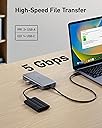
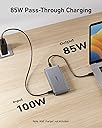
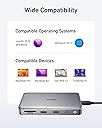
The Anker 563 USB-C Hub is a premium 10-in-1 docking station designed for professionals seeking maximum connectivity and efficiency. Featuring dual 4K HDMI outputs, 5Gbps USB data ports, and up to 100W power delivery, it supports a wide range of laptops including MacBook, Dell, and Thinkpad. This hub transforms your workspace with seamless multi-device integration and reliable pass-through charging, backed by an 18-month warranty and responsive customer service.


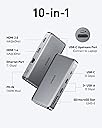

| ASIN | B0BNZ5TCG8 |
| Additional Features | Powered |
| Best Sellers Rank | #20,828 in Computers & Accessories ( See Top 100 in Computers & Accessories ) #998 in Laptop Docking Stations |
| Brand | Anker |
| Color | Gray |
| Compatible Devices | Laptops, Monitors |
| Customer Reviews | 4.1 out of 5 stars 209 Reviews |
| Data Transfer Rate | 5 gigabits_per_second |
| Enclosure Material | Aluminum |
| Global Trade Identification Number | 00194644118709 |
| Hardware Interface | HDMI , USB 3.0, USB Type C |
| Manufacturer | Anker |
| Mfr Part Number | A8386 |
| Minimum Required Operating System Version | Windows 10 |
| Model Number | A8386 |
| Number of Items | 1 |
| Number of Ports | 7 |
| Operating System | Windows 10 |
| Special Feature | Powered |
| Total USB Ports | 5 |
| Total Usb Ports | 5 |
| UPC | 194644118709 |
S**E
Perfect for our Mac Setup
We recently switched from a PC docking station setup to Mac. We researched many Mac compatible docking stations on Amazon and most of them were either relatively expensive (well over $100) or they didn't function like you would expect (no ability for extended monitors with Macs). Finally, we stumbled upon this affordable Anker 563 USB-C Hub that had all the functions we needed. We have a MacBook Air, 13-inch, M4, 2025, running Sequoia 15.7.4. After reading the instructions for the hub, we installed MacOS InstantView. Plugged the USB-C cord into the Mac and everything worked without doing anything else. 2 monitors were connected using HDMI with Extended View. One USB-A slot was used for a wireless keyboard and mouse. The other USB-A slot was used for a microphone and headset. We weren't sure if the USB-C cord would also charge the MacBook, but we were pleasantly surprised to see charging was working! We have a ton of Anker chargers and cables and have always been impressed by their quality. Happy to say this hub has been great as well.
A**O
IT STOPPED WORKING
The USB-C power port stopped working after 3 1/2 months. 04/03/2025: Amending review: EXCELLENT CUSTOMER SERVICE. The supplier reached out to me and sent a replacement free of charge. THANK YOU!!!
K**M
Works fine for a while...
Worked great for ~6 weeks before computer (Mac) stopped recognizing it when plugged in. Can confirm it was the hub that failed because I bought a different brand and am back up and running. Cheaper is not better.
M**M
This worked for my Macbook!
This docking station solved my issue for my Macbook. I tried a couple other options but this was the only one that worked. I have not experienced any issues since setting this up a few months ago.
L**Y
So far so good
**Update** This still works beautifully a few weeks in, no issues whatsoever. It doesn't get overly warm (like I would say it's mildly warm at most). After reading further, there is nothing nefarious about the screen recording message. Overall I'm happy with the ability to work on two monitors on my Mac. --- Well, after reading many reviews on desktop docs for MacBook I planned on this one. This is my initial impression of the doc so far and I'll come back to update later as I get used to it. I have a 2019 Intel MacBook Pro 15" that I wanted to use with dual monitors. This dock, so far, fits the bill. I'm connected via hdmi for both screens and the dock works as expected with the software download. I also have a Webcam and wireless keyboard connected via USB to the dock so I can work with the lid closed. My only concern is with the software download. At no time do I want anyone to have the ability to 'record' my screen without my consent. I have emailed anker to see if they can find another software provider which will perform the same but, you know, protect my privacy.
J**R
Best features
Pros: - The power-in is a USB-C cord, so you can use your laptops power supply instead of the big bulky custom ones that come with other hubs. In my case, I used my MacBook charger, which is nicer and could get a longer USB-C cord to get this to the wall. - The Upstream Port (connect to laptop), is also a USB-C port, so you can use a longer USB-C cable. Other hubs have the upstream port connected to the hub (and they are short). But with a longer cable and this slim design, I can hide the hub behind my monitor. Cons: - Only has HDMI, no Display Ports. - Probably could use another USB-C input or two. I'd gladly sacrifice the Micro SD port for this. Who uses Micro SD ports these days?
A**L
Functional but not as expected
Bought this for resetting my desk with different setup. It worked for single setup and also had to install a third party software to make it work, I felt it kind of hacky way to support dual monitors. So I decided to delete the software and return the product. It did connect as it claimed and it’s made with quality material as any other Anker products. This can be only compatible with Apple product as I tried my Dell with it but it didn’t work.
A**D
Recommend It, But...
I also have Anker 553 Usb-C hub, it has similar I/O options with this one except this one has extra Usb-C, which I needed. Usb cable is not fixed, which is great but you need a cable that can transfer video if you need replacement. Not any Usb-C cable will work. 553 model is more compact and that one is plug and play, you don't need any additional drivers. This one requires a driver to be installed, so if you need this for work computer and it is restricted, you will need to contact your IT department. If you don't want that, get the 553 model. Note : Both model's PD port does not charge Legion 7 laptop. Other features are functional.
C**M
Very impressed!
For the price of this dock, i wasn't expecting to have 2 displays connected to my m1 macbook air along with the laptop display working as well.
M**Y
Hochwertige Verarbeitung und sehr gute Funktionalität
Das Dock ist seit über an meinem Jahr in Verwendung und hängt primär an meinem M1 MacBook. Für dieses fügt es Support für einen zweiten externen Monitor hinzu, was das MacBook von Werk nicht unterstützt. Allein dafür ist das Dock seinen Preis in meinen Augen wert. Man muss beachten, dass wenn man diesen Workaround in Anspruch nimmt, die Qualität des Bildes auf dem zweiten Display nicht perfekt ist, aber das ist eine technische Limitierung, die alle Docks mit diesem Feature haben. Man muss sich halt fragen: Lieber zweiter externer Bildschirm mit Imperfekten Bild oder gar keinen zweiten externen Bildschirm? Das Dock ist sehr hochwertig verarbeitet und voll und ganz aus Aluminium. Alle Ports sind bei mir in Verwendung und ich habe in über einem Jahr keine Mängel feststellen können. 5 ⭐️
M**C
Zwei externe Monitore am MacBook Pro M1, eine zuverlässige Lösung
Ich nutze diesen Anker-Adapter für meine tägliche Arbeit. Da ich ein MacBook Pro mit dem M1-Chip besitze, stand ich vor dem Problem, dass ich nativ nur einen einzigen externen Bildschirm anschließen konnte. Mit diesem Adapter ist es mir nun endlich möglich, mein Setup auf zwei externe Monitore plus das MacBook-Display zu erweitern. Der Adapter macht einen qualitativ hochwertigen Eindruck und wirkt solide verarbeitet. Im Praxiseinsatz läuft das Gerät absolut zuverlässig und bisher komplett störungsfrei. Es gab keine Aussetzer oder Verbindungsprobleme, was im Arbeitsalltag natürlich besonders wichtig ist. Ein wichtiger Punkt, den man vor dem Kauf wissen sollte: Damit der Adapter funktioniert, muss ein kostenloses Programm auf dem MacBook installiert werden. Das stellt für mich kein Problem dar, ist aber eine notwendige Voraussetzung für den Betrieb. Mein Fazit: Der Adapter ist absolut zu empfehlen. Er arbeitet fehlerfrei, ist hochwertig gefertigt und löst das Problem der begrenzten Bildschirmanschlüsse beim M1-MacBook perfekt.
S**F
Works perfect with my M1 laptop
Works perfect with my M1 laptop, you get two monitors output. I have 32 inches Ultrawide and 27 inches Ultrawide and it works perfect for the two of them. It also provides power supply so you end up with just one cable. Highly recommend given the price.
A**R
On an M1 Mac with Sonoma, this does not work in dual screen mode
On an M1 Mac with Sonoma, this does not work in dual screen mode the hub will not recognize the second monitor. And on Wake Up, the second monitor takes 30 sec to show an image. Overall product support docs are pretty poor. Not recommended for this configuration
Trustpilot
1 week ago
1 week ago