Desertcart purchases this item on your behalf and handles shipping, customs, and support to South Korea.
๐ฅ Stay cool, save green, and control your comfort like a pro! ๐ฒ
The Emerson Sensi Lite Smart Thermostat offers an easy DIY installation with no common wire required on most systems, Energy Star certification for up to 23% HVAC energy savings, and seamless Wi-Fi control via a top-rated mobile app. Designed with privacy in mind, it ensures your data is never sold or used for ads. Compatible with Alexa and featuring smart maintenance alerts, itโs the perfect upgrade for millennial professionals seeking efficient, connected home comfort.


| ASIN | B0BXZ6KXGG |
| Additional Features | Auto Changeover, Daylight Savings Time Ready, Filter Indicator, Low Voltage, Programmable |
| Backlight | Yes |
| Best Sellers Rank | #72,503 in Computers ( See Top 100 in Computers ) #4,833 in USB Cables |
| Brand | Sensi |
| Brand Name | Sensi |
| Color | ['Black'] |
| Colour | ['Black'] |
| Connectivity Protocol | Wi-Fi |
| Connectivity Technology | Wi-Fi |
| Control Method | App |
| Control Type | App Control |
| Controller Type | App Control |
| Customer Reviews | 4.1 out of 5 stars 1,911 Reviews |
| Display Type | LCD |
| Finish Types | matte |
| Included Components | (2) AAA Batteries, Installation Guide, Mounting Hardware, Sensi Lite Smart Thermostat, Wire Labels |
| Item Dimensions D x W x H | 2.2D x 12.9W x 8H centimeters |
| Item Type Name | Smart Programmable Thermostat |
| Item Weight | 0.3 Pounds |
| Manufacturer | Emerson |
| Manufacturer Part Number | ST25 |
| Model Name | Sensi Lite |
| Model Number | ST25 |
| Model name | Sensi Lite |
| Mounting Type | Wall Mount |
| Number of Batteries | 2 AAA batteries required. (included) |
| Number of Items | 1 |
| Power Source | Hardwire or Power Sharing |
| Product Style | Simple |
| Product dimensions | 2.2D x 12.9W x 8H centimeters |
| Shape | Rectangular |
| Special features | Auto Changeover, Daylight Savings Time Ready, Filter Indicator, Low Voltage, Programmable |
| Specific Uses For Product | Air Conditioner, Boiler, Furnace, Heat Pump |
| Specification Met | Energy Star |
| Temperature Control Type | Automatic or Programmable |
| UPC | 786710568732 |
| Unit Count | 1 Count |
| Voltage | 24 Volts |
A**S
Good
Good
A**R
Replaces my brivis network thermostat with this unit
I managed to get this working with my old brivis gas heating unit. This thermostat need C wire for gas heating. Old thermostat had only two wires. But the heater unit had C wire built-in which I rewired to connect to this thermostat to make it work. Setup is very straightforward. It's being one month since I installed and working perfectly. Happy with thr product so far. Note that this is a US product and it has US units and location/ weather information is only related to US or Canada. But I use Alexa and Google Home to align with my location in AU.
G**S
Works very well
Works great. Love the Wi-Fi connectivity and being able to adjust remotely. Great for referring the temperature when coming home from a trip
C**L
Can't use outside Canada and US
This shouldn't be sold globally. You can't use it as a smart device outside Canada and the US.
๏ฟฝ**โจ
No issues yet! See below for tips
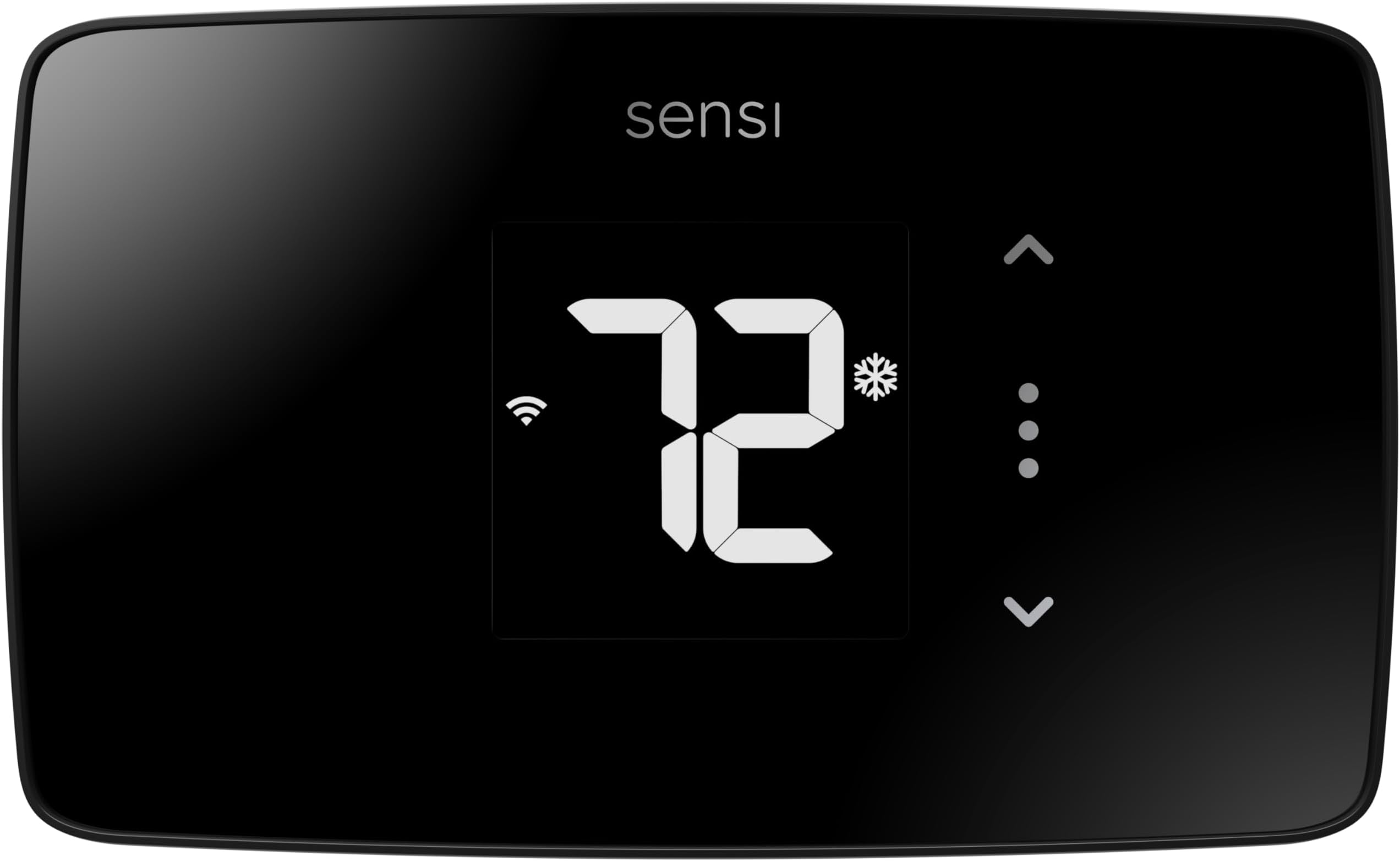
Ordered this "used like new" for under 40 bucks yesterday and and installed it today. Installation and wifi connection took less than15 minutes. However, I did install the app in my phone before I even bought the thing to look at the installation instructions, so I knew what I was getting into. Highly recommend doing that- it asks which wires you have and will tell you if the thing is compatible with your system. I have A/C, and gas heat, and no C-wire. Common issues I see in the bad reviews seem avoidable. You may need to put your Wi-Fi router into temporary 2.4GHz mode to connect, just like you have to do with other smart devices. Once it's connected the app will say it's offline for a minute or 2 but the wifi icon on the thermostat is still visible- I think it's just a lag while your info is uploading to their server. I closed out of the app and reopened it a minute later and was good to go. Easily connected to Google home assistant and Alexa. Alexa doesn't have control features in the Alexa app like Google does I the Home app. But you can say "set the A/C to 72" and it works instantly on both. In the app it shows current indoor temp, and basic current weather condition outdoors as well as indoor humidity which was a nice surprise- I don't have a hygrometer so that's great. There are settings for the stuff people complained about here โ a setting to set a temp differential since the unit does seem to be warmer than the air, a setting to slow down or (speed up) cycling if the room temp isn't stable. There's a setting to turn off the backlight so it isn't bright at night. The thermostat interface is very basic for better or for worse. There are just 3 spots to touch on the thermostat itself, right of the display. Up and down, to set the temp, and the third, between the arrows, is the "mode" (unlabeled) signified by with three dots. Touch once to see what temp it's currently set to. Touch again and the mode will switch from heat to a/c or back. I'd just prefer to be able to touch again to go back to the current temp but instead you have to wait a moment for it to go back to default display to see that touching it again will switch modes. Minor annoyance is that you can't turn the fan on from there, which is also an inconvenience for people in the home without the app. And of course any scheduling needs to be done in the app, which is fine with me. Anyway this is long but I hope that helps someone. I'll update if it all goes to schitt lol
Trustpilot
1 month ago
1 day ago