Buy anything from 5,000+ international stores. One checkout price. No surprise fees. Join 2M+ shoppers on Desertcart.
Desertcart purchases this item on your behalf and handles shipping, customs, and support to South Korea.
⚡ Power your network like a pro — fast, smart, and green!
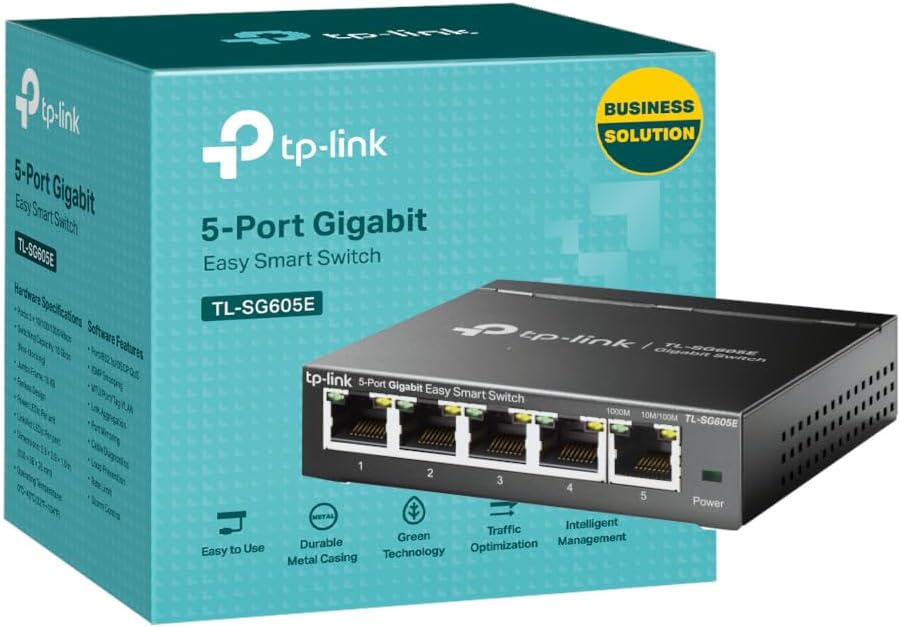
The TP-Link TL-SG605E is a 5-port Gigabit Ethernet switch designed for professionals seeking reliable, high-speed wired connectivity. Featuring plug-and-play ease, a robust metal case, intelligent management tools, and energy-saving technology, it delivers seamless network expansion with minimal setup and maximum efficiency.


| Brand | TP-Link |
| Colour | Matte Black |
| Compatible devices | Desktop |
| Included components | TL-SG605E |
| Number of ports | 5 |
| Product dimensions | 10L x 9.8W x 2.5H centimetres |
N**E
Easy to use good quality and value
Easy set up no problem increase ethernet ports from router from internet provider
M**S
A Fantastic, No-Fuss Gigabit Switch (with one small quirk!)
I'm giving this TP-Link TL-SG108S a solid 5-star rating because it does its job flawlessly, and the setup couldn't have been easier. As a "dumb switch," it's truly plug-and-play. I pulled it out of the box, connected my main router to one port and my various devices (PC, gaming console, smart TV) to the others, and everything was up and running instantly. I didn't have to fiddle with any settings or software. The performance is exactly what I needed. All my wired devices are now getting a stable, full gigabit connection, which has made a noticeable difference in large file transfers and has completely eliminated any lag when streaming 4K content. It's a simple, reliable piece of hardware that has instantly improved my home network. My only minor complaint—and it's a very minor one—is the intensity of the LED lights. The blue lights for each active port are quite bright. It's useful for a quick check, but if you happen to have the switch in a common living area or a bedroom, you might find yourself wanting to cover them up with a small piece of electrical tape. It's a small aesthetic issue on an otherwise perfect device. Overall, this is an excellent value and a must-buy for anyone who needs more wired connections without any technical hassle. I highly recommend it.
R**S
Simple, small, functional, what more do we need?
The metal cased TP-Link 8 port Gigabit TL-SG108 1000/100/10 switch works perfectly straight out of the box. No set-up is required. It auto-senses the cable connection and interfaces correctly to both T568A and T568B wiring of the cables, so there is no need for 'crossover' leads. The power supply is a small 9V plug-top unit that barely thinks about getting warm. Measured current from a 9V bench power supply was 85mA (765mW) with no ports connected, rising to 120mA (1080mW) all ports connected but no traffic, during a 7GByte 1000Mb/s backup between two long-wire ports the current peaked at roughly 230mA (~2W) but varied. Much, much better than the old 100/10 hub it replaces which always took about 350mA (~2.6W) at 7.5V 24/7 and also had an inefficient hot mains brick. The LED lights on the front edge, two adjacent to each of the eight sockets indicate activity in the normal way; solid for connected and flashing for data transfer, the green LED for 1000Mb/s and the yellow LED for 100/10Mb/s. There is also a separate green LED showing when the power is correct. I would have preferred the lights to be on the other side from all of the leads as with the version (9.0) of the TP-Link SF1005D (not shown on Az now) I bought in 2012, or on the top as with this version TP-Link SF1005D I bought in 2011, but I understand why it was done here. A couple of keyhole slots in the base of the metal box enable one to mount it on a pair of no6 countersink-head woodscrews to allow tidy routing of the cables. The four rubber feet help to prevent it from sliding off the screws. The 8 port box is 100mm x 160mm x 28mm. My house usually has no wi-fi; the CAT5E LAN is all hard-wired and this new switch living next to the big PC, a media server and the network printer, replaces a previous and out-of-date 100/10Mb/s generic unit from Maplin. The network is mixed traffic, mostly Gigabit, but still some old 100Mb/s Ethernet. The new switch handles it all at full duplex with no problems, and I have noticed a slight increase in the speed of the 100Mb/s transfers as well. I bought this after several months of positive experience with its little brother the TL-SG105 and the TD-W8970 router . As usual, I took the lid off to have a look inside (my work used to include designing high speed electronics) and it is nicely made with good quality components and proper attention to screening and track layout. Recommended. Addendum. Be aware that on this product page either Az or TP-Link has stupidly mixed up all the reviews for all the different varieties of TP Link switches, 24, 16, 8 and 5 port, Gigabit or not, metal and several versions of plastic cases, even for switches no longer available, and they have different performance and best uses. But cut to the chase, and simply go for the latest versions of the metal boxed Gigabit switches.
N**H
The switch wotks really well when correctly set up
I needed a small switch to extend one port from a TP-Link Wi-Fi extender to several devices; a 3D Printer, a laptop [used for gaming and not always plugged in here] and an existing switch that handles other devices. I bought this switch as I often use TP-Link products when setting up, adding to or upgrading network systems - something I have done as a hobbyist and semi-professionally for some years. Furthermore, I tell family, friends and some business contacts to use TP-Link as they are reliable and well priced. Sorry! I need to make a bit of a long post. It is relevant! I include some work around info for larger networks / experienced users. I will list some points about this switch; All in all, this is a very good, well priced and easy to use switch. Likes - Very sturdy metal boxing, very good speeds when properly set up, easy to use web based configuration tool, well priced and small footprint - less space used is good. The switch also works 'out of the box' on smaller networks [see below]. Dislikes - It is hard to dislike this switch, but I will say that the bigger, more complex your network, the more likely you are to need to do some configuration work [see below]. I have to praise TP-Link customer services. The first switch I initially bought was defective. This was confirmed by me doing some tests at the request of TP-Link customer services - all of which were very well documented / pointed out by TP-Link customer services and, for me, easy to follow. After a couple of days and a few e-mails, we concluded that the initial switch was defective. I was advised to get a replacement from the retailer as this would be quicker - the new switch arrived the next day. When I got the new replacement switch [via Amazon returns] it worked much better than the previous one. When I set up the switch between my router and one laptop, it worked 'out of the box' - this is excellent for smaller networks! My home network is a bit more complex though as it has router > power-line, Wi-Fi and standard network cabling [won't bore you with ratings etc]. My network has power-line adapters, two Wi-Fi extenders and a few switches. ** For smaller networks - you need read no further, as the switch will likely work for you 'out of the box'. ** This next part I include for those with larger networks and show two fairly easy work-rounds that got the switch working as needed, and excellently at that. I say fairly easy, but both are not for beginners [unless you want to learn as you go] and I recommend you at least have an entry level in networking to proceed or get help from someone with such experience. When set up from router > Wi-Fi extender [wireless] > this switch [wired] > laptop [wired] problems happened. I must stress that the replacement switch worked much better from the get-go than the returned one. The main issues were; Note: Wi-Fi extender > switch uses [physical] port one [1] of switch - this works best. Note: Remember to save changes as you go. 1; Possible conflict relating to DCHP on router and on switch with solution: - Go into router configuration and find the switch [connected devices] and make a note of its given IP address - this may be useful later - Disable DCHP in the switch and set a static IP address [can be one you took note of] for the switch to use - via the switch web based configuration tool. - In the router web based configuration tool [will vary per router] set the chosen static IP for the switch, so the switch always uses that IP address. - Turn off all network switches / extenders and router, then restart all network equipment - starting with router and progressing in order, allowing time as needed for each device to start up. This ensures router and switch do not conflict. [experienced users may disagree with this approach- but it works]. 2; Possible shut down of in use [physical] port by switch 'Loop Prevention Setting' with solution; Note: This was preventing some websites from loading and preventing any speed test sites from proper operation - they would get to a couple of percent marks, then 'hang'. Also, some games would 'hang' before this was altered. - In switch web based configuration tool, DISABLE 'Loop Prevention'. [I can hear some of the professionals screaming already]. I'm not even going to try to explain loop prevention and why it should or should not be used - web browsing is your friend [or fiend]. All I will say is that on my network, in the configuration needed there were problems as noted already, and it seemed like a loop was effectively closing a port [physical - to laptop] down then the port was re-opened some minutes later. By setting loop prevention to disabled, all the issues went away, and my network is working very well now. My education [and some work experiences] was largely in computing, but I did not specialise in networking. I include these steps only as an indication of how I got my network to perform as expected. Your results may vary. Change settings at your own risk. Get in a professional if needed.
D**B
Excellent 8 port Ethernet hub
I have found TP-Link to be a reputable company, producing good quality, reliable products and this Ethernet hub (aka Network Switch) is no exception. This works really well if your router has a limited number of Ethernet ports, yet you have more products individually needing direct Ethernet connections than sockets available. It's plug and play. Simply connect one Ethernet cable between your router and the hub, then plug the Ethernet cables from all your devices into the hub. All very easy and straightforward. Also note that your router should still broadcast your WiFi signal as normal in addition to the cable connections. Recommended.
T**M
Solid Small 8-Port Switch
Works great, metal construction and is silent, uses barely any power and is generally a great plug-and-play switch! Has 2 wall mounting keyholes on the back and also has mini activity/link LED's, so won't keep you up at night if kept in a bedroom, or be distracting if watching a movie. Tested it between 2 devices and supports a full gigabit connection (do note that this gigabit capacity is a total throughput, and will be shared between all 8 ports if all in use).
N**K
Easy set up.
Plug and play...dead easy and runs my home network beautifully. TV streaming now glitch free after coming off Wi-Fi.
J**B
Very easy to connect plug and play
I recently upgraded to the TL-SG108S and I couldn’t be happier with it. From the moment I plugged it in, everything worked flawlessly. Performance: The 8× 10/100/1000 Mbps ports provide true Gigabit speed throughout my wired network. Large file transfers, streaming media, and multiple connected devices all run smoothly without any drop-in performance. Ease of use: No configuration needed — it’s entirely plug-and-play. Auto-MDI/MDIX means no worrying about which cable to use. The metal case is compact and well-built, and it even supports desktop or wall-mount installation for flexibility. Efficiency & quiet operation: The fanless design ensures silent operation — perfect for a home office or media room. It also features energy-efficient “Green Ethernet” technology that adapts power use based on link status and cable length. I’d call that a win for the environment and my electricity bill. Reliability & quality: The unit feels robust and dependable. During use it has shown no glitches, no lock-ups, and the throughput remains rock-steady, which gives me real peace of mind. Value for money: Given its performance, build quality and features (QoS support, IGMP snooping, etc.), this switch is an outstanding value. Whether you’re building a home network or expanding a small office setup, it delivers without complexity. Bottom line: If you’re looking for a simple, high-quality unmanaged Gigabit switch that just works — go for this one. I’d absolutely recommend it to anyone needing reliable wired connectivity without fuss. Five stars well earned!
S**R
Tut was er soll für relativ kleines Geld
Habe mir den Switch gekauft, um die Datensicherung von zwei Rechnern hinter meiner alten Fritz!Box (nur 100Mbit, bedient aber ein zweites analoges Telefon) zu beschleunigen. Das hat auch geklappt. Jetzt ist nicht mehr das Netzwerk der Engpass, sondern das Finden der zu sichernden Daten und die Ablage in einem langsam etwas zu vollen HomeServer. Genaue Messungen habe ich nicht vorgenommen. Für meine Belange reicht der Durchsatz auf jeden Fall locker. Das Gerät funktioniert bisher einwandfrei. Mir gefällt das Metallgehäuse mit seiner für diesen Preis ungemein hochwertigen Haptik. Eine Erwärmung ist kaum spürbar, was auf einen guten Energiehaushalt hindeutet. Allerdings sind bisher nur 5 Ports belegt. LEDs neben den Ports zeigen an, ob ein Gigabit-fähiges Gerät oder etwas Langsameres angeschlossen ist. Hier bevorzuge ich persönlich meine anderen Switche, die hinten die Ports und vorne die Anzeige sowie ein eingebautes Netzteil haben. Je nach Aufstellung/Montage kann man das aber auch umgekehrt sehen. Es gibt für beide Lösungen Argumente dafür und dagegen. Am Ende entschieden hier der Preis und die sehr guten Bewertungen für ein Produkt, das mir technisch auf der Höhe der Zeit scheint, sodass es unkompliziert und energiesparend hoffentlich lange betrieben werden kann. Wahrscheinlich werde ich mir bald noch ein oder zwei Geräte dieses Typs für anstehende Erweiterungen bzw. WLAN-Ablösungen zulegen!
N**O
Muito bom produto
Muito bom produto
I**9
Nessun problema e bello
Prima le cose importanti: attaccati i cavi a router (che non e' Gigabit), Nas e PC, e' andato subito bene senza bisogno di configurazione. I trasferimenti dal NAS al PC ora sono moolto piu' veloci... ma non mi sono messo a fare benchmark comparativi scientifici, la vita e' breve. Poi le questioni cosmetiche: finalmente un dispositivo di rete che e' anche un bell'oggetto, tuito metallico e sodo, niente plastichina leggera, da un bel senso di robustezza, non semba cheap ma al tempo stesso non spara come certi router coloratissimi tedeschi :-) La forma regolare e non panciuta aiuta anche ad organizzare meglio gli spazi, apprezzo molto la nuova estetica TP-link.
よ**ー
安すぎるが使える
まあ、安くて使えるから問題ない。 TP-Link製品って、パケットロスが多いけれどこれは大丈夫かな? まあ、OAタップより安いSW-HUBなんて時代は変わったものだ
A**P
Dayanıklı sağlam ürün
Gayet dayanıklı görünüyor çelik kasa, hız olarak bir sorun yok iptv, playstation, smarthub lara böldüm şimdilik sorunsuz çalışıyor
Trustpilot
1 day ago
2 weeks ago