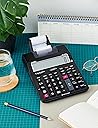
05-10-2026: This calculator is not complicated to use at all. In fact, after 50 years of using business calculators, we find it's operation the most slick and easy of all we have experienced. All you have to do is remember that you first write something on the display and THEN tap a function key to. So to calculate the sum of 2 + 2 you press the following keys in the following order: '2', '+', 2, '+', '*'. This is how business calculators have always worked and I can tell you that if you are doing any sort of business, accounting or book keeping work you will make so few errors compared to using other types of calculators you will never go back to them once you have tried these. This particular model is so good that it is worth a more detailed review: We have bought two of these so far as out as our 40 year old Decimo calculators are getting a bit tatty and their LEDs are starting to fade. The only reason we bought them is because they have a 'percent difference' key (the symbol on the key is a triangle followed by a %) which is in continual use every day by office, sales and purchasing. Running a small business we need to know the margin/mark up. However, the "mark-up" keys on calculators have always been ditched by ourselves in favour of the "percentage diference key". Even the Cost-Sell-Margin keys on this HR-150RCE, which I like, are not being used: the reason being is that in business you buy as well as sell - and when you buy it is always at a discount from a list price or a stated price, buying being a negotiation. But when you sell there is usually only one price your customer base will pay - so a 2.5% improvement in buying price makes a difference , sometimes big, to the all-important mark-up %. As for the sales price including tax - I dont know anyone who cares whether or not they are selling to businesses who claim the tax back or retail who don't, or a mix of customers. It is achieving the best % mark-up before tax when you sell that determines whether you survive long term. So, other than the all-important 'triangle%' key what else is there? Well: It is smaller than our old machines but it's keys just as well spaced-out and are a pleasure to use. It looks a whole lot better. In fact it looks amazingly good! We are going from massive cream coloured calcs which had no aesthetic merit whatsoever to a nice size calc which somehow just sits there making a great aesthetic contribution to the desk! The digits are large LCDs and the background is light enough to give a contrast which makes then very easy to read. The printing mechanism is small, noisier our old existing calcs, and uses a tiny sponge ink roller instead of a ribbon. No idea how long it will last and I doubt it will be 40 years + like the Decimo (British) 'Video Sprint' calcs. Note: It is Decomo's 'Video Sprint' models that are still working and although Decimo was British they got that one made in Japan. The keys of this Casio are very nice to work with, better than the Video Sprint. Not a single Decimo 'Video Sprint' key has gone intermittent or failed on any of ours after 40 years of continual daily use but I guess planned obsolescence (AKA sabotage) will mean that the keys on this Casio may not last as long. POWER SUPPLY: The machine comes with a button battery for its memory pre-installed and we run it with a power adaptor and without the optional AA batteries installed. It can run on AA batteries without a power adaptor so I guess that may be useful to some people. The button battery keeps non-cleared calcs remembered - even from 5pm one day to 9am the next, or over lunch breaks - and it remembers the time and date. The 150RCE displays the time after about 20 seconds of inactivity. Didn't expect that to be useful but I personally have found it very useful, I'm always glancing at it in preference to any other time source. The power adaptor is what lets this Casio down. It created a debacle for us. Casio do not seem, in my opinion, to have a competent person doing their adaptors: The first one we got (official Casio) looked normally substantial enough but the lead was a spindly, thin, vulnerable twin wire thingy which looked a mess and gave the impression that a core would break sooner rather than later near the plug. The second adaptor (the later official Casio one) looks too small to be of any long term use but there is no way of telling, it has a wire that looks fit for purpose BUT the wire is only 1.1M long!!!!! All our our many other adaptor leads for all purposes are ~2M long. Calculators are nearly always positioned to the right of where you sit so they are on the SIDE of the desk. We had to get a plug board extension and put the plug board on a stool at the side of the desk and then plug the adaptor in it otherwise it would not reach the calculator. Then followed a long period of trying to find a proper adaptor (which meant a non-Casio one). Epic fail ! We ended up buying a 1M extension cable on Amazon and with relief found that it worked. It is a Kenable extension cable with a 5.5 x 2.1mm socket at one end and a 5.5 x 2.1mm plug at the other. HOW TO SET THE TIME AND DATE: The calculator always shows the time after about 20s of inactivity and when it does, pressing the ‘TIME’ key toggles the display between the date & time. Because it would be unusual for a user to be happy with the wrong time showing on their desk it will usually be a requirement to set the correct time and date. However, the instructions that come with this machine are appallingly bad. They have pushed the printing of small text to an extreme, mixed it up with other languages, printed them on an inconveniently mega-large piece of paper and written them in a way which is the opposite of intuitive or user friendly. We may have a ceremony to burn the instructions at some point and dance around the fire lol. Two people with university degrees tried and failed to work out how to set the time and date with the instructions so one of them spent some time googling and cobbled up her own instructions on a user friendly, step by step basis and so I provide them here: 1. Make sure the calculator is turned on at the slide switch. 2. Press the ‘CA’ key 3. Press the ‘TIME’ key 4. Press and hold the ‘SET %’ key for about 3 seconds until: (1) “SET” flashes or appears on the display (2) “SET” then disappears and is replaced by either: i. Two dashes followed by a space followed by another two dashes. OR: ii. If there is already a time in the memory then that time will be displayed in HH MM SS format (3) Enter the correct time using the number keys. 5. After entering the correct time the date may appear in the US format (MM-DD-YYYY). To change the format keep tapping the ‘G*’ key to toggle through the options until your preferred format appears. For most of the world this is DD-MM-YYYY. Once the desired format has appeared then, if the date is incorrect, use the number keys to enter the correct date. 6. Tap the ‘TIME’ key to lock the settings you just made. The calculator then reverts to Rest Mode, displaying the time. CONCLUSION: This machine is by far the best we have ever had. In terms of usability, appearance and size it trumps the previous best, the Decimo 'Video Sprint'. The silly power adaptor debacle and the terrible instructions do not justify buying a worse machine. I hope it lasts.