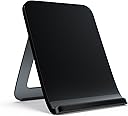
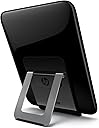


โก Charge in Style: Elevate your tablet experience!
The HP Touchstone Charging Dock offers a sleek and efficient way to wirelessly charge your HP TouchPad. With its compact design, it allows for both portrait and landscape viewing, making it perfect for watching videos or reading. Weighing only 8 ounces, this dock is not only functional but also portable, ensuring you can keep your device powered up wherever you are.
| ASIN | B0055QYJIS |
| Best Sellers Rank | #6,862 in Tablet Chargers & Adapters |
| Brand | HEWLETT PACKARD |
| Color | Black |
| Compatible Devices | Tablets |
| Customer Reviews | 4.3 out of 5 stars 665 Reviews |
| Item Weight | 0.5 Pounds |
| Manufacturer | HP |
| Mfr Part Number | FB339AA#ABA |
| Model Number | FB339AA#ABA |
| Number of Ports | 1 |
| Total USB Ports | 1 |
| Total Usb Ports | 1 |
| UPC | 886111271283 886111271276 |
| Wattage | 6 watts |
M**N
An essential accessory for your HP TouchPad
I was lucky enough to recently purchase a TouchPad during Hewlett Packard's final eBay fire sale and I absolutely love it. Upon receiving the PC tablet I immediately went on to Amazon and began searching for some nifty accessories to get the most out of my new device. I've always wanted to try an inductive charging station for one of my gadgets so when I found this HP Touchstone I thought it was the perfect opportunity. Here are my thoughts on the HP Touchstone Charging Dock for TouchPad; Pros + Inductive wireless charging for your TouchPad. + Touchstone angle is adjustable for different charging/viewing styles. + Will charge through the majority of protective cases. I have the HP Custom Fit Case and a Case Logic UFOL, both charge just fine. + Charges in both Portrait and Landscape modes. + TouchPad will enter into a display/exhibition mode while it's charging giving you the option to display the clock, photos, wallpapers, calendar etc. + Doubles as a viewing stand and allows you to use the TouchPad while it's charging. Cons - Touchstone could be a tad larger for a bit more stability. - Charging cable is permanently affixed to the base of the station. - Camera must be on the top in portrait or on the left in landscape to charge properly. - TouchPad may take longer to recharge inductively if you're in exhibition mode or depending on the OS you're using. I couldn't be happier with this HP Touchstone Charging Dock. As my first inductive charger (cordless phones, toothbrushes etc. notwithstanding) I love it. Whether you're using it as a stand, a charger or a display it works perfectly. Despite a few minor cons I'd definitely recommend it to any HP TouchPad owner. I'm actually considering buying two more so I can have one on every floor of my house for convenience.
T**1
problem charging, not fault of TouchStone
I purchased the touchStone as a last-ditch attempt to get my HP Touchpad to charge the battery. For some reason, having gone thru swaps of USB cable and ac-to-dc transformers, the TouchPad refused to boot or otherwise indicate receiving a charge to its batteries. The TouchStone charger works by induction (that is, a magnetic field that does not require a wire to the touchpad, but the charger/stand unit does plug into the wall). I was disappointed that, once placing the original touchpad (in my optional rubber case) in the new TouchStone charger cradle according to the instructions, that nothing happened. Similar to the failures with the wired chargers. So eventually I got on the 'net with HP TouchPad support. We went thru a set of basic tests that I had mostly already done, and they hence concluded that the TouchPad itself, was faulty. They took my touchpad serial number, looked it up on their system and confirmed that the unit was still under warrantee. I have to conclude that their procedure is more definitive than the posted "diagnostics" that are found on the palm sites and the user blogs. HP shipped me, overnight, a shipping container and some instructions, with which I sent the dead unit to their repair facility. The instructions warned me to back up my personal data and wipe the touchpad memory of such data, but since the device was dead, there was no way I could do that. I enclosed a note that said so, but have not appeared to get any specific response about that. They sent me a replacement TouchPad, with a generic WebOS boot image, with none of my personal data on it, so I have to conclude that they could not recover whatever had been there. The replacement (probably factory re-condition) device does boot and does indicate successful charging on both conventional chargers and the TouchStone charger. Ultimately my plan is to install a dual-boot Android ICS image and re-establish my various website passwords, but that process will be a gradual one; apparently there was some kind of palm.com "backup" website for which I had a valid login (having established it when first configuring the original TouchPad), and the replacement Touchpad indicated success in connecting to it, but so far I have not seen any indication of any of my prior personal files having been restored back to the new touchpad. So either that restore has failed or perhaps I never had successfully created a "current" backup image of the old touchpad storage, prior to it having gone to the palm-site-in-the-sky about 2 months ago. Nor did I get any kind of note with the new device indicating the nature of the problem with the original TouchPad. Is it possible I did something wrong (such as, maybe use the wrong charger and shove too much DC voltage into the device ?). I guess I will never know. But to HP's credit, they replaced the unit, fairly quickly (within a calendar week) and did not charge me anything for doing so. I gather from some touchpad blog comments, that failures of the internal charging circuit (possibly part of the micro USB port) are known in a number of TouchPads, but such a failure might have been worked-around by using the induction-based TouchStone. Since neither worked, I am forced to conclude that my TouchPad had some kind of more-profound failure. I remain interested in other experiences and details about how/whether it might still be possible to get some of my personal data restored from the palm.com site, and how things are working out with Touchpad users who have installed and are using Android ICS, either dual-boot or instead of WebOS.
@**S
Cool piece of technology
Pros: + Just sit your device on the device and voila, charging. + Can charge in portrait or landscape view + Exhibition mode which is like a fancy screen saver. When the tablet "sleeps" on the tablet you can show a clock, calendar, a pretty cool facebook app, and whatever exhibition app that you can find in the app catalog. + Dock can be adjusted for best viewing angle + It charges while the case is still on. It seems like it can penetrate through thick layers (thicker cases, or the cover flipped open) and still charges the device. Cons: - I wish it were more mobile. The cord has a usb on one end to plug into a power supply, but the other end is stuck to the charger. I can't just remove the plug and take the dock with me to work and then plug it into a different cord there. - With the case on and open, it can sometimes slide off the charger. Not slide off in a manner that'll fall to it's death, but slide off to the point where it's not charging anymore. Rarely happens though. - Tablet only charges with the camera at the top, or the camera is on the left. In other words, there's 4 ways to place the tablet on the charger, but only 2 of them will actually charge it. To a new user, it's not obvious which way is right-side up, so they could set it upsidedown, and it's not gonna charge.
P**5
disappointed
To me when I hear wireless, I think wireless (no wires). Imagine my surprise, when I see it still has to be plugged in. While the touchpad doesn't have to be plugged in, the Touchstone does if you want your touchpad to charge, and the picture in the instructions says it has to be plugged into an outlet, not into a computer. What was the point in spending almost $40 for something that does the same thing as the charger that came with it? While I understand you can be on your tablet and not using the battery life while it's on the touchstone, it seems like a dupe. In several places and pretty much all the online pictures, you don't see the USB plug and it states wireless charging. Add to that it's easy to knock the tablet off center or disrupt the connection while it's in the case, and I have no idea why this got such great ratings. I'm totally disappointed.
R**N
Excellent Product!
This thing has been wonderfully simple. It makes charging virtually painless. It's a set it and forget it accessory for sure! I've been using it to charge my Touchpad on my nightstand and use it in Exhibition mode. Anytime I wake up at night I have a large clear view of what time it is and if I have any notifications. It starts to charge the Touchpad within 1-1.5 Seconds after contact. You can only charge with the left side of the device facing down (camera to the right and home button to the left) and/or with the Touchpad seated upright (home button on the bottom), but it's not a big deal. If you have a Touchpad this is a must for it's ease of use! Pros: 1. Well Built 2. Easy to use - plug in and use it 3. No maintenance, no batteries 4. Adjustable tilt/angle Cons: 1. No PC/MAC connectivity (syncing or managing files needs to be done with a dedicated cable) 2. Should have come with the Touchpad 3. No on/off button or switch Things it could have had to make it even more awesome: 1. Integrated Speakers or an audio out 2. one or more USB connects for charging other devices 3. Video out connection for playing videos to a TV 4. Wireless Access Point/Bridge/Repeater
R**E
Don't waste your money, hp touchpad will soon not be worth $100, hardly makes this worthwhile it especially if it doesnt work
The Hp touchpad - touchstone has been mired in flaw and Fail from day one . I purchased a touchpad from the firesale, and sat on the fence on this wireless charger. I waited quite a while, and finally pulled the trigger on it. I received it , and it worked... for 10 minutes. I have never been able to get this to work again . I could not tell if the problem was the Touchpad, or the touchstone. This thing does not support QI wireless charging standards either so no luck their either. I have since given up on this charging dock, and recently disassembled it to see if I could remove the innards and replace them with that of a QI charger. I will say that this is CHEAPLY constructed and is bound to fail. A QI coil and PCB would fit, but even when attempting a universal QI receiver to the USB port, its clear that it is not going to charge it. The touchpad also seems to be coming to the end of its relevance in the world of modders hacking it to run android. Its likely that Jellybean is going to be the last OS it sees. Long story short, it only worked for 10 minutes.
A**R
Functional charger
When I bought this I thought it was the size of the HP touchpad...oops...its much smaller. It does however provide a nice stand while charging the touchpad and it you to charge the touchpad while it is in its case, though you have to be careful to line center the touchpad on the touchstone. Its nice to charge the touchpad without fighting with a micro-usb connector all the time. When I purchased the touchstone it did not come with a wall adapter, so it is important to keep the adapter that came with the touchpad.
J**N
I Hated my Touchpad Until I Bought The Touchstone!
I bought my HP Touchpad during the $99 fire sale. After I received it, I played with it for an hour and then put it down for a while. I didn't really like it that much at first. I only bought it because it was a good deal. I already had a Kindle, a netbook, a laptop and a desktop. So, I wasn't sure if I was going to have much use for the Touchpad. Several family members had also bought Touchpads. My sister purchased a Touchstone and raved about it. I decided to get one after hearing her talk about how nice it was. All I can say is WOW! The Touchstone really improves the Touchpad experience. I set my Touchpad on the Touchstone and it instantly starts charging like magic. I love how the Touchpad turns into a clock while it's sitting on the Touchstone. I also like pulling the Touchpad off the Touchstone and it's instantly on. It's also a great stand for the Touchpad if you want to watch videos or a movie. With my purchase of the Touchstone and the HP Touchpad wireless keyboard, my Touchpad is my favorite gadget now. I use it more than my laptop. I guess it just needed to grow on me and having cool accessories like the Touchstone really helped. My son also has a Touchpad and I purchased a 2nd Touchstone for him. He loves it as much as I do! If you have an HP Touchpad, you really need to buy one of these. They're a wonderful accessory for Touchpads.
L**D
Charges like a charm
Pros: abandon your usb charger that may be getting a little touchy...nice easel stand...charges fine even with the cover on Cons: only works in two positions and none of which can accommodate the open cover.
D**7
Touchpad Dock
Works well and looks good! Better than plugging in a regular corded charger. I have it set to a clock app when its when on the dock. Can't say much more about a simple item.
S**A
Four Stars
Great product
Trustpilot
4 days ago
3 weeks ago