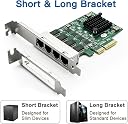
🚀 Elevate your network game with 4x 2.5G ports—because speed and reliability aren’t optional.
The ipolex 2.5G Ethernet Card is a quad-port PCIe 2.1 x4 network adapter featuring the Realtek RTL8125BG controller, delivering multi-gigabit Ethernet speeds ideal for professional and high-density networking environments. Compatible with a wide range of operating systems including Windows, Linux, and VMware ESXi 6, it supports advanced features like Jumbo Frames, Wake on LAN, and DPDK for optimized data handling. Designed for reliability, it comes with a 3-year warranty, lifetime technical support, and a hassle-free 30-day return policy.
| ASIN | B0CCXZ8T89 |
| Best Sellers Rank | #67,420 in Computers ( See Top 100 in Computers ) #169 in Network Cards |
| Item model number | RTL8125-2.5G-4T-X4 |
| Manufacturer | ipolex |
| Package Dimensions | 22.71 x 15.09 x 3.2 cm; 168 g |
L**D
Installed in a vintage 2016 system (!), it still worked perfectly, was recognized by OPNsense (FreeBSD) which is often picky about NIC's, and operates at full speed. No issues at all.
B**N
After swapping the tall bracket with the included low-profile bracket, the card slipped right into the Synology NAS and was recognized on bootup. I connected to my switch using the same manufacturer's SFP+ adapters and all went smoothly. I have no prior experience installing fiber cabling, so it was a relief how easy this went. In my case, I left the bonded Gigabit copper Cat6 connected until I went into the Synology software to configure this NIC. In hindsight, that was probably unnecessary. I have not tested performance/throughput objectively, so my comments are about compatibility and installation.
T**Y
To be fair I was a really disappointed when this card turned up. Considering how much it cost the heat sink was quite loose and wobbled about. I tried to straighten it up but it kept reverting back to its wonky state. There's a couple of plastic pegs on opposite corners of the heatsink, held in place with springs, but it looks like one of the springs was weaker than the other one and compressed fully causing the issue. Perhaps my card was faulty but this sort of thing should be picked up in QA. The card seemed to work and was detected fine after installing the Intel drivers from their website. This also leveraged the extra functionality provided by this card's chipset such as VLANs, Link Aggregation etc. so it clearly works and appears to be a genuine Intel chip. However, the heatsink got incredibly hot after only a few minutes use. I just didn't have much confidence in the heatsink doing a good job of dissipating heat, or in the plastic pins holding it on top of a chip that clearly gets really hot. If you are looking for a Dual port 10GbE RJ45 card I think there are better quality options out there. Pros: - Appears to be a genuine Intel chip - Works with Intel drivers to leverage advanced functionality such as VLANs, Link Aggregation etc. - Comes with low profile bracket Cons: - Expensive - Really poor build quality on the heatsink and installation - Runs very hot
L**R
Excelente para ampliar los puertos, llegó en tiempo, sin necesidad de buscar driver, la detectó de inmediato proxmox 9.
A**R
Cheaper than a network switch so decided to use this to bridge two home PCs together. Worked great after installing drivers. For installing drivers, what worked for me was downloading the X540-10G-2T-X8 (JLX540-AT2) chip package from the QR code on the back of the network card. This takes you to an intel site where you should download "Intel® Ethernet Adapter Complete Driver Pack" after clicking "Show All". Unzip the downloaded file and go to your windows Device Manager. Here you will see some unidentified devices. Right-click each of them and click on "Update Driver". Next, select the option to look for drivers locally. Then, point it to the extracted intel drivers folder. Windows will automatically look for the correct drivers recursively. I had to do this process for both network interfaces on the card. And viola, it works perfect.
Trustpilot
1 month ago
1 month ago