⚡ Elevate your workspace — power, speed, and style in one sleek dock!
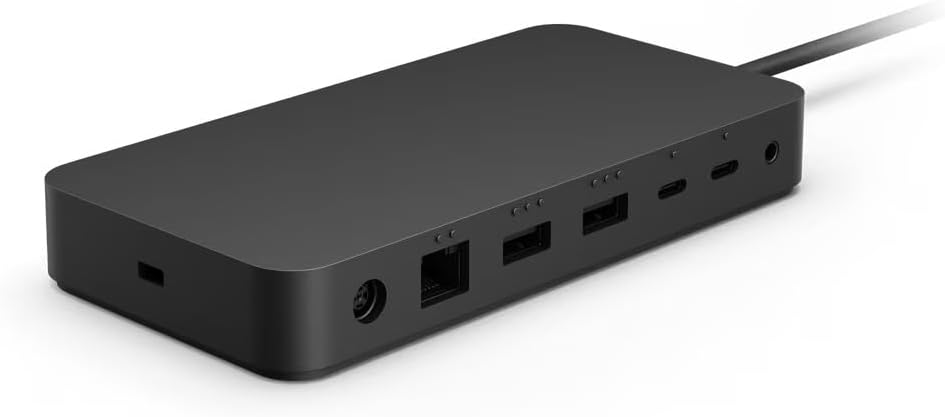
The Microsoft Surface Thunderbolt 4 Dock (T8H-00002) is a compact, lightweight docking station designed to maximize productivity by delivering ultra-fast Thunderbolt 4 data transfer, dual 4K monitor support, and reliable power delivery. Compatible with Surface devices and beyond, it streamlines your desktop setup with a single cable solution.
| ASIN | B0BXY8RZGQ |
| Best Sellers Rank | #18,845 in Computers ( See Top 100 in Computers ) #109 in Laptop Docking Stations |
| Item model number | T8H-00002 |
| Language | French |
| Manufacturer | Microsoft |
| Product Dimensions | 15 x 7.5 x 2.13 cm; 410 g |
B**L
All well but US Power plug.
Received on time, original microsoft product, works well with my 4K monitor. it comes with US power plug.
R**K
Gekocht als upgrade van mijn MS Surface Dock2. Bevalt uitstekend. Je houdt alle voordelen van de ook uitstekend werkende Surface Dock2, alleen is de TB4 kleiner, lichter, sneller qua data-overdracht en met vergelijkbare power delivery. Omdat ik hem alleen met mijn Surface Laptop 4 gebruik, is de overgang naar usb c een (klein) nadeel: ik verlies een usb c poort. Daar staat tegenover dat ik de TB4 Dock kan blijven gebruiken als ik in de toekomst zou overstappen op een ander type laptop. Aanbevolen!
A**A
Compatible with all my devices and works fine. Had to get a hdmi to thunderbolt adapter to connect to my monitor but otherwise all good
A**.
Ottimo prodotto ma pesante per il trasporto e piuttosto costoso.
D**G
This Surface Thunderbolt 4 dock is a solid, well-constructed dock. I am using it with a surface pro 8 to power the computer and simultaneously run both a UWQHD display and a 4k TV, ethernet, and external SSDs. It has worked great, with no noticeable sound and without heating up. In my opinion the use of USB-C over the SurfaceConnect port is also an advantage, because it is standard and will work with more than just Surface computers. I would highly recommend this dock it to anyone for a solid, highly capable, high-speed dock. I almost did not purchase this because of some lower review scores here, and I did have some initial issues. The issues I had were fixed with a few adjustments to settings, as described below. For surface pro users: I found that there were some adjustments in settings required to get it to work properly, because this is a USB-C dock and does not connect to the SurfaceConnect port. For example, when I use the dock, I do not use the Surface Pro's main screen, but only the external screens. One problem with this is that when the computer goes to sleep, the USB-C ports also shut down. When the computer is brought back from sleep, the external screens do not wake up. I fixed this by doing the following: 1. Update to the newest firmware for the dock (and with all Windows 11 updates, of course). 2. turning off "Link State Power Management" when plugged in. This setting is in Control Panel\Hardware and Sound\Power Options\Edit Plan Settings\Change advanced power settings\PCI Express. 3. turning off "USB battery saver" in settings\bluetooth & devices\USB More information can of course be found with a web search. Maybe not even all these changes are necessary, but my initial disappointment when my screens were not waking up after sleep was fixed with just these few settings changes. I am very pleased with it now.
A**L
Específico para Microsoft Surface. Elimina cables. Todo en uno: cargador, cable de red, cable pantalla, conexiones USB y USB-C, etc…
Trustpilot
2 weeks ago
5 days ago