Buy anything from 5,000+ international stores. One checkout price. No surprise fees. Join 2M+ shoppers on Desertcart.
Desertcart purchases this item on your behalf and handles shipping, customs, and support to South Korea.
🚀 Upgrade your workflow with the Samsung 860 EVO — speed, security, and stamina in one sleek SSD!
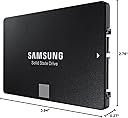
The Samsung 860 EVO 1TB SATA III SSD delivers professional-grade speed with up to 550MB/s read and 520MB/s write rates, powered by advanced V-NAND technology. It features AES 256-bit hardware encryption for robust data protection and boasts an industry-leading 1.5 million hours MTBF reliability. Designed for seamless compatibility across Windows, Mac, and Linux systems, this 2.5-inch SSD is perfect for professionals demanding fast, secure, and durable storage solutions.


| ASIN | B078DPCY3T |
| Additional Features | Portable |
| Best Sellers Rank | #149 in Internal Solid State Drives |
| Brand | Samsung |
| Built-In Media | 2.5" (7mm) SATA III (6Gb/s) SSD & User Manual (All Other Cables, Screws, Brackets Not Included). |
| Cache Memory Installed Size | 1 |
| Color | Black |
| Compatible Devices | PC, Laptop, Desktop |
| Connectivity Technology | SATA |
| Customer Package Type | Standard Packaging |
| Customer Reviews | 4.8 out of 5 stars 76,839 Reviews |
| Data Transfer Rate | 78 Gigabits Per Second |
| Digital Storage Capacity | 1 TB |
| Enclosure Material | Silicon |
| Form Factor | 2.5-inch |
| Global Trade Identification Number | 00887276232294 |
| Hard Disk Description | Sequential read speeds of up to 550 MB/s and sequential write speeds of up to 520 MB/s, making it ideal for storing and rendering large format files such as 4K video and 3D data. |
| Hard Disk Form Factor | 2.5 Inches |
| Hard Disk Interface | SATA 6 GB/s |
| Hard-Drive Size | 1 TB |
| Hardware Connectivity | SATA 6.0 Gb/s |
| Installation Type | Screw In |
| Item Dimensions L x W x Thickness | 3.94"L x 2.76"W x 0.27"Th |
| Item Type Name | Samsung 860 EVO 1TB 2.5 Inch SATA III Internal SSD (MZ-76E1T0B/AM) |
| Item Weight | 51 Grams |
| Manufacturer | Samsung Electronics DAV |
| Media Speed | 520 megabits_per_second |
| Model Name | 860 EVO |
| Model Number | 896RC |
| Number of Items | 1 |
| Read Speed | 550 Megabytes Per Second |
| Special Feature | Portable |
| Specific Uses For Product | personal, gaming, business |
| UPC | 887276232294 |
| Unit Count | 1.0 Count |
| Warranty Description | 5 Year |
J**I
Easy to clone and install
I have an older ASUS laptop that was given to me by someone who purchased a new HP. This unit had only 4GB RAM and a 500GB spinning-hard-drive. So I upgraded RAM to 8GB and bought this Samsung 860 EVO 500GB SSD to replace the old spinning-drive. This SSD arrived and I needed to buy a $7 USB-to-SATA III cable here on Amazon so I could clone the old hard drive to it. There is a lot of chatter on here about people wondering about the best ways to clone existing drives onto these SSD devices. In my case, I decided the simplest thing to do was to use something I could boot from a USB, so it wouldn't matter what operating system was on the old drive I could clone anything. So I downloaded Tuxboot and Clonezilla and ran it to install onto a USB. Super-simple process and I was ready to roll. I then hooked up the SATA end of the cable to the SSD and the other to an open USB port on the laptop, stuck the bootable USB I had just made into another and turned on power. Booted right up to Clonezilla, hit enter through every default, ensured it was using the 500GB spinning-drive for its source and the new 500GB SSD for the target, and within about a minute it was off and running. You are presented with a lot of options. I chose the simplest, device-to-device rather than doing the source-to-image, then image-to-target. Process took around 2.5 hours and then I shut down, removed the old drive from its caddy and replaced it with the SSD, hit the power switch and the system immediately booted right up to where I had left off before I cloned it! There are a lot of ways you can clone existing drives to these SSD's. You might even want to just fresh-install your system onto one of these SSD's and that's fine. I didn't want to take the time to do that. But for me, using that $7 cable I bought here on Amazon, with the Samsung EVO 860 SSD I bought here on Amazon, and free Clonezilla install-to-USB I was able to effortlessly clone the old drive to the SSD and boot right up with it without any issues whatsoever. I had zero issues. A few benefits from having gone through this: 1. I now know how to clone a laptop drive to an external drive 2. No more motor to spin a drive, so no more extra draw on the laptop's battery to keep one running 3. No more heat from a drive motor that's constantly running 4. Excellent performance and speed with this Samsung To benchmark it for you, the laptop originally took just over two minutes to boot up. After upgrading its memory from 4GB to 8GB boot time dropped a bit, to 1.5 minutes. But after replacing the hard-drive with this SSD boot time is now 30-32 seconds, from hitting the power-switch to login. And everything else on the system is much, much faster without the extra seek times and slowness of that old spinning drive. Time will tell but so far this Samsung is functioning great, was easy to clone to, Clonezilla recognized it right away (as did Tuxboot), and it booted in my system the first time after the cloning was done. And this thing is just super-fast. Plus it's a Samsung EVO. From all I've heard and read, these are pretty reliable devices with a reliability of something like 1.5 MILLION hours. That's 62,500 days or about 171 years! Try getting that kind of reliability from a spinning hard-drive! Bottom line is these are known to be great devices. There are duds out there but by-and-large it's hard to beat a Samsung EVO device for its price-point, reliability, and performance. That's why I spent the extra $$ rather than going to a cheaper, edge-brand type SSD. I have both old and new equipment and my older stuff recognized and worked with it just fine and so far it's a screamer. I highly recommend.
T**H
Outstanding Performance and Storage Capacity: Samsung SSD 860 EVO 4TB Review
I recently upgraded my computer's storage with the Samsung SSD 860 EVO 4TB 2.5 Inch SATA III Internal SSD (MZ-76E4T0B/AM), and I couldn't be happier with the performance and reliability it offers. As someone who deals with large files daily, this SSD has been a game-changer for my workflow. **Blazing Fast Speed** The read and write speeds on this SSD are remarkable. I noticed an immediate improvement in my system's boot time and the speed at which applications load. Large file transfers, which used to take minutes, now complete in a matter of seconds. This SSD truly lives up to Samsung's reputation for speed and efficiency. **Generous Storage Capacity** With 4TB of storage, I no longer worry about running out of space. This is perfect for anyone with a vast collection of photos, videos, and other large files. The capacity allows me to store everything I need with room to spare for future needs. It's a great solution for both personal and professional use. **Easy Installation** Installing the Samsung 860 EVO was straightforward. It fits perfectly into the 2.5-inch drive bay in my desktop, and the included software made cloning my old drive a breeze. Even if you're not particularly tech-savvy, you'll find the process simple and quick. **Reliability and Endurance** One of the standout features of this SSD is its reliability. Samsung has a strong track record in the SSD market, and this model is no exception. With advanced data protection and impressive endurance ratings, I feel confident that my data is safe and the drive will last for years to come. **Value for Money** While the price might seem steep at first glance, the performance and storage capacity justify the investment. Compared to other SSDs in the market, the Samsung 860 EVO offers excellent value for the features it provides. **Final Thoughts** Overall, the Samsung SSD 860 EVO 4TB is an exceptional product that delivers on all fronts. Whether you're looking to speed up your system, need ample storage space, or want a reliable drive for your data, this SSD is a fantastic choice. I highly recommend it to anyone in need of a high-performance, high-capacity internal SSD.
P**N
Good Samsung Quality
I bought this SSD (512 GB Samsung 860 EVO) to replace an older Samsung SSD that is over 10 years old. The old SSD was the Windows boot drive, so is the new one This review details the cloning and installation process. Essentially, you are going to clone / migrate the data (create an exact copy) of the old drive and apply it to the new drive. You may want to invest in an external SSD enclosure to help in the cloning process, I bought and used UGREEN External Hard Drive Enclosure Adapter USB 3.0 to SATA Hard Disk Case Housing for 2.5 Inch 9.5mm, from Amazon as well. It's about $10 but it will make your life easier AND once you're done, you can use it to house and use the old SSD (or any similar new or old SSD, as an external drive. So it's really useful! You may have read/ heard about problems some were having using the data migration that Samsung provides (Data Migration software available from Samsung website). I haven't tested or used this software so I will not comment on it. But I did download it and installed it (installation was problematic and got hung many times....upon googling, I discovered one must disable Windows Anti Ransomware protection (under Windows Security....) strange, but I disabled it and the installation worked. Don't forget to re e-enable the Ransomware protection when done!! So, assuming you have the SSD data enclosure, place the SSD inside it, connect to the PC using the included USB cable and you're ready to clone / migrate the data. Cloning Process: I used Macrium Reflect. You should really use the latest version, and it's not free anymore, but they offer a 30 day trial which will do the job. PS: The older versions seemed to have an issue with a fully updated Windows 10. Once Macrium Reflect is up and running, the FIRST THING you should do is create a Recovery Disk (find it under Other Tasks in the menu, and it's called Create Rescue Media). It's easy, just follow the prompts. Keep it aside just in a safe place, in case (this is useful as a Windows Recovery disk, which every one should have). There are videos on Youtube that show you what to do exactly when using Macrium Reflect, do watch them, they are easy and useful. But especially if your old drive / SSD and the new SSD are not the same size! Look for: How to Clone Windows from a Hard Disk to an M.2 SSD by a guy called ACCESS RANDOM. If the (old and new) drives are of different sizes you MUST watch: How to clone a disk drive using Macrium Reflect and resize the partition by a guy called Alex Kang. It has one step in that is essential to handling the different sizes issue. Both videos are excellent and walk you through each step. Once the cloning is done, remove your old SSD and install the new SSD in your PC (or laptop) using the same cables. Reboot the PC and test the drive for a few days. If you're completely happy and the system is stable, feel free to either place the old SSD in the external enclosure and use it any way you want or use the old SSD in your PC / laptop as extra storage (after erasing the old data). Speed: Any SSD is much faster than the fastest regular (spinning) hard drive. This SSD is fast but not the fastest on the market but it's perfect for booting Windows aka, as a boot drive, (Windows boots up in 10-20 seconds, depending on your PC). With this SSD I am surfing the web in less than 20 seconds from powering up. There are faster SSDs but gaining 2-3 seconds in Windows boot time is not really important to me. In closing, one final reminder: Do watch those videos!!
P**.
Great Product: Really Punched Up My Mac
I own a Late 2013 Mac 21.5". It took about 14 minutes to shut down and restart. It was even sluggish when just using a browser, so I decided to upgrade. I had videos to make and they were affected. I was a bit intimidated about the whole process, but I already possessed the tools and there were plenty of videos on YT to show me exactly what to do. I'd say the hardest thing was installing the software. As the videos say, you have to reformat the drive, partition the storage, and install the software. I was a bit unsure about all these things despite doing them in the past. That takes time and you need to know exactly what to do. I had a good backup I wanted to install but that did not complete overnight. So I started all over, erased everything, reinstalled OSX, and treated it like new Mac. I hand installed all the old software and transferred old documents via my external hard drive. Oddly, the Time Machine backup would have taken the entire day. I got the old software in a couple hours. The result is that this old Mac is just as fast as it was brand new, maybe even faster. Now it shuts downs in seconds and boots up from a complete shut-down in about 23 seconds. Brilliant! It can handle video production and mult-tasking no problem. Also, the fan probably rarely turns on because it's solid state. Side note, when I was inside I vacuumed the heck out of everything so it's clean. I'm waiting for the adhesive strips in the mail. All said, it's well worth upgrading for $54 than dropping $2K on a new Mac, IMHO. These things are built tough and you CAN add a SSD and RAM if you wanted too. Chances are, you'll just have to replace the SSD. So if you want to revive an old Mac desktop that it's on its way out anyhow, why not upgrade? Now you know why you see Refurbished macs like this selling for $750. That's a $500+ profit in many cases for something that takes only a few minutes to do. Get this SSD. It's blazing fast and quite a deal.
B**M
Fairly easy to install. Really sped up my old laptop
I just replaced my old hard drive on a MacBook Pro 15 inch late 2011 laptop with this Samsung 860 EVO SSD. My startup speed increased as follows. - Power on to lock screen: Old HD was 1 minute 45 seconds. New SSD is 51 seconds - Lock screen to full load of desktop: Old HD was 50 seconds. New SSD drive is 13 seconds - Loading a document in Microsoft Word: Old HD was 1 minute 15 seconds. I ditched my 2011 Microsoft Word and now using Pages. Load time of document is now 9 seconds. All other programs are loading and operating must faster too. I m very pleased with the speed increase. It should be noted that greater speeds might be achieved on a newer computer with full SATA III capabilities. Some things that you should know. Samsung Magician and the Samsung Migration tool do not support MAC OS. I'm guessing that Samsung and Apple do not play nice together but hardware is hardware and the Samsung 860 EVO is by all accounts a quality product. I used a free download of Carbon Copy Cloner to clone the old Mac HD to the new SSD. You will need an SATA adapter cable to connect your new SSD to your laptop for the cloning process. CNET has some videos on how to replace the hard drive and turn on TRIM. Here is a little surprise that I got after the install. My Microsoft Office 2011 would not operate on the new drive unless I re-entered the product key. Unfortunately I was unable to find my original key and even though the key is saved in a file on the hard drive it is encrypted. After some research I determined that the key is not recoverable. To make a long story short, I ditched the Microsoft Office and I'm now using Pages. Seems to work fine but I tell this story so that you will know what to expect. I love the new SSD but the above information and the lack of Mac support would have been nice to know up front. I just got a few more years life for my laptop.
L**H
Great, reliable and lasts for years!
Look, I'm a simple man and since I bought this SSD, it hasn't let me down ever since 2019. Good build quality, it has good SATA performance, all old PC will be able to support this getting mounted and its great value. 1TB is the minimum you should get nowaday, otherwise your storage capacity won't be enough. I'm still using it and it's still great 👍
M**Y
Upgrade Your Computer's Performance
As a tech enthusiast, I'm always on the lookout for ways to improve my computer's performance. And I have to say, the Samsung SSD 860 EVO 1TB Internal SSD did not disappoint. First off, the installation process was a breeze. The drive is a standard 2.5-inch form factor, making it compatible with most laptops and desktops. And the included software made it easy to clone my existing hard drive and transfer all of my data onto the new SSD. But what really sets this drive apart is its lightning-fast speed. The 860 EVO uses Samsung's V-NAND technology, which delivers read and write speeds of up to 550MB/s and 520MB/s, respectively. And the 1TB capacity means that I now have plenty of space to store all of my important files and programs. I've noticed a significant improvement in my computer's overall performance since upgrading to this SSD. My computer boots up faster, programs open instantly, and file transfers are lightning-fast. And the best part is that the drive is incredibly reliable, with a 5-year limited warranty and a 600TBW endurance rating. Overall, I would highly recommend the Samsung SSD 860 EVO 1TB Internal SSD to anyone looking to improve their computer's performance. It's a reliable, lightning-fast drive that will drastically reduce load times and improve overall speed. So if you're tired of waiting around for your computer to catch up, don't hesitate to make the switch to the Samsung SSD 860 EVO!
Z**A
Fast, Reliable, and Excellent Value SSD
The Samsung 860 EVO 500GB SATA III SSD (MZ-76E500B/AM) delivers impressive speed and reliability for upgrading laptops or desktops. Read and write performance is consistently strong, making system boot, app loading, and file transfers noticeably faster. Installation is simple, and Samsung’s Magician software adds easy drive management and maintenance. A dependable choice for anyone looking to boost performance without breaking the bank.
Trustpilot
3 weeks ago
1 month ago