Buy anything from 5,000+ international stores. One checkout price. No surprise fees. Join 2M+ shoppers on Desertcart.
Desertcart purchases this item on your behalf and handles shipping, customs, and support to South Korea.
🚀 Elevate Your Office WiFi Game with TP-Link EAP225 – Where Speed Meets Smart Control!
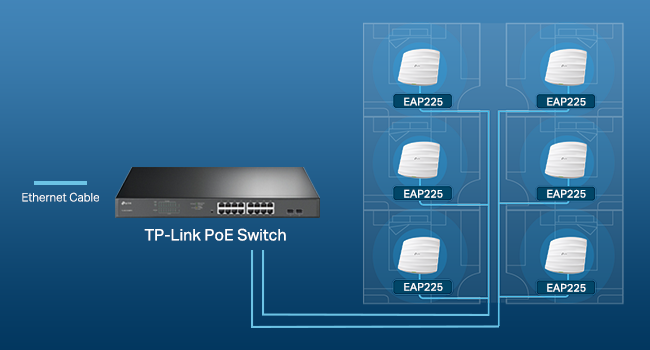
The TP-Link EAP225 is a business-grade AC1350 dual-band wireless access point featuring MU-MIMO technology for simultaneous multi-device connectivity at speeds up to 1350 Mbps. Integrated with Omada’s cloud-based SDN platform, it offers centralized network management via app or web interface, supporting mesh networking and seamless roaming for uninterrupted coverage. Powered flexibly through 802.3af/at PoE or passive PoE, it ensures easy deployment in professional environments. With advanced security protocols and a 5-year warranty, the EAP225 delivers robust, scalable WiFi solutions tailored for modern offices and small businesses.


| ASIN | B0781YXFBT |
| Antenna Location | Business |
| Best Sellers Rank | #4 in Computer Networking Wireless Access Points |
| Brand | TP-Link |
| Built-In Media | AC1350 Wireless MU-MIMO Gigabit Ceiling Mount Access Point EAP225 Power Adapter Mounting Kits Installation Guide |
| Color | PVC |
| Compatible Devices | Personal Computer |
| Connectivity Protocol | ethernet, wi-fi |
| Connectivity Technology | Wi-Fi |
| Control Method | App |
| Controller Type | Switch |
| Coverage | Indoor |
| Customer Reviews | 4.6 4.6 out of 5 stars (3,301) |
| Data Transfer Rate | 1350 Megabits Per Second |
| EU Spare Part Availability Duration | 5 Years |
| Frequency | 2.4 GHz |
| Frequency Band Class | Dual-Band |
| Global Trade Identification Number | 00845973093006 |
| Has Internet Connectivity | Yes |
| Is Modem Compatible | No |
| Item Dimensions L x W x H | 8.09"L x 7.15"W x 1.47"H |
| Item Type Name | access point |
| Item Weight | 1.1 Pounds |
| LAN Port Bandwidth | 1350 megabits per second |
| Manufacturer | TP-Link |
| Maximum Upstream Data Transfer Rate | 867 Megabits Per Second |
| Mfr Part Number | EAP225 V3 |
| Model Name | EAP225 |
| Model Number | EAP225 |
| Number of Ports | 1 |
| Operating System | Linux |
| Other Special Features of the Product | Access Point Mode |
| Security Protocol | wpa2-enterprise, wpa-enterprise |
| Smart Home Compatibility | Not Smart Home Compatible |
| UPC | 840460602310 845973093006 |
| Voltage | 12 Volts (DC) |
| Warranty Description | Limited Life Time Warranty |
| Wi-Fi Generation | Wi-Fi 5 |
| Wireless Compability | 802.11ac |
C**C
Pretty Much As Perfect As It Gets!!
First of all, let's get this out of the way. There's a review that states: "You can’t program this device (create and ssid and password protect your WiFi) without downloading their app that logs all the sites you visit TP Link shares this information with their 'partners' per their privacy policy..." Let me explain what I did and let you be the judge. I installed one. (I ordered two and they're both installed now.) Then I discovered its IP address using Advanced IP Scanner. (I also could have used IPScan or looked at a status page on my router.) At no time did I use a mobile device for anything, let alone download an app. From there, I its (really GOOD) GUI interface, turned off its DHCP and set the IP address I wanted it to be, using Firefox (I could also have used Chrome, Opera, or K-Meleon, all of which I have installed. I then went back in and set everything else the way I wanted it. If the reviewer was talking about the Omada software (which I don't use), he should have stated that. I hope this will allow you to make it past that review and read some "real" reviews. There are no cons that I can think of except those dictated by the limits on WiFi imposed by the FCC. The range is not miraculous, but it's VERY good. Really nice 360 degree coverage!! (When mounted on the ceiling, anyway!) It's extremely competent and secure, with lots of settings. Guest networks with lots of settings. Pretty much each and every setting can be set for each band (2.14 or 5GHz) and for the guest networks - separately. I have a 10 foot ceiling throughout, with ceiling tiles. I can't tell you how pleased I was that long, thin screws, "fender" washers and wingnuts were included just for that!! I can almost say it's a tool less installation, but you do have to cut a hole in the ceiling tile. I used my Swiss Army Knife. They look really nice. The power LED is very bright and visible and can be turned on or off in the settings, too. Two of them have been running flawlessly for almost two months now. It's a 3000 square foot building and it's notorious for "eating" RF. It's cider block and it even has some cinder block wall on the inside. The best cordless phones made can barely make it from one end to the other and die almost as soon as one walks outside. These two EAP's cover it completely and even reach outside! There is nowhere I can go where the signal strength isn't at least "Good". In most places, it's "Excellent". Now there's WiFi outside, too, as long as one doesn't stray too far. One is powered by the PoE adapter that came with it, and the other is powered by a PoE gigabit switch. They work great either way. And they're as fast as gigabit Ethernet, anyway! I can't think of anything I've ordered from Amazon that I like more than these things! I'd be happy if I'd spent twice the money for them; just to avoid the "junk" out there! I'm starting to have all kinds of faith in TP-Link - especially when it comes to WiFi!!
M**.
Needed an AP upstairs for kids that I could schedule and not replace my entire existing sytem.
Just received and connected, not a long-term review. I learned basic networking for an Associate's degree in programming I started in 1999. The bubble burst and due to my life commitments I never got into IT but it has helped a lot over the years. Networking sure has come a long way since then. The technologies and acronyms are enough to drive me crazy and I don't have time to figure it all out. In the default configuration the advanced features are there if you need them but this is just for a home network so I'll leave them alone. I'm using this as a standalone access point, the Omada software is probably great but I didn't want to add a controller or have a 24/7 server running it. This unit has it's own web UI that lets you set all of the basic info and a lot of advanced features. It has a scheduler so I'm just going to put some reasonable times in it for the kids to connect and change the password on our downstairs system. We don't have gigabit internet but did recently upgrade to 300Mbps. Our old Apple Airport Express system was certainly faster than our WAN connection but after seeing the insane speeds this AP hits I MAY have to get a controller to use with my TP-Link ER605 and set up a few more of these. Again, it's been 20+ years since I went to school and I haven't kept up with all the advances but the screenshot I've included was taken on my Mac Mini with ethernet disabled, wireless connection to the EAP225 connected to our LAN. Somehow I got faster speeds than I pay for but that MIGHT be some quality or service or similar trickery that the AP provides. Either way it's hella fast AND includes a POE injector which is a great deal at this price point. I had looked at a LOT of mesh and secure wifi systems but could never find for certain if the RJ-45 ports on the back were manageable. Couldn't find any company that even talked about it. Maybe they are but I didn't want to have to fill the ports with hot glue if they weren't. Decided on this instead because it's pretty easy to plug something into the back of one of those but this can be mounted on the ceiling or wall and will kill ALL the wifi upstairs if they try to take it off to get to the ethernet jack. The unit is smaller than I thought it would be. The LED is green and doesn't look like it will be horribly bright. However it has the ability to turn it off (genius!) in the UI. 120 yr old plaster house results using EAP225 connecting to testmy.net: *Using 5GHz band in the same room I get 300Mbps or more on iPhone 13 mini, one room over drops to 180, and then in the kitchen it drops to 100. Not horrible. *Using 2.4GHz band it drops to 80 in next room and 20Mbps in the kitchen. Pretty decent with the 5GHz so if you struggle with plaster walls this works well. If you were wondering why we are still using old Apple Airport setup it's because they were able to make a "mesh" system long before they became mass market items. In our impenetrable old house WiFi suffers horribly trying to get through layers of plaster, lath, more lath, and then more plaster so we have Airport units placed where we need them that are connected to a central Airport. They all share the same network name and password so we can roam and automatically connect to the best connection. Usually. After this review I've convinced myself to look deeper into the Omada software and may wind up getting a controller and a few more APs. Will update if so. This is a great price for a great piece of hardware whether you use it as a standalone AP or part of a larger system. If you want something smaller they have a /Wall version with 3 ethernet ports on the bottom and the WAN port on the back.
V**R
I was struggling to find a better access point which would give max speed and best coverage. I now have zero issues with WiFi. It’s as good as wired network. Go for it without doubt.
M**D
التغطية ممتازة جدا سعره رخيص جدا مقارنتا بالشركات الثانية جودة التصنيع لابأس بها التثبيت للنوع ذا بس للسقف بتواجه صعوبه لو بتثبته بالجدار الجانبي
S**Y
I already had two of these and got this one to replace the Telstra modem Wi-Fi as I replaced the modem with a TP-link router (Er605) but they don’t have Wi-Fi. I connected this unit to a TP-link PoE switch (TL-SG2008P) to provide power to the unit. My other two units are using the PoE injectors that are included. I have my network managed using the Tp-link Omada controller and it was seamless, was able to easy firmware updates and configure SSID’s etc simply. I would recommend the units as they seem extremely stable and give very good coverage.
J**R
Es excelente el AP, facil de configurar, trae POE, tiene muy buen alcance y sigue estable con 30 dispositivos conectados, muy buen producto
B**N
Super efficasse
Trustpilot
2 months ago
1 month ago