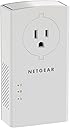
⚡ Power your home network with speed and style—no Wi-Fi, no limits!
The NETGEAR Powerline Adapter Kit (PLP2000-100PAS) delivers ultra-fast 2000 Mbps internet over your existing household electrical wiring. Featuring dual Gigabit Ethernet ports and a built-in passthrough power outlet, it’s designed for seamless 4K streaming, lag-free gaming, and reliable connectivity across large or multi-story homes. Easy plug-and-play setup with advanced MIMO and Beamforming technology ensures extended coverage without the hassle of new cables or Wi-Fi dead zones.


| ASIN | B0778Y6K6N |
| Best Sellers Rank | #6 in Powerline Network Adapters |
| Brand | NETGEAR |
| Built-In Media | Two (2) Powerline 2000 + Extra Outlet Adapters (PLP2000)^Two (2) 2m (6.5ft) Ethernet cables^Quick start guide |
| Color | white |
| Compatible Devices | Smart TV |
| Customer Reviews | 4.2 out of 5 stars 3,891 Reviews |
| Data Link Protocol | Ethernet |
| Data Transfer Rate | 2000 Megabits Per Second |
| External Testing Certification | Não aplicável |
| Global Trade Identification Number | 00606449130874 |
| Hardware Interface | Ethernet |
| Item Dimensions L x W x H | 2.8"L x 1.49"W x 5.26"H |
| Item Type Name | Netgear Powerline 2000 + Extra Outlet (Plp2000) |
| Item Weight | 1.51 Pounds |
| Manufacturer | Netgear |
| Mfr Part Number | PLP2000-100PAS |
| Model Number | PLP2000-100PAS |
| Product Dimensions | 2.8"L x 1.49"W x 5.26"H |
| UPC | 606449130874 |
| Warranty Description | Limited (1) Year Warranty |
B**E
Works perfectly!
I'm astonished at how well this works! I've never used a power line adapter before, but it was very easy to setup. I live in a big house and my router is very far away from my office. I was worried it wouldn't work well over that distance and possibly being on a different breaker, but I was wrong!!! My Ethernet connection is lighting fast now. Ping is averaging about 3ms to my gateway!!! Highly recommend!!!
E**3
Works Great for 3 Story Townhouse
I have a recently built 3 story town house. The modem is on the third floor on one end and where my wife's work computer is, is on the very opposite end of the first floor. There is Ethernet cable outlet on the second floor but not the first. We had nests on every floor, but the first floor nest would sporadically drop out and lose connection because it is so far from the modem (even though the second floor nest is directly above the first floor nest, they don't talk to each other). So, we got this and I installed one at the Ethernet cable connection at the second floor and then the other on the first floor to the computer. And it works great!! I highly recommend the product for anyone that has a similar situation. Also, I wouldn't put this into a network wall box as the heat will likely limit its life span, keep it on a regular wall outlet for cooling.
J**D
well worth the money, works exceedingly well
Bought this with a bit of skepticism, but all I can say is WOW I am impressed! Getting speed and latency measurements that are much, MUCH better then I expected them to be. Was going to spend the money to add an ethernet jack to my room, as it is on the opposite side of the house and wifi signal can be poor (especially when outside). I connect to a desktop via rdp on my local network w/ a laptop, and always deal with poor connection and inability to maintain a 5ghz Wifi connection, as it would end up reverting automatically to 2.4ghz resulting in an immediate drop in performance of the rdp desktop. With this device I now plug into it via ethernet, and my rdp connection thus far is excellent, so I am both impressed and very happy w/ this purchase. Well worth the cost, though it is one of the more expensive ones it is (imo) definitely worth every dollar. See the image for speedtest. Keep in mind I am using ethernet over usb c, so it may be an even faster connection if you are using an internal ethernet card/port (but I don't at the moment have means to test this). 10 stars if I could!! The only complaint I have is that the device when in a standard outlet doesn't leave enough space to use the top outlet w/ a grounded (3-prong) plug. Only a 2-prong one would fit above it, so it does ultimately end up occupying the entire outlet you use. But since there is a plug passthrough, its not really that big a deal / a dealbreaker (at least for me).
C**R
Decent, not great alternative to actual Ethernet cabling, okay for low bandwidth but not too high.
I've used the Powerline adapters in several situations where running regular Ethernet UTP wire just wasn't an option for various reasons. The basics are simple, both copper and (god help us) aluminum wiring can be used as a medium for Ethernet(ish) signals. And, households have a lot of wiring already in place as AC service to just about every room. But, that's where the similarities end. Household wiring can be, and often is, an utter mess of decades old patch jobs and 'cheats'. If you've a newer household with good copper wiring according to local code and installed by a competent electrician, these should work quite well and get a decent throughput of 200+ Mbs between outlets. (No, not 2000 Mbs, more like 200). This is perfectly fine for many applications and truth be told is just fine for most homeowners. However, if you've an older home with a mixture of wiring, oxidized outlets, bizarre AC panels, etc. The performance of these adapters will be a VERY mixed bag of performance and reliability. I use the 2000 series adapters for my own home which has had it's electrical work updated a decade ago and I get VERY nice performance of around 400Mbs. My In-Laws home howerver...well it's a hodge-podge of mixed wiring done mostly by my Father-In-Law and finding two good outlets was like playing a roulette wheel. In testing, I was lucky to get 20Mbs and the connections were unstable at best. For my in-laws who just want to watch Netflix far away from their 5G Router, this was okay. So, these should provide a quick, easy, decent alternative to running UTP cabling. But keep your expectations in check and consider the situation in which the adapters are being used.
J**H
Will never buy Netgear again after this experience.
This product has now failed on me TWICE within 1 year. Purchased beginning of 2020. Failed in June, 2020 (no power, no connectivity, no lights, item plugged in doesn't work). I worked with Netgears horrible support back then and paid the $16.90 to get it replaced and sent back. NOW...last week it failed A SECOND TIME. Called Netgear support today...and was on the phone for them for almost 3 hours (I swear...I am not kidding). After creating the ticket, transferred to the wrong person, then transferred to another person that also didn't have experience with powerlines who was trying to find someone, and then dumped without any warning to the beginning of another holding queue. I finally spoke to someone, albeit a very new customer support rep, that was at least trying to be helpful. After repeating my entire story a fourth time...and having to give my case number and serial number multiple times (twice to this rep), he at least tried to help me. I hung in there with him while he tried to diagnose with me until he asked me to try to sync the 2 devices together. Seriously...there are no lights on the one failed device...it is completely dead...and the outlet doesn't even work...and you actually still want me to arrange my whole other location to to try to sync them together? There are no lights on the unit... so that is where I drew the line. As I knew when I first made the call, he informed me that they could replace the hardware. However, by the time it came up that they would RMA the product, I either have to pay $17.00 (a second time no) for them to send to me...or I pay shipping to them. After 2 3/4 hours, 2 product failures, you actually want me to pay another $17 for something that so far has a 100% failure rate? Unacceptable! At this point, I am waiting for a "team leader" to call me back. BTW...there are other reviews here and other places that have the same exact example...works...then stops working. This product must have an issue with it to fail like this. However, above all, Netgear support has been the worst that I have experienced in at least 24 years (even worse than ISP...lol). It is a disgrace to a company that I have had allegiance to for many, many years! Well...to add fuel to the fire...after sending 3 more follow-up requests about Netgear taking ownership of this issue by contacting me and working through a solution by sending me a replacement...they actually closed the ticket without even responding to me by a phone call or email. Horrible, horrible support!! I tried to open another support request...I received an email back with a ticket number with them REQUIRING ME TO CALL THEM. After my last 2 1/2 hour horrible support request...I refuse to go through that fiasco again. Now I have 2 unusable pieces of junk here and no internet to my living room. I don't know what happened to Netgear...it looks like their quality is substandard...and that they don't stand behind their products anymore. If you like sub-par products with horrible support that is farmed out overseas (where they will not call or write you back)...then buy Netgear. If you want better quality product and better service...then I would explore other options like TrendNet, D-Link, or Linksys. I just purchased another switch...which is by Trendnet. Whenever it's time to replace my router...it will NOT be from Netgear. It's sad to say...but Netgear will never get a dime from me....ever again.
L**N
If you're a gamer and you're in a wireless home, this is for you
If you play games online (PC or console), you know as well as I do that wireless can be a pain. I tried playing Final Fantasy XIV on it, but would constantly disconnect every 15-20 minutes or so. It was becoming incredibly annoying, so I looked into alternatives. Finally, I bit the bullet and bought this powerline adapter (first time I've ever owned one) to see if it would help. I plugged one adapter into the wall near the router, then used the ethernet cable they provided to plug it up to the router. Afterwards, I plugged the other adapter in my bedroom, then used the other cable to connect it to my PC. After that, I simply held down the pairing button on the bottom for about 3 seconds, then released it and walked back to the other adapter and pushed the button on it. That's all there was to it. From start to finish, it probably only took me about 5 minutes to set up, so it's definitely very user friendly. I immediately ran a speed (and ping) test to see if there were any improvements. Before the powerline adapter, my download rate was fluctuating between 30-35mbps. After plugging in the powerline adapter, my speed shot up to 135-140mbps. The ping was roughly between 40-75ms on the opposite coast, so that was also pretty nice. I booted up Final Fantasy XIV again and managed to play for a few hours without a single interruption the entire time. The disconnects were gone altogether. I've been playing for a few days now with the powerline adapter and it hasn't even shown as much as a hiccup so far. I tried other games out of curiosity as well (mostly fighting games since input lag is always a big deal in those) and they responded just as well. I used to get a 3 bar connection with players if I was lucky, but now it fluctuates between 4 and 5, so the connection is pretty solid. At first I was kind of worried about dumping so much money into something without knowing if it would even work, but I'm glad I went this route instead of trying to cheap out. This is a long term investment after all. So, hopefully this product lasts for years to come and I also hope that it helps anyone else out there who may be on the fence about getting one like I was recently.
J**Y
Gigabit speeds and reliable link can be hard to achieve. I couldn't.
Good: I like the power pass thru and dual ethernet ports. Super simple setup. Relatively compact. Responsive tech support. Bad: Tech support confirmed older design (circa 2018), no diagnostics, monitor, settings available. Even with ideal (?) config, I can't see more than about 200Mbps through the two devices. Connection between powerline devices often dropped, blocking all traffic while they try to find each other again. My testbed had 1Gbps internet router to one PL2000, laptop to the other, both devices directly connected to wall plugs in same room (less than 10 feet copper). Best observed speed was about 200Mbps down and 100Mbps up. Netgear tech support Connecting laptop to second RJ45 on router-connected device I get 900Mbps up/down. Possibly my home wiring has more noise than I realize, but there's no way to really tell.
I**N
Great performance, but you MUST find the right circuit
I bought this NETGEAR Powerline Kit to fix weak WiFi and packet loss on my second floor that my Google mesh system couldn't handle. A tip for new buyers: your house wiring matters more than anything else. Initially, I only got 50 Mbps. After some testing, I found that the speed depends entirely on the electrical circuits. In the same room, I hit 500 Mbps, but for my actual setup, I had to map my breakers. Once I found an outlet on the second floor that shared a circuit with one in the basement, I achieved a stable 250–300 Mbps. It’s a great, stable alternative to WiFi if you’re willing to experiment with different outlets!
Trustpilot
1 month ago
1 month ago