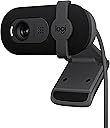
🎬 Elevate your presence, stream with confidence, and never miss a moment!
The Logitech Brio 101 is a versatile Full HD 1080p webcam designed for professionals and streamers seeking superior video quality and effortless connectivity. Featuring RightLight technology for enhanced brightness, a built-in microphone for crystal-clear audio, and an integrated privacy shutter, it ensures you look and sound your best across all major platforms including Zoom, Microsoft Teams, and Nintendo Switch 2. Easy plug-and-play setup and eco-conscious materials make it a smart, stylish upgrade for any desktop or laptop.


| ASIN | B0BXGFFSL1 |
| Best Sellers Rank | #1 in Webcams |
| Customer Reviews | 4.4 4.4 out of 5 stars (26,270) |
| Date First Available | September 19, 2023 |
| Item Weight | 4.6 ounces |
| Item model number | 960-001589 |
| Manufacturer | Logitech |
| Product Dimensions | 1.26 x 2.87 x 2.62 inches |
S**Z
Works great! Easy setup - just plug it in!
I have several Logitech track balls that are over 10 years old and still work fine so I thought I'd try this Logitech webcam since it was on sale and I've had good experience with Logitech products. I had been using the builtin camera in my old Dell laptop but now was using a larger monitor so when I looked at the monitor I wasn't looking at the laptop camera and it seemed odd with my head always turned. I was a bit concerned about how I would hook the web cam up but fortunately it was a simple plug and play. I just plugged it into my laptop and it worked fine. The picture quality is much better than my 2017 old laptop camera. I zoom once a week with old friends who have moved away and have been using it for several months now without a problem. I do have 2 complaints: 1. The instruction booklet that came with it has such tiny font that I couldn't read it. Fortunately, just plugging it in worked (I do have a Logitech software that works with my Logitech trackman so I don't know if that helped or not). LOGITECH SHOULD USE 12 font size in their instruction booklets. REMEMBER - baby boomers and people with vision issues also use computers and buy webcams! 2. My new LG 32 inch HDMI monitor is very thin so the camera doesn't attach securely to the top of the monitor. It will sit there, but occasionally it seems to drop down a bit and then I have to re-adjust it to aim on where I'm sitting. They should make the bracket that attaches smaller so it is more secure with newer thin monitors. I still gave it 5 stars because of the camera quality and the easy plug in setup.
D**S
Easy to use and a great value
This product is exactly as described and works great. Very practical and well-made. I’ve used it several times and it holds up really well. Easy to use and a great value. Highly recommend!
K**N
Best Webcam I’ve Used. It Hangs Down a Bit on the Monitor unfortunately.
This Logitech Brio 101 is the best webcam I’ve ever used. The picture is crisp and it works great for both meetings. and Setup was quick. I did have to take off one star because the way it clips on causes it to hang down slightly, which blocks a tiny portion of the top of the monitor. Not a dealbreaker, but worth mentioning. The autofocus feature works great. It has a lot of the other modern features as well. Overall, excellent video quality and performance.
S**I
Great Budget Webcam with Surprisingly Clear Quality
This webcam delivers crisp 720p video and handles lighting adjustments well for the price. The built-in microphone picks up voice clearly without much background noise. It’s easy to set up and works smoothly on multiple platforms. A reliable, affordable option for calls, meetings, or casual streaming.
A**R
Great bang for your buck!
Honestly was great quality and the picture is really good especially for the budget pricing. Didn't expect it to be as good as it was but truly is worth the price and highly suggest to purchase. Note that it is not studio perfect quality but good enough quality to stream, record or do work with. Perfect for Zoom, OBS and Camera applications. Really worth it and highly recommend to anyone on a budget.
D**L
Simple to install, Easy to use, Great price!
Arrived as expected. Plugged into USB port and it instantly worked. Resolution is great. Software is integrated into Win 11 and can be downloaded from Logitech. Microphone works better than I ever expected. When doing Zoom meetings it captures every word I say. Need to make sure I'm using the mute button when necessary.
K**L
Easy to use and works great!
This webcam is excellent! I was looking for a plug and play style webcam that had good quality. I chose this and it's amazing. The quality is great, and it only takes plugging it into a USB slot to connect. Once it's plugged it, you can use it right away. So, the connectivity is simple and solid. It has a little camera cover that it comes with to give you added privacy when you aren't using it. The quality of the audio is good, I haven't had any issue with it. However, I do often use a headset that has a microphone instead. The webcam mounts on a monitor or other surface very easily, by adjusting the base to hold onto the surface.
D**H
Works well but a little annoying. Blocks screen, can't aim.
Camera and microphone both works well. No software needed and simple to set up. I like the physical camera block for privacy. There is no physical mute though. Nitpicky stuff: I wish you could adjust the zoom as it shows a little too much of my background than I prefer. My desk is in my bedroom and the camera angle shows my bed which is annoying. You can't always rely on the meeting software to blur or cover the background. Doesn't sit nicely on my monitor. I've had a couple of monitors, and it varies based on how the monitor is made. My Alienware had a triangular shape when looking from above and it never sat well. It always wanted to aim the wrong direction. My current monitor is rectangular shaped so the camera sits better, but you can't aim the camera, it only points forward. My monitor is on an arm so I can angle it, but then I'm looking at my monitor from a weird angle when I'm in meetings to avoid showing my bed in the background. The camera also blocks a portion of the screen. It's just annoying to have to duck to see under it or move it to read a browser tab. Finally, what's with the price? I don't understand why webcams (this one is $40) cost nearly 3 times as much as a 2k security camera with microphone, zoom, Wi-Fi, Bluetooth, SD card reader, and a smart software suite that works on web and mobile ($16).
H**R
The Logitech Brio 101 is a very good webcam with clear Full HD 1080p video quality. I use it for meetings and streaming, and it works perfectly with Zoom and Microsoft Teams. The built-in microphone is clear, and the privacy shutter is a great feature. The best part is that I don’t need to open my laptop anymore—I can keep my laptop closed and still get great video quality using my external monitor setup. It’s easy to plug in, works instantly via USB-A, and feels well built. Overall, a reliable and high-quality webcam that does exactly what I need.
N**S
Excellent image. Easy to manage. Has a built in speaker and a cover for the camera. I would say the focal length is around 35mm. Could be a little wider. Lets you turn 90° and 180°.
R**L
I’ve been using this webcam for a while, and it works really well for everyday calls and meetings. The image quality is sharp, and it handles lighting nicely even when the room isn’t very bright. Setup was quick and easy — just plug and go. The only downside is that it’s not the best fit for frameless monitors since it covers a small part of the screen. Other than that, it’s a solid, reliable webcam for the price.
S**5
This is my default camera that I use daily for work meetings and it's been working without issue for about an year. Unlike my previous one, it doesn't get overly hot. The camera quality is good enough for work purposes, better than the standard laptop camera. I also haven't had any connection issues and has been reliable when using Teams or Zoom. If there was something I didn't like about it, the mounting bit required a bit of improvisation to make it stick in place on top of my monitor. As a camera though, it's been reliable on a daily basis.
N**S
Got a new PC and needed a webcam for meetings. This works great. Its design is a little odd and it doesn’t really fit my monitor? But I’ve DIY’d a little something that helps it stay balanced on the top of my screen. I haven’t really used the built in mic, but the camera quality is amazing. Lots better than my Macbook’s. The picture settings seem sorta basic, I can’t figure out how to adjust for overexposure without just lowering the brightness/saturation. And the lens cover is manual so you gotta remember to shut it after you’re done. But worth it for the price, I think!
Trustpilot
2 months ago
1 week ago