Desertcart purchases this item on your behalf and handles shipping, customs, and support to South Korea.
🖥️ Elevate your build with airflow and style that commands attention
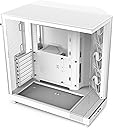
The NZXT H6 Flow is a compact dual-chamber mid-tower PC case designed for professionals and gamers who demand high-performance airflow and sleek aesthetics. Featuring panoramic glass panels, three pre-installed 120mm fans, and an airflow-optimized perforated design, it ensures superior cooling for ATX, micro-ATX, and mini-ITX builds. Its intuitive cable management and easy-access panels make building and upgrading effortless, all wrapped in a modern white metal chassis.


| ASIN | B0C89G9QDK |
| Antenna Location | Gaming |
| Best Sellers Rank | #11 in Computer Cases |
| Brand | NZXT |
| Case Type | Mid Tower |
| Color | White |
| Compatible Devices | Computers or systems with ATX, micro-ATX, or mini-ITX motherboards |
| Cooling Method | Air |
| Customer Reviews | 4.8 out of 5 stars 3,084 Reviews |
| Enclosure Material | Metal |
| Fan Size | 12 centimeters |
| Hard Disk Form Factor | 3.5 inches |
| Internal Bays Quantity | 2 |
| Item Dimensions D x W x H | 16.34"D x 11.3"W x 17.13"H |
| Item Weight | 9400 g |
| Light Color | RGB |
| Manufacturer | NZXT |
| Material | Metal |
| Mfr Part Number | CC-H61FW-01 |
| Model Name | H6 Flow |
| Model Number | CC-H61FW-01 |
| Motherboard Compatability | ATX, micro-ATX, mini-ITX |
| Number of Fans | 3 |
| Number of Items | 1 |
| Other Special Features of the Product | Compact Dual-Chamber Design, Airflow-Optimized Perforation Pattern, High-Performance Pre-Installed Fans |
| Power Supply Maximum Output | 500 watts |
| Power Supply Mounting Type | Bottom Mount |
| Recommended Uses For Product | Gaming |
| Supported Motherboard | ATX, micro-ATX, mini-ITX |
| Total Expansion Slots Quantity | 7 |
| Total USB 3.0 Ports | 2 |
| UPC | 810074844130 |
| Unit Count | 1 Count |
| Warranty Description | 2 year manufacturer |
T**K
Close to perfect.
What I look for in a AAA case are: aesthetics, accessibility, and airflow. Aesthetically, this is a nice fish tank to put your components into so that you can admire your handiwork. I didn't get the RGB version because I don't throw a lot of disco parties, so this is just a good, no-nonsense build that still looks pleasingly modern. I just looks good, as good as anything out there, and it would be a good home for those fancy RGB setups if you're into that. Accessibility of this case is also great. It comes apart with a simple thumbscrew for the front glass and back panel, making it very easy to get into and work in, and the top pops off easily if you need to get in from there. The dual chamber design makes it very easy to manage cables, even for someone like me who's generally pretty terrible at it; it has included velcro straps in the back chamber to help keep things in control, too. It's a very easy case to work in without scraping off your knuckles or struggling with finding enough room to do anything. The only downside I'd mention is the drive mount chassis in the rear chamber. It has a thumbscrew and just pops off easily to put it in and out of the case, but it seems designed for a single 3.5" mechanical drive and/or two 2.5" SSD's with typical screws. It's kind of old-school, no toolless design there or anything fancy, and almost seems out of place on this case. It wasn't hard to work with, and it works fine for what it is, but with all that room back there it feels like a more modern tool-free SSD-centric design would be more fitting to the systems most people will build in this thing. If you're only using M.2 drives, just remove it entirely. Airflow would be last, and it's kind of amazing. I did add two 140mm fans to the bottom of the case, and a 120mm exhaust fan to the back, with a 280mm AIO on the top of the case. It's relatively quiet and moves so much air that I can feel the difference at my desk when my system is turned on. You shouldn't have any trouble keeping your system cool in this case, but I definitely would recommend at least the two 140mm fans on the bottom at the very least and I'd probably use another two on the top if you're not attaching a radiator up there. I think you could get by without the 120mm rear exhaust, but the case seems designed to funnel air through that way and installing one is cheap and extra cooling never hurts. Overall, it's one the best cases I've ever owned. It looks great, the price isn't bad, it's really easy to work in and isn't ungodly heavy, and cable management is about as easy as you could hope for.
M**.
Ideal airflow with a clean design.
Had a gargantuan NZXT Phantom for several years, and had been seeing this style of case explode in popularity over the last several months. The H6 Flow kinda came out of nowhere (to me, at least), just as I was about to start ordering upgrades so I could actually run some of the most recent pc releases. This case is a far more manageable size, and as a long time fan of NZXT cases, this new offering does not disappoint. Obvious comparisons to other dual chamber/aquarium style cases aside, the H6 boasts a functional clipped front corner that comes stock with 3x120mm intake fans. At this angle, the fans blow air directly towards your GPU, as well as your CPU's air cooler tower, if you're using one. The biggest objective con in this case is that the bottom fan mounts, which are recessed to allow for a clean and streamlined installation, are restricted to 140mm fans. As seen in my attached picture, 120mm fans will just kinda... float there, but since the RGB is so extensive on mine, I almost consider it a feature. But for the sake of maximum airflow and making sure the case is a positive air pressure environment, it is something I'll address at a later date. One other important thing to bear in mind is the available depth for tower coolers. I'm not sure if it's obvious from the picture, but the leading fan is actually contacting the glass side panel. It literally could not fit any tighter. That being said, I'd either recommend opting for water cooling on the CPU, or having low profile RAM sticks for air cooling, but that's mostly dependent on how your MOBO is laid out. :P Overall, the H6 Flow was fun to build in and looks spectacular once everything's up and running. Build quality is sturdy, along with good options for cable management tucked behind the motherboard tray, and all at a very competitive, budget-friendly price.
T**O
Superb Mid/High-End Airflow Case
TL;DR Pros: Excellent airflow, great thermals, quiet operation, and a genuinely enjoyable build experience. Tons of room to work, modular panels, panoramic glass, and plenty of fan-placement options. My system stays extremely cool and quiet even while gaming on max settings at 1440p. Beware: The higher PSU placement can make rear cable management a little tricky, especially for newer builders, and the SSD tray may get in the way if you’re adding an RGB/fan hub. Neither issue was a dealbreaker for me. Overall: A fantastic case for mid-to-high-end builds that manages to look premium, stay cool and quiet, and remain reasonably priced. I’d absolutely buy it again. Full Review: I love this case. It has plenty of room to work in, lots of modular pieces that are easy to remove but give a satisfying “click” when put back on, and steel mesh that lets the case breathe. The design has a perfect balance of sleek aesthetics, panoramic glass to view components and lighting, and excellent airflow potential. I love that there is a wraparound glass panel without sacrificing the included front-angled fans, which blow directly toward the GPU. On my build, I added two bottom intake fans, a rear exhaust, and an AIO that exhausts for positive pressure, giving me 5 intake fans and 3 exhaust fans total. Under maximum load (Battlefield 6 Overkill and Cyberpunk at max path tracing, DLSS Quality, 21:9 monitor) my system functions flawlessly, with the CPU sitting in the low 60s and the GPU in the upper 40s. I use a fairly conservative fan curve because of how much airflow this case provides. You don’t have to sacrifice temperatures for lower noise levels. I don’t remember the exact curve, but it was something around 35% at 40°C and 50% at 60°C. Even without headphones, this case is whisper quiet under heavier loads. There are a few nice “extras,” if you will, that are worth mentioning. They give the case a premium feel and quality without an unnecessary price hike. The side glass panel can sit angled open, allowing you to reach inside without fully removing it. This is great if you want to quickly check a component, adjust a cable, or even do some quick dusting. I also really like the top and rear fan placement options. You can slide your fans along the tracks to adjust their locations before completely screwing them down, which gives you some flexibility when figuring out your airflow setup. The included Velcro straps and cable management track on the top and left behind the case are also appreciated. I always like seeing cases that actually give you tools to manage your cables rather than essentially saying, “Well, good luck.” One thing to take into account with this case is the higher PSU location. It makes perfect cable management difficult unless you’re a pro or care enough to obsess over it. This is only my third build, and I usually go for “good enough and functional” as long as the front looks good. In this case, the front absolutely does. The back is closed off anyway, and there is plenty of space to work with. Another thing to note is that the SSD tray sits directly under the PSU, so be aware of this if you’re planning to add an RGB or fan hub. I opted to remove the tray since I only have M.2 drives. You could potentially put the hub flat on the bottom of the case, where there is plenty of empty space, but that might make cable management more difficult. Trying to fit one to the left of the SSD tray would be even trickier. I’ve never once thought, “Man, I wish I had opted for another case.” I’d easily buy this case again and recommend it to friends who are building mid-to-high-end systems. (Note: Somewhat unrelated, but if you want bottom intake fans like I have, make sure they are “reverse blade” fans. I just flipped mine around because I’m lazy—if you look closely you can see the stickers.)
L**.
The Ultimate Blend of Performance and Style!
In the ever-evolving world of PC building, finding the perfect balance between performance, aesthetics, and functionality is crucial. As an avid enthusiast, I recently had the pleasure of upgrading my PC build with the NZXT H6 Flow case, and I must say, it has exceeded my expectations in every aspect. In this comprehensive review, I'll delve into the features, performance, and overall experience of using this remarkable case. Design and Aesthetics: The NZXT H6 Flow boasts a sleek and modern design that immediately catches the eye. Its minimalist exterior with clean lines and subtle accents exudes sophistication, making it a stunning addition to any gaming setup or workstation. The tinted tempered glass side panel provides a clear view of the internal components while adding a touch of elegance to the overall aesthetic. Additionally, the integrated cable management system ensures a clean and clutter-free interior, enhancing the visual appeal of the build. Airflow and Cooling Performance: One of the standout features of the NZXT H6 Flow is its innovative airflow design. The case features optimized airflow channels and ample room for multiple fans and radiators, ensuring efficient cooling for even the most demanding components. During extensive gaming sessions and CPU-intensive tasks, I noticed a significant improvement in temperature management compared to my previous case. The H6 Flow kept my components cool and stable, allowing for uninterrupted performance without any thermal throttling issues. Functionality and Build Quality: The NZXT H6 Flow excels in terms of functionality and build quality. The spacious interior provides ample room for large components, making installation a breeze. The tool-less design simplifies the building and upgrading process, saving time and frustration. I particularly appreciated the attention to detail in the design, such as the easily removable dust filters and the strategically placed cable routing options. Every aspect of the case feels well-engineered and thoughtfully designed, contributing to a seamless building experience. Customization and Expansion Options: One of the key advantages of the NZXT H6 Flow is its flexibility for customization and expansion. The case offers plenty of room for additional fans, RGB lighting, and custom water-cooling loops, allowing users to personalize their builds according to their preferences. Whether you're a hardcore gamer looking to add extra cooling power or a content creator aiming for a visually striking setup, the H6 Flow provides the versatility to accommodate various customization options. Conclusion: In conclusion, the NZXT H6 Flow is a standout choice for PC builders and enthusiasts seeking the perfect blend of performance, aesthetics, and functionality. Its innovative airflow design, sleek aesthetics, user-friendly features, and flexibility for customization make it a top contender in the competitive market of PC cases. Whether you're building a gaming rig or a workstation, the H6 Flow offers everything you need to elevate your PC build to the next level. With its exceptional performance and stunning design, the NZXT H6 Flow has earned its place as a premium choice for discerning enthusiasts.
R**O
Outstanding Airflow, Beautiful Design
The NZXT H6 Flow is an impressive case that strikes a perfect balance between aesthetics, performance, and build quality. Although it's classified as a mid-tower, it has a spacious dual-chamber layout that offers excellent separation of components, making cable management easy and airflow highly efficient. One of the standout features is its airflow design. It doesn’t have a traditional front mesh panel — instead, it uses angled intakes with up to 9 fan mounting options, allowing for a wide range of configurations. The included front fans are angled in a way that provides direct airflow to the GPU and motherboard, keeping temperatures well under control even during heavy loads. The build quality is excellent, and the case really shines when it comes to showcasing your components. The dual tempered glass panels provide a stunning, unobstructed view of your hardware, which makes it a great option if you like to highlight your RGB setup or just want a clean, modern look. Despite not being particularly compact, the internal layout is smart and builder-friendly. Whether you're doing a high-performance gaming build or a clean workstation setup, everything fits well and looks great when it's done. Highly recommended if you’re looking for a high-airflow case that delivers both in looks and functionality. NZXT really nailed it with the H6 Flow.
A**K
Awesome cooling performance and easy build experience
Summary: H6 is a perfect middle ground case between the historically cramped square cases and the newly emerging massive fish tank cases. Cooling performance is great and the price makes it a perfect balance of aesthetics, awesome performance, and lower price. Build quality is the standard amazing quality expected from NZXT cases. Pros - Super easy to build in! Tons of space for cable routing and management, especially in the back and at the top of the mobo where it’s usually a pain. Plenty of space for extra PSU cable length from cable kits or non-modular PSUs. - All panels pop off and on very easily. Incredibly easy to work with. - Case looks even better in person! The full glass gives a beautiful view of components. - Going from a glass front H510, I thought the full mesh would make my system much louder, but it’s just as quiet. That’s largely dependent on fans and their RPMs, but my same build in this case is quieter, perhaps from the angled fans being pointed away from where I’m sitting. - The recessed fan slots in the bottom of the case both look interesting and also seem to work exceptionally well. I’m seeing 7 degree (C) GPU temp reduction under load compared to my prior H510, but there are also multiple more fan slots on this case. Whether it’s the lower 140 slots or the front, I’m stoked to see that much of a GPU temp reduction given how intense games push GPU these days. - My favorite little detail is a small hook between the back exhaust fan and the top of the case. This allows you to route that cable safely so wire interference is not a concern. - I thought this case was going to be a lot wider of a footprint than it actually is. It is wider than my prior H510 due to the PSU being behind the mobo instead of beneath it, but it’s totally worth the extra space given the cooling performance and it doesn’t feel or look too big like some of the larger fish tanks cases are. Cons - Honestly, I haven’t found a true con yet. Biggest con I can think of is that the included fans come with a pre installed splitter. That splitter is too short to run to a mobo header, but it’s plenty of length if you have a Kraken or other NZXT RGB or Fan controller.
B**B
Airflow beast yo
I am going to start this with I have the H9. I freaking love that case. Then I seen the H6 was the little version of the H9. I scooped it up. My buddy needed a case so I said hey man I got this NZXT H6 sitting here. So we build his PC in the H6. It is a kick as... Awesome case man. It is open the wire management is just stupid easy. His other build is in the H7. He said he likes the H6 better. Yeah it is smaller than the H9 but there is so much room in there. Then glass panels ar pretty tough. Not saying ya can bounce em around. My dog knocked the side glass over. It hit a piece of his old case. I thought for sure it was scratched or broke. Not nothing. Whew lol. Look if you are shopping around for a case. Here is the real real. The H6 is an airflow beast. There is only 2 SSD mounts. There is one HHD mount as well. It will hold a beefy PSU. The Radeon RX7700XT fits in there no problem. Along with the CPU cooler on the top. It has 3 fans installed. Ya can run a 3 fan cooler on top. 2 140mm fans on the bottom and then one out the back. Go scoop it up man.
T**S
Fantastic airflow but fan installation can be tricky
I chose the NZXT H6 Flow for my new build featuring an AMD Ryzen 7 7800X3D processor cooled by a Thermalright Peerless Assassin 120 SE ARGB, primarily for its renowned airflow capabilities. It has certainly lived up to expectations, keeping this potent air-cooled setup remarkably cool. Even with these performance-oriented components on my ASRock B650 Steel Legend WiFi 6E motherboard, the system maintains impressively solid temperatures. Another huge plus is the superb cable management; the well-designed compartments made for an incredibly clean and easy build, neatly accommodating my CORSAIR 750W PSU and other cabling. While the overall airflow is fantastic, and the ease of cable management is a highlight, there were minor challenges. Installing fans in certain tight spots, especially the bottom compartment, proved a bit tricky and made some cable paths more complex than anticipated. However, this was a small issue in an otherwise smooth building process, and there was still ample room for all components, including the TEAMGROUP T-Create DDR5 RAM and SAMSUNG 990 EVO Plus SSD, without obstruction. Despite the slight difficulty with fan installation in specific tight spots, the NZXT H6 Flow is a fantastic case overall. The outstanding airflow, easily capable of supporting demanding setups like mine, and exceptional cable management features far outweigh this minor inconvenience. If you're prioritizing cool temperatures for your components and a clean, manageable build, the H6 Flow is an excellent choice that I would readily recommend.
M**O
Grata experiencia de ensamblado!
Lo tuve que pedir dos veces porque el primero vino roto, la paquetería lo maltrata bastante. Fuera de eso el gabinete es excelente, muy sencillo de armar, bastante espacioso para mi 5070. Pedí el que no tiene ARGB por lo que le coloqué mis propios ventiladores. La gestión de cable es muy buena ya que en todas las esquinas trae para amarlos, tambié de muy buenos materiales. Se ve que los de NZXT han pensado en todo, la experiencia de ensamblado de la PC en este gabinete ha sido verdaderamente grata, fue tan rápido que hasta sentí que había omitido algo.
D**E
Highly Recommend...
I'm really glad I got this Case a bit wider than normal but also less deep. But the main thing for me was the ability to pop it apart and get to any area with ease. Really nicely designed and sturdy feel, built for practicality and aesthetic together and nice cable management for those obsessed with it looking cool. Airflow is also really good due to it's size so nothing feels cramped. I can't really fault it.
E**E
Super !
Excellent boîtier, aussi beau qu'efficace Je suis très satisfaite de ce boîtier NZXT H6 Flow. Dès l'ouverture du colis, j'ai été impressionnée par la qualité de fabrication et les finitions. Le coloris blanc est élégant et le design avec les panneaux en verre met parfaitement en valeur les composants. Le montage s'est déroulé sans difficulté grâce à l'agencement intérieur bien pensé. La conception à double chambre facilite grandement le rangement des câbles, ce qui permet d'obtenir un résultat propre et soigné. J'apprécie particulièrement la circulation de l'air. Les trois ventilateurs inclus assurent déjà un bon refroidissement et les panneaux conçus pour favoriser l'airflow contribuent à maintenir des températures satisfaisantes. Le boîtier offre également suffisamment d'espace pour accueillir des composants performants tout en restant relativement compact. Une fois la configuration terminée, le rendu est vraiment superbe. Après plusieurs jours d'utilisation, je suis pleinement satisfaite de mon achat. Je recommande ce modèle à toutes les personnes qui recherchent un boîtier à la fois esthétique, pratique et performant.
T**.
وحش التبريد
من افضل الكيسات اللي جربتها للتبريد ، ملاحظة فيه مديل من مراوح ليان لي اللي هو مديل الSL مقاس 120 صعب تركبهم بد معاناة ، + مراوح السفلية برضو 140 م يركبون لازم تخليهم ثابتين بدون مراوح وماتدخلهم داخل الفتحة حقتهم هذا اللي انا مسويه وتبريد الكرت 4070ti super درجة الحرارة ماشفتها توصل 70 ماشاء الله
C**P
Le prix et qualite
Très contente de mon achat je recommended vivement
Trustpilot
1 month ago
2 days ago