Desertcart purchases this item on your behalf and handles shipping, customs, and support to South Korea.
๐จ Elevate your digital art gameโdraw smarter, not harder!
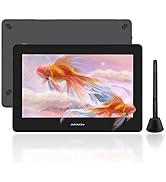
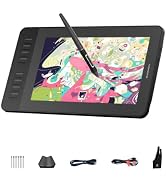
The GAOMON WH851 is a compact 8x5 inch Bluetooth-enabled graphics tablet featuring a battery-free pen with 16,384 pressure levels and 60ยฐ tilt support. It offers 18 hours of wireless use, an intuitive dial plus 8 customizable shortcut keys, and smooth pen tracking with minimal sinking. Compatible across Windows, Mac, and Android, itโs designed for professionals and creatives seeking precision, portability, and productivity in one sleek device.


| ASIN | B0CN95RSQ5 |
| Active Surface Area | 8 inches x 5 inches |
| Additional Features | 60ยฐ Tilt Support, Bluetooth Connection, Programmable Press Key |
| Best Sellers Rank | #53 in Computer Graphics Tablets |
| Brand | GAOMON |
| Built-In Media | Cleaning Cloth, Glove, Replacement Nib, Stylus, USB Cable |
| Color | Black |
| Compatible Devices | Desktop, Laptop, Smartphone |
| Connectivity Technology | Bluetooth, USB |
| Customer Reviews | 4.4 out of 5 stars 189 Reviews |
| Display Type | No |
| Item Dimensions L x W | 11.37"L x 6.74"W |
| Item Weight | 397 g |
| Manufacturer | GAOMON TECHNOLOGY CORPORATION |
| Mfr Part Number | WH851 Gray |
| Model Name | WH851 Gray |
| Model Number | WH851 Gray |
| Native Resolution | 16,384 Levels |
| Number of Items | 1 |
| Number of Packs | 1 |
| Operating System | Windows 7 or later(Wired), macOS 10.12 (Wired) |
| Pressure Sensitivity | 16384 levels |
| Screen Size | 8 inches |
| Special Feature | 60ยฐ Tilt Support, Bluetooth Connection, Programmable Press Key |
| Specific Uses For Product | Designing, Drawing, E-Signature |
| Target Audience | Student, Teacher |
| Warranty Description | 1 year |
S**D
Great tablet for making pixel art on my mac
I needed to replace my intuos pro 4(medium) since they stopped supporting drivers for newer versions of macOS. The GAOMON WH851 is the most affordable mid-sized tablet with bluetooth I could find, so I figured it was worth a gamble. Surprisingly, it exceeded my expectations. The build quality, and precision of motion tracking is just as good, if not better than the much more expensive tablet I replaced with it. I also like the compact size that takes up little space on my desk, yet my hand still rests comfortably on. The lighter pen seemed a bit cheap at first, but actually feels more natural and comfy. Paired with a 27 inch monitor it's perfect for my daily work as a pixel artist. Perhaps, higher resolution digital illustration might demand a more pro level/larger tablet, but this feels perfectly sufficient for my work, primarily done in Aseprite. After a month of heavy use, the pen tip and tablet surface show almost no sign of wear. My only complaint is it feels a touch sluggish when connected with bluetooth. It's no issue for me to stay hard-wired, but if you have to unplug it's still serviceable, and it's nice to have that option.
K**L
Have over 5 years of experience in digital art as a hobby-
-and have been using this one for over a week now through Krita, but I have some pros and cons. Bluetooth / Wired Pro: obviously the Bluetooth is great over wired since you don't have to deal with the USB cable wrapping around stuff, or getting in the way if you sit relaxed (legs up, leaning back, standing, etc), and you can lay it down wherever without yanking a cord from its socket. My previous tablet had a wire issue where it would 'disconnect' if you moved it around too much, so I'd have to wait the 5 seconds or so for it to 'reconnect' itself before using my pen again - but that small headache was remedied with this tablet's Bluetooth. Con: its battery lasts about 2-3 days of heavy use, which isn't a bad thing since you can just charge it as you use it / charge it when you aren't using it, so just a heads up. Build / Use Pro: thin, light, and compact but the quality is great - the aesthetic is really nice, it's the entire reason it caught my eye - it's smaller than my previous one allowing me to maneuver more with it such as I stated previously, allowing me to lean back with it in my lap, or kick my legs up without the size or wires getting in the way. The wheel is a huge boon - I can now rotate the canvas and zoom in/out without fiddling with buttons to do it - as a digital artist, I heavily recommend you get a pen tablet/display that has a wheel for whatever tablet you decide to go with. (Now if we can get a trackball in a pen tablet for moving around the canvas) Con: the texture on its face is definitely wearing on the nib already and the sensitivity had to be adjusted to my taste, which led to me testing pressure and changing settings; that in itself caused the face of the tablet to become marred in the week of using it, whereas my other pen tablet (Huion 1060Plus) didn't have that problem - 5 years and never had to change the nib due to its glossy face texture and more sensitive pen settings - its face didn't start having problems until around this year when the gloss began to peel from use, but the nib still looks almost new. Results: I actually love this thing and my only gripe is the marred surface and nib issue so far, though those could be user problems, but based on the price, if you are just getting into digital art, you might want to try something cheaper first just to make sure this medium is something you can see yourself doing. But for the seasoned digital artists, the tablet is worth it in my opinion if you are looking for something compact and ready at any moment at the press of a button. ETA: art was made with the tablet, inspired by the tablet.
C**_
Solid purchase, works fantastically!
At first, I was unsure about buying this product because of other reviews mentioning that it was finicky and hard to work with. I received my tablet two days ago, and so far, I've had a great experience with it! I got the medium-sized one, and even if it is a bit small physically, I always find myself surprised with how much workspace I actually have. I haven't tried out the Bluetooth function yet as I've been using a USB-C to USB-C wire connecting to my Mac computer, and there's hardly any delay or lag when I use the tablet. I know there have been some complaints about the distance the stylus has to be from the tablet in order to see the mouse on-screen, but I honestly don't see a problem with it and it's really been great for someone who is using a tablet to draw for the first time. Overall, this product is super beginner-friendly (from setting it up to using it) and I highly recommend it if you're looking for something relatively cheap.
J**N
Great drawing tablet but has its flaws
Functionally, I'd give it 4/5 stars and that's what I've given overall in this review. The first-time set-up was a breeze. I basically turned it on and it paired with my PC in a matter of seconds. I headed over to the manufacturer's website and downloaded the proprietary driver/software and installed it. Within minutes, I was using it to edit pictures in Photoshop. I was able to assign custom keys with the click of a button. Overall, the device is very, very simple to use as much as it feels responsive to boot. With that said, it does have its share of shortcomings. The most glaring is its short battery life. Descriptions state battery life of the tablet to last up to 15 hours. I've gotten maybe 6-7 out of it from a full charge. I deducted a point for that. It's also quite prone to smudging as the user can see in the pic attached to this review. And I wiped it down with a microfiber cloth multiple times too. They just won't go away unless I apply a solvent like rubbing alcohol but I don't plan to anymore out of fear that I'd strip the surface prematurely. A glove is included so I'll give the manufacturer some credit even though I'd never use it personally. 4/5 stars. Functionally solid but build quality is a bit lacking. I guess it is what it is for the price.
T**R
Excellent budget drawing tablet, exceeded expectations!
This thing is fantastic! Highly recommend for a budget drawing tablet. Excellent battery life, and I have had no issue with connectivity. Easy to use, great size for portability, responsive to stylus pressure for varying thickness of lines, and its very easy to set up the macro buttons on the side for wide wide range of different programs. Hella versatile.
Y**R
Ok
Does not feel as good as the competition
C**Y
Efficient when needed the most
Excellent product
J**N
Perfect purchase
This is perfect for what we needed. Works great.
S**S
Good one go for it, you wont regret.
One of the best in the drawing tablet or graphic tablet. Best Bluetooth connectivity, no lag, highly responsive when connected via Bluetooth or wired. High quality drawing pad, high quality pen, high quality buttons, high quality dail. Box contains all accessories mentioned. Its compatible with my iphone, andriod and my windows laptop. It is good size,i took it for note making and etc, its worth it. The hand glove made it easier to work, its difficult in beginning but as you use it , its a piece of cake and makes our work faster. The bag given to carry or store it is also good and high quality. For note making , drawing, and designing and sketching this is best i have seen in amazon so far of this price range. Note: there are various settings in there official software, its a bit hassle and issue for people what to use and how to use. Apart from that i tested all sensitivity levels, responsiveness, various apps and softwares, it works perfectly.
A**U
The GAOMON Bluetooth Drawing Tablet WH851
The GAOMON Bluetooth Drawing Tablet WH851 has been a great purchase. It works well and connects easily, which makes it convenient to use without any cables. The writing space is large, so itโs comfortable for taking notes. I mostly use it for school, and itโs helped me stay more organized while studying. The pen feels natural and the pressure sensitivity is good for both writing and drawing. It does lag a little sometimes, but overall the battery life is good and it feels well made. I really like it and would recommend it to anyone who wants a tablet for school or creative work.
A**W
Easy to set up and use
Light and compact, easy to install and use. Came with the right accesories and spare pen nibs. Very useful thank you.
C**Y
Not as advertised
Does not work as advertised. Low quality and cheaply made.
R**.
Impressed
Apart from a bit outdated driver software the tablet is pretty solid. Best in terms of price to productivity in my opinion. Wireless performance is also good, no latency issues. The battery last more than a couple days. The only issue is I'm not sure if they have any service centres in India.
Trustpilot
5 days ago
1 month ago