Desertcart purchases this item on your behalf and handles shipping, customs, and support to South Korea.
🖨️ Print smart, print fast, print like a pro.
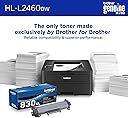
The Brother HL-L2460DW is a compact, monochrome laser printer engineered for home offices and small teams. Delivering sharp 1200x1200 dpi prints at speeds up to 36 pages per minute, it offers versatile connectivity via dual-band Wi-Fi, Ethernet, and USB. Featuring automatic duplex printing, a 250-sheet capacity tray, and mobile app control, it combines efficiency with eco-conscious design. Backed by a 1-year warranty and optional toner subscription, it’s the reliable, no-fuss choice for professional-grade black & white printing.

| ASIN | B0CPL2N5H6 |
| Additional Printer Functions | Print Only |
| B&W Pages per Minute | 36 pages_per_minute |
| Best Sellers Rank | #943 in Office Products ( See Top 100 in Office Products ) #3 in Laser Computer Printers |
| Brand | Brother |
| Built-In Media | AC Power Cord, Drum Unit, Toner Cartridges |
| Color | Black |
| Color Depth | 1 bpp |
| Compatible Cartridge | Brother Genuine TN830, TN830XL, TN830XL2PK |
| Compatible Devices | Laptops, PC, Smartphones, Tablets, iPhone |
| Connectivity Technology | Ethernet, USB, Wi-Fi |
| Control Method | App, Touch |
| Controller Type | Android |
| Customer Reviews | 3.9 out of 5 stars 2,696 Reviews |
| Display Type | LCD |
| Duplex | Automatic |
| EU Spare Part Availability Duration | 1 years |
| Hardware Interface | Ethernet, USB |
| Initial Page Print Time | 8.5 seconds |
| Ink Color | Black |
| Item Dimensions D x W x H | 14.2"D x 14"W x 7.2"H |
| Item Type Name | Laser Printer |
| Item Weight | 15.6 pounds |
| Manufacturer | Brother |
| Maximum Copy Resolution Black and White | 1200 x 1200 dpi |
| Maximum Copy Speed Black and White | 36 pages_per_minute |
| Maximum Media Size | 8.5 x 14 inch |
| Maximum Print Resolution Black and White | 1200 x 1200 dots_per_inch |
| Maximum Sheet Capacity | 250 |
| Model Name | HLL2460DW |
| Model Number | HLL2460DW |
| Model Series | HLL2460 |
| Number of Ethernet Ports | 1 |
| Number of Trays | 1 |
| Other Special Features of the Product | Auto-Duplex, Energy Star, Envelope Printing, Epeat Qualified, Network-Ready |
| Output sheet capacity | 100 |
| Paper Size | Up to 8.5 x 14 inches |
| Power Consumption | 44 watts |
| Print media | Envelopes, Paper (plain) |
| Printer Connectivity Type | Ethernet, USB, Wi-Fi |
| Printer Output Type | Monochrome |
| Printer Type | Laser |
| Printing Technology | Laser |
| Processor Count | 1 |
| Resolution | 1200 x 1200 |
| Special Feature | Auto-Duplex , Energy Star, Envelope Printing, Epeat Qualified, Network-Ready |
| Specific Uses For Product | Home, Office |
| Total USB 2.0 Ports | 1 |
| Total Usb Ports | 1 |
| UPC | 012502673989 |
| Unit Count | 1 Count |
| Warranty Description | 1 Year Limited |
| Warranty Type | Limited |
| Wattage | 470 watts |
L**N
Fast and easy to use.
This is a nice and speedy little printer that is perfect for a small office or home office. My wife has one at her job, and when our 21 year old HP Laser finally decided to retire, she had me get one of these for here at home. It has fast page output with the first page in under 8 seconds and about 35 PPM. So let me tell you what all you get in the box. Brother Laser Printer. AC Power Cord. Starter Toner cartridge approx 700 pages at 5% coverage. Quick Setup Guide in multiple languages Drum Kit, attached to the starter cartridge. Since she had a project she needed done quickly, I ordered this along with extra toner, 3rd party. It has automatic duplexing and it works well. She had a 100 page booklet she needed to get out, double sided And she needed 5 copies. The main paper tray holds up to 250 sheets, although I never fill them that far, to avoid jams. TRUST ME ON THAT. SO I installed the printer to her desktop, connected it wirelessly to our home network, and sat down and printed her booklets. It took 20 minutes total and that was with adding paper. Now that kind of printing speed is awesome for a total of 500 pages. Although it did use up most of the starter cartridge, but I had it all set up and booklets not only printed but Velo bound as well before she got home. So here is what I have to say about the whole shebang. It's affordable. It's speedy. It does what she needs. It's not a heavy printer. Anyone remember the very first HP Laser printers that you needed a hoist to lift and move? It's nowhere near that weight! I think it's like 14 pounds loaded with paper. It works just fine with both Windows 11 and my Linux computer. That makes it just right. for our use. Brother also has a subsciption program for toner, but that's up to you. We don't use it. 5 stars and rockin'!
T**M
Perfect printer - works every time
This printer does exactly what I need it to do, which is to reliably and easily print whenever I need to print a letter, return label, or other random document. It works every single time, no fuss, no toner cartridge issues…. It just prints! Perfection! I print once every week or two. I previously have had inkjet printers, and I felt like there was an endless workflow of troubleshooting to get one thing printed. This printer is the opposite. I literally will just think of something that I need to print send it to the printer from my phone, without even turning it on or checking anything about it. The when I walk over the printer, the document has printed in black-and-white. Every time. If you’re looking for a B&W printer that just reliably print very easily over Wi-Fi this is the one to get.
N**P
Buyer Beware!!!!
Let me tell you first off, I have absolutely NO complaints about this printer. The printing is sharp enough for me and meets my needs. I actually bought another Brother printer a couple of months after this, but not the exact model as I wanted something a little less expensive. Now to the reason for 1 star... As I was balancing my checkbook, I saw there was a debit accorded to Brother Refresh program. I was on the phone (you couldn't chat about this matter, because I tried that first) for over an hour and 50 minutes! What was this charge for? So, here's my warning: The "FREE" trial for the Refresh program isn't really free at all. Apparently, they somehow keep track of the number of pages you print out and if you go over their specified number, they charge you FOR EACH ADDITIONAL PAGE! Apparently, I went over and was charged $25, plus tax. Okay... So I immediately said I want to cancel my "free" trial and asked for a refund of the amount charged to me. I have no complaints about the gentleman who I spoke with, although he had to go back and forth so much to figure out what the issue was. And apparently, they have a rule that the rep has to come on every 2 minutes to say he is working o the problem and would I mind allowing him another 2 minutes. I told him not to waste that time, that I would trust that he was trying to resolve things, but I guess it's protocol. So, after all that time, after explaining that I printed too many pages over and over (which I understood the first time), he said that they will not refund the charge. I asked to be transferred to someone who was in the department who handles the charge specifically, but he said he had to handle it. So, I wanted to know why, when I bought the printer AND the toner (and the paper, of course), and did NOT want the "free" trial, I was getting charged for the extra pages. Brother gave me nothing! The rep just kept repeating the fact that I printed too many pages. He couldn't seem to understand that it shouldn't matter as Brother had not given me anything in return for that charge. He said it was because I still had 30% of my toner left and they don't send it out until it's lower. I told him they aren't going to be sending the toner because I CANCELLED THE FREE PROGRAM! So why don't the refund me?! He didn't seem to understand... again, just repeated numerous times that I printed extra pages. Oh my goodness! Just to clarify, I was pleasant to him the entire time and assured him that I understood this wasn't his fault, etc. I apologized if I sounded frustrated toward the end of the call, although I wasn;'t shouting or anything... just trying to explain. I'm extremely frustrated and will try again another day to speak with someone who can understand that I have a problem with paying for a "free" service that I never benefited from. I just caution anyone who decides to purchase this or any other of Brother's printers that offer the Refresh program. Maybe others will appreciate it, but not me. At the time I bought the printer, I also bought replacement toner. And I certainly don't need anyone monitoring how many pages I print. Totally invasive! Unfortunately, I had my grandson set the printer up and link it to the computer. He apparently entered my information, thinking it was something he needed to do. He's a teenager. My bad, but the free trial is BS.
C**R
How to Turn Off Deep Sleep, Have Consistent WiFi and Fix Paper Tray 1 Error
I really like how compact the printer is. My main annoyance with this model is that you only have two arrow key buttons to navigate through all the options so it made setup a bit confusing. No issues with WiFi but software is required on all the devices you want to stay connected to your printer. But you might want to turn off Auto Shut off and Deep Sleep mode to always have WiFi access to the printer. One caveat though, if you try to search for Airprint printers or open the Brother app out of range of the router, the printer will be shown as “Offline” even as you get back in range (to reconnect, a restart of the tablet or mobile phone is required once in range of the WiFi connection). The mobile devices will otherwise auto-connect to the printer once in range of the WiFi network. How to Turn Off Auto Shut Off: General Setup —> Ecology—> Auto Shut Off—> Off How to Turn Off Deep Sleep Mode: General Setup —> Ecology—> Sleep Time (set to 0 minutes). Once you press OK on Sleep Time, press Back and the Down Arrow keys at the same time. Then you have access to the Deep Sleep option. Regarding the Tray 1 paper error (printer not recognizing paper in the tray): I ran into the same issue but figured out it was a user error. The paper guides (the gray plastic parts with the green adjustable levers located within the paper tray) need to be adjusted so that the paper fits securely. There can’t be too much space between the paper guides and paper.
C**N
Decent little laser for family use
I grabbed this Brother for the living room so my two kids can print homework without hijacking my work laptop. Setup on Wi-Fi was quick on my phone and it talks to Alexa, so I just say to print stuff from the shared laptop and it goes. Prints come out sharp and pretty fast, even when my son dumps a 10 page report on it at 9pm. Duplex is handy because we burn through paper. My only gripe is the starter toner feels skimpy and the app nags about subscriptions. I just buy toner myself and ignore it. Once it is on the network, it just sits there and does its job.
M**W
Simple Setup and it just works right out of box
Back in June of this year I purchased an HP inkjet printer. I will not go too far off topic but it was one of the most frustrating purchases of my life. I bought it because it was a cheap little printer, under $50 and it fit on the bookshelf where I needed to place it, which was a big consideration for the printer purchase, along with the fact that it had to be hooked up wirelessly also. After three days of trying to get it to work with senseless App control HP made me get could not get it hooked up. During the initial setup process out of box - HP setup a password that I did NOT know about and when I reset my internet router it asked me for this password. I was so perplexed and frustrated I could not get past this step. After two days of talking to HP they finally helped me get wireless setup complete. But then the stupid printer broke and made horrible sound when it would try to grab paper. I simply had enough. So I decided to spend more money on this Brother Laser printer. I hate to spend the more money, but I was ready to throw HP printer up against the wall. So to keep my sanity I paid the more money. This Brother printer was easy to setup and easy to connect to my ISP and router. Took no longer than one minute to get to where I could print. This printer is fast and prints without acting like it's going to have a heart attack like the stupid HP crap I had before. So if you do not need color printing this is very good for small to medium workloads. I don't need color printing really so this is very good.
W**K
Brother products never ceases to amaze
NICE little printer. Sharp prints, light weight, space saving and even equipped with wireless printing! For this price range it's so affordable. On setting up, it took me half a day to figure out why my network wasn't accepting. I nearly gave up thinking something's wrong until I asked AI and it said it just needs a password. It's working great now.
M**L
Not what I hoped for printer
Nearing the end of my old inkjet, I grabbed this for my small apartment, thinking a laser would save space and hassle. Setup on Wi‑Fi took longer than it should and the app kept freezing. It prints fast, but the fan is loud in my studio space. First week, the toner warning already popped up, which stresses my tight budget. I printed a 20‑page lease and it came out fine, just not as crisp as I expected for laser. Kind of regret not waiting for a better deal 😕
J**O
Set It, Forget It, Print Forever
This is the best decision I’ve ever made — and I’ve made some terrible ones. But buying this printer? Iconic. Life-changing. I've had this monster for 9 months, and I just ran out of the toner that came in the box. That's right — 730 pages printed. I just dropped $128 Canadian (tax included) on a genuine 830XL high-yield toner that will yeild 3,000 pages. At my current printing rate, that means I won’t need to buy toner again until society collapses or I fake my own death and disappear. That’s about $40 a year — which is less than what I spend on coffees I don’t even like. This thing is reliable. No paper jams, no weird cryptic error messages that make you question your will to live. Just quiet, dependable printing like God intended. Double-sided printing? It’s got it. It’ll save you money on paper and give you that false sense of being eco-friendly. Win-win. Wi-Fi? Solid. Anyone in your house can print — including your weird cousin visiting for the weekend or the friend who “just needs to print one thing” and then squats at your place for three days. Also, it handles thick paper and envelopes like a champ. No curling, no crying, just results. If you have a colour printer, keep it. Love it. Cherish it. But buy this one too — for everything that doesn’t need colour. Because 98% of what you print is boring and black-and-white, such as life. Bottom line: it’s fast, efficient, and won’t try to ruin your day like every other printer you’ve ever owned. Buy it, and feel a glimmer of hope in this cold, chaotic world.
S**.
Compacta y práctica
Justo lo que estaba buscando, es una buena impresora monocromática, tiene todas las opciones necesarias para cumplir con una buena impresora. impresión a dos caras, maneja diferentes tamaños de papel que es excelente. Otro aspecto que me gustó mucho fue poderse conectar por medio de Wi-Fi a tu red privada, mando imprimir mis documentos desde el teléfono o desde mi computadora Mac. Excelente compra.
G**H
A GOOD SIMPLE LASER PRINTER
This is a very good printer for my regular B & W 1 side printing task - which is my most typical requirement. Replaces a very trusted and long used HP 1010 laser printer that was not reliable under WIN 11 on my new PC The Brother printer runs wireless and was a breeze to install
D**.
Nice replacement printer
This is a very nice printer that replaced my older one in this series. Sets up and works well. I really like the wifi feature which allows printing from anywhere in the house from my cell phone. DC
G**2
Funciona muy bien!
Tengo pocas semanas utilizando esta impresora como para poder ofrecer una reseña más apegada al uso continuo y por un plazo de tiempo mayor; sin embargo, puedo afirmar que, además de que la recibí en el tiempo garantizado, la impresora ha estado funcionando perfectamente: imprime bien, con excelente claridad y definición, imprime dúplex sin atorarse, e imprime rápido. Al inicio, batallé un poco para instalarla inalámbricamente, pero tampoco fue algo que me llevara mucho tiempo. Nunca había tenido productos Brother, este ha estado funcionando tan bien o mejor que una HP que me dio buen servicio por años. Sólo me queda pendiente ver si los toners de repuesto son más económicos y tan buenos como los HP.
Trustpilot
2 months ago
2 weeks ago