Desertcart purchases this item on your behalf and handles shipping, customs, and support to South Korea.
๐ Unlock NVMe Speed on Your Pi 5 โ Because Fast Storage is the New Flex!
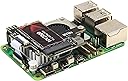
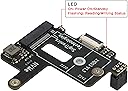
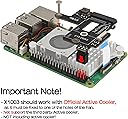
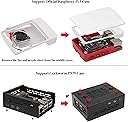
The Geekworm X1003 Mini PCIe to M.2 HAT is a precision-engineered expansion board designed exclusively for Raspberry Pi 5, enabling ultra-fast NVMe SSD storage via PCIe. Supporting M.2 Key-M 2230/2242 SSDs and compatible with the official Pi 5 Active Cooler, it offers a compact, plug-and-play solution to supercharge your Piโs storage capabilities. Ideal for professionals seeking high-speed, reliable storage upgrades with expert-backed support.


| ASIN | B0CSFHTJP8 |
| Best Sellers Rank | #4,488 in Single Board Computers (Computers & Accessories) |
| Brand | Geekworm |
| Built-In Media | 1 x X1003 PCIe Peripheral Board with accessories |
| Compatible Devices | Raspberry Pi 5 |
| Customer Reviews | 4.0 out of 5 stars 71 Reviews |
| Hardware Interface | PCI |
| Item Weight | 11 g |
| Manufacturer | Geekworm |
| Mfr Part Number | TB-2024-06 |
| Model Number | X1003 |
| Number of Items | 1 |
| Operating System | Raspberry Pi OS Bookworm |
| Style | Classic |
| Style Name | Classic |
| Warranty Description | 3 months |
F**O
Good ssd solution for RBPi
Easy to install and work out of the box doesnโt require special configuration
G**6
Very good customer service
Worked and detected my Kioxia BG4-based SSD, was able to write and read at advertised speeds however it would not Boot from the drive. I reached out to their support and they very quickly dispatched some FFC cables to remedy the issue. 10/10 customer service!
J**C
Works well but should include hardware for mounting a 2230 NVMe device
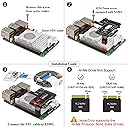
Works fine for me, pay careful attention to the orientation of the ribbon cable, makesure the correct end is attached to the NVMe PCB. The ends of the cable are NOT reversible, just because the contacts are on the correct side of the cable does not necessarily mean the cable is oriented properly. Also, this PCB can only be mounted with a Raspberry Pi Foundation Pi 5 cooling fan. Other fan styles will not work. There is no hardware for holding down a shorter 2230 NVMe device. It really should include the hardware since it can be hard for a hobbyist to find. I would have rated this device at 5 stars had it included that hardware.
R**D
Very easy to install, works with RPi 5 active cooling
I bought two different solutions for adding an NVMe drive to the Pi 5. This one was simple to install and worked perfectly. The only downside is that it can not handle full length M.2 cards, but that's not a problem as long as you buy the correct sized NVMe SSD m.2 drive. My RPi5 now boots fast and apps launch fast. I am currently operating my Pi 5 with no SD card installed. I used the new network installer capability to install the OS to the SSD drive and worked easy as pi! As an aside, I accidentally broke the ribbon cable clip on the Pi 5 itself. I did some googling and found a suggestion to use cardboard from a cereal box to secure the ribbon cable. This work wonderfully. The ribbon cable clip on the Geekworm HAT was undamaged. Be sure to pay attention to which side of the ribbon and insert them properly.
A**N
Edit after some time...
Original review below, update: This stopped working at some point. The SSD is still good, so I'm pretty sure the hat just didn't want to stay secured. While using the SSD with the RP5, it was good at first, but now the device isn't recognized at all. Had to fall back to the SD card, and the OS didn't want to recognize the SSD. Eventually just had to give up on the hat, raspberry pi started working again after removing. Original: Used this in combination with a Raspberry Pi 5, official active cooler (from another bundle), and the leftover SSD from an upgraded Steam Deck. After installing the hat on the motherboard and inserting the Steam Deck SSD, the raspberry pi OS recognized the drive immediately with no issues. Check that the ribbon cable is oriented exactly as the instructions and label on the ribbon shows. Major nitpick: If you are installing a 2230, you have to secure the SSD yourself. The included screw is for a 2242 SSD. I was able to salvage a rubber stopper from another enclosure, but some people may have difficulty with this. I only found out about this after looking closely at the small instruction pamphlet.
A**R
Board works, ribbon cable doesnโt.
Yes I know itโs a WD and yes Iโve tried other SSDs (Intel & Kingston). The board is powered but the Pi doesnโt detect anything at all. The only explanation I could understand is that it might be a faulty ribbon cable. I hope to get in touch with someone and get a replacement ribbon cable
S**S
Great for standard RPI5 case!
The only adapter I've found that can put an M.2 Nvme SSD in a standard RPi5 Case with the official cooler...
J**N
This is a very nice NVMe PCIe HAT for the Raspberry Pi.
Not much to say here, but it works great. A little fiddly to install since the cable is short (as it needs to be). My RPi boots perfectly with no issues. This HAT will ONLY work with the official RPi 5 cooler. I know it is stated in the description as well, but it should be reiterated. Be careful on choice of NVMe. The Union Memory PCIe Gen3 NVMe has worked as expected. Very fast booting!
W**Y
great product
great item used on a raspberry pi Linux cnc controller build
D**B
Couldn't detect the drive
Tried with recommended M2 drive and would not detect drive. I suspect that the ribbon cable is faulty. I have a Pimoroni hat and it worked as expected with the same M2 drive. This cable problem seems to be frequent with these Geekworm Hats. I don't recommend the Geekworm Hats; get a Pimoroni or Pineberry instead.
E**K
compact but no thanks
has to be used with official cooler and takes up 6 gpio pins
A**P
Working!
My first attempt at X1003 did not end well. I couldn't get it to work with any SSD (I tried 3 different brands). I reconnected the SSD, reset both ends of the ribbon cable - nothing helped. I ended up returning it. Decided to give it a second chance. Ordered a new one. This one worked without issues. I have been using it with 1TB Timetec SSD and so far things are looking good.
Trustpilot
2 months ago
3 weeks ago