Buy anything from 5,000+ international stores. One checkout price. No surprise fees. Join 2M+ shoppers on Desertcart.
Desertcart purchases this item on your behalf and handles shipping, customs, and support to South Korea.
🚀 Elevate your eGPU game — power, speed, and compatibility in one sleek bracket!
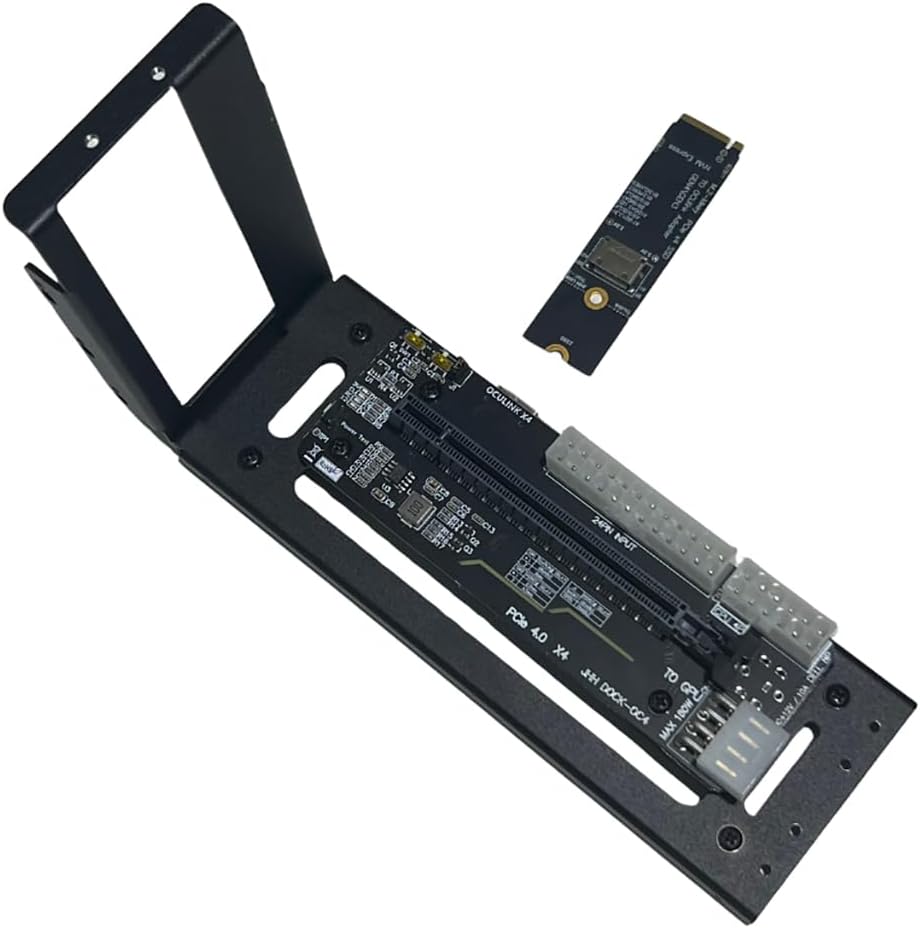
The JMT M.2 M-Key to PCIe 4.0 x4 External Graphics Card Stand Bracket is a cutting-edge adapter designed for Oculink and M.2 NVMe laptops and handhelds. It enables high-speed PCIe Gen4 x4 expansion for GPUs and other PCIe cards, supports flexible 24-pin power input from ATX/SFX power supplies (500W+ recommended), and offers smart synchronous start/stop functionality. Perfect for professionals seeking to supercharge their portable setups with desktop-grade graphics and I/O performance.
| ASIN | B0CRR7HMX5 |
| Additional Features | Unique Start/Stop Functionality |
| Best Sellers Rank | #155 in Computer Graphics Cards |
| Brand | JMT |
| Color | Black |
| Compatible Devices | Desktop, Laptops |
| Customer Reviews | 4.0 out of 5 stars 56 Reviews |
| Enclosure Material | Metal And Plastic |
| Global Trade Identification Number | 00783798005388 |
| Item Weight | 0.32 Kilograms |
| Manufacturer | JMT |
| Material | Metal And Plastic |
| Mfr Part Number | F51620 |
| Model Name | AMD Radeon RX 6800 XT |
| Model Number | F51620 |
| Mounting Type | Tabletop Mount |
| Special Feature | Unique Start/Stop Functionality |
| UPC | 783798005388 078379800538 |
| Unit Count | 1.0 Count |
| Warranty Description | 1 |
S**W
Works well, solid build
Works well, and constructed well. I would opt for the one with power supply along with it, but to save a few bucks, rock solid unit.
M**.
Inexpensive and works, I'm an Oculink believer now.
Works. Nice that includes the m.2 Oculink adapter. Be sure to buy an Oculink cable. I have a mini PC that only has (1) M.2 PCIE x4 4.0 slot, so I had to clone my MVME to SATA drive. Comparing FPS with games that struggled, it's apparent that Oculink > USB4/TB4. I wish this had a Power supply mount, and that the Oculink port was more accessible towards the bracket of the graphics card. The power switch on Auto didn't work, so I toggles it to On. Works like a charm. There's potential to 3d print an enclosure. Install notes: ONLY plug your power supply to the 24-pin connector (check/green). DO NOT connect power to the connectors circled in res (X/red). If your GPU requires PCI-E power, plug those power supply cables directly to the GPU power connectors (not dock).
E**N
A little sketchy, but it works
It worked more or less perfect. The only problem I had was the I couldn’t get it to turn on using the turn on with pc startup so I had to set it to be on 24/7, but that wasn’t exactly a problem for me since I intended for the pc to never turn off since it runs a whole bunch of servers
T**P
Excellent for the price, great quality.
Title says it all. The PCB doesn't feel cheap or flimsy. It comes with brackets and support to secure the PCB, GPU, and even remount mount the enclosure to something. (The mount also has magnetic feet which is really nice) The M.2 adapter included was also sturdy. It didn't feel flimsy. Compared to other cheaper options, this adapter picked up any GPU or PCIe expansion card installed over the others (including GPUs that ran solely off of PCIe lane power) where as competitors would fail detecting cards that didn't require external power. The added switches on the x16 part of the adapter is also a good touch, allowing you to force power the card or wait for PC detection before booting. Honestly, 10/10 adapter for the price.
M**A
1 of 4 worked. DO NOT BUY
first worked. Need smaller, two fan gpus for these docks and no oculink cable is included. Tight fit but that may protect gpu if you move it. NEXT THREE I BOUGHT DID NOT WORK!!!!
J**R
Occulink doesnt hot plug. You have to power this dock up before starting your rig.
My Pi5 now does 4k games.
D**P
Needs better documentation
I was able to get it working, but it really could use some assembly instructions. There are multiple power connectors and it would be nice to know which ones are mandatory, and which ones are optional. There are also a few design issues. The occulink connector is on the right side where most people would probably put their power supply. It would be better to have the connector come out of the back of the dock. The retention bracket angles away from the card, you have to flex it into place to secure the GPU to the dock. It would be nice if it fit properly without having to force it.
S**H
Failed for dual gpu use.
Lack of information and could not find display. Very frustrating to use.
Trustpilot
2 weeks ago
1 month ago