Desertcart purchases this item on your behalf and handles shipping, customs, and support to South Korea.
๐ Upgrade your network, upgrade your hustle.
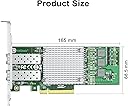
The H!Fiber 10Gb SFP+ PCI-E Network Card features a powerful Broadcom BCM57810S chipset with dual SFP+ ports delivering up to 10Gbps speeds. Compatible with major Windows and Linux operating systems, it fits PCIe x8 slots and supports advanced QoS for stable, high-speed networking. Ideal for professionals demanding reliable, scalable connectivity with easy installation and robust customer support.


| ASIN | B06X9T683K |
| Best Sellers Rank | #65 in Internal Computer Networking Cards |
| Brand | H!Fiber.com |
| Built-In Media | 2 x SFP+ |
| Color | BCM57810S(2xSFP+) |
| Compatible Devices | Windows 7/8/10, Windows Server 2008/2012/2016/2019, Centos/RHEL 6/7/8, Ubuntu 16/18/19/20, Debian 9/10/11,FreeBSD 10/11/12, Vmware Esxi 6/7, SLSE 11/12. (Not support Mac OS and Bypass Mode) Compatible Devices Windows 7/8/10, Windows Server 2008/2012/2016/2019, Centos/RHEL 6/7/8, Ubuntu 16/18/19/20, Debian 9/10/11,FreeBSD 10/11/12, Vmware Esxi 6/7, SLSE 11/12. (Not support Mac OS and Bypass Mode) See more |
| Compatible Operating System Family | Linux, Windows |
| Customer Reviews | 4.5 out of 5 stars 500 Reviews |
| Data Link Protocol | Ethernet |
| Data Transfer Rate | 10 gigabits_per_second |
| Hardware Interface | PCI Express x8 |
| Item Dimensions L x W x H | 8.8"L x 6"W x 1"H |
| Item Weight | 0.21 kg |
| Manufacturer | H!Fiber.com |
| Mfr Part Number | BCM-57810-2S-HF(EU) |
| Minimum Required Operating System Version | Debian 9.0 Stretch, Ubuntu 16.04 Xenial Xerus, Windows 7 |
| Model Number | BCM-57810-2S-1pc |
| Number of Items | 1 |
| Product Dimensions | 8.8"L x 6"W x 1"H |
| UPC | 602693070041 |
| Warranty Description | 3 Year Manufacturer |
E**R
Great price, great performance, works with OPNsense
April 28, 2026 Update: I've been using these network cards from OPNsense version 23.7.10_1-amd64 through version 26.1.2-amd64 with no problems. The performance and reliability have been superb. Original December 31, 2023 Review: Using a fresh OPNsense install (version 23.7.10_1-amd64) this network card was detected right away and I had no problems installing and configuring to work with OPNsense. I have two of these network cards, along with two of the SFP+ RJ45 transceivers listed below, installed in a custom PC used for a router; the transceiver worked great with this network card (I needed a transceiver that could auto-negotiate at 2.5Gb). https://www.amazon.com/dp/B089CWVHX4 I don't have a 10Gb home network setup yet, so I was only able to test up to 2.5Gb for home network; this network card worked great. I have 1Gb+ internet service and had no problem consistently achieving 1Gb+ download speeds with this network card and transceiver. I was previously having performance issues with network cards that used RTL8125B chips and I225-V chips. I saw a number of OPNsense forums mentioning these X-520/82599 based network cards are reliable, reasonably priced, and have OPNsense/FreeBSD driver support, so I wanted to try 82599 and see if that solved my performance issues. So far it has been great and I wish I would have started with this configuration instead of wasting so much money on other network adapters.
W**Y
Works on Debian 10 Linux and Windows 10
Windows 10, it worked out of the box. To get it to work on Linux, it took me a little long as it detected the card and showed the interfaces, but I had to dig through the startup log (dmesg) in order to find out that the drivers were not loading. Downloaded the drivers, installed them, and POOF! Working in Linux, too! I don't foresee myself needing to add anymore 10G NICs to any more of my devices, I would definitely consider re-ordering these. iperf3 results [ ID] Interval Transfer Bitrate Retr Cwnd [ 5] 0.00-1.00 sec 1.06 GBytes 9.09 Gbits/sec 53 1.76 MBytes [ 5] 1.00-2.00 sec 1.09 GBytes 9.38 Gbits/sec 9 2.02 MBytes [ 5] 2.00-3.00 sec 1.09 GBytes 9.41 Gbits/sec 32 2.01 MBytes [ 5] 3.00-4.00 sec 1.09 GBytes 9.38 Gbits/sec 2 2.01 MBytes [ 5] 4.00-5.00 sec 1.11 GBytes 9.57 Gbits/sec 44 2.04 MBytes [ 5] 5.00-6.00 sec 1010 MBytes 8.48 Gbits/sec 153 1.99 MBytes [ 5] 6.00-7.00 sec 966 MBytes 8.11 Gbits/sec 131 2.01 MBytes [ 5] 7.00-8.00 sec 1.04 GBytes 8.97 Gbits/sec 15 2.01 MBytes [ 5] 8.00-9.00 sec 1.12 GBytes 9.59 Gbits/sec 66 2.02 MBytes [ 5] 9.00-10.00 sec 1.03 GBytes 8.81 Gbits/sec 163 2.03 MBytes - - - - - - - - - - - - - - - - - - - - - - - - - [ ID] Interval Transfer Bitrate Retr [ 5] 0.00-10.00 sec 10.6 GBytes 9.08 Gbits/sec 668 sender [ 5] 0.00-10.00 sec 10.6 GBytes 9.08 Gbits/sec receiver As you can see, there is some variation in the speeds, but seeing that this server is now live (I should have saved iperf results before I turned this server loose), but for the most part, I am getting 9+ Gbits per second. Damn impressive.
R**N
High Speed SFP Duals Card that just works!
This is the second one I have purchased. It is a backup in case the one I currently have goes bad. I use this in my pfsense machine I build from an old HP SFF desktop. It's extremely stable and very fast throughput. I have used it in windows as well and the driver support is plug and play. I have never had an issue with it and love having dual connectivity as I use it to support multiple VLANS. This helps me maximize my home network. Very good value for the money.
L**R
Good card , works on Windows 11
Good card , works on Windows 11 but you REALLY have to install the driver from the link in QR code (for Windows 11 use setup.exe , not Asus thing or other) because the default driver installed by Windows works, but create a world of problems starting from taking about 10 minutes to apply any change to card setting up to connection disappear sometimes for a minute or two. Also in my case the connection for some reason 1400 on both ports (even the one that have no SFP+ module in it) instead of expected 10G , but since currently this is my only 10G device on the network besides the switch , all others 1GB I do not really care. But it strange.
M**H
Foreign powers sure are fast.
It sends all my data overseas, but my network go brrrrrrrrr, so cool.
S**N
Easy setup, works great!!
I have multiple Jellyfin servers, and installed 1 10g nic in the Windows platform and 1 in the Ubuntu platform. Ubuntu connected with native drivers and Windows was an easy download, install BAM, both of these budget 10g nic's using DAC cables are getting me 300+ transfer speeds. As for how long they last, well I'll update a review if reliability becomes an issue. They do get hot when loaded for long periods, so I placed a 40mm Noctua blowing directly on just one, so if it dies, temp specifically won't be the factor. So far, a fantastic product, priced right and super fast shipping!
T**O
10GB fast
Best for price and it's dual NICs. Uses Intel hardware for better compatability. Used on my Dell R430 server and a few desktops for my 10GB network.
A**Y
Fast and reliable!
I bought two of these to put on my Plex computer and my main desktop and they work great! I can transfer files from PC to PC super fast now!
J**.
Perfecta
La TPLINK me dio muchos problemas con Ryzen 7 3D, no funcionaba, se desconectaba, no la recomiendo con chips amd, รฉsta ha sido enchufar y todo correcto.
P**E
Great Value
I must say, that thise netcard are pretty good and are just working right out of the box. CachyOS (Arch Linux) found the card right away, no driver install needed. I got two of them, and have bought a pair of DAC Cables and have made direct connection between my PC. All I needed was to setup local ip adresse and up and running in no time. I used 10.0.0.1 for port 1, 10.0.0.2 for port 2, Gateway 10.0.0.10 and DNS 10.0.0.10, on the other card, I used 10.0.0.3 and 10.0.0.4 and again 10.0.0.10 for DNS and Gateway. If you want, you can either use bridge or bond to combine both ports on one of the netcard, so you instead of 10GbE get 20GbE out of the cards! Use arch wiki for how to or even just ask ChatGPT. Just remember, if you want to bind two ports to become 1, that this shall ONLY be done for 1 of the cards. I really recommend this under rated cards. Buy them and enjoy the fun with either 10GbE or 20GbE networking the EASY WAY.
M**G
Not able to get over 3gbps
Regardless of which combination of PCI-e slots and settings I used, I wasn't able to get this above 3gbps even using fibre cables and transceivers. Returned it and gave up.
L**R
Todo correcto
Todo correcto En un HP Compaq 6200 Pro SFF PC con ESXi 7
L**E
+++++ร++
Super
Trustpilot
1 day ago
1 month ago