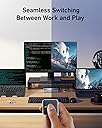
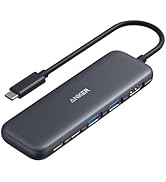
🔌 Power your dual-screen hustle with seamless switching and zero downtime!
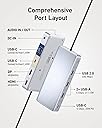
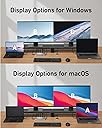
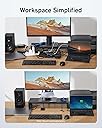
The Anker 554 USB-C Docking Station is a professional-grade KVM switch designed for seamless control of two laptops with a single button. It supports dual 4K monitors via HDMI and DisplayPort, delivers up to 100W power delivery for simultaneous charging, and offers a versatile array of USB and audio ports. Ideal for multitasking millennials craving efficiency and a clutter-free workspace, it combines premium build quality with responsive customer support.


| ASIN | B0C532J5JW |
| Best Sellers Rank | #11,340 in Electronics ( See Top 100 in Electronics ) #203 in Laptop Docking Stations |
| Customer Reviews | 3.8 3.8 out of 5 stars (239) |
| Date First Available | July 9, 2023 |
| Item Weight | 9.9 ounces |
| Item model number | A83K1 |
| Manufacturer | Anker |
| Product Dimensions | 6.69 x 2.83 x 0.94 inches |
A**R
Perfect Solution For Me
Before purchasing the Anker switch, I had tried a different one that was poor quality and didn’t work for me. The Anker KVM is a much better build quality, and works flawlessly for me. Set up was easy. I have two Lenovo laptops connected to one monitor and one Logitech wireless keyboard and mouse. Switching between the two laptops is super convenient and fast with the wired remote button. The Anker device has enough capacity to keep both laptops charged through their USB-C connections. The Logitech USB unifying receiver connects to a USB port on the front of the KVM device. Thr monitor is connected to the KVM with an HDMI cable. I only have minor complaint. The laptops don’t always wake up when I switch to them if they are idle for a while. I have to tap the actual laptop mouse pad to wake it. The issue may stem from the wireless keyboard and mouse rather than a design flaw with the switch. I have used the Anker KVM switch for about a month, and I am very satisfied with its performance and the convenience it provides.
C**L
Excellent customer service!
**Updated review: After my initial review, Anker immediately reached out to me to see if there was a way to resolve my issue. They ensured a full refund, if I was not completely satisfied and were willing to give me a discount if I would keep the unit in spite of my issues. I totally appreciated the responsiveness and empathy from their customer service. As an aside, I did check with my internet service provider (AT&T) and found out that my Wi-Fi settings were not optimized for video conferencing. Once those updates were made, I have had no issue with video conferencing using Wi-Fi connection only. It made me very happy that I was able to keep the Anker unit, because the only reason I was going to return it was because I thought I need to have an ethernet port. It is worth noting that the other KMV unit I was thinking of keeping had issues with one Dell monitor flickering. The Anker unit has no such issues with the same monitors and is very stable with switching between systems. Overall, the Anker KVM is much easier to set up, minimal wires, and I really like the little magnetized switch that I can stick to the front of my system for easy access in order to toggle between systems. Honestly, I am willing to go with a product even if I have to spend a little bit more when I know that the company stands behind it and is supported by a responsive customer service. It has been almost a month of using the item, and I am very happy. ---- For my consulting business, I need to toggle between my personal computer and my client computer. Because I work with data and large spreadsheets in both systems, a dual monitor set up is a must have. It was drama to swap wires several times a day--lag time to switch, wires would pop out. The Anker KVM switch fixed all of that. The lag time to switch between systems is negligible. Set up was intuitive with the quick start guide. I wished there was a couple more ports, or the option to order one with more ports -- I can't plug in my ring light and there is no ether port, which leads to my next issue. I previously was wired into my home Internet and subsequently, had a stable signal for video conferencing. I have already noticed that my video freezes several times during a meeting, tested both on Zoom and Teams so far. My job is 90% meetings, so to not have the ability to have a stable connection is a miss for me. I will be returning this unit and getting another that has an Ethernet port. If that's not something that matters to you, I highly recommend this product. It may seem pricey, but it delivers as promised.
A**R
Serious Monitor Signal issues
I jumped at the promise of this product but am now repenting at leisure. The Anker 554 has terrible problems passing along live monitor signals at the moment you switch computers. You click the button to switch to your other machine and the monitor goes black while you sit there moving your mouse and typing on your keyboard to no effect. Doesn't matter if you have a live session or if the login screen is active. The keys I type while the monitor is black are visible once I finally get in -- it isn't that the machine is in sleep mode, the monitor simply does not detect any video signal. This happens on both my M1 mac mini and my 2018 mac mini, my PC seems to work fine but that does not help me for daily operation. I have only found two ways to be productive: 1) to wait until the monitor sends itself into power saving mode and THEN my mouse/keyboard can wake the monitor or 2) to unplug the usbc cable at the mac mini and plug it back in. I have played with every display option on the monitor and machines, tried a million cables, read all the Anker "display problems" articles and Apple "monitor not responding" articles, nothing has yet solved this issue. A previous reviewer talked about lack of EDID support - maybe that's the problem. Whatever it is, this KVM is missing something fundamental and I would not buy it knowing what I know now, or at least I would keep all my packaging until I did serious testing.
B**L
It great, you just need to setup the keyboard/mouse wake up on your device. Charges both my laptops effortlessly, the butto is separate so you can stow away the wires in the back However, It came with a US plug rather than a UK plug, hence the 4 stars. You will need an adapter or alternative cable
Y**T
Edit: Updated to 5 stars after Anker reached out and rectified the situation. Very impressed by their customer service! Received the package and the packaging looks worn out. The plastic wraps around each cables were already torn and visibily have been unpacked by someone prior to this. I paid the price for a new item, but received a used item :( Other than the unpacking experience, the product itself works well. It's an expensive and niche product for people who want to switch between a desktop and laptop setup, but it works great and supports high resolution monitors which is not typical in other KVM switches / USB-C docks.
V**L
Anker read my mind when creating this product. I have a personal laptop and a work one, both sharing same peripherals (keyboard, mouse, headset, 2 monitors). I previously had a nonbrand hub which did the job but was crashing a bit. This KVM is awesome, expensive yes, but works great!!! Just make sure both laptops have Thunderbolt support or USB 4/5, one monitor has DisplayPort and another HDMI, then you're set!
A**R
I am using it with a Macbook Pro (M2) and a Dell XPS 15 9570 and it has been going okay for my needs. My setup is with a single LG 34" ultrawide monitor connected via HDMI, with two Logitech wireless mice and a keyboard, all connected wireless via a single Logitech Bolt USB dongle. The second USB A port is connected to a webcam, and the remaining USB-A port is connected to a charging pod for my earbuds. I have one USB-C port free. I work with both laptops in clam-shell (lid closed) mode. Switching between the laptops works fine with all accessories getting picked up by both MacOS and Windows 11. I couldn't get the Macbook Pro to work until I allowed the USB dock to be connected via a notification in MacOS. After that things work except for the following issues: * I have to lift the Macbook Pro lid up to get the display to show on my external monitor, this is annoying but better than me having to unplug and plug the display cable from my previous Dell dock * Power delivery is not 100W, unless you have only one laptop connected to the KVM switch. This is actually mentioned in the product description, but I overlooked it. This makes Dell XPS 15 Windows 11 report "Weak charging stage, please check power charger" notification against the battery icon with a warning in the taskbar, and also will make the boot pause before Windows loads with a similar warning. I don't use the XPS for gaming or anything power hungry, and you could always just connect the power supply that came with the XPS. But other than, works great for me.
G**Y
Easy to set up and easy to use. The magnetic back on the switch is a handy feature - I just stick it to my monitor bezel. KVM ultrawide monitor, $500+. KVM dock, <$300 and I can use it with any monitor I like. I have an actual KVM monitor with a USB-C upstream port, and a USB-A upstream port + HDMI and I had to buy a separate USB-C dock with power and USB and HDMI to get the convenience of a "flick of a switch". This dock does it all easily.
Trustpilot
2 weeks ago
2 months ago