⚙️ Power your FPGA projects with speed and precision — don’t get left behind!
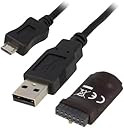
The DIGILENT Programmierer 210-299 (JTAG HS3) is a compact, high-speed USB2 JTAG programmer/debugger designed for Xilinx FPGAs and SoCs. It supports adjustable JTAG speeds up to 30 Mbit/sec, flexible voltage references from 1.8V to 5V, and features an open drain buffer for advanced Zynq SoC debugging. Compatible with Xilinx ISE and Vivado tools, it offers a plug-and-play experience powered directly via USB, making it an essential tool for professional FPGA developers seeking efficient, reliable programming solutions.
| ASIN | B0725Z7Q12 |
| Batteries Required? | No |
| Batteries included? | No |
| Colour | Black |
| Customer Reviews | 4.4 4.4 out of 5 stars (19) |
| Date First Available | 29 Oct. 2017 |
| Item Package Quantity | 1 |
| Item Weight | 27.2 g |
| Item model number | JTAG HS3 |
| Manufacturer | Digilent |
| Part number | 210-299 |
| Product Dimensions | 7.62 x 12.7 x 1.27 cm; 27.22 g |
| Shape | Round |
| Size | Small |
| Special Features | High Speed |
| Specification met | Industry Standards (Unspecified) |
P**R
Likely have bought a couple dozen of these for work. If you are using the Xilinx red or blue JTAG boxes, please stop. These work as-well (or better?), cost *much* less, are simpler to work into experimental rigs. Working on an experimental radar, so not uncommon to have JTAG into three different FPGAs over a physically large rig, and more than one test rig. Saves time ($$$) when you can leave a rig in-place, and not have to shuffle around pricey Xilinx JTAG boxes.
M**R
When I first connected the device, Vivado did not recognize it. When I checked device manager to be sure Windows recognized it as a device, I found that it showed up as a generic RS-232 device. I made sure I installed the cable drivers for Xilinx (ticking the box on the inital Vivado installer), and then I used device manager to uninstall the RS-232 device. Once windows stopped catagorizing it as an RS-232 generic adapter, The Xilinx cable driver was able to use it as a JTAG adapter. So it works, but not without some manual troubleshooting, without any documentation directly mentioning these driver problems, which to Digilent's credit, is not their fault. It works now. I hope this helps someone else wondering why the JTAG device doesn't show up at all in Vivado.
D**I
Good product
T**S
Save a lot of extra $ instead of buying the name brands to program or flash your FPGA devices, or debug. Use with Vivado tools and Xilinx UltraScale+, have had no issues.
D**.
Its exactly in the description, thank you!
Trustpilot
3 days ago
1 month ago