![[QLED Screen Upgrade] 7" Double Din Car Stereo with Wireless Apple CarPlay and Android Auto, 240W Powerful Sound, 4.2-Channel Audio Output, Bluetooth, MirrorLink, Backup Camera, AM/FM Car Radio](https://m.media-amazon.com/images/I/71dmmWFMGQL._AC_SL3840_.jpg)


Buy anything from 5,000+ international stores. One checkout price. No surprise fees. Join 2M+ shoppers on Desertcart.
Desertcart purchases this item on your behalf and handles shipping, customs, and support to South Korea.
🚗 Elevate your drive with next-level sound, vision, and wireless freedom!
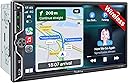
This 7" Double Din Car Stereo by SJOYBRING features a vibrant QLED HD display, wireless Apple CarPlay and Android Auto for seamless smartphone integration, and a powerful 240W 4.2-channel audio system. It includes a waterproof HD night vision backup camera with a 170° viewing angle and supports steering wheel controls for safer, hands-free operation. Designed to fit most car models with optional installation accessories, it offers a premium in-car entertainment and safety upgrade at an unbeatable price.


| ASIN | B0CWRM74FR |
| Audio Output Mode | Stereo |
| Audio Output Type | Speakers |
| Best Sellers Rank | #5,133 in Electronics ( See Top 100 in Electronics ) #29 in Car Audio Receivers |
| Brand | SJOYBRING |
| Built-In Media | 7inch double din Head unit, Frames and Brackets, ISO Stereo Harness, Rear camera, Remote control |
| Color | Black W021 |
| Compatible Devices | Smartphone |
| Connectivity Technology | Bluetooth |
| Connector Type | RCA |
| Control Method | Touch |
| Controller Type | Apple Carplay |
| Customer Reviews | 4.2 out of 5 stars 921 Reviews |
| Format | Unknown format |
| Item Dimensions D x W x H | 3.66"D x 7"W x 3.93"H |
| Manufacturer | SJOYBRING |
| Mfr Part Number | JOY-W021 |
| Model Number | JOY-W021 |
| Number of Channels | 4 |
| Other Special Features of the Product | Android Auto, Apple CarPlay, Built-In Bluetooth, DSP, Screen Mirroring |
| Output Power | 240 Watts |
| Output Wattage | 240 Watts |
| Special Feature | Android Auto, Apple CarPlay, Built-In Bluetooth, DSP, Screen Mirroring |
| Supported Internet Services | Pandora, YouTube, iTunes |
| Surround Sound Channel Configuration | 4.2 |
| Video Encoding | MPEG-4, RMVB, DivX, AVI, 1080P, MP3, WMA, JPEG |
| Warranty Description | 1 Year Warranty |
| Wattage | 240 watts |
| Wireless Technology | Bluetooth, Wi-Fi |
N**R
Excellent Value - Nice Settings - Good Bonus Camera - Unfortunate Glare
I bought this on sale for my 2004 Toyota Tundra. I did a decent amount of research beforehand and am happy I decided to go with this unit. No real issues in first 3 months of ownership. Apple CarPlay was easy to set up and if my phone's Bluetooth is on when I start the truck it connects fairly quickly without issue and stays connected. The CarPlay screen/layout is editable from your phone and it's easy to switch between CarPlay and radio/other sources. Some reviews mention not being able to play radio while using GPS of CarPlay but that hasn't been my experience (however, I might have newer software as I asked customer support for the custom Toyota boot logo which, as an aside, is a really nice touch). I'm not an audiophile so I can't comment on whether this improved the sound of my 20-year old truck speakers, but I do like the ability to adjust the EQ especially the output for my after market subwoofer as the alternative would be crawling under the seat with a screwdriver to manually adjust a dial. At the time of purchase they included a 'free' backup camera and it's surprisingly good quality. In the unit settings you can turn reverse guidelines on/off - a number of cameras out there require you to cut a wire to turn the guidelines off which makes it harder to turn them back on ;p My truck is 18-feet long and I was able to run the camera from the rear license plate all the way up to my head unit without needing any extenders - curious why people don't think the wiring is long enough, perhaps a less optimized wire route. Touchscreen has good responsiveness - for reviews saying otherwise I wonder if they've removed the protective film that's on the screen... I'm giving the unit 5-stars for value, features, and support. However, and this might just be my setup, there is a good amount of glare. Not sure other brands could avoid this. My truck isn't crazy big but my viewing angle is more side-on as opposed to head-on which probably contributes to the glare. NOTE: This was my first time installing a car radio - I'm fairly handy but did lean on YouTube videos to help as I'm not sure the manual would've been enough. I had to buy a wiring harness to connect this to my truck's speakers/system but that will be the case for 99% of buyers - I also needed a plastic dash mount kit so heads up you might need one too.
K**O
Very pleased with this purchase
I installed this unit in my 2008 Jeep Wrangler 4dr. Amazon says it won't fit, but it does. A Metra 95-6511 dash kit, Crux SOOCR-26 harness kit and Metra 40-EU10 antenna adapter are required for this application. Installation is not difficult for someone with mechanical experience and a bit of patience to remove the center dash panel. It isn't necessary to completely remove the panel and disconnect all of the climate control switches. Once the panel is loosened by removing two screws at the top and two at the bottom behind the trim panel, it pops out with a little bit of controlled force. I decided to mount the rear camera on top of the license plate holder light fixture. It had to be near the outer end to make room for the LR taillight assembly which must be removed to tap in the power and ground for the camera. Just run the cable behind the holder and through the existing hole in the body into the cavity behind the taillight. The camera cable will be routed up through the rubber grommet under the carpet and then along the edge (also under carpet) past the rear door and front door. Removing the plastic trim panels is required along with replacement plastic clips. Route the cable around behind the brake and accelerator pedals. It is a little difficult to get the camera cable up through the dash into position behind the stereo but I used a flexible fiberglass rod. Once the cable and harness adapter are in place the rest is just connecting the wires as shown in the manual. I used closed end cap connectors then zip tied the bundles together to keep it neat and tucked in. It is recommended that before you go through all of the trouble, first connect just the red and yellow power wire, ground and one speaker (I used green) to make sure the unit is functional and correctly connected to power. If so, you're good to go. After installation, I found that this unit does everything I need it to do. Sound quality is good (I have replaced the Jeep factory speakers with Kicker) and all of the functions work well. Setting up Bluetooth and Android Auto is easy. There are several display settings and everything operates smoothly. Depending upon how you mount the camera, there are settings to change the up/down and L/R orientation. It will probably be necessary to update the firmware after installation. The company website does not have download links for this. You must email them and include a photo of the version screen and a copy of the Amazon invoice and they will send back instructions for the update. A nice added feature is the ability to customize the boot screen with the manufacturer's logo of your car. This is available with the update package. Just tell them what you want. All in all, this appears to be a good choice. Lots of features and a low price point for a vehicle I use as an off-road toy. I've no doubt this unit will do well for a daily driver. Time will tell about the long-term durability but for now, it's all good.
D**R
WOW...just WOW!!!
I did my research for weeks, was hesitant to buy this one because it comes with features that high dollar stereo systems have for a price almost half of what they cost. Thank God I finally settled on this one. It is amazing, was easy to install, the wireless android auto works perfectly, I use Waze for navigation, it works full screen, I listen to Sirusxm through my phone and it shows up full screen. I know I feel like I'm over selling this, however, I am amazed with what it does for the price. If I had any concerns, it would be that the microphone is a little weak, but it comes with an external mic that takes care of that. You can't go wrong with this stereo. Oh, forgot to mention, the display is top of the line, the backup camera comes in clear and sharp.
J**H
(does NOT fit 2010 Corolla) I Regret this purchase.
I saw another review with it installed in a 2010ish Corolla and thought it would work in mine. it does not - the instructions say to use the original mounting hardware, but the mounting holes on the be stereo itself do not line up. So although it's hidden, my stereo is mounted with duct tape. But with that disclaimer made... The good: -The screen is nice. Colors are vibrant and resolution is definitely sharp. -included back up camera is fine, although instructions for wiring are not helpful. The bad: -Screen is as responsive as a cheap tablet from 2003. -no matter how your phone is connected, there is a constant 0.5 second delay in everything. This extends into everything you do on the device - when Im parked and waiting and want to watch YouTube, the video is out of sync with the audio. EVERY VIDEO is unwatchable. When I contacted support, their response: "It doesn't seem to affect the use" Wow, thanks. -but the WORST: this thing forces connection through wireless, even when wired. If your phone Bluetooth is on and previously paired to the car and connect through USB, it connects to your Bluetooth. If you turn off your Bluetooth, it FORCES IS BACK ON and connects again. If you unpair and forget the car Bluetooth from your phone, it forces it to pair again. The only way for you to actually connect using a cable is to turn off your wifi and Bluetooth on your phone. At first, I thought this was just buggy. But then it started getting sketchy, and I'm thinking it's because they skimped out on a cheap USB port that can't meet the data speed requirements for Android Auto. Overall, I regret this purchase. I'm sure there's cheaper options that perform just the same, or much better options for a little higher price. But I'm not gonna have spare time to rip this thing out, so I just have to live with this duct taped into my console, hijacking my Bluetooth to play out-of-sync audio. "It doesn't seem to affect the use". I mean can you believe that????
L**O
Worth the price! Clean Fit!
This Screen is a solid 8.5/10. I’ve have had this screen for about a week now, and I can certainly say that the quality of the stereo system is very good and the price is fair. I am a big fan of the Apple CarPlay and the Reverse camera included in the kit. I am also fond of the clean touchscreen design and high quality feel the stereo has. The radio that comes with the stereo is very efficient and easy to use. I appreciate how the USB cover fits very nicely and doesn’t make the unit look cheap. the product was fairly easy to install; this unit was installed into a 2001 Toyota Tundra limited Access cab. It’s very convenient that everything is automatically uploaded as soon as you connect to Apple CarPlay via USB, unfortunately you cannot do this as easy with the USB C cable. Bluetooth is obviously still an option and once you connect the car kit automatically connects from then on. Lastly, the unit is just clean and high quality and worth the price, the install was easy and I only needed to buy a aftermarket wiring harness additionally when installing this system. All in all, I am very fond with this product and rate it positively. Cons: This unit specifically has some delay. Whenever you click apps, change songs, connect to the CarPlay, basically whenever you do anything there is some delay. The delay is minimal but it’s definitely noticeable and maybe a dealbreaker for someone looking for a flawless clean transition or a high responsive system. It’s kind of annoying that you have to follow a long-ish process to upload a specific logo for the unit boot up screen. When I placed my order I expected it to be fairly easy. I was looking forward at looking at the Toyota logo every time I started my truck, but because I don’t want to go through the process of uploading the logo, I’m Stuck with a low quality image of the company logo. The back up camera has super minimal glitches whenever in use but it does not effect or impair your driving in any way, just a small detail.
T**Y
WOW!!!
I’m seriously impressed with this stereo. Honestly, I expected something decent for the price, but what I got feels like a premium unit you’d normally pay hundreds more for. The responsiveness is spot-on. No lag, no frustration, just smooth performance every time I use it. Installation was much easier than I anticipated, especially for a truck setup. Everything fit well, the connections were straightforward, and it powered up without any headaches. That alone saved me a lot of time and stress. The interface is clean and intuitive, making it super easy to navigate while driving. Whether I’m adjusting settings, switching music, or using features like Bluetooth or Apple CarPlay, everything just works the way it should. Sound quality is another big win. It brought new life to my system. Clear highs, solid mids, and noticeably better overall balance compared to what I had before. Overall, this stereo exceeded my expectations in every way. It delivers high-end performance at a fraction of the price, and I’d absolutely recommend it to anyone looking to upgrade their truck without breaking the bank.
J**H
Good, but volume knob doesn't have great longevity
Overall a good product, BUT: the volume knob is now not working well. It doesn't want to go up or down consistently and takes way more turns than it should. It started doing this over the last couple months I assume with the additional wear as I've had it installed for probably a year.
H**E
This is exactly what we were looking for at a price lower than we expected
This is a fantastic upgrade from the stock CD/radio in my daughter's 2009 base-model Toyota Corolla. Once you are used to having a backup camera, navigating by GPS audio/video map directions, streaming music from your phone, and hearing/sending text messages by voice, those conveniences can be sorely missed. I worried she would try to mess with her phone while she was driving (especially for navigation), so this was a birthday present for both my daughter and us parents. The wireless CarPlay connection is fast and (so far) solidly reliable, so she can plug in her phone to charge and tuck it away before she starts to drive. To prep for the install, I also purchased a 2009-2013 Toyota Corolla stereo double DIN dash kit and a Toyota wire harness (2 pieces), making the connections to the wire leads from this new unit to the OEM plugs used by the original stereo literally plug-and-play. No steering wheel controls in her base model, so I didn't have that complication to deal with, but even that didn't seem too hard based on the directions, just one more adapter to possibly purchase. Fishing the wires to support the backup camera was the hardest part of the install and between the printed instructions and the videos, there weren't really any outstanding questions about how everything should go. My total install time was probably 2.5 hours, but I'm the methodical detail-oriented type, so probably spent an hour tucking away the wires and lining up the trim in the dash "just right". Once it was all connected, the setup and bluetooth connection were straight-forward and easy, and we were ready to go in no time. As others have stated, the customer service is very responsive, and they quickly sent over instructions for updating the unit to the latest firmware versions and adding a nice OEM-looking boot screen, which was a very professional touch. Some of the nicer settings available for this unit are the home/call button backlight colors, a digital equalizer to tune the speaker sound, adjusting the audio attenuation to turn down music volume when audio like driving directions play over it, and setting a default volume when the stereo first comes on. There is also a screen brightness control which may be important if you drive at night. While the screen is very easy to read in the daytime, it can be distractingly bright in your field of vision at night. I think we found a good balance that works for both day and night, but I was happy to see that setting was available. Overall, very happy with this purchase, and would buy it again if I had it to do over. The only feature that would be nice to add would be an auto-dimmer of the screen (and maybe button backlight) based on the ambient light inside the vehicle. Apps like maps flip to dark mode based on sunset times, and that helps, but having the screen itself dim automatically would be a great feature to at least make available as a setting in some future version.
Trustpilot
1 month ago
3 weeks ago