Desertcart purchases this item on your behalf and handles shipping, customs, and support to South Korea.
๐ฅ๏ธ Elevate your viewing game โ where stunning OLED meets AI-powered brilliance!
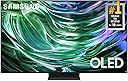
The Samsung 65-Inch Class OLED 4K S90D Series HDR+ Smart TV (2024) combines OLED technology with Pantone-validated colors for stunning picture quality, enhanced by Motion Xcelerator 144Hz for smooth visuals and Dolby Atmos with Object Tracking Sound Lite for immersive audio. Powered by the NQ4 AI Gen2 Processor, it upscales all content to crisp 4K resolution. Featuring Samsung's Tizen OS and built-in Alexa, it offers seamless smart functionality and gaming experiences, making it a top-tier choice for professionals seeking premium home entertainment and productivity.


| ASIN | B0CV9VGMPT |
| Additional Features | NQ4 AI Gen2 Processor; HDR10+; Object Tracking Sound; Active Voice Amplifier Pro, OLED HDR Pro; Motion Xcelerator 144Hz; Ultra Viewing Angle; Real Depth Enhancer |
| Annual Energy Consumption | 213 kwh |
| Antenna Location | Home Viewing |
| Aspect Ratio | 16:9 |
| Audio Input | HDMI |
| Audio Output Mode | Stereo, Surround Sound, Dolby Atmos |
| Base Depth | 10.4 inches |
| Base Width | 14.4 inches |
| Best Sellers Rank | #13,506 in Electronics ( See Top 100 in Electronics ) #9 in OLED TVs |
| Bluetooth Version | 5.2 |
| Brand | Samsung |
| Built-In Media | Power Cable, Remote Control, User Manual |
| Color | Graphite Black |
| Compatible Devices | Smartphone |
| Connectivity Technology | Bluetooth, Wi-Fi |
| Connector Type | HDMI, USB |
| Content Sharing Direction | Mobile to TV |
| Contrast Ratio | High |
| Control Method | Remote |
| Controller Type | Remote Control |
| Customer Reviews | 4.0 out of 5 stars 1,048 Reviews |
| Display Backlight Technology | Self-Luminous |
| Display Language Options | English |
| Display Refresh Rate in Hertz | 120 |
| Display Size Class | 65 inches |
| Display Technology | OLED |
| HDR Format Supported | HDR Pro |
| Hardware Interface | HDMI |
| Integrated Surround Sound Format | Dolby Atmos |
| Internet Applications | Alexa, Apple TV, Disney+, Google Assistant, HBO Max, Netflix, Prime Video, Web Browser, YouTube, hulu |
| Item Dimensions D x W x H | 10.4"D x 56.9"W x 35.3"H |
| Item Weight | 49.6 pounds |
| Item Weight Without Stand | 46.7 pounds |
| Line Voltage | 100-240 VAC 50-60 Hz |
| Manufacturer | Samsung |
| Maximum Display Brightness | 1000 nit |
| Mfr Part Number | QN65S90DAFXZA |
| Model Name | AMZ1DSAMQN65S90DA |
| Model Number | QN65S90DAFXZA |
| Model Series | S90D |
| Model Year | 2024 |
| Motion Enhancement Technology | Motion Xcelerator 144Hz |
| Mounting Type | Wall Mount |
| Number of Audio Channels | 2.1 |
| Number of Batteries | 2 AAA batteries required. |
| Number of Items | 1 |
| Operating System | Tizen |
| Picture Quality Enhancement Technology | NQ4 AI Gen2 Processor |
| Refresh Rate | 120Hz (Up to 144Hz) hertz |
| Remote Required Battery Size | AA |
| Resolution | 4K |
| Screen Finish | Flat |
| Screen Mirroring Technology | Smart View |
| Screen Size | 65 inches |
| Signal Format | HDMI |
| Size | 65-Inch |
| Speaker Description | Built-In Speaker |
| Special Feature | NQ4 AI Gen2 Processor; HDR10+; Object Tracking Sound; Active Voice Amplifier Pro, OLED HDR Pro; Motion Xcelerator 144Hz; Ultra Viewing Angle; Real Depth Enhancer Special Feature NQ4 AI Gen2 Processor; HDR10+; Object Tracking Sound; Active Voice Amplifier Pro, OLED HDR Pro; Motion Xcelerator 144Hz; Ultra Viewing Angle; Real Depth Enhancer See more |
| Specific Uses For Product | Entertainment |
| Total Number of HDMI Ports | 4 |
| Total USB 3.0 Ports | 1 |
| Total Usb Ports | 2 |
| Tuner Type | ATSC/ClearQAM |
| UPC | 887276821825 |
| VESA Mount Standard | 300 x 200 mm |
| Video Encoding | H.264, H.265 (HEVC) |
| Warranty Description | 1 year manufacturer |
| Warranty Type | Limited |
| Wattage | 70 watts |
| Wireless Technology | Bluetooth, Wi-Fi |
J**K
Great as a monitor for an aging Mac Studio user.
Getting older isn't so bad, but the one thing that's been bothering me is constantly having to check my vision to upgrade my eyewear and adjusting monitor screen resolutions on my Mac Studio. I've been using Mac Studio Display for years and despite its native 5K resolution, I was pretty much stuck on 2560x1440 and still wasn't comfortable. I needed more desktop space without having to use magnifying glasses. I tried using various monitors and they've all been gathering dust or been given away to friends and family who had better uses. After finding some reviewers having used this and a similar LG model as a PC monitor, I thought I'd give it a try and boy am I glad I did! I got it set at full 4K resolution and I can make out every detail and text from my normal desk working distance. I'd have to rely exclusively on my prescription reading glasses to work on my computers. I still have my Studio Display connected in case I need to work on photos and videos with color accuracy, but for the bulk of my time on my desk, this is pretty awesome. Sharpness and clarity on small texts is easily the best I've seen on any 4K monitors I've purchased (less than $500) in the past. I've watched some 4K movie trailers from Apple TV and with a bit of tweaking on the TV settings, it's a total winner for that usage. Taking a break from work to watch a movie on a 42" screen about 3 feet from away with your legs up on the desk is just perfect. Only tested for a few hours, but like I said earlier, unless you need to monitor professional video/graphics work, this works very well as a 4K computer monitor for those with vision problems. It's just really simple - it's a big screen so everything looks bigger at the same resolution WITHOUT losing the details (this is what normal/cheap TVs can't do). So you don't have to fight your vision to keep a large computer desktop space. This will NOT work if your desk depth is too shallow. I'd say the monitor needs to be at least 2 feet away from the front edge of your desk and I'm very comfortable at 3 ft from my eye to screen surface. If you have a small desk, I suggest you get a bigger desk just to use this as a monitor. It's that good. All this just so I can get a little over 2X computer desktop space without straining my vision. Totally worth it for me.
B**R
Once you go OLED...
First of all the Amazon unpack crew were awesome. I'm incredibly pleased with their service. Now to the TV. WOW. OMG. AMAZING. :) For those that need more details this replaced a 10-year-old Samsung vanilla LED backlit LCD TV. My old TV had no local zones, no real HDR, and while it said I had Dolby I never got it to work. After 10 years of moderate use the LEDs are burning out leaving darker areas all over the screen. For what I paid it's been a good TV but the technology has changed a lot since I bought it. I decided to spend a little more $$ this time and try OLED and I'm glad I did. The picture is stunning and the sound is very good without any help (I will be adding 5.1). My living room is dark but even with the windows uncovered the picture is clear and bright with barely any glare. I don't like the remote because I have very large hands and it is very tiny. I have managed to use it and like that it's solar powered but seriously can't they make them a little larger? I'm not thrilled with the overly complex Samsung home screen but then I'm used to a fire stick which has a nice simple functional home screen. In all if it holds up over time I'm very pleased with both the set and the Black Friday deal on Amazon.
J**.
Buyer Beware!!!
I waited until today to write this review of this TV for a specific reason to be shared below. This comment has NOTHING to do with the seller or the actual delivery and setup. Both of those parts of the purchase went without issue or headache. This TV was delivered December 9th and on Sunday December 29th the TV would not turn on. I first thought it might be the remote not getting enough solar charge, but that didn't seem to fix the issue after letting the remote set in light for a while. Not a reason I am giving this TV a score of 1 star, but there should be a way to see if the remote is getting enough power or is charging at all. I find it a bit ridiculous that there isn't a couple of LED lights on the remote to just let you know where you are in the charging aspect. I then did what any normal person would do and went to the Samsung website for assistance. The Samsung website was so useless that I don't even understand why they have the help section. No red light? Try a different plug>You think!? It worked yesterday, but sure. Push the home button on the remote>Okay, but I don't know if the remote is charged, but nothing changed Hit the power button on the TV to see if that fixes the issue> Okay, where is the power button? Since I have no manual and couldn't seem to find it on the website, I could only find "For newer models it is usually on the right side of the TV" > Only HDMI/USB ports on the right side of the TV. Out of options, I went to chat and got the automated chat that took me through the same steps. I get that for people who didn't read the help section. Then I requested to chat with someone, that person just wrote down what the help and automated chat stated before. I had to provide the SN of the device prior to them proceeding. When we got to the power button part, I kept saying there isn't a power button over here. Then I would ask through chat, you have my model, where is the power button? I just received the can answer of it being on the right side of the TV. I asked to escalate it to someone who wasn't going to provide me the canned answers and could actually help, I was directed to the Samsung in house support. I decided that trying chat again was not going to be useful. I then thought about returning the TV and purchasing something else, but got a good deal on this one for Black Friday. I decided to move forward with the in home support. The first day that they had available was Friday Jan 3rd, meaning 20 days of owning the TV it goes out and I have to wait 6 days with a broken TV equaling a 76% uptime on a brand NEW TV! I went back and started watching my 14 year old Panasonic Plasma TV ( I know old, but it was working) until the repairman arrived. I made sure that it was accessible per their instructions. When HE arrived to work on it, he informed me that I had to HELP him take it off the stand, place it on the floor for him to work on it. I asked him if he had a blanket for the floor and he seemed shocked that I wasn't going to provide my blanket for him to repair my device. He went and got one from the truck after he remember he had one. We put it down for him to repair the device and put it back together and back on the stand. He left in a rush that he didn't realize that he had left a part in the back of the TV. We had to do the same steps again to get HIS part out of the back of my TV! Before him leaving I asked if he had anything to clean the screen and he said no and left. This got me starting to think where else do we accept this type of behavior? Would anyone go to get an oil change and need to help the mechanic drain the oil, because he couldn't? Then when getting back in the vehicle it is covered in oil and they just skip away! What about the people at home that cannot assist the in home support to get the TV down and on the floor? Do they just cancel and say, that is on you to get it on the floor, because that isn't the instructions provided prior to them coming out to fix a BRAND NEW TV! My impression? The TV is Junk The Chat/help is worthless In Home support is slow and lacking forethought
B**N
When & what Amazon will do for me!
Mine broke in May on the 21st... finally got a tech out here on the 12th of June... he said"its not repaiable" Sent info to Amazon ... says they'll contact me in 48hrs with a resolution... Not Yet! Today i the 16th of June! Still waiting July 3rd.... Asurion! Assyrian finally got their s*** together... After being without a TV for a month, they finally delivered yesterday. We had other projects going on. But I finally got it back online last evening at about 8 PM. Finished setting it up this morning. This all should been completed in a couple of days instead, I have been out of a t v for a month! I mustadmit this OLED TV buy.Samsung has a beautiful picture. loved i loved it when I first bought it in 2024 & now the new replacement. I hope this this goes without any trouble. Alas, for a long time longer than a year Again Asurion very very much disappointed me! It should not have taken as long as it did to get my t v replaced, but they tell me the checks in the mail! We'll see.I've got to wait about ten days. I went ahead and bought a duplicate of what I had before, THE SAMSUNG O L E D T V. I'M GLAD THIS IS FINALLY OVER! WELL, IT WILL BE ONCE I GET TO CHECK!
K**T
Absolutely awesome tv
This tv is awesome. The picture is absolutely amazing. It has a lot of great features. A control my entire smart home with the built in Alexa. Can view all my ring cameras. It connects to WiFi easily and has all the streaming app you want.sounds good for a tv that is not even an inch thick. Has a fright colorful screen. The cost was a great value for the quality of the tv. The screen seem very thin but seems to be very durable. You wonโt go wrong getting this tv.
P**R
Find a new Samsung OLED from previous model year.
When you buy a TV on Amazon, don't buy it solely based upon price. Make sure to check out all the available vendors and be willing to pay a little more to purchase it from a highly rated seller. I think the most disappointed buyers on Amazon probably bought on price alone and they may have received a used or refurbished TV rather than a brand new unit. Even if the packaging suggested it was brand new, it may not have been. This TV is now 2-3 years old and has worked flawlessly out of the box since day 1. Being an OLED, it delivers a brilliant picture. Nothing better than OLED IMO. The sound is very good and its ultra slim profile is space saving in my tiny home. I would highly recommend Samsung as a brand. This TV has worked extremely well. Lastly...I would suggest to all buyers to determine what you want from your TV. If picture quality is most important, find a new TV in the desired size that's a model year older than the current year. Most of the technology will still be there and you'll save hundreds of dollars.
Z**N
Great TV, but...
Picture is great. Only issue so far is, after 2 months, the tv would not turn on. Called customer service and a technician came out a couple of days later. He took the back off and replaced a part inside. Easy fix, under warranty so no cost. Been working fine since then, about 4 months. Only 4 stars because of this issue.
C**H
Bad enough customer service experience I'm switching to LG/Sony
The TV itself was pretty amazing... until the unit's power supply blew up a few months after purchase (known issue, look it up). Now Samsung is ghosting me and won't respond to any attempt to communciate. Longer story - Samsung has been a total NIGHTMARE to work with to try and get either a replacement or store credit under the warranty. It started with Amazon suggesting I reach out to Samsung leading to multiple iterations of answering the same questions multiple times, doing the same troubleshooting steps multiple times for multiple agents, sending the same photo of the serial number and unit number and invoice multiple times, etc. Why one hand is utterly incapable of talking to the other with them is hard to fathom and quite frustrating. At some point Samsung came to the conclusion they wanted to send a technician out to me to attempt a diagnostic and repair. I'm a bit far from any major city and it was pretty clear fairly quickly they weren't going to be to get a tech in the area, but for some reason even after one department had concluded that was the case, the next time I called and got a different deparment it was up to ME to explain to them why trying (again) to find a technican wasn't a good idea. Not that it helped, they tried again, wasted a few more days, and came back with the same conclusion their company had already made - no tech in the area. Again, hands do not talk to each at Samsung. Then we got to the point where two deparments had two different ways to fix this and both claimed they owned the process - one said they would contract a trucking company to pick up the old unit and give me a store credit. Other deparement said that was silly, they would contract the same trucking company and send them a new unit and have them deliver and pick up old unit. Second department seemed to win the day and I've been waiting about a month and half since this determination. I was told originally that the trucking company would reach out in 10-15 business days. No luck. I texted on the thread Samsung had been communicating with me on asking for next steps. Now told 5 more days was needed, but exchange was made, trucking company had the new unit and to wait to hear from them. I was also given an email for the trucking company. I emailed them; no response, of course. 15 days later emailed again and texted again. Zero reponse on either channel. 2 weeks later, aka 2 days ago, texted again. No response. I'm being ghosted, obviously. My next steps are I'm going to reach out to Amazon for any advice and see what they suggest. I will also call Samsung again and see if that spurs action. Not sure after that.
Trustpilot
1 month ago
2 months ago