


Desertcart purchases this item on your behalf and handles shipping, customs, and support to South Korea.
💿 Elevate your media game with Verbatim’s powerhouse dual-layer discs!
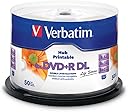
Verbatim LifeSeries DVD+R DL discs offer 8.5GB of storage with 8X write speed, perfect for high-capacity video or data archiving. Featuring a white hub printable surface, these discs allow professional-quality, full-color label printing. Compatible with most dual-layer DVD drives and players, the 50-pack spindle is backed by a Limited Lifetime Warranty, ensuring reliable performance and long-term data preservation.


| ASIN | B0080Q22KC |
| Best Sellers Rank | #4 in Blank DVD+R Discs |
| Brand | Verbatim |
| Built-In Media | Item |
| Color | multicolor |
| Customer Reviews | 4.2 out of 5 stars 1,706 Reviews |
| EU Spare Part Availability Duration | 1 years |
| Format | DVD |
| Global Trade Identification Number | 00023942976936 |
| Item Weight | 0.09 kg |
| Manufacturer | Verbatim Americas LLC |
| Media Speed | 8x |
| Memory Storage Capacity | 8.5 GB |
| Mfr Part Number | 97693 |
| Model Number | 97693 |
| Recording Capacity | 4 hours |
| UPC | 023942976936 |
| Unit Count | 1 Count |
| Warranty Description | Limited Lifetime Warranty |
| Write Speed | 8x |
J**E
Nice disks
Great disks, good way of having physical media instead of trusting some server wherever it may reside. Burning software reported nice and smooth burn at 8X which is pretty good. Good price point for something that can last over 25 years without power and doesn't react to rapidly changing magnetic fields. Recommend
C**O
They worked great with one of 2 of my burning programs
I first tried the discs with DVD Shrink and it wouldn't recognize the discs. I then tried DVD Fab, the first 4 I used that were rejected by DVD Shrink, worked just fine with DVD Fab.
K**S
Much easier to find than LightScribe discs
These discs actually are just what I needed I still have a couple of Sony Carousel CD and DVD players and I do still have the ability to create my own discs. I actually have drives that can do LightScribe but since nobody makes LightScribe this anymore that are inexpensive I went with these.
Q**N
Complete waste of money and time
I wish i would have read these other reviews before I bought this trash because theyre all true. When i would get a disc to finally burn after attempting 2-3 other discs and ejecting it and putting it back in countless times, it would only occasionally play on a single new dvd player i own. Neither my old dvd player, or my tested and functioning xbox player could read anything from any disc. If you love throwing your time and money away, this is the product for you!
Z**R
Ok, but don't burn in a BD writer
Pros: Good for labeling with marker. So far no write errors (first 4 discs). I only burn long movies on these, or backups if I need 8GB. Cons: After burning standard DVD video on a BD writer, these discs do not play in my BD player. These are the only discs that give the "invalid" error when starting in the BD. But they will play in a standard DVD player. However, after burning on standard DVD writer, they will play in the BD player. I recommend burning movies on these discs using only a standard DVD writer. No other disc I used out of 3 brands had this issue.
I**0
Great to use in a DVD Recorder
These ended up working so much better than an off brand I had previously purchased. My Pioneer DVD Recorders recognized the discs immediately.
J**N
Always good discs
Great discs, but Amazon keeps shipping them in an unpadded bag so that the plastic container gets banged around and shattered.
V**O
Steady performer
I have ordered these several times and I use them to preserve video. Got the Verbatim brand on the recommendation of my brother who works in video film and imaging. They aren’t the cheapest buy but the price is good. The Verbatim brand is known for quality, seldom a bad disc in the batch and durable for the long term.
K**K
Verbatim DVD dwuwarstwowy DVD+R DL
FULL RECOMMENDATION!
R**O
In 20 anni non ho mai bruciato un DVD della Verbatim, nemmeno uno, né con questa tipologia né con altre paritetiche
L'errore che commette la maggior parte di chi masterizza è quello di voler masterizzare al massimo della velocità offerta dal "supporto" (inteso come DVD) acquistato. Per essere sicuro di masterizzare con efficacia, puntando alla qualità della masterizzazione dei dati impressi su questo tipo di supporti, la prima cosa da fare è quella di abbassare la velocità in fase di masterizzazione. Per esempio, se un supporto è testato per masterizzare ad una velocità di 8X, impostando il masterizzatore con una velocità di masterizzazione a 4X, saremo quasi certi che la masterizzazione andrà a buon fine con una precisione di scrittura sul supporto nettamente superiore rispetto alla stessa masterizzazione a 8X. Qualcuno potrebbe obiettare che allora non ha senso vendere ed acquistare un supporto certificato a 8X se poi si deve masterizzare a metà della sua velocità prevista. Nello specifico se uno desidera masterizzare al massimo della velocità supportata da un DVD senza mai fallire le masterizzazioni , bisogna in primis avere dei requisiti hardware software superiori ai normali standard qualitativi offerti dai PC e notebook di serie. Semplificando, se volete masterizzare al massimo della velocità offerta da questi tipi di supporto, dovete avere un masterizzatore che consenta un'alta precisione di masterizzazione (parliamo di masterizzatori che non possono costare solo una ventina di euro come quelli di serie), un PC dotato di RAM interna almeno doppia rispetto alle sue normali esigenze di funzionalità , di un software per la gestione della masterizzazione serio, tipo Nero Burning o comunque software blasonati dello stesso calibro. Senza questi presupposti non ci si può lamentare se si "bruciano" i DVD imputando la causa unicamente alla loro marca o tipologia. Riassumendo, se volete masterizzare con successo con un PC normale, dovete: 1) prima di masterizzare assicuratevi che il PC non tenda a "singhiozzare", (ovvero abbia la tendenza a bloccarsi momentaneamente con clessidra che gira), nel qual caso sarebbe veramente d'aiuto masterizzare disconettendosi da internet e disabilitando MOMENTANEAMENTE l'antivirus (che va quindi riabilitato immediatamente una volta terminata la masterizzazione). 2) Impostare la velocità di masterizzazione a metà della velocità supportata dal DVD che avete acquistato 3) Utilizzare un software di masterizzazione serio di comprovata efficienza 4) non muovere e non dare scossoni al PC durante la masterizzazione (come avviene con quelli che vanno in giro per la casa con il notebook mentre è in corso di masterizzazione) 5) ultimo (ma non per ultimo) avere un buon masterizzatore e una sufficiente quantità di RAM installata nel PC. Se la ram scarseggia, durante la masterizzate, non giocate e non fate fare al PC altre cose. Lasciategli fare solo la masterizzare e magari per quei 10-15 minuti in cui il vostro PC è impegnato in questa operazione, voi trovate qualcos'altro da fare ma non sul PC. **************** AGGIORNAMENTO GIUGNO 2018 **************************** Questo giugno ho ricomprato una campana di questi dvd, e, dei precedenti 50 pezzi, non ne ho bruciato nemmeno uno; quindi riconfermo le mie 5 stelle.
R**R
El producto es sencillamente lo que se describe
M**O
Très bon produit
Très bon produit
C**3
Muy bueno
Muy buena calidad y capacidad. Funcionan excelentemente bien
Trustpilot
2 days ago
1 month ago