Desertcart purchases this item on your behalf and handles shipping, customs, and support to South Korea.
🎮 Dock, charge, and dominate your game setup like a pro!
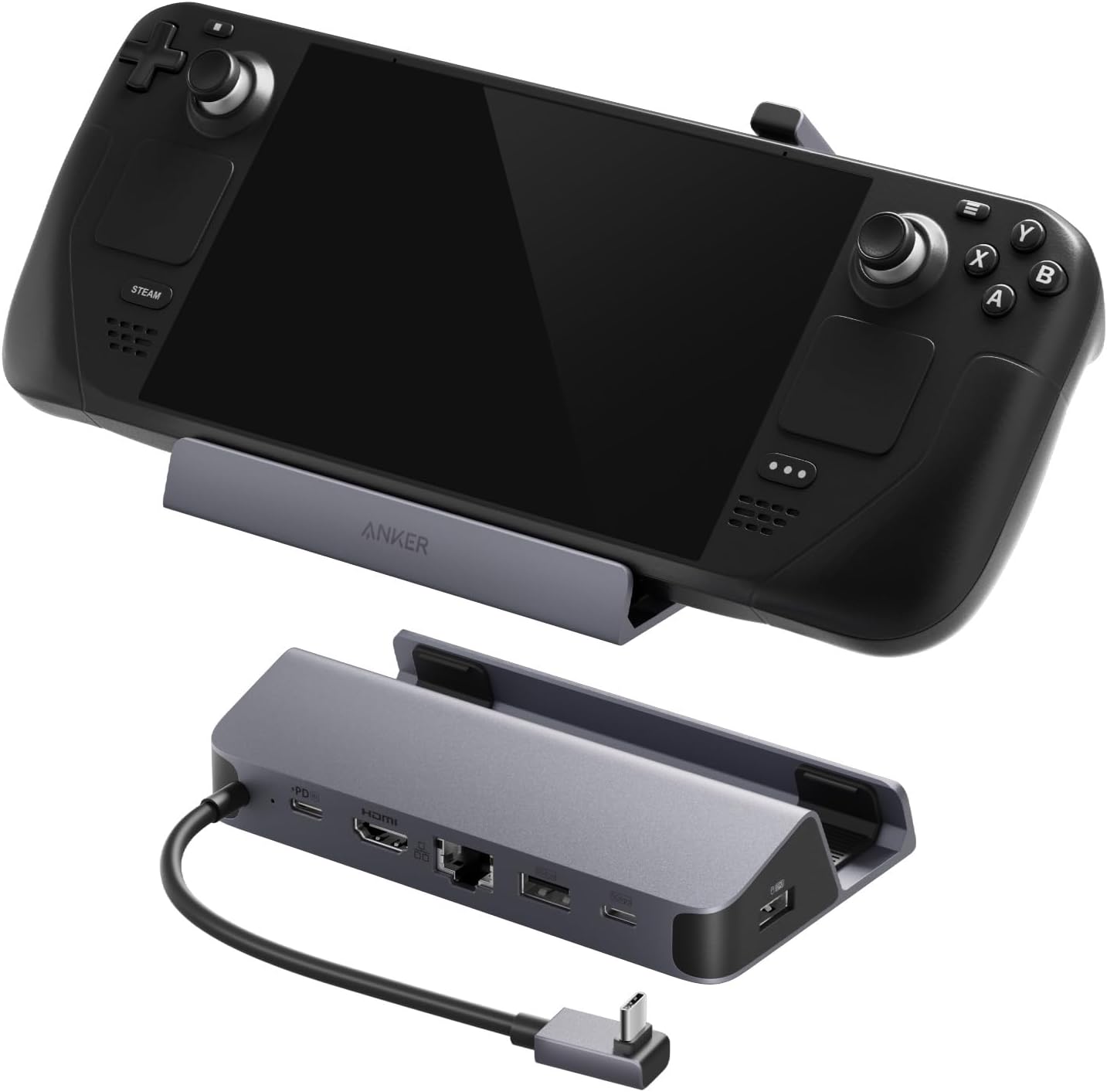
The Anker Steam Deck Dock is a premium 6-in-1 USB-C hub designed for Steam Deck and similar handheld PCs, featuring 100W fast charging, 4K@60Hz HDMI output, 1Gbps Ethernet, and multiple high-speed USB ports. Its durable anodized aluminum build and stable rubberized base make it a sleek, reliable docking solution that transforms your portable gaming device into a full desktop experience—at a fraction of the official dock's price.


| ASIN | B0CS6BWL4Q |
| Best Sellers Rank | #322 in Computers & Accessories ( See Top 100 in Computers & Accessories ) #29 in Laptop Docking Stations |
| Brand | Anker |
| Color | Grey |
| Compatible Devices | Steam Deck/ Steam Deck OLED/ Asus ROG Ally/Lenovo Legion Go/ USB-C Pad |
| Customer Reviews | 4.4 out of 5 stars 1,687 Reviews |
| Hardware Interface | Ethernet, HDMI , USB 3.0 |
| Input Voltage | 240 volts |
| Item Weight | 150 g |
| Manufacturer | Anker |
| Mfr Part Number | A83S1 |
| Model Number | A83S1 |
| Number of Items | 1 |
| Number of Ports | 6 |
| Total Number of HDMI Ports | 1 |
| Total USB Ports | 4 |
| Total Usb Ports | 4 |
| UPC | 194644194666 |
| Unit Count | 1 Count |
| Warranty Description | 18 months |
| Wattage | 100 watts |
C**G
Works well, significantly cheaper than the official Valve solution.
I've purchased quite a few Anker products over the years and they've all been of surprisingly high quality given their price. This handheld PC dock is of the same standard I'd expect from all their other products. It's significantly cheaper than the official Valve Steam Deck Dock, but the official dock does offer an included charger and DisplayPort out, which this does not. I already had a compatible charger on hand, and DisplayPort was not a concern for my setup, so this option suits my needs great. It has an anodized aluminum frame, kind of a silvery-but-not-gray tone to it. It has rubberized surfaces to keep the device in place in the dock and the dock on whatever surface you set it on. The braided USB-C cable seems to be thick and sturdy, and will likely hold up well over the long haul, assuming you don't abuse it. My setup has hardwired ethernet in and HDMI going out to an AVR. There's a few USB ports (A and C) that can be used to attach other peripherals like a keyboard and mouse, or a video game controller. I mostly use this setup for Steam Link / Remote Play with my desktop PC, to put the games "on the big screen", and for that it works well. There's definitely a lot of little setup things that need tweaking, but that's on on the software side and has nothing to do with Anker's product here. I'd definitely recommend this Anker dock to anybody looking to dock their Steam Deck or similar handheld PC and wants ethernet in, HDMI out, and a handful of additional USB ports. It looks nice, functions just as it should, and seems of high quality at the price point. Just keep in mind it does not include a charger; and you'll probably want one that's at least 45W -- Anker sells a nice one. :-)
S**N
Amazing Price and Dock
I wasn't using my steam deck a whole lot until a friend said try switching to a this dock for playing. This Anker Steam Deck Dock basically turns my Steam Deck into a desktop. I give it a 5-star win because it's a minimal one time -setup, plug-and-play experience that works with my Steam Deck and multiple other PC handhelds. I’ve got my peripherals such as controller, mechanical keyboard, mouse, and a TV hooked up through the ports on the back and wirelessly through HDMI and USB-A ports, which makes it feel just like my old laptop setup. The dock seems to be quite durable as well as compatible and fits with many types of devices. The 100W charging is pretty awesome too if you want to plug in a regular laptop too. The weighted base with grippy silicone keeps everything steady and If you want a set-up that gives you a feeling like playing at your desk, I highly recommend this. It’s way cheaper than the official one and does the exact same thing. Overall using this dock pushed the adjustments I needed for a happier gaming time, The only wish i havr for it would be a few more USB Ports.
B**Y
Can't beat the quality for the price
The Anker Steam Deck Dock is a great compact hub that makes using the Steam Deck on a monitor or TV incredibly easy.It provides all the key ports you need—HDMI for 4K at 60 Hz, Ethernet, USB-A, and USB-C—so you can plug in a keyboard, mouse, and other accessories without hassle. Charging is fast and reliable, letting you play while docked without worrying about battery life. The dock feels well built and stable on the desk, and the angled USB-C connector keeps the handheld seated comfortably while gaming. Overall, it is a very practical and high-quality dock for anyone wanting a simple way to turn the Steam Deck into a mini desktop setup.
C**B
amazeing
Recently, I got an Anker 6-in-1 Charging Station for my Steam Deck, and so far, it has been a fantastic addition to the Steam Deck setup. The dock provides a USB-C hub complete with a variety of useful features: an HDMI port capable of supporting 4K at 60Hz makes this process really painless when trying to stream and hook up with bigger screens. Meanwhile, it will also be fitted with one 1Gbps Ethernet port to ensure that I can connect it for faster and more stable gaming online. In addition, with two USB-A ports and one extra USB-C port, the connecting of other accessories and peripherals will pretty well be easy without requiring separate adapters. And pretty cool, too, is the fact that there's 100W fast charging that keeps my device going even in long gaming sessions. The dock itself is compact and slick, fitting just about right with my gaming setup without taking too much space. I like how well it is built, too; it feels sturdy, and the design holds either the Steam Deck or the ROG Ally nicely in place. It made my setup so much easier, having all of my connections wrapped into one, leaving me to never again have to worry about the chaos of multiple adapters and cables on my desk. All said and done, highly recommended is this charging station for those who own a Steam Deck or an ROG Ally. It's such a functional, multi-functional piece and strong accessory, which really extends connectivity and amplifies charging speeds. Recommended to gamers who like neat and efficient setups.
F**K
Great Deck Accessory
This functions perfectly, and provides a solid value for its price point. The only downside is that it puts slight pressure on the Steam Deck's display. After hundreds of hours of use, this had not caused any issues, and I only noticed because the pressure point shows when the Deck is powered on, but the screen is black (such as between loading screens). I found that this can be avoided by simply seating the Deck so that only the left half is sitting in the dock (this also gives the intake vent the most space). If you have a case on your deck, this would not be an issue at all. Overall, this is a solid accessory for the Deck. I would highly recommend getting this if you have one.
D**W
Great alternative to the OEM version.
I was going to buy the official Steam Deck dock from Valve, but at $80... it gave me pause. I'm so glad I held off because this Anker dock is a perfect companion to my Steam Deck OLED. Build quality: this dock is nice and weighty. I never feel like my Deck will fall off the side table. Rubber padding protects the Deck so I never have to worry about it getting scratched up. Connectivity: The ethernet port and USB expansion ports are very welcomed additions. I haven't tested out the ethernet port yet (no room on the router) but the HDMI port works a treat. I also love the USB ports. I leave a 1Tb drive I had laying around as a dump for games I don't play often enough to warrant taking up space. And when I dock, they just pop right into the library. Setup and Use: Dead simple. Just pop it out of the box and plug in the cables you want to employ. Overall: It's very cool to have a portable steam PC that I can move from TV to TV (I have two of these docks). I also have my PC for 4K144 gaming when I need it, but I kind of prefer lounging on the sofa with a controller sometimes.
P**K
Very happy with this unit. Works with all my devices.
Picked this up on Prime Day for about $28US. Works great with my Steam Deck. Also, since this is basically just a USB-C hub, it works with my Macbook and also with my iPad (w/ USB-C). I'd get a 100W charger if you're going to use it extensively with the Steam Deck. I used the charger from my Macbook (140W) which works fine.
M**L
Nice Dock, but not compatible with all devices
Dock is very well made and I am sure is fully functional however I was unable to even try to use it. When purchased the listing stated this is compatible with the ASUS ROG Ally X, however the docking slot for the device is not large enough for the device to fit. The listing now notes this discrepancy, much to my chagrin. I have always had luck with Anker products, and had this actually fit my device, I probably would have enjoyed this as well.
P**L
High-Quality, Reliable, and Packed with Features
The Anker Steam Deck Docking Station is a premium accessory that transforms the Steam Deck into a versatile desktop gaming setup. Built with Anker’s signature quality, it has a solid, compact design that sits securely on any surface without wobbling. The multiple ports—including HDMI, USB-A, USB-C, and Ethernet—provide seamless connectivity for monitors, peripherals, and wired internet, making it perfect for both gaming and productivity. Setup is plug-and-play, with no drivers required, and connections remain stable during extended use. Video output is crisp and lag-free, and USB devices respond instantly. The dock also allows charging while in use, eliminating the need for extra cables cluttering your desk. While it is slightly pricier than some generic alternatives, the durability, reliability, and polished performance make it well worth the investment. For Steam Deck owners seeking an all-in-one docking solution, this is a top-tier choice.
T**I
Anker never disappoints
I bought this for my steam deck. Direct internet cable connection showed the Latency of 17 with GeForce Now ultimate tier (definitely get it with your steam deck btw). Cable connected to docking station then to deck showed the latency of 19 which is exceptional considering the internet going through a middle device first and then to steam deck. PD 100w worked without any problem with a 100w single-port only USB-C charger (also from Anker btw). HDMI connects flawlessly as well. Peripherals USB-A port also directly recognised the controller with zero lag/latency. I haven't been disappointed with Anker until now. Been using the brand for 5-6 years at least. I will update this post in case in the future the docking station caused any problems but so far so good everything seemes very well way above average brands for a very good price. If you see this post like this without updates, know that the device is still working flawlessly regardless of the time you read this post.
S**E
Ottima dock station
Visto il prezzo di quella della Valve ho deciso di acquistare questa molto più economica. La utilizzo quando devo collegare alla Steam Deck alcune periferiche come mouse e tastiera. La qualità dei materiali è molto buona, è in metallo e ha una striscia di gomma dove vai ad appoggiare la Steam Deck per non graffiarla. Il cavo con cui lo colleghi alla porta usb-c è della lunghezza giusta e le porte delle periferiche sono sul retro, facili da raggiungere. La maggior parte delle volte la utilizzo collegandoci mouse e tastiera (scomodissima altrimenti da richiamare su steam deck) e il monitor per avere più spazio. Certe volte collego anche un controller così da giocare usando il monitor come schermo principale. Molto comodo anche per collegare chiavette o hard disk per spostare file. Questo prodotto praticamente vi trasforma la Steam Deck in un computer.
L**S
It works
Just connected the power supply and the HDMI cable, everything works fine. I haven't tried connecting more peripherals
T**I
)
Ok
Trustpilot
2 weeks ago
5 days ago