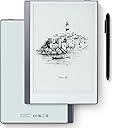
📝 Elevate your note game — where tech meets timeless paper vibes!
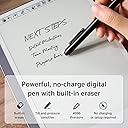
The Geniatech KloudNote Mini 9.7" is a sleek, silver digital notebook featuring a 9.7-inch eye-friendly E-ink display and a powerful 1.5GHz quad-core processor. Designed for professionals, it offers a wireless 4096-level pressure-sensitive stylus with a built-in eraser, cloud synchronization, and smart note-to-text conversion. Running Android 8.1 with a 4100mAh battery lasting up to 40 hours, it’s optimized for seamless productivity and eye comfort during long work sessions.


| ASIN | B0D5Y7DLXQ |
| Are Batteries Included | Yes |
| Batteries | 1 Lithium Ion batteries required. (included) |
| Best Sellers Rank | #64,233 in Computers ( See Top 100 in Computers ) #202 in Graphic Tablets |
| Brand | Geniatech |
| Color | Silver |
| Customer Reviews | 3.8 3.8 out of 5 stars (104) |
| Date First Available | 23 July 2024 |
| Item Weight | 420 g |
| Item model number | Kloudnote Mini |
| Lithium Battery Energy Content | 4100 Watt Hours |
| Lithium Battery Packaging | Batteries contained in equipment |
| Manufacturer | Geniatech |
| Number Of Lithium Ion Cells | 1 |
| Operating System | Android |
| Product Dimensions | 24.99 x 17.5 x 0.1 cm; 420 g |
| Screen Resolution | 4096 levels per inch |
| Series | Kloudnote Mini |
| Standing screen display size | 9.7 Inches |
J**F
Very feels like paper ! It's probably the cheapest option available, but feels very good overall!! I use it everyday for school!
M**T
No es la mejor tablet para escritura, pero funcina bien, el lápiz y la interacción en pantalla es bastante aceptable.
T**D
Summary: The Kloud Mini eInk tablet is a solid device for reading books and taking/sharing notes on the go. You can load the Android Kindle eReader app from the included app store, and the built in Notes app has a slew innovative features built in for sharing your notes to others nearby or online using standard file sharing services. The UI experience is a little rough around the edges, but if you stick to the main uses of an eInk tablet, it's a good experience. Oh, and make sure you perform the update that is offered during the initial setup for the best experience. Details: The built in Notes app uses the included stylus to allow you to not only take notes, but also draw pictures with a pressure sensitive tip. If you make a mistake, just flip over the stylus to use the other end as an eraser just as you would a normal pencil. The feel is excellent and it is very speedy to update for eInk. You can also convert your notes using optical character recognition although you will need to create an account on the Kloudnote server to do that. Now the real jewels here are the multiple of features to allow you to share your notes and drawings. If you're having a family game night playing a game that requires sharing a drawing, you can cast your screen to nearby displays that support casting for all to see rather than breaking out a big pad of paper. I was easily able to cast this to my Roku on my living room TV. It would also work well for ideation sessions in the conference room at the office. Once you have some notes or drawings you want to share with your team or family, you can also share files in a multitude of ways: -Generate a QR code to be scanned by nearby phones -Send by email -OneDrive or Dropbox file sharing (need to log into your account for these) Overall, the Notes app works well and offers a lot of ways to move or share your content. As far as an eReader, my only minor nit is that you have to download the Kindle app yourself and this was a little slower than I expected. Nevertheless, if you've used the Kindle app from the Android store, it's the same experience. The display works great in full sunlight and much easier on your eyes than a backlit LCD screen. One other item I need to point out is that unlike other Android tablets where you swipe up to bring up the navigation keys, this has a small button centered on the right edge of the screen (you can slide it up or down) for navigation. You tap it twice to get to the controls, but from there you have your "back", "home", "power", and a couple of other controls. It takes a little getting used to, but it does work well. Last Word: It bears repeating that this is an eInk tablet and if you stick to using it for things that eInk accels at, you'll have an enjoyable experience. But if you insist on trying to shove a round peg through a square hole, then not so much, but that isn't the device's fault.
A**H
Picked up the tablet to take notes and do assignments for school, Pros: The device is quite solid in terms of processing power onboard memory and I-ink display quality and writing feel. Additionally, because of the android backend you may side load any application you desire onto it. The Custom android UI is well laid out and feature rich incuding everything you would need to effectively take notes or draw on the device in a work or school setting. Cons: Native Software is buggy. For example in the PDF viewer the "pen only" mode on the PDF viewer simply doesnt function preventing you from anotating documents effective and the custom version of android it runs on is frequently reseting device defaults. The device also lacks google play entirely which is understandable given but limits the available app pool dramatically. Things to note: Because of the display tech used The device is also unsuited for web browsing or video watching this is not a fault of the device itself but moreso the technology used in its unique display Overall, A great budget example of an E-ink tablet but the technology as a whole needs to comedown in price before I can recommend it. Wait for a sale and pick it up for around 200-250$ CAD
A**E
I’m excited to use the note taking and I’m looking forward to using the other features. I which that the front was also covered as the back.
Trustpilot
3 days ago
2 months ago