


Desertcart purchases this item on your behalf and handles shipping, customs, and support to South Korea.
โ๏ธ Elevate your digital creativity with precision and power in your palm!
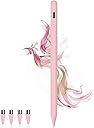
The DOGAIN Stylus Pen combines a sleek aluminum alloy design with a live battery display and magnetic attachment for iPad Pro and Air models. Featuring a durable POM tip for precise, smooth writing, it supports wide device compatibility across iOS, Android, and Nintendo Switch. USB-C charging and smart auto-off optimize battery life, making it an essential tool for professionals seeking seamless digital note-taking and drawing.
| ASIN | B0D7M8CBQP |
| Battery Average Life Standby | 5000 hours |
| Battery Description | Lithium-Ion |
| Best Sellers Rank | #5,091 in Cell Phones & Accessories ( See Top 100 in Cell Phones & Accessories ) #134 in Styluses |
| Brand | DOGAIN |
| Color | 2SS-Pink |
| Compatible Devices | Compatible with iOS/Android Phones and Tablets (Note: Due to the large number of touch screen devices in the market, the writing response may vary.), Not Compatible iPad 8th Gen and iPad air 4th Gen models, Not Compatible with Laptops And Not support Windows System devices |
| Compatible Tablet Computer Models | Apple iPad (8th generation), Apple iPad Air (4th generation), Apple iPad mini 6 |
| Customer Reviews | 4.1 out of 5 stars 1,598 Reviews |
| Enclosure Material | Aluminum |
| Item Weight | 0.04 kg |
| Manufacturer | DOGAIN |
| Material | Aluminum |
| Minimum Required Operating System Version | Android 1.0, iOS 1, iPadOS 13 |
| Number of Batteries | 1 Lithium Ion batteries required. (included) |
| Number of Packs | 1 |
| Unit Count | 1 Count |
| Warranty Description | 365day |
A**R
Fantastic for the price
Fantastic!!! My kids live it
R**C
AMAZING PEN!!!!
FINALLY A PEN THAT ACTUALLY WORKS ON IPHONE!! best $10 iโve ever spent! itโs sleek and easy to hold. on some sessions, the writing is slightly off but iโm also working on a small screen. 10/10 recommend buying!!!!
J**0
Excellent performance, especially with paper-feel protectors! But so-so on battery life....
I purchased this Dogain stylus for my UJJ Android tablet, and it has been a workhorse from day one. I use it as my daily planner for work, personal life, and performance (using PDF Xodo). It even works seamlessly with my Pixel phone, which is a fantastic bonus for quick edits on the go. The Professional Test: As a vocalist and director, I use this to mark up sheet music, conduct children's choirs, and sing professional solo roles. The Exsultet (a long and demanding chant) was my first true test with this pen, and it was awesome. I also use it for digital art in Krita and Sketchbook; the precision is excellent. Durability & Feel: I recently added a paper-feel screen protector. It makes the writing experience feel natural, but it is abrasive. Iโve already worn through my first nib, so having replacements included was a lifesaver. Note: the nibs stay secure and don't wiggle or fall off during heavy use. Why 4/5 Stars (The Battery): The battery easily survives a 4-hour rehearsal, but Iโm not sure it would last a full 10-hour workday without a top-off. I typically charge it at lunch when the indicator shows 3 lights (approx. 50-75%). It charges quickly, but for power users, you'll want to keep your cable handy. Verdict: If you are a multi-device user who needs a reliable pen for score annotation and data management, this is a stellar choice.
P**O
Great companion for any touch device
Easy to use and no Bluetooth or wifi required for your touch screen device. The long battery life and quick charging keeps you going all day.
P**3
Why is it sooo... wavy???!!!
Sadly I'm having issues with this item. I got it so I could Start drawing again and wanted to move into the digital media didn't want to break teh bank. Saw this figured I'd give it a go. Drawing lines straight down works fine bit if I try to do any kind of curve like a face it starts waving the line I tried many different ways to see if it would change based on angle or pressure or no pressure changed the tip ( it comes with extras ) nothing I try is working. Tried 7 different programs 3 different devices nothing changes that when I try to draw a curved line or a circle it's Hella wavy can't even write letters with it either. Kuz lines across also turn wavy only lines straight down are straight... not sure why it's doing this soo. I guess I'll use it as a tap to color or a tap the screen to do keyboard or whatever other taps or if I need to draw a down line..... guess I wasted money.. kuz I have to find another one. And spend more.. pretty disappointed kuz this item had 4 stars... I'm not the only person having this issue. Someone posted a video of the issue I'm talking about with her reveiw. Give it a watch.
J**S
Awesome
Works great I love it
M**๏ธ
Works perfectly on my touchscreen computer
At first I was skeptical about buying this pen but it worked on my touchscreen computer it lasts quite a long time once fully charged & I love that it has a type C charger I can use my phone charger to charge it . Its so easy to switch on/off just double tap the end
G**A
Conflicting if I like it or not...
So.....obviously for the price, its great and tbh I hate the thick stylus pens because I need them for graphic art, which makes this version with a smaller and skinnier tip sooo much better to use. However - thats also the problem - I need this for graphic art, and it is so hard to make it draw straight....the lines get squiggly for no reason even though I'm drawing it straight. I'm really conflicted on if I will continue using it or not.... Also for reference - I have an S26
Trustpilot
2 weeks ago
3 days ago