Buy anything from 5,000+ international stores. One checkout price. No surprise fees. Join 2M+ shoppers on Desertcart.
Desertcart purchases this item on your behalf and handles shipping, customs, and support to South Korea.
🎨 Elevate your art game with precision, color, and style — don’t just create, captivate!
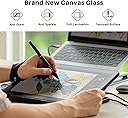
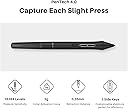
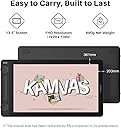
The HUION Kamvas 13 (Gen 3) is a 13.3-inch fully laminated drawing tablet featuring anti-sparkle Canvas Glass 2.0, 16,384 levels of pen pressure sensitivity via PenTech 4.0, and 99% sRGB color accuracy. Designed for professional artists and illustrators, it offers a glare-free, vibrant display with factory calibration, dual programmable dials, and 5 shortcut keys for enhanced workflow. Compatible with Windows, Mac, Android, and Linux, it connects via a USB-C single cable for a sleek, efficient setup. Ideal for creators seeking precision, portability, and vivid color fidelity.


| ASIN | B0D813G71Q |
| Active Surface Area | 293.8 × 165.2mm |
| Additional Features | 5 press keys+ 2 Dial, Canvas Glass 2.0, Full Lamination, PenTech 4.0 |
| Best Sellers Rank | #8 in Computer Graphics Tablets |
| Brand | HUION |
| Built-In Media | 3-in-1 Cable, USB Extension Cable, Pen Holder PH06, Pen Nib x 10, Cleaning Cloth, Glove, Pen Display, Pen PW600L,ST300 Adjustable Stand, Quick Start Guide |
| Color | Black |
| Compatible Devices | Desktop, Laptop, Smartphone (Android(USB3.1 DP1.2 or later)), Tablet (Android(USB3.1 DP1.2 or later)) |
| Connectivity Technology | 3-in-1 Cable or Full-featured USB-C cable (sold separately) |
| Customer Reviews | 4.5 out of 5 stars 676 Reviews |
| Display Type | LCD |
| External Testing Certification | Nao aplicavel |
| Item Dimensions L x W | 14.2"L x 7.98"W |
| Item Weight | 1.96 Pounds |
| Manufacturer | Shenzhen Huion Animation Technology LTD. |
| Model Name | GS1333 |
| Model Number | GS1333 |
| Native Resolution | 1980x1080 |
| Operating System | Android(USB3.1 DP1.2 or later), Linux(Ubuntu 20.04 LTS), Windows 7 or later, macOS 10.12 or later |
| Pressure Sensitivity | 16384 Levels |
| Screen Size | 13.3 |
| Special Feature | 5 press keys+ 2 Dial, Canvas Glass 2.0, Full Lamination , PenTech 4.0 |
| Specific Uses For Product | Animation, Designing, Painting |
| Target Audience | Creators, artists, illustrator |
| Unit Count | 1.0 Count |
| Warranty Description | 1 Year |
L**L
Fantastic product, no regrets.
I’m really happy with this drawing tablet. I had a very old Wacom cintiq that was no longer compatible with modern computers but was dreading how much anything similar would cost but this was a great affordable option. Set up is easy, pen feels good, tablet is light but not too light. I was worried the scroll on the side would be a problem since I’m a lefty but it hasn’t been. Screen is good quality. Pen tracking is good, I am struggling to get variable pressure response but I’m also working in new software so it might be user error. 2 points to consider: 1) Don’t forget this tablet needs a computer/laptop. One of my few complaints is the 3 in one cable is a little inconvenient with the port locations on the laptop I’m using (hdmi is on the left and both USB’s are on the right next to the power plug, laptop is old enough c ports don’t support power), i did find a way to arrange things to solve the issue but i have a feeling the cord with be my point of failure in the future. 2) this screen is not touch compatible, my old one wasn’t either but I do catch myself having the impulse to pinch zoom. Overall very happy with this product and would fully recommend to anyone I know.
M**Z
As a Xp-pen fan, I am SMITTEN by this tablet.
I purchased this tablet the same day it was released! I'll start with Pros and cons, and go into the story of what I was looking for and the main issue I had below. Pros: - No etched glass "rainbow pixilation" - its very clean and smooth with no weird light refraction happening. Please view close up photos. - Buttery smooth, I really love the high pressure sensitivity (newer users won't feel a difference between 16k over 8k, but people drawing for many many years will noticed the difference immediately.) - Crazy thin parallax, I forgot parallax was even a thing because of this device. - Great design, buttons and dials all feel great. - Quality hardware*: Does not feel cheap or clacky, it's just the right weight and solid form (*could use better adhesive, more on this later) - I really love the feel of everything: the screen, the pen, the buttons, the dials. - The third button is heaven, further the tool wheel it pulls up really increases the range of efficient work. Little extra ditbit is the driver UI is super clean, very nice touch. - No diagonal jitter. - 1080p is clean in this screen size. - Huion customer service is A++++ (more on this below) - I love it's thick tapered pen, I don't like pencil-style styluses for drawing tablets. Cons: - It can get a bit too warm on the port side after a few hours of use. Just warm enough to be uncomfortable, I have to take a breaks by turning it off to let it cool down. This usually happens around the 3 hour mark, and cools down quickly. - Relatively dark screen, only gets up to 200 nits, which is a bit of a bummer, so its not very good in bright situations. I did found a workaround with this by playing with the settings, but you do end up with too much high contrast, so you are potentially losing some of the color range. I'm okay with it as it is a balance with making it power efficient, which I was prioritizing for this on-the-go setup. Simply don't sit in the sun and you'll be good! - I feel it's almost a bit long for backpacking it, but it does have to accommodate the buttons and dials. TL:DR: Wanted tablet for school, when in my past life was a professional artist so I was picky. The tablet received had a physical issue where the screen was pulling up from the case near the C-port, but Huion came through with a replacement, and I received EXCELLENT and VERY SWIFT assistance from Huions customer support team. They made the replacement process genuinely pain-free. So as the title states, I'm a huge XP-PEN fan, all my models at home/for work have been XP-PEN. So when I started school I wanted a graphic tablet for on the go. My requirements were: - Portability: Must be small but large enough, slim and lightweight - Energy efficient: the lower the better, but enough balance for a bright enough screen - A dial: I became spoiled with dials from XP-PENs pro series at home. - Etched Glass Screen: I wanted the screen to last/not get damaged from tons of use, nor did I want to replace any screen protectors. - Thunderbolt compatible, I wanted a single cable situation. It'd be embarrassing doing the whole 3-1 cable setup in the middle of class. - Pressure sensitivity: I realllly wanted to get something with 16k pressure. - Decent Color Gamut ranges: I could have gotten an iPad but I wanted the power of and access of a windows PC. - Affordability would be cool but not a priority as long as it fit the above. I researched for a week straight and unfortunately XP-PEN tablets didn't fit this bill all at once so I broadened my search to Huion. I found this tablet the night before it's release just as I was about to settle for something that didn't match enough of my requirements. The Kamvas 13 Gen3 hits ALL of my requirements! When I received it and tested it, I was blown away. I was VERY satisfied, even with the slightly dark screen. It felt better than my at-home XP-PEN 22r pro which is simply insane to me. Even though I was just testing it, doing nothing serious with it yet, the tactile feel of it was so satisfying that I was sucked in immediately to drawing something much more in-depth than just a few spirals and writing. A few days in however, I noticed that the screen was pulling up near the C-ports as I could see into the body of the tablet. At first I was worried it was from the heat of use, but my husband mentioned he saw it the first day initially. I quickly registered the tablet and submitted a support ticket. They responded to me within 24 hours, and initially asked if I were able to push it back into place, and if I was okay with that they could offered me a 30.00 refund for the inconvenience. The reason for why it may have been pulling up was that it may have faced some high heat on its travel to me. Makes sense as it was summer and Im out in the desert. I wanted/need this tablet to last the next 2.5 years of school, so I requested a replacement after some hesitancy. They were able to assist me with processing a replacement easily. They sent me a return label, and sent the replacement after receiving back the original tablet. They were also very patient with me as I lagged a bit during returning the original as by this time, I was in my first rounds of exams in school. The label they sent, was VERY fast, so a day after dropping it off, they had the original back, and a day later I had the replacement on my door step through Amazon. To be frank, I was astounded and in awe by the number of people who assisted me with this process, so professionally and so quickly/efficiently despite the affordability of the device. The replacement has a 0.01 difference in the screen calibration paperwork, and is in perfect working order - No screen issues this time around and is just as magnificent as the first one, sans screen lifting. Anyways, this is a lot of words to say I'm a new believer/Fan and will certainly be recommending Huion products to my hobby and professional art friends and professional colleagues from now on!
A**N
Great beginner drawing tablet!
Works wonderfully! I just got into drawing again recently and I've always wanted to go further with digital art, so I finally got myself a good starter tablet with a screen to work with. I already had a drawing pad, but I prefer screened tablets so I can see exactly where I'm drawing. I'm still learning how to use the buttons properly, but they work well when used! The surface texture is perfect, similar to paper, and the glove fits wonderfully and slides effortlessly on the screen when I'm drawing! The tablet is pretty easy to set up and the pen works great! I love the pressure features and tilt! This tablet is awesome and so worth it! I can also use it as a small second monitor for my PC, so even if I don't draw for a while, it's still being used!
Q**N
Full Review From a First Time Screen Tablet haver
This is my first time ever reviewing a product on Amazon but I just had to because the low reviews left me a little nervous I was dropping $215 (it was 20% off when I purchased) on a faulty tablet when I could save my money on a better tablet but I am absolutely in LOVE with this tablet. I have been an artist for over 12 years and I have tried different tablets from Wacom (usually non screen) until I purchased my iPad but it has been getting slow so I decided to purchase my first screen tablet! This tablet is a beautiful beginner tablet and it is super easy to use. Not to mention the size was bigger than I thought but I am definitely not complaining. The screen is matte and anti glare but not so much as to eat away at the nibs super duper fast like the matte screen protectors for an iPad (I've had to purchase MANY new nibs for my apple pencil.) The buttons are silent but still give a small enough pop so you know you've pressed them and the function of the dials is super easy and are very customizable, I use mine to zoom in/zoom out and rotate my canvas with ease. The box was heavier than I expected and realized that it was the weight of the tablet AND the STAND that comes with it! The stand is very good quality and sturdy and has different levels of tilt so you can adjust it however you'd like. Drawing on the tablet itself is buttery smooth and the sensitivity is amazing, giving you very precise and consistent lines within the drawing program (Clip Studio for example since that is my main one). The screen is neither too dim or too bright when messing with some settings, but if you work in the dark like I do, it will be a perfect brightness. The set up was easy and simple, I have an HP Laptop with limited USB ports but as long as you have 1 HDMI port and two USB ports, you are good to go! They do sell an all in one cable to skip the hassle of all of that but it is $30 on their website and does NOT come with the tablet itself but if you have great cable management, it shouldn't be a problem. My only complaint is NOT about the tablet itself, but the driver needed to install to customize your keys and let the tablet run better since I did install the driver designated for the tablet however, when I launched up Clip Studio, the cursor offset was SO far off I physically could not draw and I could not find the problem anywhere. BUT I did find the solution! I had a Huion tablet before (Inspiroy H1060P) and had the driver installed previously, so I got rid of the Kamvas driver and downloaded that old one instead and problem was solved! I have not had a problem since but I will update if anything pops up! In conclusion, the Kamvas 13 (Gen 3) is amazing and functions comfortably and beautifully with Clip Studio (I haven't had a chance to try out other art programs), the pressure sensitivity is great, the customization of the buttons is easy through the driver and it's a really good size for the price. If you are thinking of getting this for yourself on a budget or if you're getting this as a gift for an artist that is starting out or wants to get a bit of an upgrade from their pen tablet, iPad, finger and screen, this is a great beginner tool. Happy drawing!! <3
N**A
Problems out of the box + update
This is right out of the box. Is there a fix for this i can’t send it back as i am behind on a project. It feels nice to draw on and its a nice size but this a huge step back. And trust me its affordable but not broke part timer affordable. Points for being easy to setup and hopefully i just got a defective and not all of them are like this Update: huion reached out to me and offered me technical support to see if the problem could be fixed but we couldnt so they offered to replace the whole thing for free. The new tablet was delivered pretty fast so thank you to their customer support for being fast and understanding. Minus the first set back and judging my review based only on the product itself i still think its pretty good. Decent size and the screen finish makes it very satisfying to draw on. The pen is nice and not too big it has 3 extra keys on it for color select, eraser, and the third opens a small keypad on screen of course these can be changed. The amount of keys on the side and 2 scroll wheels are very helpful and I rarely have to reach for the keyboard or add an extra pad for commands.
C**.
It's a draw
I am new to pen displays, drawing/graphics tablets. I settled on the Huion 13 Gen 3 after looking the many options available. Every tablet seems to have negative comments but then there are people who only know how to be critical or negative. They are never happy or pleased. The display arrived overnight. What a distraction! I found going to the online manual more helpful than the quick setup pamphlet that came with the display. I was up and running within minutes of connecting the cables. The few glitches I had were quickly resolved online. The display works well with GIMP, LibreCAD and Krita. My monitor is 24" and the Huion is only 13. It will take me some time to adjust to the difference. The tablet is simple enough to use. I had fun testing the pressure pen and ran into no issues. The controls/buttons will be just fine once I figure out how to configure them to my needs. Every user will obviously have different needs. The Huiron is remarkable for the price. I'm going to use it for photo retouching. I'm not an artist but anyone with artistic abilities will certainly have fun with this one. Am I happy with the 13" display? It's fine for now. A larger unit would of course be nicer and better but larger units also take up more space. I don't know how long a tablet will last. There will always be better ones. For now, this one is just fine.
C**R
The Best Drawing Tablet I've used!
Ive been drawing for over ten years and Ive used both pad tablets and an Ipad for my art prior to this. I have to say this easily blows both out of the water, being able to draw on the screen while also having all the features that desktop art programs have has been such a greaat experience so far. I've been using Krita with it as my art program, though I do intend to use Clip Studio Paint with it in the future. Great Display, the colors are beautiful. Perfect size, it's screen is bigger than my laptop's screen by about an Inch! Very well made, Durable, Portable, and Easy to set up. I genuinely have no complaints just a great tablet. Heres the video from when I first opened it/turned it on and my first few drawings on it! Also for anyone wondering I am 22 years old.
L**H
Worth it.
From what I can tell, it's great. Had a bit of trouble setting the monitor up but that was just from my own ignorance regarding having a display tablet for the first time. After I got everything set up, it was a learning curve to learn since I've used drawing tablets for the longest time. But I've gotten used to it after a few weeks. Don't like the buttons (personal preference) but I'm slowly getting use to it as well. Overall, great display tablet! Just remember to get a display cord if you want to hook up both your main monitor and display tablet.
C**L
Great tablet!
If you're really into digital art I can't recommend this enough. If you're a beginner and unsure, I'd recommend just a cheap $80 one to make sure you're gonna keep the hobby up. But if you're 100% into drawing? Yes buy this. Don't even hesitate. It's amazing, my only complaints are: The dials are a bit finicky. Nothing huge, but you can't scroll too fast or it "bounces back" sort of in your program. Annoying but the solution is go slower. The brightness could be a bit better, but it absolutely suffices. Setup was frustrating and it's a shame the other cable has specific requirements. But all in all, like a 9.5/10. I am 100% satisfied with my purchase, so much so I'd rebuy this already if mine somehow broke lol
J**S
Se cumplió lo prometido!
El producto llegó mucho antes del tiempo establecido y en perfectas condiciones. Todo muy bien empaquetado y con los sellos correspondientes. He estado usando la tableta sin ningún problema y estoy muy contento pues todo salió muy bien. Excelente vendedor!
厳**人
質実剛健、基本性能の底上げに特化した隠れ名機?Pro称号の謎
私は主に描き味、ペン性能に重きをおいてレビューします。私自身は20年レベル公私でWacomの板タブ、ここ5年はHUIONの液タブで趣味絵をたまに描く程度です。購入価格43,984円からクーポンが付いて37,386円で購入。 【Proの冠がなぜこの機種に?】勝手な憶測 明らかに基本性能の底上げに要点を絞った、THE シンプル機種ですね。なのになぜProの名を冠しているのでしょう。コレ、私も所有してるKAMVAS16(2021)の後継機かと思ったのですが、どうやら二世代前(5年以上前かな?)、PW-507ペン時代にKAMVAS Pro 16 ってのがあったんですね。この当時はフルラミネーション(Wacomでいうダイレクトボンディング)と、液晶表面がAGガラスであるのが高級機、Pro機の証と言いましょうか(笑)、そんな頃の機種の名残で後継機の本機にもProの冠がついたままになってるんでしょうね。今ではProと付かない機種ですらフルラミネーションやAGガラスが当たり前で色域も複数備える機種(13、16Gen3など)が出てますので違和感を感じるのだと思います。 【接続・付属品】 旧機種と同じく3in1ケーブルでの接続となりますが…PCへつなぐ先はUSB TypeAとグラフィックはHDMI接続ですのでノートPCの方などはCポートしかない場合Aポートへの変換が必要です。ケーブル長が私の持っていたKAMVAS 16(2021)より長くなっていたのが良かったです。電源もACから一箇所取る必要があります。なお、ケーブルは本体側USB-C コネクタが一般のものより長く(穴は深く)なっており、汎用品は使えません。これは接続の強度、確実さを上げるためのものでしょうから、汎用品を使わせない意地悪ではないようです(笑)。 スタンドも付属してますが私は使いません。Parblo のスタンドを使うのをお勧めしておきます。自在に角度変更可能です。 【2025-12-12:追記】ドライバについて、マッピングの事、複数ペンのサポートは? 私はQHDのマルチモニター3画面に加えて本機液タブを4画面目の最後のモニター(グラボが4画面までの接続なので)として接続しておりますが、OS起動直後はマッピングがメイン画面にズレていることがあります。が、これは本機のドライバソフトを「(OS)起動時に自動的に開始」をONにしておけば、OS起動時にしばらくすれば裏でこのドライバが立ち上がると同時に正しい画面、液タブの方にペンポインタはちゃんと固定されますので焦らないようにしてください。通常はONになっていると思いますので触る必要はないですが。 あとペンの登録が私が見た中では3本ぐらい、個別の登録アイコンが色々やってるうちに出てきました(消しましたが)w 恐らく別でPW-600S(スリム)ペンなどを購入すればパラメータ違いのペンを登録できると思われますのでペンに依って使い分けも可能になるのかなと。ちなみに裏で起動していれば ctrl+Alt+tでいつでもドライバは立ち上がります。 【OSDによる映像調整】★★ この KAMVAS Pro 16V2の泣き所がこの旧来式のOSD型調整機能です。横のボタンをポチポチやりながら調整するわけですが…前機種で知っててもやりづらいw そして、最初はsRGBにセットされてるはずですが、多くの人には黄ばんだ色に見えるのでは。自分で色を調整するには メニューに入って Color を選んだら自動的にPCMって項目になるんですが、まず「Native」に決めます。そこから1段上がって(戻って?)再び Color から輝度均一機能のON・OFF(ONで良いだろこれ)、色温度やガンマ、色相、彩度などが自分で変更できるようになります。最初コレが分からず格闘しましたが、サポートにメールしたところ数十分で返信が来て教えていただきました。迅速な対応で非常に有り難かったです。 基本的に【sRGB≒Rec709】での色域しか持っていませんので、輝度や自分なりの調整すればそんなにいじくり回すこともないでしょう。実際私も旧機種は最初にやったきりほぼそのまま4年使用してましたし・・・。 【ペン性能】★★★★★ 素晴らしいです。私はYouTubeの【7Pens】氏(個人で80枚以上の板・液タブを自腹購入してる方)のレビューを非常に参考にしていますが氏の評価でもPW-600ペンは非常に評価が高く「Wacom並み」の評価です。自分で使ってみても本当に何の欠点も見当たりません。動画も付けますが、これまでちょっと弱かった斜め補正も格段にパワーアップしており、画面端でも全くポインタがズレません!こんな端っこで絵は描かないですが性能としてこれには正直感動しましたw 当然真ん中で通常描く時でもペンを倒し気味に描いた時に威力を発揮します。視差やジッターなどももはや問題になる様な不具合はなく、むしろ上位に入る性能です。なお、芯ですが最初に装着されてるのはフェルト芯なのですが予備で入っているのはプラ芯10本です…なんで?w PW-550ペンと芯は同じですね。 【2025-12-09:追記】クリスタにおけるジッター このCLIP STUDIO PAINTにおいては、アプリの手ぶれ補正を切るとあまりきれいな線が描かれません。SAI、Krita ではその様な線が荒れる現象は観られませんのでアプリ側の問題かとも思いますが、本機液タブ&ドライバ側での互換性なのか、現在の所不明です。ただ手ぶれ補正を10強ほど入れれば全く問題なく描けるんですけどね。 ・IAF & MAX 荷重:ここがペンのダイナミックレンジを決める。 7Pens氏の測定でもIAF(初期応答)は1g台から反応してますが、IAFのメーカー公称2gは「測定誤差もあろうからHUIONの言う2gは正直で誠実なもの」という評価でした。MAXは450~500gレベルまで公称通りの性能を示してました(Apple Pencil2もこれぐらい)。そして何より、コレが少なくとも7Pens氏の所有する5本ほどのPW-600ペンで「性能にバラツキが少ない、一貫性がある」事も高い評価の一部です。Wacomもさすが、氏の所有する8本ほど揃った性能でしたがもう1つの中華メーカーは…ゴホッゴホッ いずれにせよMAX荷重値も500gレベルになった事でもうペンに関する弱点は無いと思って良いと感じます。 私自身のレビューとしては前所有のKAMVAS 16(2021)PW-517世代とWacom Intuos5(板タブ)ペンとの比較になりますが、PW-517比で明らかにIAFは敏感になっており、触れるようなタッチでも線が描けます。PW-517もかなり良い線行くのですが私の望む最軽の力で描くと線が途切れますがPW-600ペンはちゃんと描けます。Intuos5は1gを標榜する性能ですので当然同レベルで描けます。ほぼ同等の感触です。 描画遅延についても問題になる様な感覚はありません。そもそもこれらはソフトウェア側の要因も大きいので。クリスタ、SAIで使用する限り全く問題はないと思います。 【2025-12-09:作例追加】あまりに描き味が良いので画像追加 お目汚しになりますが…あまりに描き味も良いので落描きが捗ってしまいましたから画像を追加しておきます。またペンのIAF(初期応答、ON荷重とも言われる)~MAX荷重のレンジが広がったため筆圧のコントロールが非常にやりやすくなりました。120サイズのペンブラシを用いながら、糸のような細い線も描くことが出来ます。またそれを維持したまま引くことも。 【画質・AGガラスの見え方、感触など】★★★★★ ここも素晴らしいです。解像度こそFHD(1920X1080)どまりになってますが、はっきり言って個人的には15.6インチの液タブには充分だと思います。画素密度は142ppi と言うことになり顔を近づければピクセルは見えますが通常距離で気になることは私はありません。絶対ピクセル見えるの嫌マンの方が買う液タブでもないですけどね。 ・AGガラスのAG具合、表面の感触 アンチグレア(耐反射)ガラスですが、よく問題になるのが「スパークリング」いわゆるギラツキ、偽色、と言われるものですが「無い」と言っても良い出来です。このスパークリングは「物理サイズが小さいのに解像度が高い」液タブであればあるほど出やすいのですが解像度をFHDに抑えてあるからかギラツキはありません(と言っても良いと思います)。 そしてAG度合いを強めるほど「画質が低下」します。例えば18.4インチで4Kを実現している同社のKAMVAS Pro 19はギラツキを抑えるためAG度合いを頑張りすぎたのか「画面全体がモワッとした」透明感に欠ける画質となっていました。その代わりザラザラとした表面の質感を得ることになるのですが…。 しかし本機は透明度が高く、非常にくっきりした画質となっています。その代わり画質を犠牲にしてもAGに力を入れた機種よりは若干反射するかな、という感じです。もちろん部屋の明かりがはっきり写るほどではありませんがそれなりに反射します。AGのザラザラが控えめなのでペン先の感触はツルッツルなiPad程ではないですが、サラサラ・・・まではいかない、中間ぐらいのそれなりにツルる摩擦感です。ペン先の保ちは良さそう(笑)。フェルト芯が良いと個人的には思いますがお好みで。私はこのAGの効きと具合と画質とのバランスが非常に気に入りました。AGガラス機には基本的にシートを貼る必要はない、と言うのがメーカーの見解ですがこの辺はお好みで。 【2025/12/12:画面の透過度が分かる画像を追加】この透明感を観て欲しいw 良くも悪くも先々代のガワ、筐体は使いまわして?(笑)コストダウンを図ったようなのでAGガラス(Canvas Glassというらしい)も言うなれば1.0のままです。現在は最新上位機種などは2.0になりましたがAG具合を強めたため、反射は極めて抑えられたがその代わりモヤッとしたボケ感が目立つようになりました。更に27インチのHUION最新機種では3.0になってます(実機未確認)。私は比較してもこの1.0の方が好きです。FHDゆえドットが顔を近づけると見えるほどで、「シャープさという意味の画質」では最新機種より群を抜いて綺麗です。UIの文字判別も見えやすく、視力が上がったような感覚ですこぶる気に入ってます。上位機種もこのAGガラスだったならぁ…と思ったり。ま、この辺は見え方の好みが各人あるでしょうが。※私の視力では通常描く距離で使用してドットは見えませんがくっきり感は充分伝わるという感じです。 【色域について】 先述しましたが基本sRGB≒Rec709の色域しか持っていません。ので基本的には画面上で絵を出す用途に向いてると思いますが、何が何でも印刷用途には駄目、と言うわけでもないでしょう。Adobe RGB100%なモニターや液タブ持ってる人なんて、果たして何%いるのでしょう(笑)?よほどこだわりがあるアマチュアか企業相手の出版物を作成するプロでも無い限り、多くの人は普通の色域の液タブでコミケなどでは印刷物も出してますよ(笑)。もちろん、色が厳密に決められたプロ用途で使う液タブでもないですが。 【本体質感・熱など】★★★★ ・熱に関してはほとんど感じません。コネクタ付近が僅かにあたたかいぐらいです。 ・表面はわりと手脂が付きがち。これはAGガラスをザラッザラにせず透明感の方を取った副作用ですね。むしろマメに拭いてやるほうがお手入れとして良いのかも(笑)。 ・VESA非対応、ここはどう取るかですが…個人的には対応して欲しかったですが、そうすると背面の強度が更に必要になりコストアップになるし、メーカーとしてはこのサイズまでは持ち運びを想定しているようで、薄くするためにもVESA対応はしていませんね。なのでスタンドは Parblo をお勧めしてます。 【まとめ・総合評価、満足度】★★★★★ 先々代のKAMVAS Pro 16を最新世代のPW-600ペンに対応させるべく、基本性能を劇的に上げた隠れ名機な気がします(笑)。動画にも示したように画面端でもポインタずれが全く無い基本性能の高さ、コレはペンだけではなく、そのペンの情報を正確に受けつつ補正する本体側の性能も大変重要なポイントになりますから、その辺も手抜きがない証です。その上で贅沢機能は省いてコストを下げた花より実を取る機種って感じ? いずれにせよ派手な機能はありませんが、PW-600ペンの性能の高さ、描き味はもう「Wacom並み」と言って良いでしょう。5万だと全く話になりませんが(それなら16Gen3買いますよねw)私が購入したぐらいの価格なら、ものすごくオススメです。個人的には非常に気に入りました。色域が一種類、タッチなどはなし、など足りないものを分かって買うならペン性能の高さから満足出来るのではないでしょうか。本機に限らずですが、PW-600世代から購入する初心者の方が本当に羨ましいですw
S**O
Uma mesa magnifica porém com uma ressalva imporante[...]
Uma mesa magnifica porém (teoria) com uma ressalva imporante: Instale os drivers **antigos**, calibre a mesa e reinstale os driver **mais recentes**. Pelo que parece a mesa tem um problema de drivers que caso voce mova a caneta para alguma das extremidades laterais o mouse não acompanha direito; ou fica levemente fora de curso ou muito fora do esperado - Mas pelo que parece só acontece caso vc nunca tenha baixado os drivers antigo, já ter ido direto para os mais recentes.
U**S
Stand missing.
Stand missing
Trustpilot
1 month ago
2 months ago