Desertcart purchases this item on your behalf and handles shipping, customs, and support to South Korea.
๐จ๏ธ Print smart, save big, and stay effortlessly connected!
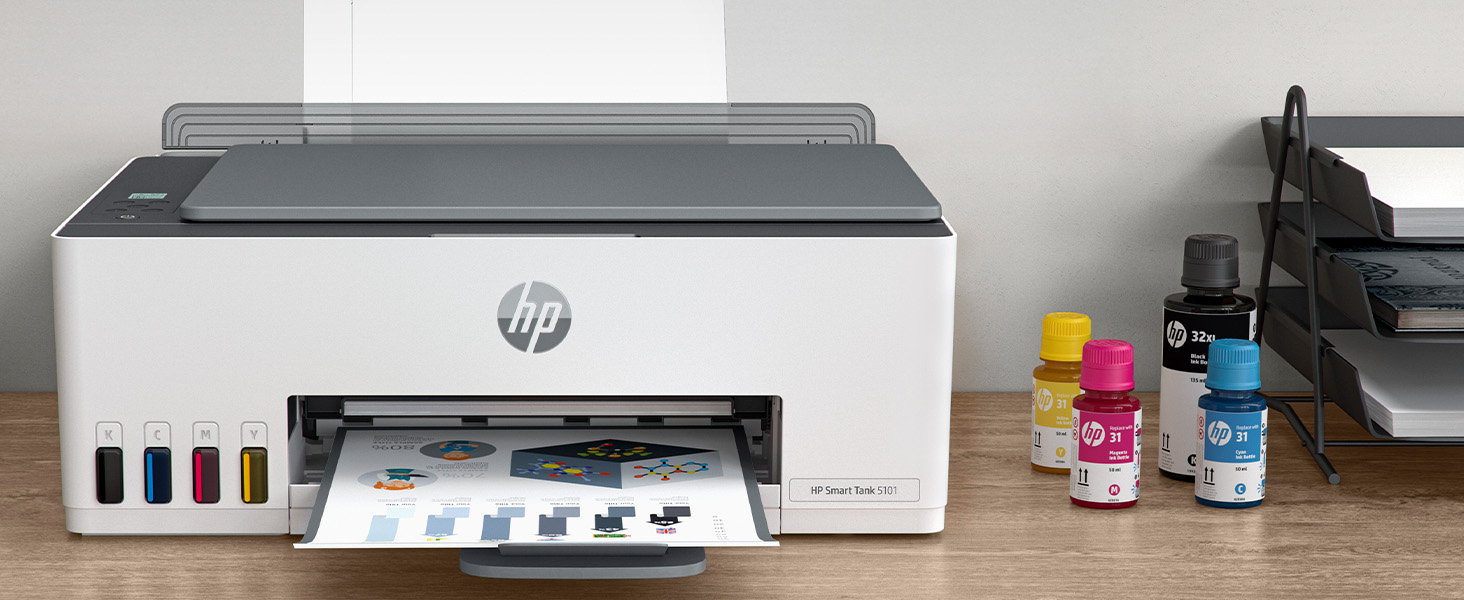
The HP Smart Tank 5101 is a wireless all-in-one inkjet printer designed for high-volume home use. It offers fast black-and-white printing at 12 ppm and vibrant color prints at 5 ppm with a sharp 4800 x 1200 dpi resolution. Included with the printer is 2 yearsโ worth of original HP ink, enabling up to 6,000 pages of printing right out of the box. Its self-healing Wi-Fi ensures stable wireless connectivity, while the spill-free refill system makes ink replacement clean and easy. Perfect for professionals seeking cost-effective, high-quality printing, scanning, and copying in one sleek device.


| ASIN | B0BL466Y41 |
| Additional Printer Functions | Copy, Scan |
| B&W Pages per Minute | 12 ppm |
| Best Sellers Rank | #63,003 in Computers ( See Top 100 in Computers ) #143 in Ink Tank Printers |
| Brand | HP |
| Built-In Media | HP 31 Cyan Original Ink Bottle, HP 31 Magenta Original Ink Bottle, HP 31 Yellow Original Ink Bottle, HP 32XL Black Original Ink Bottle, HP Smart Tank 5101 All-in-One Printer |
| Color | White |
| Color Depth | 24 bpp |
| Color Pages per Minute | 5 ppm |
| Colour | White |
| Compatible Cartridge | 32XL (Black), 31 (Cyan), 31 (Magenta), and 31 (Yellow) |
| Compatible Devices | Laptops, PC, Smartphones |
| Connectivity technology | USB, Wireless |
| Control Method | Touch |
| Controller Type | Android |
| Customer Reviews | 3.9 out of 5 stars 8,549 Reviews |
| Display Type | LCD |
| Dual-sided printing | No |
| Duplex | Manual |
| EU Spare Part Availability Duration | 2 Years |
| Hardware Interface | USB 2.0 |
| Initial Page Print Time | A4 Black 14 sec; A4 Color 21 sec Seconds |
| Ink Color | black, cyan, magenta, yellow |
| Item Dimensions D x W x H | 36.1D x 43.5W x 15.7H centimeters |
| Item Type Name | Inkjet Printer |
| Item Weight | 5.03 kg |
| Manufacturer | HP |
| Maximum Copies Per Run | 99 |
| Maximum Copy Resolution Black and White | 1200 x 1200 dpi |
| Maximum Copy Resolution Color | 4800 x 1200 dpi |
| Maximum Copy Speed Black and White | 10 ppm |
| Maximum Media Size | 8.5 x 14 inch |
| Maximum Print Resolution Black and White | 1200 x 1200 Dots Per Inch |
| Maximum Sheet Capacity | 100 |
| Maximum print Resolution Color | 4800 x 1200 Dots Per Inch |
| Model Name | ST 5001 |
| Model Number | ST 5101 AIO |
| Model Series | 5000 |
| Model name | ST 5001 |
| Number of Drivers | 2 |
| Number of Trays | 1 |
| Other Special Features of the Product | Energy Star, Self Healing Wi-Fi |
| Paper Size | 3.5" x 5", 4" x 6", 5" x 7", 8" x 10", 8.5" x 11", 8.5" x 14", A4, A6, half letter, legal, executive) |
| Power Consumption | 0.11 Watts |
| Print media | Envelopes, Glossy photo paper, Paper (plain) |
| Printer Connectivity Type | USB, Wireless |
| Printer Output Type | Color |
| Printer Type | Inkjet |
| Printing technology | Inkjet |
| Processor Count | 1 |
| Resolution | 4800 x 1200 |
| Scanner Type | Flatbed |
| Series Number | 5101 |
| Special features | Energy Star, Self Healing Wi-Fi |
| Total USB 2.0 Ports | 1 |
| Total Usb Ports | 1 |
| UPC | 196068963484 |
| Unit Count | 1 Count |
| Wattage | 3.02 watts |
D**D
Not quality like hp used to be - very disappointed
Poor printing quality, if your pin printing a picture, it cuts off every eighth or so picture, way too often the colors are very dark. They're not vibrant at all and then the other situation is printing from your mobile device. It cuts off about 15% of the outside of the photo. For instance, if you're printing a picture of a face, it's gonna cut off the forehead enlarge it so much that maybe even the ears will get cut off. I'm so extremely disappointed in this printer and I've always used HP from the 90s and back then those printers... they lasted. I had whichever version it was. I don't remember, but I used that daily multiple times a day bright colors it printed exactly the size I wanted it to size and the colors were wonderful. The ink containers lasted long enough and these current ones, my last three each HP's that I've had do not feed the paper right it either eats the whole bundle or it won't catch. HP has got to do better :-(
W**H
Affordable good quality ink tank printer
We have owned a few printers over the last 30 or so years. Most have been HP and we have always liked them and had good luck with print quality and features. The one sticking point has always been cartridge cost and reliability. And they have never worked well refilling them. Our last printer was a Canon and we will never buy one again. I had been watching the ink tank printers but price was the stumbling block. With the 5000 series the ink tank printers they are finally affordable. This printer makes very nice crisp prints in both letters and pictures. It does scan, the tray is direct feed from the rear top of the printer making it nice if you make water slide decals or anything similar. Super easy to set up and install the software, print heads fill tanks etc. Once on your network it just powers down and waits for the next time you tell it to print. The printer appears to be a winner and now we just have to test it for long term reliability of print heads etc. But as it stands we are impressed and do recommend this if you are tired of the small amounts of ink in cartridges and the high cost.
J**M
Tanks A Lot!
I recently started working exclusively from home, and needed my printer on a daily basis. I thought it would be alright paying $35 for an ink cartridge, as long as I just used black. Then the cartridges were lasting all of 6 days, and it was getting ridiculous. I didn't even know that these printers were an option. So in my research I wanted to stick with HP, because I already had all the software on my computer. I am also pretty frugal, so I went with the cheapest one that had good reviews, and hoped for the best. Looks like I chose wisely. After using this printer for a month, I have nothing but good things to say about it, and it has already paid for itself in ink alone. It sounds like a printer. It's not quite, but it's really not too loud. It is not a speed demon, but I don't need it to be the fastest. I am fine with how fast it will print. You can pay more for a faster printer if that is important, but I just let it do it's thing while I continue to work. The pages look great! Everything is crisp and clean. Even the ocassinal photos that I could not print before come out looking just like the picture. Set up was a breeze, especially since I already had the software installed. And setting up the wifi was as simple as connecting any other device. I have had zero issues with lost connection from the printer. On two occasions the printer showed offline, but it turned out to be the laptop that missed it when I turned the printer on after the computer, and it was fixed with a restart. If I were to remove a star it would be for the amount of paper that you can load. But it is still more than the last printer, so I will leave that star right where it is. I have been through two reams of paper so far, with no sign of low ink. This is the best printer I have ever had, and absolutely the cheapest to operate.
D**E
Dirt cheap to operate!
Can be a bit persnickety connecting but once set up this thing is amazing. Had it 2-1/2 years now and just filling up the black ink now; the bottle supplied initially had enough left to top it up from almost empty and still has a bit left. We would be buying cartridges about twice a year before.
M**3
Dead After Just One Week
I got this during Prime Week. I read the reviews, and took a gamble that this would work. I'm fairly competent when it comes to system building, and installs. The initial install went without a hitch! I went with a USB connection, since I do not like the WiFi options. Printer was functioning properly, showed up on the device list, and test prints were great! The HP desktop app showed everything was functioning fine! Cut to a few days later, I began printing some artwork and a printer error would occur. It would print a few lines of images and suddenly stop, saying the document couldn't be printed and to update the driver. Sometimes it would print one line, sometimes half a page, but the error repeated. I uninstalled the printer, and all of it's software. Went to HP's site and repeated the install process, but this time it would only give me the option of a WiFi connection, which was weird. I discontinued that process, went to the HP site downloaded the full webpack and attempted another reinstall. That went smoothly, I thought, but when the install concluded the printer was only showing up as an imaging device. The device manager showed an error under "other device". And in the device listing in Control Manager, the printer showed up with a "driver unavailable" error. I spent two days trying to trouble shoot this, even trying the WiFi connection as a last resort. That failed to work also. One solution I tried was a third party printer driver app, from Microsoft. It couldn't resolve it either, returning a fatal error of "C0000022". None of the resolutions for that error worked either. I should mention, unlike others experiencing this problem, I didn't receive any recent updates from Microsoft to my system prior to the error. Even after updating the printer's firmware the install problem persists! Installing a printer shouldn't be rocket science. Save yourself time and frustration. This is getting boxed up, and sent back, in the morning.
Trustpilot
2 weeks ago
2 days ago