

Desertcart purchases this item on your behalf and handles shipping, customs, and support to South Korea.
✈️ Elevate your cockpit game—fly smarter, not harder!
The Octavi IFR-1 is a precision-engineered, compact all-in-one cockpit controller designed in Germany for immersive flight simulation. Featuring 20 tactile buttons, a high-quality dual-axis rotary encoder, and LED-backlit controls, it offers professional-grade avionics management including autopilot, FMS, COM, NAV, and transponder functions. Compatible with Microsoft Flight Simulator 2020/2024 and X-Plane 11+, it connects easily via USB-C for quick setup, making it the ultimate tool for serious flight sim enthusiasts and IFR training.
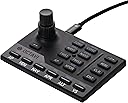
| ASIN | B0BZTBCHQD |
| Additional Features | Compact, Cost-Effective, Customizable, Ergonomic, Multi-Instrument |
| Best Sellers Rank | #10,986 in Video Games ( See Top 100 in Video Games ) #50 in PC Game Flight Controls |
| Brand | OCTAVI |
| Brand Name | OCTAVI |
| Button Quantity | 20 |
| Color | black |
| Compatible Devices | Windows, Mac |
| Compatible Video Game Console Models | Microsoft Xbox One, Microsoft Xbox SERIES X, Sony PlayStation 4, Sony PlayStation 5 |
| Connectivity Technology | USB |
| Controller Type | Gamepad, Keyboard |
| Customer Reviews | 4.6 out of 5 stars 102 Reviews |
| Hardware Platform | Laptop, PC |
| Item Dimensions | 4.4 x 2.9 x 1.8 inches |
| Item Dimensions D x W x H | 4.4"D x 2.9"W x 1.8"H |
| Item Weight | 9.6 ounces |
| Manufacturer | OCTAVI |
| Model Name | Octavi IFR-1 |
| Model Number | IFR-1 |
| Package Quantity | 1 |
| Power Source | Corded Electric |
J**S
!
If you are even marginally into flight sim, get this after you buy or with your flight stick/throttle/rudder pedals. If you already have those, what are you waiting for? Get this handy little thing, you will not be sorry! Plug and play for FS2024 (don't know about others, sorry). I fly the 172 G1000 and the 208B G1000 in career mode and have no idea what I did before. Now this doesn't "look" like a panel for a specific aircraft because it isn't suppose to be. it works with all aircraft in MS2024 (not sure about marketplace addons though I don't know why it wouldn't). This is an interface so you can easily Change freq's like the real thing. The knob is a 2 part knob with base turning for big numbers and top for small numbers and a "click" push down just like the real thing. This is far better than dragging your mouse across the screen! And honestly, I got this because dragging the mouse across the screen is scream worthy. I almost quit ms2024 because I hated it so much. but this thing is a dream! Not only can you change comm and nav freq's as well as switch to active or not, you can change the altimeter setting by selecting Com2 and push down (click) on the knob, then rotate the bottom knob until desired setting is in, so easy! You can change pages on the left and right screen, change the transponder, select procedures, and of course full auto pilot control! Each button lights up when selected so you know if its active or not and which comm or nav you are on as well as your AP settings. Adjust Auto Pilot Alt setting by selecting "AP" then Alt and rotating knob until desired setting is in. Honestly this has more buttons and uses than I have described here. Now, I fly in VR so I don't look at this when using it. It's easy to memorize most buttons and function. Plus this has a raised "line" between the left buttons and the right ones. Also has a raised "bump" in the middle of the left buttons so you can easily feel where your fingers are in VR and without looking. Soft keys but firm. Construction of this thing is wonderful! Very durable and small size, easy to store or set aside when not in use, takes up virtually little room. As for value, The Octavi-IFR is well worth the money. Heck, id be happy to pay more for it for what joy and functionality this brings to my sim! What I am truly surprised by is the price, this is easily a lot cheaper than many "dedicated" or "specific aircraft" only panels cost. and this can be used on all the planes, not just the glass panel ones. or specific models like other panels. I truly love this thing. I hope that the company does well and produces other plug ins like this. Though honestly, I am not sure what I would add as what I don't have buttons on my flight stick and throttle programmed for, I just use the on screen mouse to "click" the switches like lights etc. But this manages my comms, nav, screens and AP! Thanks Octavi! P.s. I have been using the Octavi-Ifr now for 10 months and it still works like a charm!
E**C
Absolute game changer
This is a complete game changer. If you are serious about flight SIM, this is an absolute must have. This product is well build and well designed. If you are like me and sick and tired of endless scrolling and dragging your mouse to set altitude and heading for the autopilot and try to program a radio frequency, this unit completely eliminates the need for a mouse when doing that. The rotary encoder is amazing and registers every click. I tried to use the rotary encoder on the honeycomb bravo but it was a complete disaster and didn't register clicks well at all. This Octavi IVR registers every click and is very smooth. I wish it had a "FLC" (Flight Level Change) button, but I can just use vertical speed instead, so no big deal there. The heading hold and NAV hold buttons are a little hard to press, but other than that, i absolutely love this thing and wish I had bought it sooner. One thing to mention, you have to install the plug-in, Then launch MSFS 2024, then launch the plugin and it should say "connected to MSFS 2020" before it will work. *Edit, the HDG and NAV buttons are NOT hard to press, I just needed to set the button to "delayed response" in the simulator because it was registering too quickly. After that, it works flawlessly!
D**N
This is the physical FMS knob you want and need.
I bought this because of all the breathless reviews; and I'm glad I did. I wanted to use it with the stock Cessna 172 in MSFS 2024 but did not want to install MobiFlight. I have nothing against MobiFlight and may end up installing it soon, but for now I want to avoid as many third party dependencies as possible. I am happy to say I need not have worried because out of the proverbial box it lets me: Press the PROC button on the G1000 MFD, press ENT to Select Approach, scroll down and pick an approach and select it (ENT); answer the other questions and Load the approach. Then select one of the waypoints and delete it for a straight in approach; all without ever touching the mouse. I would buy it even if that was all it does; but you can also set the altitude, heading, vertical speed and much more. The secondary functions are only slightly more awkward but the labels for them are hard to read (I have to get a flashlight sometimes). This is a very well made product though, very easy to use and likely to be very durable. It badly needs FLC but you can remap the buttons with MobiFlight if it comes to that. They should offer it with a mounting bracket and I hope the next version has physical buttons for PROC, VNAV, FLC and FPL (all secondary functions currently). Every product should make me as happy as this one did.
T**E
Lovely device, also useful for larger cockpit setups
I already love my IFR-1 and will say it does exactly what it claims to do. The knob has a nice feel to it and is much more like the real thing than using a Knobster. The buttons are a bit soft, and I worry about their long term lifespan, but everything works. My only gripe is that for this premium price (and I get it - smaller niche market) they left too many functions of shift keys. There are mode keys and then clicking the knob is a shift key as well. For this price, they should have put it more buttons. Leave the half dozen Mode buttons, but eliminate Shift keys (blue labels on top of the buttons). Just add that many buttons. Also those blue labels are very difficult to see. The backlights only help for the white labels on the primary functions but the blue functions are important and used on every flight too. Like FPL, for example. You have to memorize where it is, or check a referenced, or add an led light above your IFR-1 if you're using this in more of a cockpit setup. Overall 4 stars. Simply adding enough buttons to eliminate "knob-click-shifting into the blue functions" entirely would make this a 5-star product.
E**N
Just get it
It’s good. Really good. It does what it says it does, and the build quality is fantastic. Out of the box functionality w/the plugin is acceptable. I don’t really use the stock aircraft in MSFS, but I tested the controls on the 172 (non-G1000 version), and things behaved as expected. Autopilot behavior on all the different button presses and combos definitely has a learning curve to it. I use the WBSim 152 as my main GA aircraft, and there are definitely issues w/ functionality with the standard plugin. But, Octavi very clearly says to expect issues with third-party aircraft. To remedy this, I downloaded MobiFlight and Octavi’s provided C172 profile. After a few tweaks to the inputs, I am able to get MobiFlight to have the controls do exactly what I want them to do. All said and done, it was about 30 minutes of trial and error. I cannot recommend this thing highly enough. The combo of being able to set all your steam-guage instruments, radios, and NAV headings, is just so darn cool. This thing is barely bigger than a credit card, super sleek looking, and well-made.
P**O
A high quality addition to your flight sim
I am writing this review as the company was kind enough to refund my purchase. It requires Mobiflight to program it and run it which simple as it is, it did override my computer’s ability to recognize aftermarket products such as my helicopter collective and throttle. This was problematic for me because I had to go back into the programming software and have the computer recognize it all over. However - I did have the ability to test this product out and I must say its quality is second best to none. It reminds me of a very nice electronic component in a luxury car. The features were simple with clear instructions and it has a very valuable purpose. This was very helpful for setting navigation and autopilot when the work to do so prior required having to take eyes off the flight path and click and scroll while actively moving, which affected my point of view, distance, and sometimes if not frequently inadvertently activating other buttons. It is a very clean, ergonomic, and sleek device. It comes well packaged and is overall high quality and worth the price. I wish I could have made it work but I’m not a tech guru and those who are, could probably use all things flawlessly. I do recommend this product.
A**L
Octavi IFR-1 - You'll wonder how you ever flew without it!!!
Why did you pick this product vs others?: Other flight sim products simply don't do what the Octavi IFR-1 does. It interacts flawlessly with the G1000 in the Cessna 172 G1000 that came with my X-Plane 12. But, it also works flawlessly with the Diamond D20 that I purchased for X-Plane 12. I've not used in with another aircraft because I'm enjoying it so much with these two. While I'm taxiing out to the runway, I'm dialing in my flight altitude of 4,500' and a vertical speed of 500 fpm, and turning my heading bug to the runway heading without EVER touching my mouse. After takeoff, I establish a climb of 500 fpm and press the button to activate the autopilot to climb to my selected altitude. Then I press the HDG button to follow my heading bug. Boom!! It's that simple and easy. Actually, it's more like purchasing airplane magic at an excellent price. The IFR-1 is so good, so complete in features that it is hard to believe Octavi is a "startup" company and this is their first production model. This is a talented team, and I can't wait to see what they do next!
K**S
SUPPORT1
I am a flight sim junkie. When I saw the IFR-1 I "bit" like a starving fish. It arrived quickly and I instantly installed the software (on MSFS 2024). There is a little learning curve, like a calculator with multi-function buttons. On day one everything worked perfectly. On day two, one very important function stopped working when using the top small knob. I spent hours trying to figure out what happened overnight, the small knob worked for everything except that one item (Vertical Speed). I gave up after hours and emailed support. After multiple discussions with the tech, Daniel, he pinned down where the problem was expected. It was an overlooked flight sim function duplication. Once corrected the IFR-1 was perfect. Lack of or poor support ruins the products worth, no worries here. I was surprised that my emails were actually answered within minutes after being sent. The entire event was fast and professional, I could not have asked for better support. p.s. I learned a bit about proper function modifications too.
H**R
Works right out of the box with all the functions.
Although I have a Bravo throttle quadrant, with all the Autopilot functions, I use this on my gaming laptop with MSFS2024. At conferences, I teach flying and students see me use this and ask where to get it. Wish I had commissions. The encoder knob works with all the functions right out of the box. Go get it.
C**.
The best little cockpit I've ever used!
This item is truly remarkable with lots of features crammed into one compact console, making all my flight simming easier. The Germans have always designed and made great products for centuries and this I would say is one such product!
S**L
Très utile avec MFS 2024
Fonctionne super bien
J**D
Bon produit mais livraison 1 semaine de retard.
Arrive 1 semaine en retard mais l’attente en vaut la peine.
A**R
Works well
Many functions in a very small panel is great. Works with the plug in supplied for X plane 12 on my Mac M3. No configuration required for a Cessna 172. Apparently Mobi Flight is needed to configure for airliners. A third party mounting plate is available separately.
Trustpilot
1 month ago
3 weeks ago