


🔒 Unlock the future of PC security with a touch—fast, flawless, and foolproof.
The Benss USB Fingerprint Reader is a compact, aluminum-finished biometric scanner designed for Windows 10 Hello. It offers ultra-fast 0.15-second fingerprint recognition with 360-degree touch capability, supports up to 10 fingerprint IDs for multi-user access, and requires no additional drivers for genuine Windows 10 systems. This device enhances PC security by using advanced biometric algorithms to detect real fingerprints, providing a seamless and password-free login experience.
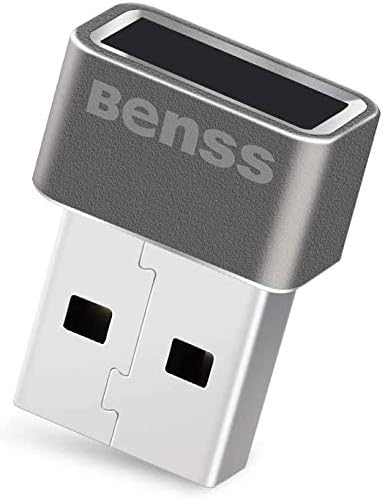


| ASIN | B078WTZJL3 |
| Brand | Benss |
| Color | Gray |
| Customer Package Type | FFP |
| Customer Reviews | 4.2 4.2 out of 5 stars (485) |
| Date First Available | January 9, 2018 |
| Exterior Finish | Aluminum |
| Hand Orientation | Ambidextrous |
| Handle Attachment Mechanism | USB |
| Handle Material | Plastic |
| Included Components | Instruction Manual |
| Is Discontinued By Manufacturer | No |
| Item Dimensions LxWxH | 0.83 x 0.6 x 0.55 inches |
| Item Weight | 0.635 ounces |
| Item model number | BSSLU01G010 |
| Lock Type | Biometric |
| Manufacturer | Benss |
| Material | Aluminum |
| Metal Type | Aluminum |
| Number of Items | 1 |
| Product Dimensions | 0.83"L x 0.6"W |
| Special Feature | Easy to Install |
| UPC | 712492204216 |
| Unit Count | 1.0 Count |
F**D
Great little device, easy installation.
I initially thought this little fingerprint reader was a great idea but unpleasant thoughts of past issues of "Plug and Pray" came to mind. Reasonably priced I threw caution to the wind and jumped in. Delivery was prompt and I was surprised at the small size of the device, thinking it would have been larger but the lack of detailed installation instructions was I thought going to be problematic. Surprisingly I plugged it into a USB port and Windows did the rest. Configuration took all of five minutes and it was up and running in no time. It works as advertised, reads fingerprints immediately and the Windows' interface is seamless. If you're a tech/gadget kind of person it's a must have. You don't need it but it'll be a pretty slick addition to your system
D**T
Great product! Works with Windows 11. Easiest way to unlock your PC
It was getting annoying to type my password all the time after locking my PC, and the cost of a webcam that specifically works with Windows Hello facial recognition was too costly, but this small, USB fingerprint scanner is an awesome solution that works incredibly well. I had to add a desktop USB port to have this easily accessible, but that was easy, and this scanner works perfectly all the time. Installation was incredibly easy, and so was registering a few fingerprints. Now, I simply touch the scanner and in a second my PC is unlocked and ready to go. Best little PC gadget I've purchased in a long time. If you hate typing your password all the time like I do, this fingerprint scanner is the best. I loved it so much; I bought two more for my laptop and secondary PC.
G**N
Works like a charm
If you know how to install, it's much like plug and play. I've had this product for less than a day and love it already. Much better price point than all the others for what you're getting as well. Why pay $60-80 when you can pay no more than $20 for the same, if not better product. Unfortunately, it's very confusing at first due to miscommunication on the product page, lacking with confusing instruction on installation. Some Q&A's say you need to visit this shady website, or have this odd "extension". All very wrong... All you need to do is follow basic "Windows Hello" instructions, as it's a built in fingerprint recognition software by Microsoft which is probably already installed onto your device. A simple Google search explains how to set it up in minutes. Once done, it's honestly almost as fast as an iPhone's fingerprint scanner as far as speedy unlocking goes. Like I said, it's really great, just a bit of confusion on the seller's side. The packaging is also very strange, had me confused when I received it in the mail. It's in another language with a ton of typos; probably has to do with the outsourced manufacturer. I could be wrong, but it looks very alike other USB fingerprint scanners I've seen on Amazon, just a different branding. My guess is that this is just a reseller with their own branding and a lower price. Hey, if it's working great, I'm happy. I only wish the seller could get that sorted out and have a more "proper" packaging and better product description on Amazon. I want to give it a 5-star rating, though due to these miscellaneous problems, I can't. I understand why customers think it's fake, even I was skeptical when I first unboxed the product. But yes, it's all legitimate and everything and is making me very happy with my purchase. If I ever see these corrected, I will update my review. That said, I think it's really great!!
P**R
Works Perfect!
The device uses a scanning field to which you should put the tip of any finger, right or left hand. The system scans the finger and then analyzes the pattern of characteristic points and other finger identification features. Based on these data, access is granted to the user with subsequent touches of the reader. The installation and configuration of the device is very easy and fast. The most popular applications of fingerprint readers: - logging into websites and banking platforms, - granting access to workstations, operating systems, folders or applications, - work time recording systems. The undoubted advantage of using this scanner is that you do not need to remember often long and complex passwords or pins.
K**A
AMAZING! WITH ONE SMALL SETUP CAVEAT!
In terms of functionality, you'll be starstruck. It's quite fast and it is very very easy to set-up (once you get to the Windows Hello part). Now, the driver setup prior can be quite a doozy even if you go onto the site, download the drivers and install those drivers. Simply go into your Windows Search Bar and search 'Device Manager'. Plug in your fingerprint scanner after you open it. You'll see 'Goodix Fingerprint' or something similar pop up in your device manager. It will have an Unknown Device logo on it. Right click it and click 'Update Drivers' followed by clicking 'Find Drivers Online' [or something similar]. It'll take a short while, but BAM! It works as intended! This fixes it like a charm (if it didn't seem to work at first) and your Windows computer will recognize it. Please makes sure to mark this as helpful to spread the word!
R**R
Seems to work at first but then fails after first use
I installed two of these, one on my desktop and one on my laptop. In both cases after installing and recording my finger print, they both worked maybe once and then failed to read my finger print accurately there after. I could remove my finger print and record it again but the same thing happened each time. I know that my finger print works because I continually use it on my phone. I returned these for a refund.
S**E
Plug and play sur Windows 10 Pro Français. Je l'ai simplement branché puis j'ai configuré mes empreintes dans Windows Hello facilement. La détection de l'empreinte est instantané et fonctionne très bien. Pas besoin de s'y reprendre plusieurs fois pour faire détecter le doigt. Je recommande!
R**S
Tried on my PC. Downloaded software. It didn't’ work and I gave up after hours of trying. Might work for someone else. Didn’t work for me,
R**I
a complete waste of money, it is recognised by windows, no driver updates with windows or the supplier, and when I click the link with the error message it takes me to a windows 10 page just as helpful as the message.
Trustpilot
2 weeks ago
2 days ago