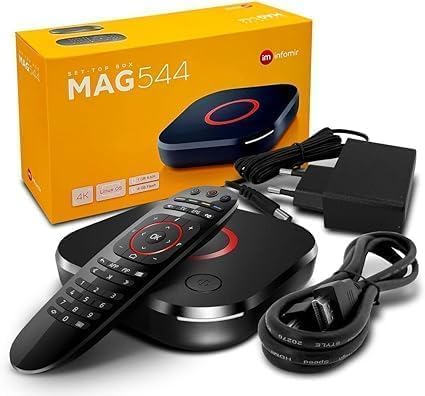
Desertcart purchases this item on your behalf and handles shipping, customs, and support to South Korea.
๐ฌ Upgrade your streaming game with the MAG 544W3 โ where power meets pristine 4K clarity!
The 2024 Genuine Mag 544W3 is a premium 4K Linux set-top box featuring a powerful Amlogic S905Y4-B Quad Core CPU, 1GB DDR4 RAM, and dual-band WiFi (2.4G/5G) plus Ethernet connectivity. It supports 4K HDR 60fps video playback with HEVC codec and Dolby Digital Plus audio, delivering a high-performance, immersive home media experience. Designed as a reliable replacement for previous MAG models, it runs on Linux 4.9 for enhanced stability and compatibility.
| ASIN | B0D33QZJLN |
| Best Sellers Rank | 107,374 in Electronics & Photo ( See Top 100 in Electronics & Photo ) 61,847 in Home Cinema, TV & Video |
| Box Contents | 2 AAA batteries required. (included) |
| Brand | Infomir |
| Brand Name | Infomir |
| Colour | Black |
| Compatible Devices | Television, Smartphone, Personal Computer, Laptop, Tablet |
| Connectivity technology | Wireless |
| Connector Type | HDMI |
| Connector type | HDMI |
| Controller Type | Remote Control |
| Customer Reviews | 4.1 out of 5 stars 97 Reviews |
| Form Factor | Set-top-box |
| Item Dimensions L x W x H | 11.5L x 11.5W x 2.8H centimetres |
| Item Weight | 0.5 Kilograms |
| Manufacturer | Infomir |
| Manufacturer Part Number | MAG544 |
| Memory Storage Capacity | 4 GB |
| Model Name | Mag 544W3 |
| Model Number | Mag 544 W3 |
| Network Connectivity Technology | Wireless |
| Other Special Features of the Product | Browser |
| RAM Memory Installed | 1 GB |
| Resolution | 4k |
| Special feature | Browser |
| Supported Internet Services | Browser |
| Supported Internet services | Browser |
| Video Codec | HEVC |
| Video Output Resolution | 4K |
J**S
Works excellently
Absolutely does the job it is supposed to do and does it well. If your old MAG box is playing-up at all, get this new one.
S**L
Fast and accurate
Fast and accurate
A**R
Initial problems but found a fixโฆ
The product looks very sleek out of the box. When I plugged it in however it was was not recognizing any of my hdmi ports. I continued to move it to different hdmi ports and although it would connect to some it would flicker and was an inconsistent connection. When I googled it I found this suggestion which I did and it now works perfectly. MAG Box Settings (If you can see the menu) 1. HDMI Event Reaction: Go to Settings > Video > HDMI Event Reaction and set it to Ignore. 2. Video/Graphic Settings: In the inner portal settings (or Video/System settings), adjust these: 1. Set Video Output Mode to 1080p or 1080i (instead of Auto). 2. Set Graphic Resolution to 1920x1080 or 1280x720.
A**S
Good upgrade
Upgraded this from a Mag 254 very pleased with the performance thus far.
J**O
Gjjfthbcfgnkkk
Excellent product
H**Y
Infomir Mag 544W3
Infomir *New* 2024 Genuine Mag 544W3 works as expected.. Inconvenience when going up and down with channels due to proximity of Home button
Trustpilot
2 months ago
2 months ago