

Desertcart purchases this item on your behalf and handles shipping, customs, and support to South Korea.
🚗 Capture Every Mile, Day or Night — Your Ultimate 4K Roadside Witness!
The VANTRUE E1 Pro is a compact yet powerful 4K dash cam featuring an 8MP Sony IMX678 sensor and a 158° wide-angle lens for ultra-clear footage. It leverages STARVIS 2 and PlatePix HDR technology for superior night-time license plate capture. Equipped with 5G WiFi, GPS tracking, and voice control, it offers seamless connectivity and hands-free operation. Its 24/7 buffered parking mode with motion detection and Starlight Night Vision ensures comprehensive vehicle protection. Built with a durable super capacitor and supporting up to 1TB storage, it delivers reliable, long-duration recording in extreme conditions.
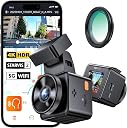


| ASIN | B0DSKXJV3H |
| Are Batteries Included? | No |
| Auto Part Orientation | Front |
| Auto Part Position | Front |
| Battery Cell Type | Lithium Ion |
| Best Sellers Rank | 10,132 in Electronics & Photo ( See Top 100 in Electronics & Photo ) 160 in Car On-Dash Mounted Cameras |
| Box Contents | Cable Clip, Car Charger, Car Mount, Crowbar, E1 Pro Dash Cam, Type C Data Cable, Electrostatic Stickers, Warning Stickers, User Manual |
| Brand | VANTRUE |
| Brand Name | VANTRUE |
| Colour | black |
| Compatible Devices | Smartphone, PC |
| Compatible with Vehicle Type | Car, RV |
| Connectivity Technology | Wi-Fi |
| Connectivity technology | Wi-Fi |
| Control Method | App |
| Country of Origin | China |
| Customer Reviews | 4.0 out of 5 stars 1,574 Reviews |
| Display Type | LCD |
| Field of View | 158 Degrees |
| Flash Memory Supported Size Maximum | 1 TB |
| Flash Memory Type | microSDXC |
| Frame Rate | 30 |
| Global Trade Identification Number | 00193368006606 |
| Item Dimensions D x W x H | 4.4D x 5W x 4.4H centimetres |
| Item Weight | 95 Grams |
| Manufacturer | VANTRUE |
| Manufacturer Part Number | VANTRUE E1 Pro |
| Maximum Aperture | 1.8 f |
| Memory Storage Capacity | 1 TB |
| Model Name | E1 Pro |
| Model Number | E1 Pro |
| Model name | E1 Pro |
| Mounting Type | Windshield Mount |
| Number of Packs | 1 |
| Other Special Features of the Product | App Control, Built-In GPS, Compact Design, G-Sensor, Voice Control, Excellent Night Vision, 5G WiFi, Support LTE Module, 4K HDR, STARVIS 2, IMX678 Chip |
| Product Warranty | 18-month |
| Real Angle of View | 158 Degrees |
| Screen Size | 1.54 Inches |
| Supported Standards | MP4 |
| UPC | 193368006606 |
| Vehicle service type | Car, RV |
| Video Capture Resolution | 2160p |
| Video capture resolution | 2160p |
L**H
Excellent little dash-cam.
Well-made and surprisingly small. Easy to fit and unobtrusive. Unusually, it comes complete with a polarising filter to remove any screen reflections (just twist the filter once fitted until they disappear). Very reasonably priced for a 4k camera with the latest Sony Starvis 2 sensor which produces good, clear video day and night. A one-star review here claims that you can’t power it from a USB C socket but that hasn’t been my experience - it works perfectly for me. The screen is small but usable although it’s easier to set it up initially through the phone app. The only minor issue that I had with it was that if you use the GPS time signal for the internal clock, the daylight saving setting uses the US dates to automatically change in the spring and autumn which are different from the dates we use in the UK. That said, it’s easy enough to set the time manually so not so much a problem as an inconvenience. It does run very warm but no more than my previous dash-cam which lasted several years with any problems.
A**R
Very good
Im a proffesional drivers who uses daschams to record every minute of my driving so im quite familiar with how unreliable dashcams can be. Ive tried many of the Chinese brands, and Nextbase cameras. No matter the price, the functionality of the Apps are ALWAYS absolutely diabolical and theyve nearly always been very unreliable. Vantrue and Viofo are probably the only well known camera brands I haven't tried. And considering I can't swap Viofos between vehicles due to no suction mounts being available, I thought I'd ditch my Nextbase and give this Vantrue a go! First things first, the aesthetic quality is outstanding, the attention to detail in the design of the box and the camera itself is superb. It really feels like youre opening a high end product. The camera functionality is superb, the menus easy to navigate, and all settings can be adjusted from the App if you'd prefer. The app, unlike most actually functions, most are horrific, always crashing or refusing to function. My nextbase app is basically unusable. This connects quickly, downloads fast and has never crashed on me yet. The camera video quality is 4k, and obviously fantastic as a result, the Plate pix function does work at making number plates slightly more readable by removing the glare, but it does darken the overall video quite considerably. I would prefer a 60fps function as 30fps always struggles to capture numberplates that are moving. It has a super wide angle lense, which is obviously a good thing, however its so wide it makes positioning the camera awkward as it always captures a portion of the unswept area of windscreen which makes the corner of the video appear dirty. But moving it further away from that area means the right hand corner of the video captures the plastic cover for all of the sensors behind the rear view mirror. Annoying for me, but wont affect everyone. Haven't had any issues with overheating, but we shall see what happens in the summer. 4k cameras always get a little warm. Small ones like this always struggles the most. Overall, a good camera so far. **edit** After about 1 months use i found this to be totally useless at capturing registration plates in anything but bright sun. It performs worse than a 6 year old 1080p 60fps dascham. Night performance is beyond disappointing
A**W
Great image quality but over heats, really hot.
Great quality but unfortunately was many others have said on here it runs hot, really hot. I have had two ( front and back ) for six months and the front camera has gone through 3sd cards. ( these are not cheap either), more than the camera) My current card is an Extreme high performance card but even that is over heating. Be very careful touching it and extremely careful taking the super hot card out of the camera. Often cuts out and needs unplugged to cool down. The only way I can keep it cool is by having really cold air con on the windscreen. Support has suggested I send it in for a replacement but I can't see this fixing the issue. I also have a much cheaper dash cam in my van also from amazon never had an issue.
D**S
Bit to small for my eyes
No to sure about this camera every time I go over a bump it takes a photo. Clear picture though, and for anyone with not so good eyes like me. The controls and figety ness of it can come annoying but apart from that easy to install and sticks well to glass even through the hot weather we just had.
K**H
Good quality camera at a reasonable price
I have had this in the car now for a few weeks. Its quite neat in size compared to some others, an alternative I had ordered was returned as it wouldn't fit discreetly were as this does. Overall the fitting was straightforward, I use an ODB power supply cable which can keep the camera running for parking mode without allowing the battery to run down and not allow the car to start. Quality wise, in daylight and well lit streets it fine, images are clear and registration plates, road signs etc. are clearly visible so there would be no issues in having to use the footage in an insurance claim or similar. Download speed over the Wi-Fi is as expected, its not the fastest however is useable for transferring clips to a mobile device to watch.
M**S
Compact solid Dashcam with great features
The E1 dashcam, while it is small and compact, feels solid and is loaded with many features. It comes well packaged in a box which contains all you need to get up and running except for an SD card which must be purchased separately. I assume the reason for this is to keep the cost of the dashcam lower and it enables you to purchase an SD of the size that suits your particular recording storage needs. The E1 has an adhesive GPS mount which I was a bit apprehensive about as I am used to Suction mounts. I found however, if planned correctly, it is easy to attach to the windscreen in an optimum and unobtrusive position. The dashcam is so small that in my case, I have it almost hidden behind the rear-view mirror and it therefore does not clutter my drivers view. Before I attached the mount to the windscreen, I downloaded the Vantrue App from the play store to my phone, powered on the dashcam in the car and connected my phone to it via Wi-Fi. I was then able to see “live” on my phone exactly what the dashcam was viewing in various windscreen positions. While I could have used the 1.54-inch screen on the dashcam itself, the bigger screen on my phone was easier to use. Using this method, I was able to select the best windscreen position to mount the camera. I then marked the position on the outside of the windscreen with paper stickers and thoroughly cleaned the inside of the windscreen. Using the external markings as a positioning guide, I attached the supplied electrostatic sticker (which is similar to a screen protector you may fit on a mobile phone), onto which I then stuck the adhesive mount. The dashcam easily slides into and out of the mount and is held solidly in place by a magnet. The car charger, which has a USB port built in for charging your mobile etc., plugs directly into the mount itself so the dashcam can be easily detached at any time to connect directly to a PC. The charger cable is 3.5 meters long, enough in my case (Kuga) to route from the mount to the power socket and be easily hidden. The dashcam has three small buttons which allow you to set it up, or in my case, I found setting up the dashcam to my preferences was easy using the app. There are many settings that can be changed, some of which are: Recording resolution, Loop recording duration, G-Sensor sensitivity, Collision detection, Motion detection, speed in KMH or MPH, Time and date stamp, Speed stamp, GPS location stamp, Voice control sensitivity, Parking mode and Auto LCD off. As I mentioned earlier, the dashcam does not come with an SD card so you will have to purchase one separately. It supports an SD card from 32Gb up to 512Gb in size and must be of high quality such as U3 Class 10. Vantrue recommend that you format the SD card at least once a month. This can be done via the app or the dashcam itself, and I was able to set a monthly reminder on the dashcam to do this. Be sure you download any important recordings before formatting as once formatted, all recordings on the SD card are lost. The E1 also has voice recognition. Some of the commands you can use are “take photo”, “Turn on/off Wi-Fi”, “Turn on/off audio”, and “Lock the Video”. I was driving with the car radio on when I said, “take photo” and it was successful. I tested a few of the other voice commands too and while I mostly listen to chat shows and not loud music, the commands worked which impressed me. If however you do listen to loud radio or if there is a lot of road noise, it may not be as reliable. I also found the “Wi-Fi” commands great as I did not have to go pressing buttons on the dashcam to connect my phone. A two-button small wireless remote is also supplied with the E1. One button allows you to turn on and off audio recording and the other is used to lock the current video and take a photo. This may suit someone in noisy environments or who may not want to use the voice commands. The remote which uses a replaceable CR2032 battery, can be attached with the supplied 3M sticker to the steering wheel, the dashboard or wherever suits best. There are quite a few resolution settings that can be set for recording quality and while I didn’t test all resolution settings, I found that the quality of recording was very good on those I did test. I live on the edge of a city so I would be doing both city and countryside driving. This would have an impact on recording during darkness as you would not always have street lighting and therefore you may be relying totally on your headlights for recordings. While the recordings are clear, the ability to read number plates, depends greatly on the environment. Things such as speed, day / night-time, sun glare, headlights, streetlights etc. but in the event of an accident, the dashcam footage even if it did not capture the car reg number, will clearly prove who is in the wrong. The Sony sensor and 160-degree lens has a very wide field of view both left and right of the car so it will pick up what’s happening over multiple lanes of traffic. The E1 can be set for loop recording with file lengths of 1, 3 or 5-minute duration and when the SD card is full, it will continue to record, overwriting the oldest recordings. When the SD card is formatted, three folders are automatically created, “Event”, “Normal” and “Photo”. The inbuilt G-Sensor has different sensitivity settings for the automatic locking and saving of a recording so that if car is hit or shaken, the recording will be locked and saved to the “event” folder and will not be overwritten by normal recordings which continue to be stored in the “Normal” folder. Setting sensitivity too high however may cause the “event” folder to fill up as going over rough road etc. may cause the dashcam to think an “event” has happened. According to the manual, thirty percent of the SD card is allocated to the “event” folder and if the “event” folder becomes full, then new events will overwrite the oldest events. It is therefore good practice to review and download any important events ASAP. The same applies to the “normal” folder. Recordings can be viewed on the dashcam or within the app on your phone. They can also be downloaded to your phone, or you can connect the dashcam to a PC and download the recordings in this way which is much faster. If viewing recordings on a PC, most compatible MP4 media players will work. I tested this with Windows media player, VLC media player and Films & TV. I also tested it with the Vantrue player that I downloaded from the Vantrue website which utilises the inbuilt GPS information in the recording. This shows your speed, time and date, car reg number (I put in ABC123 for the photos) and will also show your car position and the route of your journey on google maps as you play back the recording. Like most technology providers these days, new firmware may be released at times for the dashcam which can be downloaded from the Vantrue website. I found it quite an easy process to upgrade the dashcam but make sure you copy any important recordings before you attempt the upgrade. You simply use a PC to copy the new firmware file to the SD card in the dashcam, disconnect from the PC, power up the dashcam on its charger, and wait a minute or so while it updates. Other than a flashing green light, the camera will appear to do nothing during this process so wait, and it will power itself up once finished. You must also format the SD card after the upgrade. I did find that all my settings were lost after this process however it only took a couple of minutes to re-enter them via the app. In conclusion, I think that this is a great feature rich, good quality dashcam in a small compact size with the bonus of being so easy to set up. While you may not use all its features, I think you won’t go far wrong in selecting the E1. Note: Some of my photos have information blanked out for privacy.
N**L
Excellent customer service and a great product
After having a roadhawk HD 2 camera for years it was time to upgrade to something with a higher quality image. After doing my research I decided to go with the Vantrue E1 due to the compact size and high quality image at 60fps. I also purchased the polarised lens and hardwire kit. After using the camera for a few days I downloaded the footage to check the quality and was pleasantly surprised, I expected a high quality image but this was better than I expected. After 3 months of ownership the camera developed a problem, it was still usable but wouldn't automatically overwrite the old files so I would need to manually format the sd card using either the app or computer. I decided to raise a support ticket with Vantrue and received a reply within 24 hours, after a couple of messages back and forth to check a few things a new camera was shipped to me. I can't recommend Vantrue enough just based on their excellent customer service, then when you look at the great product, it really is a no brainier for me, so much so, I'm going to get another camera for another car.
D**N
Product support ? Not sure. Image qualtiy ok
If you need to see the number plate of the offending car you need a good pc or tablet to do this. Does not like old teck. The focus is not great but it was possible to see and incident and details required. It gets very hot when first plugged in I assume it was due to charging the capcitors. I wanted to ask questions to customer support and nearly did a return becuase I could not get the funtion I required. I don;t want to give permission for all my photes on my device to allow the app to work so used an SD card to usb c reader. Does what I need it to do but feel the image could be better.
D**L
This is a great dash camera
This is the third one of these that I have purchased. There are two real parts of the install. One is mounting the camera to the windshield, and the second is running the wiring for power to the camera. The camera is really in two parts. The main camera which is a small cube, and an adapter that sticks to the windshield and holds the camera in place. In the box you get a clear sheet that looks like a screen protector that you are supposed to stick to the windshield and you stick the camera to that. After trying this once, either I didn't do it right or it didn't work right. The camera fell off. So I now leave that stuff in the box and stick the mount directly to the glass. (Be sure to clean the glass first). This works well. You do need as Micro-SD card to capture the images. The app needs to be downloaded to see the clips captured but you can also remove the Micro-SD and look at them on a computer or whatever. Unless you just plug in the cable to the camera and drape the wire down to the power port in your car, wiring is more of a problem than sticking the camera to the windshield. The cable with the camera is a usb-c on the camera end and what was called the cigarette lighter plug in the other end. If your car only has USB A or C connectors, you will need to purchase a separate cable. A small tool is provided to lift up trim parts on the car to slide the cable underneath to make it look nice. On some cars (Like my Jeep Wrangler) this is very easy to do. The others were installed on Kia and Hyundai cars which seem to be be build much tighter fits, and were a real pain. The level of difficulty will depend on your car and how hidden you want the cable to be. The camera works well and has an excellent picture quality. If you don't want it recording your conversations in the car, you can mute the microphone. It records in a loop, so older clips get erased when the memory card is full. You should also format the card on a regular basis. How much video you can keep depends on the size of the card you purchase. The only other comment I have is that it does get hot.
P**R
Perfect artikel
Klein goed beeld met wifi
A**T
TOP
Super
M**T
Excellente dashcam, je recommande !
Très satisfait de cette VANTRUE E1 Pro 4K. L'installation est simple et rapide, et la caméra est suffisamment compacte pour rester discrète derrière le rétroviseur. La qualité d'image est vraiment impressionnante, de jour comme de nuit, avec une excellente netteté qui permet de distinguer facilement les plaques d'immatriculation. L'application est intuitive, la connexion Wi-Fi est rapide pour récupérer les vidéos, et le GPS intégré est un vrai plus. Les matériaux donnent une impression de qualité et l'ensemble inspire confiance. Pour le prix, je trouve que le rapport qualité/prix est excellent. C'est un achat que je referais sans hésiter pour protéger mon véhicule.
M**G
Good for Alaska or north-pole expedition !!!
Good for Alaska or north-pole expedition !!! Loved the product compact size, the functions and options .. BUT .. It overheats within about few minutes, even when used in the car with air-conditioning running at maximum cooling.. even tried windshield air-went at full (it’s currently winter in Saudi), well...I also tested it indoors in my home with the air-conditioner blowing directly onto the camera.... but it still became extremely hot. NOT recommended
Trustpilot
4 days ago
1 week ago