Buy anything from 5,000+ international stores. One checkout price. No surprise fees. Join 2M+ shoppers on Desertcart.
Desertcart purchases this item on your behalf and handles shipping, customs, and support to South Korea.
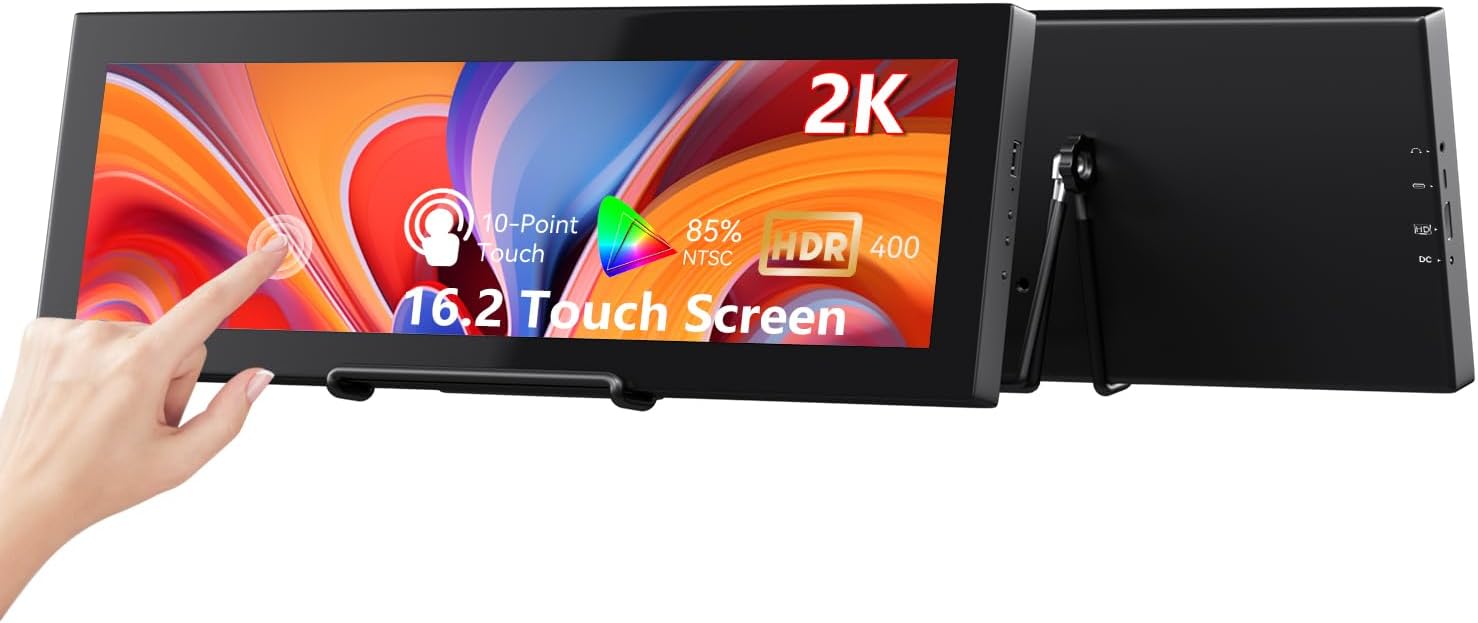
🚀 Elevate your setup with the ultimate portable touchscreen powerhouse!
The Prechen 16.2'' 2K QHD IPS touchscreen secondary monitor delivers a stunning 2608×720 ultra-wide resolution on a bright 800-nit IPS panel. Designed for Windows users and optimized for Aida64 system monitoring, it features dual HDMI and USB-C connectivity with plug-and-play ease, a durable metal build, and responsive multi-touch functionality. Perfect for professionals and gamers seeking a sleek, portable, and highly functional secondary display to boost productivity and system oversight.


| ASIN | B0GHR4Y57V |
| Additional Features | Touchscreen |
| Aspect Ratio | Unknown |
| Best Sellers Rank | #32,339 in Electronics ( See Top 100 in Electronics ) #830 in Computer Monitors |
| Brand | Prechen |
| Brightness | 300 Candela |
| Color | Black |
| Compatible Devices | Camera Desktop Gaming Console Laptop SmartphoneSpeaker Tablet |
| Connectivity Technology | HDMI USB Type C |
| Contrast Ratio | 1000:1 |
| Customer Reviews | 4.3 out of 5 stars 77 Reviews |
| Display Resolution Maximum | 2608x720 Pixels Per Inch |
| Display Technology | IPS |
| Display Type | LED |
| Hardware Connectivity | HDMI |
| Has Color Screen | Yes |
| Image Contrast Ratio | 1000:1 |
| Item Dimensions D x W x H | 0.78"D x 17.44"W x 5.9"H |
| Manufacturer | Shenzhen Kenowa Electronics Co., LTD |
| Model Number | HD-162 |
| Native Resolution | 2608x720 |
| Number of Component Outputs | 2 |
| Refresh Rate | 60 Hz |
| Resolution | HD+ |
| Response Time | 3 Milliseconds |
| Screen Finish | Glossy |
| Screen Size | 16.2 Inches |
| Screen Surface Description | Glossy |
| Specific Uses For Product | Business Desktop Entertainment Gaming Photo Video Editing Surveillance |
| Total Number of HDMI Ports | 1 |
| UPC | 753018197995 |
| Unit Count | 1.0 Count |
| Viewing Angle | 178 Degrees |
| Warranty Description | 1 |
R**W
Perfect little “dashboard” monitor for gaming setups
I picked up the 12.3-inch portable touchscreen (1920 × 720 IPS) to sit beneath my 34-inch ultrawide so I can keep Discord, Spotify, and hardware stats in sight while gaming—mission accomplished. One USB-C cable carries both power and video (HDMI is there if you need it), so my desk stays tidy. The CNC-machined shell feels solid, and the integrated folding stand lets me dial in just the right angle for quick glances. The 1920 × 720 resolution is perfect for a “heads-up display.” Windows recognized it instantly; I set scaling to 125 % so small text stays crisp. Colors match my main screen surprisingly well, and the back-light is bright enough to read even in daylight. Touch input is responsive, though I mostly use a mouse. I route all audio through my desktop speakers, so I haven’t bothered with the monitor’s built-in ones—can’t comment on sound quality. The only other quirk is the 75 mm-only VESA pattern, which is fine with the included stand but worth noting if you plan to arm-mount it. Bottom line: if you want a compact auxiliary screen that tucks neatly under (or above) your primary monitor and saves constant Alt-Tabbing, this monitor nails it. I’d buy it again without hesitation.
B**D
Great device and a great price!
This device does exactly what it says. It is a touchscreen monitor that connects to Windows and automatically becomes touchscreen capable without the need to install any drivers or other software. The resolution is very sharp and the touchscreen is very responsive. All-in-all, it's an excellent device that did just what I needed it to do. It comes with all the cables you need for a typical install. It even comes with a power block if you need it, but the screen can be powered with the USB cable. Awesome product at a great price.
R**O
Defective First Unit, Replacement Working Well So Far 16.2 size
I ordered the 16.2 version. When my item first arrived, I noticed faint green lines around the edges that created an oval-shaped clear area in the center. On top of that, I couldn’t get the touch calibration to stay set, which made the touchscreen essentially unusable. It also caused weird monitor issues where almost seemed to slow down my main display, Samsung G50SF and even made green vertical lines in greyish backgrounds. After unhooking defective unit and restart monitor went back to normal. The seller sent a replacement, and so far this one has been much better. The display looks good, and the touch functionality calibrated properly and has been working as expected. No more weird monitor quirks so far. It’s also worth noting that this isn’t truly 2K or QHD—it's closer to an ultrawide 720p resolution. That said, at this screen size it still looks surprisingly good. I’ll update my rating over time if no additional issues come up.
H**L
This impressive little monitor improves my productivity
I’ve been using this 12.3” portable touchscreen monitor for a couple months now, and honestly, I can’t believe I worked without it for so long. This thing has completely changed how I manage my workspace setup. I primarily use this as a dedicated display for system status monitoring and chat applications, and it’s absolutely perfect for that. Having all my monitoring tools, Discord, Slack, and other communication apps on this separate screen means my main monitor stays clean and focused on actual work. No more constantly alt-tabbing or having tiny windows cluttering up my primary display. The 12.3” size is exactly right - big enough to actually read everything clearly but small enough that it doesn’t dominate my desk space. It fits perfectly next to my main setup without feeling cramped or overwhelming. The screen real estate is surprisingly useful for what it is. I was skeptical about how useful the touchscreen would be, but it’s actually really handy for quick interactions. Dismissing notifications, scrolling through chat history, or tapping on system alerts feels natural and saves me from reaching for my mouse constantly. Getting it running was dead simple - just plug in the USB-C cable and it works immediately. No driver hunting or complicated setup. The fact that it’s portable is a nice bonus too. I’ve taken it to a couple client meetings where having an extra screen for reference materials was clutch. If you’re looking for a way to expand your workspace without going full dual-monitor setup, or if you want a dedicated screen for monitoring/communication tools, this is fantastic. It’s become an essential part of my daily workflow and I’d definitely buy another one.
L**N
Stream Deck killer, while killing it as a music player.
Day 1 setup, used the VESA mount to side mount it vertically on my monitor. The screen looks crisp even though it is NOT hdr-capable unlike what the listing says. It is still OLED and the touchscreen works. Note that you need to use the USB-A to C to have touchscreen functionality when using HDMI, the Type-C to Type-C will not work unless the port on your motherboard or laptop is specified as Thunderbolt. I use this as a music player and a larger, virtual steam deck with as many buttons as a stream deck XL for less than half of the price. Another note is that if you plan on something similar, you also need some sort of Elgato stream deck product already to set up the virtual stream deck. Once it is set up, the physical stream deco can be unplugged.
A**L
Great with minor setup!
This screen is something I have been looking at but was hesitant due to the lack of information out there. Quality is very impressive. Not a plastic casing and does support VESA. Comes with 1 power brick, 2 usb-a to usb-c cables, 1 hdmi & 1 usb-c to usb-c. My Use Case: Secondary touchscreen monitor in extended view setting to view discord and other applications while my main ultrawide is in use for gaming. Items to note: Touchscreen does work ONLY if plugged into computer along with power. I was not able to power and use it with one cable. Top usb-c port was for power only, regardless if its wall or pc. Second usb-c port was not working for me but not needed due to the hdmi. HDMI is full size and plugs into my graphics card. Touchscreen functionality tip: If this is the first touchscreen plugged into your windows device. It will most likely need to be configured in settings otherwise the touch goes to the wrong screen. To fix this, go to control panel, tablet pc settings. click setup and follow the prompt. Easy to do but required me to contact support and manufacturer before coming across a Youtube video.
A**R
Product in need of QA&QC
I like the utility and concept. I think the side ports are a terrible choice of wire management. The screen I received has damaged pixels and the touch screen doesn’t work on the monitor itself
C**S
I guess "meh"?
I don't want to be super negative - I'm sure this is a great device for some. I've got an ultrawide monitor setup (primary is a Samsung 93SD), and purchased this to have a touch screen to navigate things like discord when I'm gaming, or actively using another screen. The resolution seems fine, it comes with an array of cords, and everything that you'd need to set up. The touch screen feature works as intended. The "but", comes from the things that started to happen with my other monitors. All of the sudden, I started to notice issues with watching videos on other monitors, knock out the color balance on my gaming monitor. I can't say for sure that it's this monitor (honestly, I'm not sure how to establish causality) - but when I don't have this plugged in, the issue stops. If my use case was different, or I had a different PC, this might make a great fit - I genuinely don't know. I just wouldn't recommend it to anyone who didn't have something real specific that they needed a smaller touch screen to navigate.
Trustpilot
1 month ago
2 months ago