Desertcart purchases this item on your behalf and handles shipping, customs, and support to South Korea.
🚀 Elevate your multitasking game with crystal-clear dual 4K power!
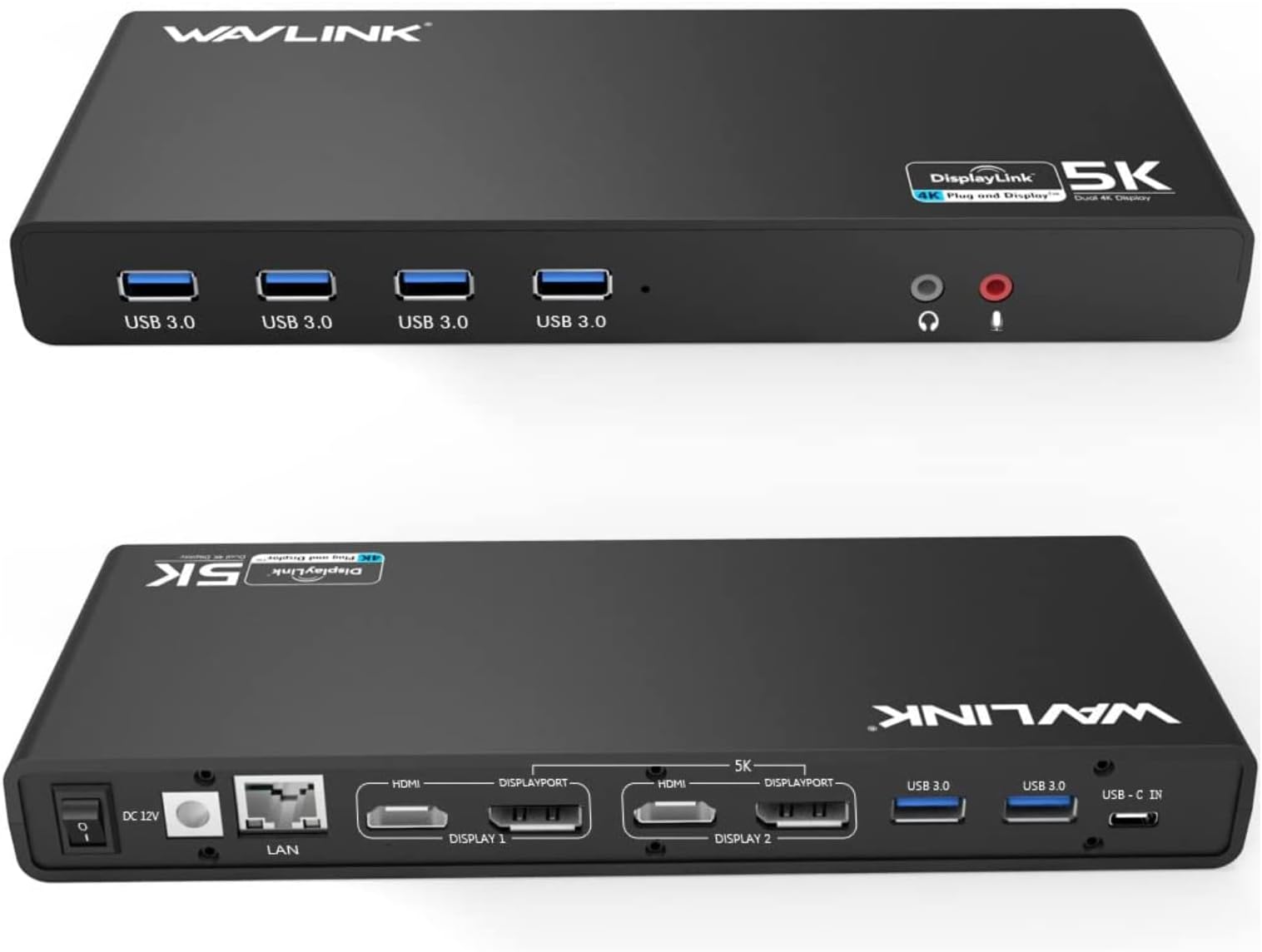
The WAVLINK Displaylink Docking Station is a professional-grade USB 3.0/USB-C hub designed for Mac, Windows, and ChromeOS users. It supports dual 4K@60Hz monitors through flexible HDMI and DisplayPort outputs, offers 11 total ports including 6 USB 3.0 and Gigabit Ethernet, and ensures broad compatibility with modern laptops. Ideal for home offices and remote work, it delivers plug-and-play convenience backed by a 24-month warranty and responsive customer support.


| ASIN | B07DCLK55V |
| Additional Features | Plug and Play, Powered |
| Best Sellers Rank | #1,060 in Computers & Accessories ( See Top 100 in Computers & Accessories ) #115 in Laptop Docking Stations |
| Brand | WAVLINK |
| Color | 69DK1 |
| Compatible Devices | Apple M1/M2/M3/M4/M5/Neo and Intel Macs (with macOS 10. |
| Customer Reviews | 4.2 out of 5 stars 1,691 Reviews |
| Data Transfer Rate | 5 gigabits_per_second |
| Hardware Interface | 3.5mm Audio, DisplayPort, Ethernet, HDMI, USB 3.0 Type A |
| Item Dimensions L x W x H | 8.9"L x 3.34"W x 1.1"H |
| Item Type Name | USB 3.0 & USB C Docking Station |
| Item Weight | 8.8 ounces |
| Manufacturer | WAVLINK |
| Mfr Part Number | WLAMJP2C-UG69DK1-A |
| Minimum Required Operating System Version | Windows 10 |
| Model Number | 8541562306 |
| Number of Items | 1 |
| Number of Ports | 11 |
| Operating System | Chrome OS, Windows, macOS |
| Special Feature | Plug and Play, Powered |
| Total USB Ports | 6 |
| Total Usb Ports | 6 |
| Unit Count | 1 Count |
| Warranty Description | 24-month worry free warranty and life-long technical support. WAVLINK Committed to providing you with high-quality products and quality services.Please don't hesitate to contact us via Amazon if you have any questions. |
S**R
Best one yet.
This is my 3'rd docking station. Each one from a different manuf. I have to say this has been the best one I have tried. it simply just worked out of the box, and no drivers to get and install. A nice perk was that it runs cool to the touch. The other 2 would get very hot, and all that means is that its life here on earth is limited because its getting pushed to hard.
2**S
Wavlink support is fantastic in my book.
Bought the product on January 31,2025. Had it for 5 months. It died. I wrote a review indicating it had died. I DID NOT reach out to WAVLINK, they reached out to me. They offered to uphold the warranty and provide either a refund or another product. I was initially skeptical. I was looking at other products on the market, but did not really find one that would fit my needs. I requested a replacement unit. The WAVLINK company immediately shipped me another unit and indicated I should reach out to them should I need any technical support. Did I mention WAVLINK contacted me after they read my review.... Connected it the same way I had the previous one and it worked perfectly. Granted this is day 1 with the replacement, but I am most impressed by WAVLINK and their support of their product. I have since recommended to a few friends to purchase WAVLINK products since they stand behind them. The docking station works as advertised. It supports two additional monitors at 4K each. My primary laptop is an HP Spectre with a 4k screen and supports DP1.4 through the thunderbolt connection. For this product to support the 4k screens one needs to understand the capability of the computer (laptop in my case) and its' capabilities. I am impressed with their product and their support. I have changed my 1 star rating (solely based on it dying and I did not think I would get support) to a 5 star rating for the product and the support team.
B**B
AWESOME DOCKING STATION FOR PC & MACOS WITH EITHER USB 3 OR USB-C
I have to use a Mac for my day job and I'm remote. So I wanted a docking station that allowed me to use my monitor and home setup for my PC. This docking station is compatible with both!!! Most other docking stations that claim they are for both Mac/PC need to have both be USB-C/Thunderbolt and aren't compatible if you want to use the docking station with PC through USB 3. On the PC side, it's plug and play -- I literally just plugged the USB cable in and everything was working on its own. For the Mac, I had to download the driver, and once that was installed, it was plug and play as well. EASY PEASY. Display settings recognized everything for Mac. It comes with two cables (one USB 3 and the other USB-C). I use the USB 3 one consistently which also works with the USB-C to USB adapters for mac. This device came up on Amazon search as an ad, and I'm SO GLAD it did because it's the only one I've found that works like this which is exactly what I needed!!!! Plenty of ports for everything, no issues with anything. Stellar product all around!!! Highly recommended.
T**O
Arrived Quick, Works great - So I Thought...
***Important Edit*** I did not know that I would need to run a program to use the display ports. And by doing that, it put a heavy load on my laptop and made my primary programs start glitching out. I can not have that in my setting so I had to return it. Sidenote: You can use the hub without using running the display ports program, The hub itself runs fine and you have full access to all the input slots. But, you can not extend your display at all. The return process was easy and I have already been given a full refund. (Original review below) Bought to use with my 2019 MBP. Primary use will be DJ'n and music production. Out the box and hooked up, I love the sleek size and placement, I will be using all the 3.0 slots. All the slots are running some high end pieces of audio equipment and so far, not a bit of interference using the hub. Hooking up the HDMI ports: of course I had no physical issue hooking up 2 HDMI ports so that worked just fine BUT, in order to use the HDMI outputs you need to download/update the drivers for hub then re-start your computer and give access to the your preferences in order to be able to expand the displays. I do like that I now have 3 displays on my MBP vs my old nonpowered hub that only allowed for 1 screen expansion. Now to the thing that I DO NOT like about this product. The power plug is a brick vs a regular plug. I wish that it was a regular plug as I am using a bunch of plugs to run all my equipment. when you have to add brick plugs into the picture, then you end up loosing a plug slot or have to elevate the plug with a coupler to be able to use with pretty much any power strip. I will be using this hub in both home and professional settings so I will be locating my coupler so that I do not have to loose a plug slot. All and all, for the price and the use for me as a musician, I am very happy with my first impressions of the powered hub. After reading the little instruction book that comes with the product, I learned that you can expand your display's even more by getting a second powered hub and daisy chaining them together.. Pretty cool but I wont need to go down that road with what all I am using my setup for. I hope this review helps anyone considering this product. #HumanJukeBoxDJMO
B**.
Not Reliable for Daily Use – Constant Crashes
I purchased this docking station at the end of June 2025, and less than a year later, I’ve experienced ongoing reliability issues. The monitors disconnect or crash at least once per day, and the device frequently malfunctions. The only way to get everything working again is to force restart my laptop, which is disruptive during the workday. After restarting, it takes an additional 5 to 10 minutes for both monitors to come back online. Over time, the Ethernet and display ports have also stopped working entirely. I recently switched to a MacBook and was hopeful the dock would perform better compared to my HP device. Unfortunately, I discovered that my package did not include the USB-C to USB-C cable that was advertised, which added to the frustration. The listing also mentions a 24-month “worry-free” warranty and lifetime technical support, with instructions to contact the company through Amazon. However, I have not been able to find any clear way to reach support to report these issues. I’ve seen other reviews where WAVLINK responded directly, so I’m hoping this review prompts someone from their team to reach out. At this price point, I expected much better reliability and support. Based on my experience, I would recommend considering a more dependable alternative.
M**A
So Far So Good
After my Plugable docking station crashes my brand new laptop multiple times while trying to wake it up, I thought it was best to try something different. The Plugable used to take between 5 to 10 seconds to wake up the computer and all the monitors with a Windows sound for each device that is connected, but this one takes up to 2 seconds. It makes only one sound to wake up the computer and all the devices are automatically available. This one is about 75% faster than the plugable and my internet speed is about 40% faster than it used to be with the Plugable. I doubted it because there's no DVI and VGA ports on this one, but I'm still able to connect 5 monitors on this one like on the Plugable and now waiting to receive a USB 3 to VGA adapter to connect an additional monitor. Like all universal docking station, this one doesn't charge your laptop, so you have to plug it on the power outlet. I wish there was a way to connect both my work laptop and my personal laptop at the same time so with just a push of a button to switch between laptop. Right now I always have to unplug one laptop to connect the other one. It looks like no docking station can do that yet. One problem I found so far is that I cannot use DP and HDMI at the same time. If I connect to a DP, I lose the screens that are connected to the HDMI. That's not a big deal for me because I have the option to connect only to HDMI. Only 2 monitors are able to display the resolution 2560 x 1440 and any additional monitor would display 1920 x 1080.
M**C
Easy set up and works great
It exactly met my need of a docking station with a DisplayLink chip to connect two monitors to my older HP Pavilion 15 Laptop. It arrived on time and in good condition. Easy to hook up and use.
A**Z
Might work intermittently, but causes external monitors to flicker, and randomly disconnects...
With 15+ years of experience working in IT, I'm no stranger to laptop docks, and frankly have rarely given them much thought. You plug them in, and they just work. However, with this one, I'm seeing a very strange behavior in that my external monitors exhibit a subtle flicker when connected to this dock. They are perfectly stable and have no issues if I connect one directly to the HDMI out on my laptop, or when I test them on an alternate computer... however, bizarrely, when I type on my usb keyboard (also connected to this dock), the image on my external monitor flickers just enough to catch my eye and be distracting. I have already downloaded the latest display link drivers, and have not seen any improvement. I'll keep looking for a solution, but if I can't find one soon, I may be forced to return this one and look for another brand. Update: I ended up being forced to return this dock. I began experiencing recurring issues where my external monitors connected through this dock would lose connection for a very brief moment. Which for me, was a big problem, because it happened during important meetings where I was sharing content from my external screen via Zoom. When it lost connection for that moment, it crowded all of my content over to my main laptop screen and messed up the screen share. I had to scramble to bring the content to the top of the mess, and start sharing again, which was not a smooth process. Thinking that it was just too much for the dock to push two 4k displays, I tested it with only 1 external 4k monitor connected, but it had the same issues. Perhaps it would work for a 1080p monitor or two, but it definitely cannot handle the 4k screens (in spite of the misleading product specifications). On a good note, I ended up solving my problem in a fantasticallly economical way... I connected 1 monitor directly to my laptop via the single HDMI port, and then I connected the other one via a $18 USB-C to Display Port adapter, and it has been rock solid!! Sure I've got all my usb devices plugged into my laptop instead of a tidy dock, but functionality outweighs cosmetics any day.
I**S
Super universal link for computer systems
After ordering over 5 of these from other products, this one was easy to set up . Great fast connection for all wifi , usb and monitors.
A**A
Perfetto! 5 stelle. Top.
Collegato come da manuale, acceso... qualche attimo per configurarlo (ho preferito scaricare il driver originale, anche se già era stato riconosciuto da windows) e... tutto perfettamente funzionante. Consegna super veloce e accurata. Soldi ben spesi, almeno per il momento!
A**ー
使い勝手が良いです
ノートPCのマルチモニター用で購入しました。PC本体+ディスプレイポート×2の3画面が可能になりました。 USBもこの機器から可能なため、本体には1本のケーブルで拡張可能です。 持ち運びもするため、全てが1本化出来るのが良かったです。
M**N
Amerikaanse stekker
Deze was niet voorzien van een Europese stekker. Beetje vreemd..
F**N
Très bon matériel de multi- connexion
Très facile à installer et matériel très stable
Trustpilot
1 month ago
2 days ago