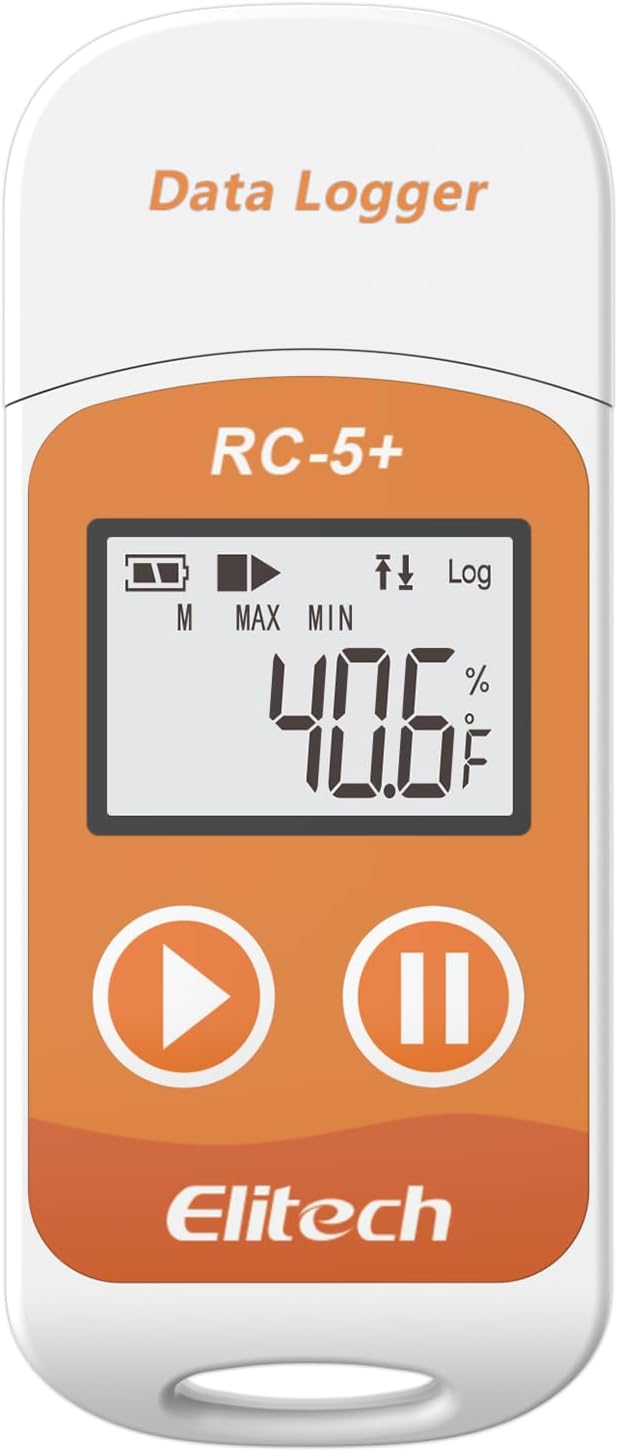
🌟 Stay ahead of the curve with Elitech RC-5+ — your ultimate temperature watchdog!
The Elitech RC-5+ is a reusable digital temperature data logger with a wide -22℉ to 158℉ range and ±0.9℉ accuracy, designed for professional monitoring of pharmaceuticals, food, and sensitive goods. It stores up to 32,000 data points and auto-generates PDF/CSV reports via a built-in USB port without needing extra software. Featuring an LCD display, multiple start options, customizable alarms, IP67 waterproof rating, and a battery life up to 6 months, it offers reliable, plug-and-play temperature tracking with free ElitechLog software for Windows and Mac.


| ASIN | B0DQKZ5XV7 |
| Age Range (Description) | Adult |
| Batteries | 1 CR2032 batteries required. (included) |
| Best Sellers Rank | #14,697 in Industrial & Scientific ( See Top 100 in Industrial & Scientific ) #2 in Industrial Data Loggers |
| Brand | Elitech |
| Color | Fahrenheit(℉) |
| Connectivity Technology | Usb |
| Date First Available | December 16, 2024 |
| Display Type | LCD Screen |
| Included Components | Elitech 1pack RC-5plus Fahrenheit, with user manual, calibration certificate |
| Indoor/Outdoor Usage | Outdoor |
| Item Weight | 1.44 ounces |
| Item model number | RC-5plus Fahrenheit |
| Manufacturer | Elitech |
| Model Name | RC-5plus Fahrenheit |
| Number of Batteries | 1 CR2032 batteries required. (included) |
| Outer Material | Plastic |
| Package Dimensions | 4.09 x 2.48 x 0.75 inches |
| Power Source | Battery Powered |
| Reusability | Reusable |
| Special Feature | High Accuracy |
| Style | Industrial |
| Unit Count | 1.0 Count |
| Upper Temperature Rating | 158 Degrees Fahrenheit |
R**3
Handy device for recording temps, and easy to use!
I bought this little compact device to monitor the temperature inside of my storage unit. I pay for climate controlled storage and I noticed some of my things were starting to get ruined inside the unit. Sometimes I would show up and the temperature didn't feel right. Well, all of that was revealed after I purchased this and set it in the storage unit for a month! It turns out I'm not getting the climate controlled storage that I've been paying for, haha! Because of this, I now have evidence and proof that the storage unit has not been staying the proper temperature, and now I can file a claim for the things that were ruined and hopefully recoup some of my losses. The device itself is easy to use and it has a small built-in battery that's capable of lasting up to 6 months (and it's replaceable). Once you plug it into your computer and configure the settings, you simply set it where you want it and hit the play button. It starts recording until you hit the pause button. Once you are done, you just plug it into your computer and you can have a nice detailed report in either PDF or Excel spreadsheet format. I believe this was a great purchase and a great value for what it cost. For that small amount of money, it's going to save me literally thousands on the items that were damaged inside my storage unit! I highly recommend this device to anyone that needs accurate temperature recordings logs and data.
M**G
Marvelous compact temperature-data logger
I initially purchased two units, an RC5+ and an RC-5+TE. I have since purchased two additional "TE" units. These loggers are intended for use in monitoring shipments of food and other goods that need to be kept cold, so of course a record of the shipping conditions is essential. Check the specs to get an understanding of their outstanding flexibility. My use is in monitoring temperatures in rooms in which the air conditioning or heating may have problems, so I need to be able to monitor fairly rapid temperature changes. If you need to monitor for conditions like this, you should buy the "TE" version which adds an external sensor on the end of a cable about 3 feet long. Nothing magic about that sensor, there is another one like it inside the RC-5+ case and you can choose which to use, but the external one has much less mass than the case so it responds more quickly to temperature changes. It took me a little while on line to find the correct application software to download. For a Windows PC that is ElitechLogWin V6.4.0. There is an understandable user manual included in the app, but it has some omissions I found annoying. Most of those have to do with how to transfer data from the logger into the PC, how to configure the logger, and how to choose stored database files to display. This is like any other competent tool that's new for you, not everything is obvious and there is a learning curve. But the hardware and software work just fine, and the plotting routine (PDF only) is marvelously capable. Not only can you overlay multiple data logs, you can even display (and export!) logs that only partially overlap -- and the software takes care of this offsetting and scaling for you! And you can change the X-axis scaling and location of the viewing window; it's a little clunky in my opinion, but workable and I'm making fewer errors now. If I didn't feel these are marvelously capable and well worth their cost, I wouldn't have bought two more soon after the first two! The only reason it didn't get 5 stars from me is what I consider some obvious omissions in the user manual explanations. Martt Harding
O**T
The software is not intuitive but it works fine once you have figured it out.
Be sure you have it set to "internal" sensor. If you don't, it will appear to be recording but will not have any data when you check it 30 days (or however long you choose) later. That is pretty frustrating. To be clear, I tested it, and it worked fine then when I reset it to use it in again (in an outdoor storage container for 30 days), the software defaulted to 'external" sensor. So, I wasted 30 days recording nothing. In order to avoid this, make sure that the last page you set in the parameters is under settings/advanced. Set the sensor to "internal" then save parameters while still on that page. Go back to settings/advanced again and verify that it is still set to "internal" then unplug it. (You can set it to start recording at a predetermined time or to start recording when the device is pulled out of the USB port.) Once you have unplugged it, check the screen to make sure that it has the "record" arrow and also that it displays the current temperature. If it says "nc" on the screen then it has defaulted back to external sensor and you will have to repeat the process to set it back to "internal". To be fair, it works pretty good once you figure out the software, but it is disappointing to wait 30 days only to find out it hasn't recorded anything. Keywords: problem, mistake, error, failed, nc, -100, pdf, csv, data
D**N
Read the Online Instructions
A very sparse set of instructions came with the item, so I had trouble getting it to work at first. I looked online and the instructions from the manufacturer there were much clearer. With that info, it is very easy to use. Once I got it running it did just what I wanted. The refrigerator in our new travel trailer wasn't holding temperatures right. I put this in the refrigerator and let it run for a couple of days. Then I plotted the results (done automatically from the vendor software) and was able to show the RV dealer what was happening. The refrigerator would get cold and stay cold for 6-8 hours, then it would stop cooling for 6-8 hours allowing the inside to get way too warm to keep food safely. It would have been very hard to see what was happening without this recorder. We've had some trouble getting repairs done on our trailer due to the factory refusing warranty repairs, but with the detailed data we gathered with this recorder we're confident the problem will get fixed.
P**S
Worked great for me.
Worked great for me. I know some people had trouble with it but it's probably not them, a lot of this stuff from China is hit or miss.
O**N
Lo uso para registrar la temperatura ambiente desde el 7 de enero de 2021 a la fecha, los datos los exporto a excel desde la aplicación de elitech y en una hoja que hice para analizar los datos, voy agregando las lecturas almacenadas, lo programé para que tome lectura cada 12 minutos, el objetivo de este registro es confirmar y evidenciar los efectos del cambio climático, es decir, este registro va para largo tiempo, mínimo 3 años, aunque no es molesto el recoger las lecturas ya que como almacena 32 mil registros puedo recuperar los registros cada 3 meses y agregarlos al excel mencionado, muy buen instrumento de medición, lo recomiendo ampliamente
M**D
Very good
C**S
Good one.
G**A
Fiquei chocado com a versatilidade! Comprei pra comprar pra garantia que uma geladeira não esfriava o suficiente e acabei arrumando desculpas pra usar na "caixa que esfria" alheia por pura curiosidade.
神**谷
4~5月中のビニールハウスによる育苗の温度記録として設置。 ボタンを押せばすぐに起動し、日中40度以上の高温が苗焼けの原因と判明して満足。 防水性もあったので動作に問題はなかった。 しかし事前準備がとにかく手間がかかり、まず設定変更&データ抽出のためのデータ管理ソフト(ElitechLogWin V6.0.0)を 探し出すところから始まり、最初に標準時間を英国→日本へと変換する必要がいる。 また温度記録も毎秒~時間単位で設定しなければならない。(自分は5分毎にした。) 記録中は放置で問題ないが、ロガーからは自動的にPDFで保存されるのでそのままでは使い勝手が悪すぎる。 そのためExcel(CSV)形式で抽出すためデータ管理ソフト経由が必須。 この作業自体はそこまで難しくないが、複数台導入するなら管理No.を別々に振らないと混乱する。 データ編集するつもりならExcelも必須であることも追記しておく。 とはいえ非常に安く温度ロガーを導入、しかも複数同時に購入できるのはすごいメリット。 毎年の電池交換を推奨しているが、年1~2か月程度の使用頻度ではたいして消耗していない。 ロガー設置して原因判明したら、即座に温度管理システムを導入して高温防止をすれば問題なくなる。 対策として、ビニールハウスに空動扇を導入して完璧な育苗ができるようになった。 ロガー自体は不要になったが、これからも温度記録はつけていくつもりだ。
Trustpilot
1 day ago
2 months ago