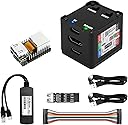
🚀 Unlock Next-Level Remote Server Mastery with NanoKVM!
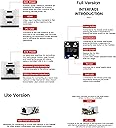
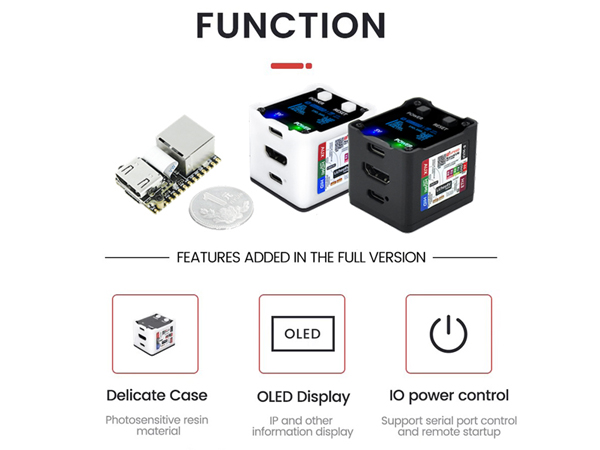
The Sipeed NanoKVM IP-KVM Mini Remote Control Server is a compact, Linux-powered RISC-V development board designed for professional-grade remote server management. Featuring a 1GHz C906 CPU, 256MB DDR3 RAM, and 1TOPS NPU, it delivers high-quality 1080P 60fps video streaming over a 100M Ethernet connection with ultra-low latency. Its multi-interface design supports HDMI input, USB HID emulation, and remote mounting, making it an indispensable tool for IT managers and tech-savvy professionals seeking seamless, reliable remote operations.


| ASIN | B0DWMHTB8D |
| Best Sellers Rank | #264 in Single Board Computers (Computers & Accessories) |
| Brand | WayPonDEV |
| Color | Black Full Kit |
| Customer Reviews | 4.0 4.0 out of 5 stars (66) |
| Date First Available | January 8, 2025 |
| Item Weight | 5.9 ounces |
| Item model number | NanoKVM Cube IP-KVM Remote Server |
| Manufacturer | WayPonDEV |
| Number of Processors | 1 |
| Operating System | Linux |
| Package Dimensions | 6.81 x 4.65 x 1.85 inches |
| Processor | 1 GHz |
| RAM | DDR3 |
| Series | NanoKVM Cube IP-KVM Mini Remote Control Operations Maintenance Server |
| Wireless Type | 802.11a/g/n/ac |
E**K
Compat KVM that is simple to use
I bought two of the NanoKVM Lite devices for some servers in my garage that are not easy to access. I printed a 3D case for each of them using a design I found on Thingiverse. To keep the lid on while inserting cables I used some superglue. It looked very nice but then at some point both stopped working. One doesn't respond at all and the other reports it's overcurrent. I don't think the superglue would do that, but maybe something became loose at some point. When they were working they were easy to use and the performance was good. I did have a problem booting when I tried a 512GB micro SD card and later switched to a 32 GB micro SD card.
B**B
Good value for the money.
Really impressed for the money! Works as a great IP KVM with my home server tucked in a closet. Few quirks... You will need a 8-32GB micro SD card, follow the link in the item description above for setup and the SD image download, I didn't have HDMI video until I performed the software Update feature after logging into the console. Pretty cool little IP KVM, not sure I'd use it for business but great little home IP KVM that is normally cost prohibitive.
R**R
Unreliable.
I bought this in April ~7months ago. I got it set up, and left it plugged into my home server 24/7 so that if I ever could not SSH into my server I could still manage it. When I actually needed it to work last week it did not. I re-flashed the internal SD card and it still will not power on. I do not know when it stopped working but it did not even last 8 months, and I never used it beyond setting it up/testing it when it arrived. Waste of time and money.
S**E
Works as described, would be better in my case of the KVM had wi-fi capabililty
Works as advertised, but be aware that if your PC needs to be on a wired network you will need to run 2 cables to the computer, one for it and one for this KVM. Would be better if the KVM was wifi compatible, my use case requires that the computer be on a dedicated high speed connection.
C**N
How have I been living without this?
So far, this is very impressive but a little lacking. First, it's odd it does not come with an HDMI cable. I bought a short, thin one here from Amazon for $6. It does include the ATX daughter-board to control powering on or off a tower computer, but it's usually sold separately with other IP-KVMs. This device is used to control a computer (mini PC, tower, laptop, desktop, etc...) remotely over the network via the web browser of another computer! No software is needed to install and get it working. However, this does replace the monitor of the remote PC. There is no video pass-through. But you can see the monitor in your browser from another computer instead. This means you can access any operating system and can enter the BIOS (even update the BIOS) remotely with no software required! If you want to access from anywhere in the world, it uses the free TailScale app for encryption and security. The app is free from GitHub. The software on this IP-KVM is open source, so no worries about viruses or other nonsense. There is no further cost, meaning no subscriptions or upsells. This device just works. It's small, light weight, can use power from a single USB port (which also conveys the keyboard and mouse to the target computer) and it is hardwired network access only (no wifi) and it does not carry audio, just K(eyboard) V(ideo) and M(ouse). It's hard to believe these are so tiny, inexpensive and easy to setup and use. One of these controls one computer. If you have several computers you want to control remotely at the same time, then you would buy a NanoKVM for each computer. The computer you are connecting FROM does not need anything other than a web-browser. Again, no software to install and only the target computer needs the NanoKVM. This is handy for me to set up computer downstairs with new Windows installs, updates, BIOS settings, all from my bedroom upstairs. The computers I work on are put on my workbench downstairs. I used to have to go up and down the stairs constantly to check on the state of the update/install. Now I just lay in bed with my wireless laptop near me and I can monitor the progress while checking email or watching videos by simply leaving a browser tab open. Where has this been all my life??
M**G
Very useful KVM
This had everything I needed to get a remote console on a machine that didn't have it. I've used this on a few machines. I intend to get a few more.
A**R
Arrived and works. Has some quirks though.
Arrived and works as advertised. I actually like it. Advice remove the reserve pin sticking out on the f-panel board to hook up to the motherboard. The jumpers that came with it were janky and did not work but breaking off that single pin allows it to just plug in and work. Has some software quirks currently. Their forums were helpful though on github. Also recommend disabling the tail service. Not much point. Last bit of advice use chrome. I prefer firefox but chrome had a 10x decrease in bandwidth usage with it. Not sure why yet. Despite all that I really like it!
A**R
Will work only with specific boards.
Sadly didn't work as i needed. Seems only works with specific motherboards. couldn't make it work as simple as it should have been.
N**N
Screen share works but while I can use a keyboard, mouse does not work well(cursor moves but I cannot seem to click). Tried switching HID mode on and off but it does not help
Trustpilot
3 weeks ago
1 week ago