Buy anything from 5,000+ international stores. One checkout price. No surprise fees. Join 2M+ shoppers on Desertcart.
Desertcart purchases this item on your behalf and handles shipping, customs, and support to South Korea.
🎮 Capture Every Frame, Own Every Moment
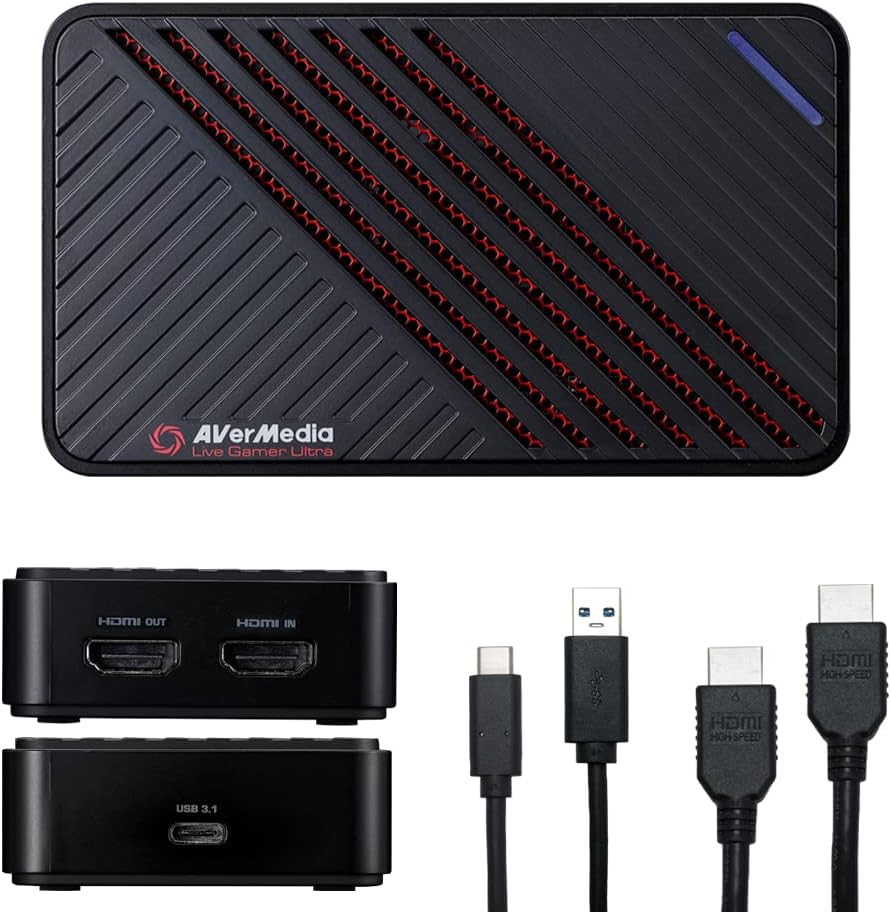
The AVerMedia Live Gamer Ultra GC553 is a compact, USB 3.1 Type-C powered capture card designed for professional-grade 4K60 HDR passthrough and 4K30 capture. It delivers ultra low latency for seamless gameplay recording and streaming on Windows 11 and macOS 10.13+, supporting next-gen consoles like Xbox Series X/S, PS5, and Switch 2. Its plug-and-play design and broad compatibility make it the go-to device for millennial pros seeking uncompromised video quality and smooth performance.


| ASIN | B07DHV47HF |
| AV Output | HDMI 2.0 |
| Antenna Location | Video Recording, Gameplay Broadcasting |
| Best Sellers Rank | #242 in Internal TV Tuner & Video Capture Cards |
| Brand | AVerMedia |
| Built-In Media | CyberLink PowerDirector 15 Product Key Card, HDMI 2.0 cable, Live Gamer Ultra (GC553), Quick start guide, USB Type C to Type A Cable |
| Compatible Devices | PS5, Xbox Series X/S |
| Customer Reviews | 4.2 out of 5 stars 766 Reviews |
| Global Trade Identification Number | 00795522965851 |
| Hardware Interface | USB 3.1 Type C |
| Item Dimensions | 4.43 x 2.6 x 1.02 inches |
| Item Type Name | Game Capturing Device |
| Item Weight | 0.26 Pounds |
| Manufacturer | AVERMEDIA |
| Mfr Part Number | GC553 |
| Minimum System Requirements | Operating system: Windows 10 x64 (Support UVC Protocol) Desktop: - Intel Core i5-4440 3.10 GHz or above - NVIDIA GTX 660 - 4 GB RAM (8 GB recommended) Laptop: - Intel Core i7-4810MQ - NVIDIA GeForce GTX 870M or above - 4 GB RAM (8GB Recommended) |
| Model Name | Live Gamer ULTRA |
| Model Number | GC553 |
| Operating System | Windows 11, macOS 10.13 |
| Other Special Features of the Product | Not_Performance_Used |
| Platform | PlayStation 5, Xbox Series X |
| Recommended Uses For Product | Video Recording, Gameplay Broadcasting |
| Special Feature | Not_Performance_Used |
| Tuner Type | ATSC 3.0, HDMI 2.0 |
| UPC | 795522965851 |
| Unit Count | 1.0 Count |
| Video Capture Resolution | 1080p, 4K30 |
| Warranty Description | 3 year manufacturer |
P**.
Works great on macOS
I'm writing this review primarily because none of the other reviews seem to cover using the device on macOS, which is what I bought it for. This is for the GC553 connected over USB-C with an Apple Thunderbolt cable as the Mac instructions suggest. I have the device connected to a 2018 Mac Mini, which obviously doesn't meet the system requirements AVerMedia provides but that's fine because I'm not using their software. I took my chances going in knowing this was a standard USB Video device and figured if the Mini can encode 4K30 in realtime via hardware then why would I need discrete graphics? As it turns out, I was right and it works fine. The official software provided for the device can't even capture a stable 1080p30, which is expected since it's just encoding in software. But it can apply firmware updates and change settings. OBS can't do hardware encoding on the Mini either, so that's not very good either. The good news is that any app that can do video capture + hardware encoding on a Mac works perfectly. The easiest option is Quicktime Player, which comes with macOS. Quicktime Player offers two quality settings, High and Maximum. High is 720p, maximum is 1080p. Both capture at a flawless 60fps with no dropped frames. Unfortunately QuickTime Player doesn't let you capture at 4K. I don't know how many capture apps for macOS support both hardware encoding and 4K devices, but I found a 3rd party app called SwiftCapture and purchased that. It can capture 4K30fps directly to H.264 on the Mac Mini flawlessly, no dropped frames. This is exactly what I wanted and it confirms that the official system requirements are just a limitation of the official software and you probably can use the capture device on any mac with USB-C as long as it supports hardware encoding. Note that I use this specifically for capture to files only. I haven't looked to see if any 3rd party streaming app supports the hardware encoder on the Mac Mini. OBS doesn't as of version 23.2.1. You can still use that anyway but the framerate will be choppy since it's not hardware encoded. As far as the product goes, I was impressed by the size. It's much smaller than the HD PVR that I used to capture component video previously. And the fact that it is USB powered is also nice. Set up was fairly easy, just connect it following the instructions and use the software on their website to update to the latest version. The only disadvantage I can see is that it doesn't seem to be capable of capturing 1440p60 unless the source device is outputting that resolution. When you have 4K content, I can capture in 4Kp30 or 1080p60 which is downscaled from 4K, but it doesn't let you capture the 4K downscaled to 1440p60. When you put the device into 1440p mode during 2160p video it just displays a message about resolution not being supported. In the software provided it seems the only way to capture at 1440p is to put the device into 4k30 mode but save your video as 1440p30. I'm not sure if it behaves the same way on Windows but it would be nice to be able to directly capture into 1440p even if the content was 2160p. Overall it's a great little device if you just want to do video recording from a Mac, especially if you don't use the provided software.
D**L
Works like a champ, never gets hot, and always delivers quality.
I’ve been using this capture card for a little over 8 months and I’ve got to say... Elgato has its work cut out for them. 1080p120 recording capability is super nifty, and the passthrough ports enable you to use high refresh gaming monitors without having to worry about Windows desktop cloning ruining your fun. If you want G-SYNC/FreeSync support, you won’t get it here. But if you’re running a dual PC streaming setup like mine, you’re probably not having an issue hitting your monitor’s refresh rate anyways. This is also very plug and play with OBS, and supports 1080p60 YUY2 for the best performance.
G**R
Works Great For Switch 2, Passes Thru 4K HDR, Full Surround
When researching this device I got bad information. Unlike the previous Avermedia LGP 2 this device does not actually limit the Switch 2's 4K HDR or its Linear 5.1 Surround sound. When using the previous device I actually had to play games in 4K without HDR and listen to them in stereo sound only. I have had no such issue with this device. I am running the Switch 2 through the device into my Marantz reciever (9.1 dolby atmos) and it sends the full 5.1 Linear surround signal. The Switch2 is limited to this ONE type of surround sound in the console's settings. So you need to make sure you can pass through this signal if you are using a surround system (may not impact headphones as much). The basic idea is that I did not want to sacrifice 4K, HDR or my surround set up in any way while playing the Switch 2. I was not willing to play in stereo or without HDR like the previous device forced me to do. Now what I am talking about is playing the Switch 2 uncompromised, not the quality of the recording. I am only recording in 1080 P and the recording itself may be in stereo. I did not test that but it sounds fine for youtube, and I dont want to record in 4K since it takes up alot of file space. So this did exactly what I was looking for. Again if you are using headphones it will probably sound good enough. Just be aware that using USB headphones will remove the sound data from the recording. You will likely need to use wired headphones connected directly to your stereo using a 9mm jack to avoid the issue. Thats what I do if I want to use headphones on Switch 2. My expensive headphones are USB only and wont allow me to record the audio for gameplay, just the video. Normally I run the console through my dolby atmos surround system, so its not a big deal. I got this device SOLELY to record the Switch 2 (but without compromising audio and video passthrough). I use the PS5 Pro and Series X's recording feature to record gameplay on external HDD's for those systems. The Switch 2 does not have a built in recording feature for long videos unfortunately. For PC gaming I use OBS on the PC to record that. This was my only solution for Switch 2 without compromising the pass through. The only issue is that you will need pretty good PC specs to run this device. My main work PC was not powerful enough, but the PC I use for gaming for overly capable so I am using that PC to record Switch 2. I just need to turn that PC on whenever I record Switch 2.
R**B
Best External Capture Card Currently.
I was quite impressed with the GC553 external capture card, even though we had a tough beginning to the relationship. First upon opening I tried to run it with a regular USB C to USB C cable because I had minimal USB A 3.1 ports available. No dice it only powered up but did not deliver data over this connection. You MUST use the provided cable or it wont work. Next I tried to upgrade the firmware to the latest version and had it fail twice, okay not normal. So I figured maybe power cycling the unit would help. This caused everything to go bad, the device no longer showed up as the correct name and instead showed up as "westbridge" and was not showing up as a capture device either so things were looking bad. After much hunting and emailing the company support line I was able to hunt down a little article on the support website called "GC553 Recovery Utility Steps" which had a nifty little application and guide to follow to reset the unit to factory firmware and make it show up correctly to windows again. (If needed go to AverMedia website under their support FAQ and search for GC553 Recovery and look under F/W Upgrade tab) So after recovering the device I was finally able to flash it to the latest firmware, the only thing I can notice is that the USB C side of the plug is a little loose when I hold slight pressure on the wire it will cause windows to keep making the device connected bonk noise repeatedly. So I guess the only advice is to be very careful with the provided cable as no other USB C cable will work with the unit. After that ordeal was over I was very impressed with the actual performance and capture of the device, compared to the old thunderbolt blackmagic intesnsity extreme I had been using I was now able to capture at full 2560x1440 with out having to use a scaler in my setup which eliminates another piece of hardware. So in short if you need a small and portable capture device, this is the best one as of Dec 2018. Just take care with the plug and connection on the device it self and make sure not to move or jostle it while updating firmware.
G**V
Likely requires a very specific setup to perform as expected.
I don't usually write reviews on products, but content creators deserve to be aware of the hassles you have to go through to work with this product. The reason I purchased this product in the first place is because the competition - the Razer Ripsaw - began having severe issues. They are currently out of stock indefinitely, so I had to look into another low latency alternative. That being said, I've been reluctant to try Avermedia products because of problems in the past, but I figured if they're developing low latency products, maybe things have changed. To setup this product: you must absolutely download the Avermedia RECentral software. The reason being that the LGU has built in HDCP protection that you must disable within this software. The passthrough still works, as my TV was able to see the game just fine, but the RECentral software OBS could not see the signal until this was disabled. After that, OBS can recognize it just fine. I've had this computer setup for a while now and it has worked fine with other capture cards, again until the Razer Ripsaw imploded and created a new star. However, there came more problems within OBS. Firstly, OBS is unable to recognize audio input with the default capture settings. You must setup a custom audio capture under the device properties for this device. Avermedia recommends you use their "Live Gamer Ultra Streaming audio" or whatever, but you can also select HDMI. The recommended option creates an audio desync. Additionally, switching between consoles and games seems to cause further audio desync. For instance, I was playing Super Smash Bros. Ultimate on Nintendo Switch, and with default video settings, the video was delaying in OBS. After limiting the FPS output to 60, it seemed to stabilize only to then experience audio delay. When experiencing no delays and switching to Xbox, the audio desync was immediate and only resolved when switching FPS output to match the console output, only to desync again. My computer is running Windows 10, I'm running an Intel i5, 16GB of RAM, and a NVIDIA GeForce GTX 750 Ti. I use an HDMI Splitter to easily switch between consoles and this does not cause a delay to my TV. It may be a factor in the OBS output, but if I can't use an HDMI splitter, it defeats the purpose and convenience.
J**L
It works!
This product was used on the Xbox Series X to utilize 1440p @120hz At first I had a huge problem with the capture going out constantly in game. Solution was to disable VRR Variable Refresh Rate. Basically VRR is supposed have the console control the frame rate of the display or whatever input. In this case, it caused the capture card to black out very time the console tried to control the frame rate. Other than that I have had zero problems. Make sure when using capture software to match the resolution to the resolution to your console or else you'll never see the capture. Support is very poor tbh DO NOT DOWNLOAD ANY SOFTWARE FOR THIS. It does not even work and it doesn't matter.
A**C
The ONLY External Capture Card You SHOULD Be Using!
ElGato has disappointed me severely in the past, with my HD having compatibility issues despite hours of troubleshooting. So I switched to AVermedia on the recommendation of my youtube friends and got their new 4Kp60 model. And the footage captured looks REALLY REALLY good. I was pleased with the saturation of the colors as well as the consistent quality of it per second. Other capture devices have given me occasional seconds of grainy picture, yet I haven't had that issue with footage captured with this device. And the best part? NO INPUT LAG. That passthrough gimmick is no joke. And virtually no input lag is a NECESSITY if you're serious about capturing footage that is accurate to your actual play skill and not indicative of your ability to compensate for split second input lag. I'd highly recommend it to those who want to get into youtube. Is it expensive? Yes. My working class butt couldn't buy anything like new full price games or computer parts for three months. But youtube video making is an investment, and it is most definitely WORTH the investment.
T**L
It's a hit!
I am not highly familiar with this brand, although I had a VGA video converter from them a few decades ago that was decent. Looking for a replacement for my ElGato HD60 (which I'm giving a 1-star review), I found this on Amazon. I've not heard much about this unit, not seen many video producers or streamers talk about it, but I gave it a shot since I had so much trouble with ElGato. This thing performs excellently. The video quality is great and there is virtually no lag. I can play games in the preview window with no trouble. The unit is very compact and sleek, and I like that it only needs USB power. It works fine in OBS. I did have some sound buffering on my front USB port, but the rear USB port was fine, so try that if the sound isn't good. I will say that I haven't tried the 4K. I do think it's a shame this only supports 30FPS recording in 4K, and for gaming I would much prefer 60FPS HD, but this may be a useful product for someone needing 4K if 30FPS is enough.
A**R
Amazing
I tried to save myself a few dollars buying a cheap capture card initially... What a nightmare. I lost 2 days of streaming trying to get it working. This card arrived this morning, within 5 minutes of plugging it in, I'm online & everything is working perfectly. Do yourself a favour & buy a reputable brand like this... The cheap junk is just that.
S**.
Calidad
Graba a alta calidad y soporta los 120hz de la Xbox series, el único problema es que no tiene un puerto para conectar los audifonos y eso ocasiona que no pueda grabar el audio de mis amigos
B**N
Bad software, doesn't work on Linux
The software is .. insanely slow and clunky. On a Windows machine (where this product worked, ish - see below) it took forever to install their utility, it constantly suggested a firmware update, then failed identifying the device it just told me to update.. Bad start. I did manage to update the firmware using a Windows VM, so maybe that's a fluke? But! I bought this to use it on Linux. UVC should make that easy, in theory. Unfortunately I couldn't make the device work on two entirely different Linux machines - it is detected but doesn't provide any output. After days of tinkering and seeing reports of other people with the same issue online I have to assume that I am out of luck, that this hardware isn't standards compliant and was therefore a giant waste of money for me. Exploring alternatives now
K**Y
Worked well
This one is worked for me. Was trying different not work for me as been very slow . After change this one is better .fast than other one and worked good.
あ**よ
セットアップもすんなり、Switchの画面キャプチャーで使ってます。
WindowsのノートパソコンとMacのノートパソコンにセットアップしてみました。 Macは最後のintelマックですが全く問題無く使用出来ました。
Trustpilot
2 months ago
3 weeks ago