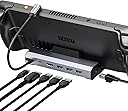
๐ฎ Elevate your gaming desk setup โ dock, charge, and conquer in 4K clarity!
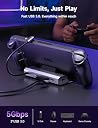
The JSAUX 6-in-1 Docking Station (model HB0603) is a premium accessory designed for Steam Deck OLED, ROG Ally, Legion Go, and MSI Claw. It features a 4K@60Hz HDMI output, gigabit Ethernet for ultra-fast wired internet, three USB 3.0 ports, and a USB-C port delivering up to 100W power for rapid charging. Combining hub functionality with a stand, it transforms your handheld console into a desktop powerhouse, enhancing productivity and immersive gaming with seamless connectivity and power delivery.





| ASIN | B0B7HVZNMB |
| Brand | JSAUX |
| Brand Name | JSAUX |
| Colour | 6-IN-1 |
| Compatible Devices | Valve Steam Deck /Steam Deck OLED, ASUS ROG Ally, Lenovo Legion Go, MSI Claw |
| Customer Reviews | 4.3 out of 5 stars 4,174 Reviews |
| Hardware Interface | Ethernet, HDMI , USB 3.0, USB Type C |
| Item Dimensions L x W x H | 32L x 109W x 153H Millimeters |
| Item Weight Unit of Measure | 170 Grams |
| Manufacturer | JSAUX |
| Manufacturer Part Number | HB0603 |
| Model Number | HB0603 |
| Number of Items | 1 |
| Number of Ports | 6 |
| Product Dimensions | 32L x 109W x 153H Millimeters |
| Total HDMI Port | 1 |
| Total USB Ports | 4 |
| Unit Count | 1.00 Count |
| Wattage | 100 Watts |
U**N
Great dock for the price
One of the must own accessories if you own a Steam Deck. Much better value than the official Valve dock.
A**N
Funciona super bem
Muito bom. Atendeu bem as minhas expectativas.
G**Y
Great device!
Pretty good build quality, outputs 4K 120hz, usb slots for wireless mouse and keyboard. Ethernet for faster speeds. Can't got wrong!
H**A
Mas de un mes de uso hasta el momento
Hace un mes que lo recibรญ y no eh tenido problemas hasta la fecha, sigue funcionando perfectamente para hdmi y carga (no uso nada mas aparte del control bluetooth para mi Steam Deck). En un principio batalle para comseguir imagen en la pantalla pero fue solo configuracion del steam deck. Buen producto
M**E
Regarding Couch Co-Op...
Okay, it works! Beautifully. I have a 62" TV and it's beautiful. Playing solo, it's flawless. No issues at all. Couch co-op? It also *works! *You'll need more than the dock. Here's what I got to make it work (links below): - 3 8bit Ultimate 2C Wireless Controllers: $89.97 ($29.99 each) - SABRENT 4-Port USB 2.0 Data Hub: $7.95 - Amazon Basic 2-Pack USB-A 2.0 Extension Cable, Male to Female, 3.3 foot: $8.09 ---------------- Total: $106.01 Why?: The Bluetooth in the Steam Deck is not designed to take the bandwidth of several controllers. After one connection, each subsequent controller gets increasingly more lag. By the fourth, it's so lagged it's unplayable. What?: You need to bypass the Bluetooth for all but at most one controller. That means you need a wired connection, or a controller with a USB dongle that will connect directly to the dock (if that's you, keep reading). A wireless controller with a USB dongle mimics a wired connection, so it won't overload the Steam Deck. I didn't have that. I had one Xbox controller and three Nintendo Switch Pro controllers. (Of note here, Nintendo controllers send BT signals that are both proprietary and condensed, making them the worst to use but there are workarounds. I do also have another Xbox controller, and the second one still had lag when both were connected). I bought three 8bit wireless controllers to fix the problem. But, it didn't. The controllers would each constantly disconnect and reconnect while playing. Apparently, it's this dock's USB 3.0 ports. The USB 3.0 ports project a slight radioactive signal that disrupts the 2.4G wireless signals that go from the controller to the dongle. Some USB 3.0 ports have proper shielding built in to dampen that radioactive interference, but not this dock. The best solution is to move the USB dongles away from the dock and connect them to USB 2.0's. So, I got the SARGENT 4-Port Data Hub with USB 2.0 ports (THIS IS THE MOST IMPORTANT THING). That helped, but still I was getting intermittent disconnections. The port's wire is not long enough to avoid all interference. So, finally, I got a USB 2.0 extension cable. I have my Steam Deck dock on one side of my TV stand, and I run the extension cable to the other side where I have the USB Data Port with my 3 8bit controller dongles plugged in. It works!! In the end, I'm using a single Xbox controller for myself and 3 8bits for the other players. And I make my friend with a Nintendo Switch 2 jealous of all the Steam games I can play on my TV. Links: 8bit Wireless Controllers: amazon.com/dp/B0FX3TJ5RX?ref=ppx_yo2ov_dt_b_fed_asin_title SABRENT 4-Port Data Hub: https://www.amazon.com/dp/B00BWF5U0M?ref=ppx_yo2ov_dt_b_fed_asin_title&th=1 Amazon Basic 2-Pack USB-A 2.0 Extension Cable, Male to Female, 3.3 foot: https://www.amazon.com/Amazon-Basics-Extension-Keyboard-Transfer/dp/B00NH13Q8W/ref=sr_1_1_ffob_sspa?
S**U
Works as expected. Love it.
This allows me to game with my Steam Deck on my Mac Mini's external monitor. This is perfect for games with on-screen text, as sometimes it is difficult to read on the smaller OLED screen.
Trustpilot
4 days ago
1 month ago