

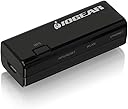



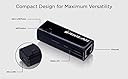

IOGEAR Ethernet-2-WiFi
Product ID: 736581889
Details
- BrandIOGEAR
- Data Transfer Rate300 Megabytes
- Global Trade Identification Number
- Hardware Interface802.11 b/g/n
- Item Weight23 g
- ManufacturerIOGEAR
Desertcart purchases this item on your behalf and handles shipping, customs, and support to South Korea.
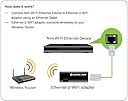
IOGEAR Ethernet-2-WiFiが無線LAN子機ストアでいつでもお買い得。当日お急ぎ便対象商品は、当日お届け可能です。アマゾン配送商品は、通常配送無料(一部除く)。 Review: Perfect Mate For TiVo DVR’s - Initially when I obtained my Tivo Premier Series 4 DVR, I relied on the TiVo AGO100 WiFi to USB adapter. It was slow and became useless when streaming came onto the scene. Probably because it interfaces with a USB 2 port. I then upgraded the TiVo Internet service to utilize a Lincsys (Cisco) PLE500 power line Ethernet adapter. One adapter was connected to an Asus RT-N66 router via Ethernet and the other adapter connected to the Tivo also via Ethernet. Since I have two TiVo’s, a total of three power line adapters were needed. Eventually I noticed that the Lincsys PLE500 power line Ethernet adapters started slowing down after about three years in service. I then replaced them with spares I had on hand and with that the speed was restored. I not sure how long the PLE500’s would be available. I started to investigate WiFi to Ethernet adapters and tried a TP-Link RE105, it did not work very well, it kept interfering with the other devices on the network. It could be that it’s a range extender and there isn’t a way to disable it. It became very difficult to find a driverless WiFi to Ethernet adapter until I stumbled upon the IOGear GWU637. The setup was very easy, just plug it into the Ethernet port on the PC, follow the instructions to access your wireless network. Be sure to turn off the WiFi on the PC while configuring the GWU637. I use wireless MAC address filtering on my router for extra security and the GWU637 has the WiFi MAC address printed on the side of the device near the serial number, that’s a plus. After configuration, I then connected the device to the USB port for power and the Ethernet port on the TiVo Series 4 DVR. Next I checked the Settings > Network > View network status and Voilà it showed the Wired Ethernet adapter MAC ID. I then checked the Client List on the router it showed the GWU637 connected to the TiVo with max bars. Incidentally, the TiVo is about 75 feet from the router. That evening when I went to a streaming service, the selection process was faster and the show I selected streamed flawlessly. I tend to be very stingy giving a product 5 stars, but the IOGear GWU637 deserves it. I’m impressed! Review: Todo bien - Todo bien


| ASIN | B018YPWORE |
| GTIN (Global Trade Identification Number) | 00881317513335 |
| UPC | 782386489319 881317513335 731215286797 |
| おすすめ度 | 5つ星のうち4.0 2,420 レビュー |
| データ転送レート | 300 メガバイト毎秒 |
| データ転送速度 | 300 メガバイト毎秒 |
| ハードウェアインタフェース | 802.11 b/g/n |
| ハードウェアインターフェイス | 802.11 b/g/n |
| ブランド | IOGEAR |
| ブランド名 | IOGEAR |
| メーカー名 | IOGEAR |
| メーカー型番 | GWU637 |
| 商品の重量 | 0.05 ポンド |
| 型番 | GWU637 |
K**N
Perfect Mate For TiVo DVR’s
Initially when I obtained my Tivo Premier Series 4 DVR, I relied on the TiVo AGO100 WiFi to USB adapter. It was slow and became useless when streaming came onto the scene. Probably because it interfaces with a USB 2 port. I then upgraded the TiVo Internet service to utilize a Lincsys (Cisco) PLE500 power line Ethernet adapter. One adapter was connected to an Asus RT-N66 router via Ethernet and the other adapter connected to the Tivo also via Ethernet. Since I have two TiVo’s, a total of three power line adapters were needed. Eventually I noticed that the Lincsys PLE500 power line Ethernet adapters started slowing down after about three years in service. I then replaced them with spares I had on hand and with that the speed was restored. I not sure how long the PLE500’s would be available. I started to investigate WiFi to Ethernet adapters and tried a TP-Link RE105, it did not work very well, it kept interfering with the other devices on the network. It could be that it’s a range extender and there isn’t a way to disable it. It became very difficult to find a driverless WiFi to Ethernet adapter until I stumbled upon the IOGear GWU637. The setup was very easy, just plug it into the Ethernet port on the PC, follow the instructions to access your wireless network. Be sure to turn off the WiFi on the PC while configuring the GWU637. I use wireless MAC address filtering on my router for extra security and the GWU637 has the WiFi MAC address printed on the side of the device near the serial number, that’s a plus. After configuration, I then connected the device to the USB port for power and the Ethernet port on the TiVo Series 4 DVR. Next I checked the Settings > Network > View network status and Voilà it showed the Wired Ethernet adapter MAC ID. I then checked the Client List on the router it showed the GWU637 connected to the TiVo with max bars. Incidentally, the TiVo is about 75 feet from the router. That evening when I went to a streaming service, the selection process was faster and the show I selected streamed flawlessly. I tend to be very stingy giving a product 5 stars, but the IOGear GWU637 deserves it. I’m impressed!
C**N
Todo bien
Todo bien
M**S
Works great, fast set up
Using for my VoIP PBX at home for a work phone. Easy to set up using Chrome Just make sure you turn on " Obtain an IP address automatically" after setting up. Small form factor.
V**V
Easy setup, works well
Takes 2 minutes from unboxing to full ready
L**E
IO GEAR
It works but the documentation needs to thoroughly touch all aspects of setup, else non-technical users will think it does not work.
Trustpilot
1 month ago
1 week ago