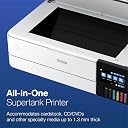
🖨️ Elevate your print game with Epson’s EcoTank Photo ET-8550 — where pro-quality meets smart convenience!
The Epson EcoTank Photo ET-8550 is a wireless, cartridge-free all-in-one printer designed for professionals and creatives who demand vibrant, lab-quality photos and sharp text. Featuring a 4.3-inch color touchscreen, automatic duplex printing, and support for large-format borderless prints up to 13" x 19", it delivers fast 15-second 4x6" photo prints and up to 6,200 pages per ink set. With versatile media handling, mobile app control, voice-activated printing, and an eco-conscious design that eliminates cartridge waste, this ENERGY STAR certified printer combines high performance with cost efficiency and sustainability.


| ASIN | B08R5M2HDH |
| Additional Printer Functions | Copy, Scan |
| B&W Pages per Minute | 16 ppm |
| Box Contents | EcoTank Photo ET-8550 All-in-One, Quick Installation Guide, Power Cord, CD-ROM (User Manual, software), 1 bottle of 552 Photo Black (70mL), 1 bottle of 552 Black (70mL) and 1 bottle 552 Cyan, Magenta, Yellow, Grey (70mL) (4) |
| Brand | Epson |
| Brand Name | Epson |
| Color Pages per Minute | 12 ppm |
| Colour | white |
| Compatible Cartridge | Epson EcoTank Photo ET-8550 Ink Bottles (552 Photo Black, 552 Black, 552 Cyan, 552 Magenta, 552 Yellow, 552 Grey) |
| Compatible Devices | PC, Smartphones |
| Connectivity Technology | Wireless |
| Control Method | App |
| Controller Type | iOS, Android |
| Customer Reviews | 4.2 out of 5 stars 2,373 Reviews |
| Display Type | LCD |
| Dual-sided printing | Yes |
| Duplex | Automatic |
| Hardware Interface | USB |
| Ink Color | black, cyan, magenta, yellow, gray |
| Is Electric | Yes |
| Item Dimensions D x W x H | 75.7D x 52.3W x 42.9H Centimeters |
| Item Type Name | Inkjet Printer |
| Item Weight | 11.11 kg |
| Manufacturer | Epson |
| Max PrintResolution Color | 5760 x 1440 |
| Max PrintSpeed BlackWhite | 600 x 1200 dpi |
| Maximum Copy Resolution Black and White | 5760 x 1440 dpi |
| Maximum Copy Resolution Color | 5760 x 1440 dpi |
| Maximum Copy Speed Black and White | 16 ppm |
| Maximum Sheet Capacity | 100 |
| Model Name | EcoTank Photo ET-8550 |
| Model Number | ET-8550 |
| Model Series | ET |
| Network Connectivity Technology | Wireless |
| Other Special Features of the Product | Automatic Document Feeder Wireless, Double-Sided Scan Automatic Duplex Borderless Printing Touch Screen Display Automatic Duplex |
| Output sheet capacity | 50.0 |
| Paper Size | 13" x 19" (A3+), 11" x 17", A3, Legal, Letter, A4, Executive, 8" x 10", 5" x 7", 4" x 6", 3.5" x 5", A6, Half Letter, #10 Envelope, User Defined (2.2" x 3.4" to 13" x 78.7") |
| Power Consumption | 150 Watts |
| Printer Output Type | Color,Solid Color |
| Printer Type | Inkjet |
| Printing Media Type | Glossy photo paper |
| Printing Technology | Inkjet |
| Resolution | 5760 x 1440 |
| Scanner Type | Photo |
| Special Feature | Automatic Document Feeder Wireless, Double-Sided Scan Automatic Duplex Borderless Printing Touch Screen Display Automatic Duplex Special Feature Automatic Document Feeder Wireless, Double-Sided Scan Automatic Duplex Borderless Printing Touch Screen Display Automatic Duplex See more |
| Specific Uses For Product | |
| UPC | 010343952492 |
| Unit Count | 1.0 Count |
User
Não compraria novamente
A impressora parou de funcionar com 3x de uso. Simplesmente não liga. A impressão da foto é excelente mas não volto a comprar a marca.
User
110 only
110 volts, not compatible with Saudi Arabia’s electric outlets
User
TERRIBLE WOULD NOT SUGGEST BUYING
I just received my printer a couple of days ago. So far so good. Mind you I am going on 85 years old and was able to just follow the directions and get it doneIt took me 2 1/2 hours to set it up as I had to remove all the tape, fill the ink cartridges, do the alinements, figure out the trays and what they went to. Clean up all the garbage and get ready to install the software.You cannot not have your computer connected to the printer while you are doing this. Just follow the directions and you will be fine.Once you have followed all the instructions, you can set up your wireless connection or connect through your USB connection. I chose the USB connection.As my last printer was an Epson Stylus Pro Injet 3880, which printed large format paper I was not too thrown by the page inserts.I will have to say that the output tray is very flimsy. But, just be carefull when you push it back in and you will be fine. I love the fact that when you get ready to print the tray comes out automatically. I find that amusing.I do like seeing the ink capacity in the front of the printer. I had been using my husbands HP All In One so I was used to the front panel and touch screen. The scanner worked perfectly except it took me awhile to work through the software.I did run a print using the high setting, photo luster paper and it created a beautiful print. However, because I work in graphics I need to calibrate my monitor and check the print color to see if I need to reduce the red a little in my On One print settings.I have not printed on my 19x20 sheets yet, so will get back later when I do all my adjustment for quality and then do those prints The paper capacity is fine for my everyday printing, although my epson 3880 could use alot more at a timeAt this point, I am very happy with what I see.WELL NOW THAT I HAVE BEEN TRYING TO USE THIS PRINTER FOR EVERYDAY PRINTING OR PHOTO PRINTING I CANNOT FIGURE OUT WHICH CASSETTE TO USE. I HAVE PUT PAPER IN BOTH THE BACK FEEDER AND THE CASSETTE @ 2 AS I CANNOT FIGURE OUT WHICH CASSETTE IT IS GOING TO PRINT FROM I AM GOING TO SEND IT BACK AS I CANNOT NOT REACH ANYONE AT EPSON CONCERNING ANY ISSUES. ALL I GET IS EMAIL MESSAGES ASKING ME DIFFERENT QUESTIONS OF WHICH I HAVE ANSWERED EVERY TIME. I CANNOT FIND A PHONE NUMBER ANYWHERE SO I CAN TALK TO SOMEONE. I HAD AN EPSON STYLUS PRO 3880 FOR 13 YEARS BUT FINALLY HAD TO REPLACE IT. WELL QUESS WHAT I REPLACED IT WITH THIS ONE. UNLESS YOUR AN EPSON TECH AND HAD BUILT THIS MACHINE I WOULD LOOK ELSE WHERE. SOOOOO SORRY I LEFT A POSSITIVE REVIEW BEFORE USING IT MORE THAN TWO TIMES
User
La mejor impresora fotográfica de inyección de tinta
Cumplió más allá de lo que esperaba, la calidad de la impresión es muy buena, fácil de instalar y usar, la app para celular es muy intuitiva así como su manejo desde la pcLa calidad de las impresiones es muy nítida y viva, ideal para fotografía sobre todo si vas a imprimir un volumen mediano de fotos, ya que en cuanto a su costo beneficio sin duda alguna es de lo mejor que encontrarán
User
White screen after selecting the language and manual set up..
Followed the instructions to the T for setting up.. LCD asked if I wanted to set up via mobile App which I ignored. LCD just turned white… switch On Switched Off Many times.. plugged unplugged many times … nothing moves on LCD….Filled the Ink Tanks … still nothing appeared on LCD.. after few minutes everything switched off… Inks haven’t been charged…Dont know what to do? Any help here?
Trustpilot
4 days ago
3 weeks ago