Buy anything from 5,000+ international stores. One checkout price. No surprise fees. Join 2M+ shoppers on Desertcart.
Desertcart purchases this item on your behalf and handles shipping, customs, and support to South Korea.
🚀 Power your AI ambitions with Tesla K80’s relentless compute muscle!
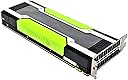
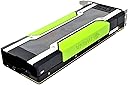
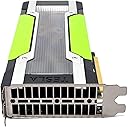
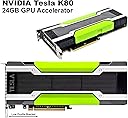
The Dell NVIDIA Tesla K80 is a renewed, server-grade GPU accelerator featuring 4992 CUDA cores and 24GB of GDDR5 memory. Built on PCI-E 3.0, it delivers 5-10x performance boosts for AI, HPC, and scientific applications, especially large language models. Designed for passive cooling in high-airflow environments, it’s a cost-effective powerhouse for professionals demanding serious parallel processing.


| ASIN | B07GJ45V3D |
| Antenna Location | Professional |
| Best Sellers Rank | #5,149 in Amazon Renewed ( See Top 100 in Amazon Renewed ) #398 in Computer Graphics Cards #1,537 in Renewed Computers & Accessories |
| Brand | Dell |
| Compatible Devices | Server |
| Customer Reviews | 3.9 out of 5 stars 137 Reviews |
| Display Maximum Resolution | 4096 x 2160 |
| Display Resolution Maximum | 4096x2160 |
| Graphics Card Interface | PCI-Express x16 |
| Graphics Card Ram | 24 GB |
| Graphics Coprocessor | NVIDIA Tesla K80 |
| Graphics Description | high-performance GPU accelerator for professional applications |
| Graphics Processor Manufacturer | NVIDIA |
| Graphics RAM Type | GDDR5 |
| Graphics Ram Size | 24 GB |
| Graphics Ram Type | GDDR5 |
| Item Dimensions L x W | 10.5"L x 4.4"W |
| Manufacturer | Dell Computers |
| Memory Clock Speed | 2.5 GHz |
| Mfr Part Number | HHCJ6 |
| Model Name | K80 24GB GDDR5 PCI-E 3.0 |
| Model Number | HHCJ6 |
| Recommended Uses For Product | Professional |
| UPC | 680266196275 |
| Video Processor | NVIDIA |
| Warranty Description | 90 days limited warranty |
H**Y
Not easy to cool
It works great in ANSYS, but it runs SUPER hot like I'm not even kidding. I have 2 stacked 140mm fans blowing at it through a fan shroud and it's idling at 54 and 87 degrees on the 2 cores. Loaded it up to 100% and it shot up to 95C within 30 seconds, though it finished the analysis within that time so no complaints. If you are running this in a desktop, you better water cool it. A couple of little "features" I'm running an 8700k on Asus Maximus Hero X with 2*Strix GTX1080 already installed. This card goes through PCH and does not take up any PCIe lanes, did not have any impact on SLI performance. There is also no performance hit on my 970Evo M.2 SSD which is also going through the PCH. When it overheats and crashes, it doesn't bring the whole system down. It just freezes for a second but your computer can keep running just fine.
J**Z
Good product good price
Had to redo the thermal paste on the GPU (suggest you do the same if you get one) also suggest getting fans for it as it’s built with passive cooling which is no bueno… the active cooling systems are easily found and run about $30 bucks… a bit loud but well worth it. The gpu is good for LLM local builds and some other large tasks. It functions fine and for the price I will pick three of these any day over a new 5080. Not as fast as the Nvidia Instinct but more applicable use…
J**S
it's not for graphics
I am often amazed at the ignorance of some people, this is not a card for graphics. but people purchase it anyway . Thinking they are getting a cheap graphics card and then complain that it doesn't have any graphics. Anybody who's purchasing it for such an application is just deluding themselves. Having said that. What the card Is good for is providing your system with a processing subsystem for applications such as running LLM's for which it works extremely well.. If you do have it in a graphics-based system and you wanted to offload some Cuda functions to it . It may and I say may be possible. But probably slower than running on your native graphics card. Yes it runs hot because it's supposed to . It's a passive cooling system and requires a tremendous amount of airflow like you would find in a server. There are a number of fan adapters for this card , and one could make, if one were industrious enough a liquid cooling or Peltier cooling solution. this card works for exactly the reason I purchased it , which is being able to load LLM's I use a combination of backend applications such as a ollama coupled with WebUI and for TTS I'm using Coqui-TTS. All of this pairs with Wingman AI for the front end interface. I can run some fairly large models up to 27B on one card in conjunction with my main 4090 graphics card I can run 30 and 32B these are fairly large and accurate models.
W**Z
Couldn't make it fit
Unfortunately wasn't compatible for my Precision workstation
C**S
This is not HDMI nor does it have any output - it is a Processor GPU only
Let me clarify a few things here: 1. First and foremost - this is a CPU based GPU and it not a graphics accelerator with no output. This is for data mining. Does that mean you cannot reset it to be a graphics accelerator, NO not at all, but you will need a compatable GPU card to run along with it to get the benifits and you will need to manually change this on the card via command line. It is not hard and if you search the web you will find out how to do this. 2. There is no HDMI interface even though it is in the specs for this device. That is just a flat out lie. In fact there are no outputs at all - VGA? NO - DVI? NO - HDMI? NO - Video port? NO there are none, Zero, Nada, Zilch output ports on this card - Hopefully that will clear that up for anyone thinking you can just plug a monitor into the card as there is a ZERO % chance of that. Did I say there are no ouputs? There are none. 3. To power this card on you will need a power cable which was not included which is probably okay as it will depend on the system you are placing this into. I am putting this into a rack mounted Dell R740XD which is a 2u rack mounted server with 256GB of RAM loaded into it. (server supports up to 1.5TB of RAM with its 24 memory slots inside using 64GB chips) This card is huge so make sure you have plenty of space for it. takes up two slots and it long. 4. This GPU will run extremly hot and the server I have has 6 high speed fans blowing over the 2 processors and yes that beast has 2 processors in it, each with 24 cores. Hence the Fans. and if you are putting this into a desktop you had better come up with a cooling soltution as there are no fans on this GPU and you will have to make your own. There are sites that refers to this and offers solutions so I will not recrete the wheel if you have searching skills you can find them. Some people have even made 3D-printer models for this purpose. Bottom line is if you cannot hear you fans they are probably not going to have the airflow you need. Servers have high speed fans that dwarf those desktop fans. They are not as large but they move a ton of air. 5. This card has two GPUs and most likely in windows you are only going to get one of them to work. I gave this 2 stars - might deserve only 1 due to the false description of the card being HDMI. If you enjoy technology and want a challenge and have another GPU that would benifit from the added memory then this could be a fun project. If you want something plug and play then run away as that is not what this beast is.
A**O
Good for LLM tests
Good card for a bench test LLM that won’t break your bank.
K**J
Absolute steal for the amount of GDDR5
Picked up for $59 and committed to not spending a dollar more to get it running on its own server. I wound up having to buy a couple flash drives for $11, so $70 all-in. I used an old bargain-bin motherboard with a dual-core FM2 CPU with integrated graphics which was living in a dusty closet box and which had a stick of RAM left on it, some leftover 25mm fans (and yes, these ARE awful to listen to) I affixed to the card directly with spare acrylic glue, and a free PSU which came with one more CPU power connector than I required for the motherboard -- and, of course, drivers from Liz II's reign. I've spent somewhere around 10 hours getting everything to work -- I tried a free flash drive which failed before caving and buying a couple decent ones; this wasted a lot of time -- I also started off working on two other motherboards, but found them to be unsuitable for different reasons. The current working setup is sitting on the floor lifted by a clothespin and a tube of chapstick, and I think the stick of RAM is bad, but the K80 is now remotely addressable when the rest of the system feels like working, by God. Just know what you're getting into: a project, and Fun with a capital F. Note, too, that setups like this are not supported by Nvidia and is not how the cards were designed to operate. Don't expect it to work with any random PC setup; in theory, you should use a certified-compatible motherboard and power supply in an enclosure made to handle cooling cards like this.
K**R
K80's
The Gpu's were well taken care of. Trying to set up a small LLM. A "Y" splitter would be nice as well a bracket plate to secure to the computer case. Otherwise they are nice
A**R
Dead on Arrival
Sadly I bought this card and then left it on a shelf for nearly 7 months as I was too busy to get the cooling set up for it. When I finally installed it, it not only failed to fire up but it also prevented my PC from booting - basically several hundred pounds of brick. With the time that elapsed between purchase and finding out it was worthless there wasn't much I could do - can I prove it broke itself whilst sitting in a box on the shelf? Of course not - would never touch a refurbished Amazon product again.
S**R
Fehlender Support
Leider keine aktuellen Treiber mehr, daher für aktuelle Anwendungen auch nicht mehr zu gebrauchen
C**Z
Espectacular, pero...
Una gráfica espectacular para Machine Learning pero, por desgracia, los drivers de la K80 son incompatibles con los de mi otra gráfica, una Nvidia Titan X Pascal de 12Gb. ¡Una verdadera pena!
C**Z
una porqueria
una porqueria, echa fuego y no va
Trustpilot
2 weeks ago
2 days ago